This time I want to talk about something not specific to InterSystems IRIS, but that I think is important if you want to work with Docker and your server at work is a PC or laptop with Windows 10 Pro or Enterprise.

As you likely know, containers technology comes basically from Linux world and, nowadays, is on Linux hosts were it shows maximum potential. Those who use Windows on a normal basis see that both, Microsoft and Docker, have done important efforts during these last years that allow us to run containers based on Linux images on our Windows system in a really easy way... but it's something not supported for production systems and, this is the big problem, is not reliable if we want to keep persistent data outside of containers, in the host system,... mostly due to the big differences between Windows and Linux file systems. In the end, Docker for Windows itself uses a small linux virtual machine (MobiLinux) to run the containers... it does it transparently for the windows user... and it works perfectly well if, as I said, you don't require that your databases survive longer than the container...

Well,...let's get to the point,... the point is that many times, to avoid issues and simplify, we need a full Linux system and, if our server is based on Windows, the only way of having it is through a virtual machine. At least till WSL2 in Windows is released, but that will be another story and sure it'll take a bit of time to become robust enough.

In this article, I'll tell you, step by step, how to install an environment where you'll be able to work, if you need it, with Docker containers on an Ubuntu system in your Windows server. Let's go...

15 11
3 29.7K

I'm trying to set up VS Code for ObjectScript using the instructions found here. I've got both Cache 2018.1.2.309.0 and IRIS 2020.1.0.215.0. When I try to connect to either one of them the connection fails, and I get a notification in the bottom right corner that says "Unexpected token < in JSON at position 0". I've checked the JSON settings file that VS Code uses, and they're fine and formatted properly. All of the settings I've entered are correct.

0 20
0 6.1K
Article
· Apr 26, 2021 3m read
SSH for IRIS container

Why SSH ?

If you do not have direct access to the server that runs your IRIS Docker container
you still may require access to the container outside "iris session" or "WebTerminal".
With an SSH terminal (PuTTY, KiTTY,.. ) you get access inside Docker, and then, depending
on your needs you run "iris session iris" or display/manipulate files directly.

Note:
This is not meant to be the default access for the average application user
but the emergency backdoor for System Management, Support, and Development.

2 34
0 1.3K

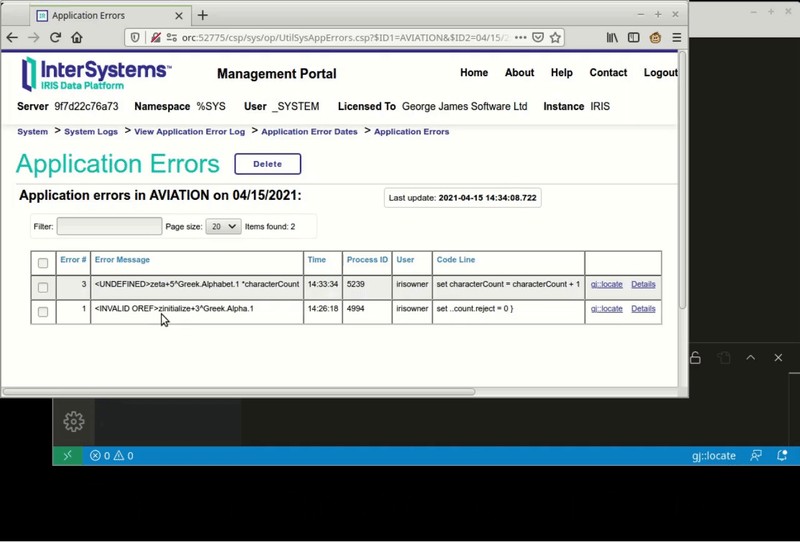
Announcing gj :: locate. A simple extension for VS Code that will help you get to the source of your errors.

In VS Code, using either the Serenji extension or the basic InterSystems objectscript extension, this small add-on will open the appropriate class or routine and position you at the exact line where an error occurred.

No more tedious counting of lines to find <UNDEFINED>zCredit+206^Ledger.Invoice.1. Instead, with gj :: locate you can get there with just a couple of clicks.

This 20 second video tells it all:

2 2
2 310
Article
· Apr 20, 2021 3m read
Why gj :: locate?

You may think it isn’t too difficult to get from label+offset^routine to the actual source line responsible for the error. For an expert it isn't that hard... most of the time. But there are enough oddities and special rules that even an expert can get it wrong, whilst spending a lot of time trying to get there.

gj :: locate is the latest tool from George James Software – it debugs any error, class or routine by converting the location of an error in compiled .int code to the corresponding location in your source, and then taking you right there.

Image this scenario…

4 0
1 326

In Studio you could open a class directly via it's name, without having to traverse the package tree with multiple clicks until arriving at the desired class.

You would Ctrl + O or (File -> Open) and be able to simply type in the class name, for example:

You press Enter, and viola - the class is opened.

How do you achieve this in VSCode?

5 1
0 780

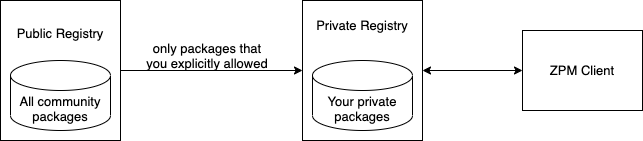
ZPM-Registry – is the package registry for the ZPM package manager.

As you probably know, the ZPM package manager is configured by default to work with the public community registry https://pm.community.intersystems.com/, which currently has more than 150 packages published.
You can install and configure your own registry for use in your organization.

3 2
1 478

Hi Developers!

Many of you publish your InterSystems ObjectScript libraries on Open Exchange and Github.

But what do you do to ease the usage and collaboration to your project for developers?

In this article, I want to introduce the way how to introduce an easy way to launch and contribute to any ObjectScript project just by copying a standard set of files to your repository.

Let's go!

10 21
6 2.5K
Article
· Jan 25, 2021 2m read
Static Documentation Generators

Hi Community,

In the past, technical documentation of the source code and software products was generated in chm, pdf files and documentation generators of the programming languages themselves. This old approach had the following limitations:
1. Outdated documentation;
2. Non-interactive and difficult to consult documentation;
3. Layout unresponsive, unfriendly and not adherent to HTML;
4. Inability to customize the layout of the documentation;
5. Inability to have HTML 5 documentation online and offline.
6. Lack of Markdown support.

1 5
0 689

The ObjectScript language of InterSystems IRIS has a very powerful metadata engine called XData. This feature allows the creation of metadata definitions for your classes, to be used by the compiler or by programs that will extend the standard features of the language, based on the XData definitions of its scope.

2 0
0 460

About this article:

In InterSystems IRIS, the default form of access to the management portal is HTTP, which means that if the client is in the office and the server is in the cloud, many clients probably desire to encrypt their traffic in some way.

Thus, we would like to show you some ways to encrypt your traffic to and from the IRIS management portal (or various REST services) running on AWS.

2 0
2 862
InterSystems Official
· Oct 20, 2020
ObjectScript extension for VS Code reaches 1.0

Hello Developer Community!

Once again I'm here to talk about the ObjectScript extension for Visual Studio Code, and this time we are excited to announce the release of version 1.0!

The community has come together in an unprecedented way to deliver this product with InterSystems, and its only fitting that a tool so critical to developer productivity would be built with community testing, feedback and source code from the very beginning.

16 0
0 1.1K

Hello developers!

Share the best practices: 1) saving frequently used code sections, 2) quickly finding it, and 3) quickly including it into the current program?
There was a thought for 1,2 to use DC(this resource), but the search is not always convenient not only for me

The idea on the surface is to use the git repos wiki.
Are there any other best practices?

0 12
0 277

Hello Developer Community!

I’m pleased to announce the 0.9 release of the ObjectScript extension for Visual Studio Code. Earlier this year I announced that InterSystems would be joining the community in evolving this already popular tool. Since then, we have been hard at work solidifying the code base and building a slew of new features.

11 10
2 917

The Eclipse environment persists perspective data to enable layout customization and other features. Sometimes when this data becomes out of date, Eclipse fails to clear references to it. For example, upgrading a plug-in can leave behind data about an earlier version of that plug-in. This mechanism applies to all Eclipse plug-ins and is not unique to the Atelier plug-in.

In light of this: You may find that after upgrading from Atelier 1.1 to 1.2, your Atelier perspective looks something like:

5 2
0 1K