Hi guys,
I've created an iris command line utility to interface the Linux command line with Interface IRIS
https://github.com/RamSailopal/iriscmd
It maybe of use to some of the community
Ram
A programming tool or software development tool is a computer program that software developers use to create, debug, maintain, or otherwise support other programs and applications.
Hi guys,
I've created an iris command line utility to interface the Linux command line with Interface IRIS
https://github.com/RamSailopal/iriscmd
It maybe of use to some of the community
Ram
Background: We have our own SQL map that predates InterSystems'. A program writes an XML file for each table map class as $system.OBJ.Export would. $system.OBJ.LoadDir loads the XML files into .cls files.
The reason is a long story, but we need to update parameter EXTENTSIZE (only) in existing classes. This does not seem to happen. As a test I used $system.OBJ.
Hi, folks!
Sometimes I need to schedule a task programmatically.
And in 99% I need having some class method be periodically called.
And I want to have the schedule be started by one line. As a job in crontab.
I decided to introduce such a module with iris-cron-task module.
See the details below!
Hi Community!
I'm sharing a little tool (REST service) to download interoperability messages from your browser.
You only need to:
/downloadmsg) and set DispatchClass=Util.DownloadMsg.///
/// Util to download messages given a message header id
///
/// Setup:
/// 1. Create a webapplication (e.g. /downloadmsg) and set DispatchClass=Util.DownloadMsg
/// 2. Go to http://localhost:52773/downloadmsg/ns/user/msgid/19 to download the message reference by header 19 in namespace user
Class Util.DownloadMsg Extends %CSP.REST
{
XData UrlMap [ XMLNamespace = "http://www.intersystems.com/urlmap" ]
{
<Routes>
<Route Url="/ns/:ns/msgid/:msgId" Method="GET" Call="DownloadMessage"/>
</Routes>
}
/// Download a message given a Ens.MessageHeader id
ClassMethod DownloadMessage(ns As %String, msgId As %String = "") As %Status
{
set ret = $$$OK
set currentNs = $namespace
try {
set $namespace = ns
$$$ThrowOnError(..ExportMsgToStream(msgId, .stream, .filename))
// set headers to download stream as filename
do %response.SetHeader("Content-Type", "application/octet-stream")
do %response.SetHeader("Content-Disposition", "attachment; filename="""_filename_"""")
do %response.SetHeader("Content-Length", stream.Size)
do stream.Rewind()
do stream.OutputToDevice()
} catch ex {
set ret = ex.AsStatus()
}
// restore namespace
set $namespace = currentNs
quit ret
}
/// Export a message to stream given a Ens.MessageHeader id
ClassMethod ExportMsgToStream(msgId As %String, Output stream As %Stream.Object, Output filename As %String) As %Status
{
set ret = $$$OK
try {
// stream
set stream = ##class(%Stream.GlobalCharacter).%New()
set filename = ""
// message header
set headerObj = ##class(Ens.MessageHeader).%OpenId(msgId,,.sc)
$$$ThrowOnError(sc)
// message body
set obj = $classmethod(headerObj.MessageBodyClassName, "%OpenId", headerObj.MessageBodyId)
set classname = $classname(obj)
// output to stream
if classname="EnsLib.HL7.Message" {
set sc = $method(obj, "OutputToLibraryStream", .stream)
$$$ThrowOnError(sc)
set filename = msgId_".hl7"
}
else {
set writer = ##class(%XML.Writer).%New()
set writer.Indent=1
set writer.NoXMLDeclaration=1
$$$ThrowOnError(writer.OutputToStream(.stream))
$$$ThrowOnError(writer.RootObject(obj))
set filename = msgId_".xml"
}
} catch ex {
set ret = ex.AsStatus()
}
quit ret
}
}
Hello, developers!
I would like to share the history of the project - the ZAPM shell.
As soon as ZPM was implemented, I immediately began to think about how best to use it.
And immediately faced with the desire to move more quickly between namespaces, especially when there are more than 20 of them. I had to leave the ZPM, move to the desired namespace and re-enter the shell. I suggested an improvement - a new "namespace" command for easier navigation. I didn’t wait - I did it myself. And so it went. If you need it, get ready to do it yourself.
Hi,
I am investigating creating builds from TravisCI, which will pull the source from github.
This will also involve a code review process, pull request, etc.
It will be done in Multiple phases. The first one will not involve automated testing using TravisCI yet. It will only involve travisCI pulling the latest code from github and creating a release for testing(A deployment file in a format that can be loaded by Ensemble0)
What I want to know is: Is there a way or tool available to take the source files and create an XML file which can be used for deployment to Ensemble?
Kind regards,
Stefan
I am currently evaluating Source Control systems that we can use for both MS SQL, MS Visual Studio, and InterSystems IRIS. For both MS SQL and MS Visual Studio we do have the option of either Azure or GitHub. I understand when we upgrade to IRIS 2019.1 we have options for Source Control, and in previous Global Summit's I have heard GitHub discussed. So why can't I user GitHub for both MS SQL/MS Visual Studio and IRIS?
The question has come up several times and I saw mixed answers and no quick example
My personal preference is using CPIPE device as you get back exactly the output you will get at the command line interface of your OS .
The tricky thing is to stop reading in time.
The example just displays what you normally see in your console.
it becomes useful if you look for things that you can't get from any $system.whatever()
e.g.
- your servers IP address or addresses depending on your configuration.
InterSystems IRIS Business Intelligence provides the Cube Registry as an interface for managing and scheduling build and synchronize tasks for your cubes. The Cube Event Monitor is a new tool on Open Exchange to help you keep track of those events' status and performance, the number of records being updated, and any build errors (errors when processing individual records) that have occurred.
I find the Data Import Wizard very handy. Has anyone thought of enabling the form in the application where it can be adapted for application user requirement?
csp/sys/exp/UtilSqlExImWizardContent.csp?Wizard=Import&$NAMESPACE=
In this article, we'll talk about an application that I use every day when monitoring applications and integration solutions on the InterSystems IRIS platform and finding errors when they occur.
While looking for a solution for logging object changes in InterSystems IRIS, Ensemble, and Caché DBMS, I came across a great article about logging with macros Inspired by the idea, I forked the project the paper had described and adapted it to some specific needs. The resulting solution is implemented as a panel subclass, %CSP.Util.
Someone may have asked this before but is there a way to return the TRACE statements that we have placed in the Data transformation within the DTL Editor Testing Tool (EnsPortal.Dialog.TestTransform.cls)? Is this something we can get in an Enhancement request in for?
It would save sometime in troubleshooting where an error might be in the DTL.
Just wondering...
Thanks
Scott
Cache for UNIX (IBM AIX for System Power System-64) 2018.1.3 (Build 414U) Mon Oct 28 2019 11:24:02 EDT [HealthShare Modules:Core:15.032.9026 + Linkage Engine:15.032.9026]
In Cache for Windows (x86-64) 2018.1.3 (Build 414U) I found something very useful
During my search for a snapshot of a persistent object,
I met a feature that I would like to share as it could be useful in some special situations.
My trigger was to have a before- and an after-image during unit testing.
Hi Devs!
A few months ago I raised a discussion on the naming convention for ZPM modules.
And you free to put your name or your organization name for the packages you want to have your personal or company's brand.
But if you contribute to community, we suggested to have "community." package for all such libraries.
But the name is too long.
What if we use "isc." instead? Which can be read as "isc ->InterSystemsCommunity". Short and unique.
What do you think?
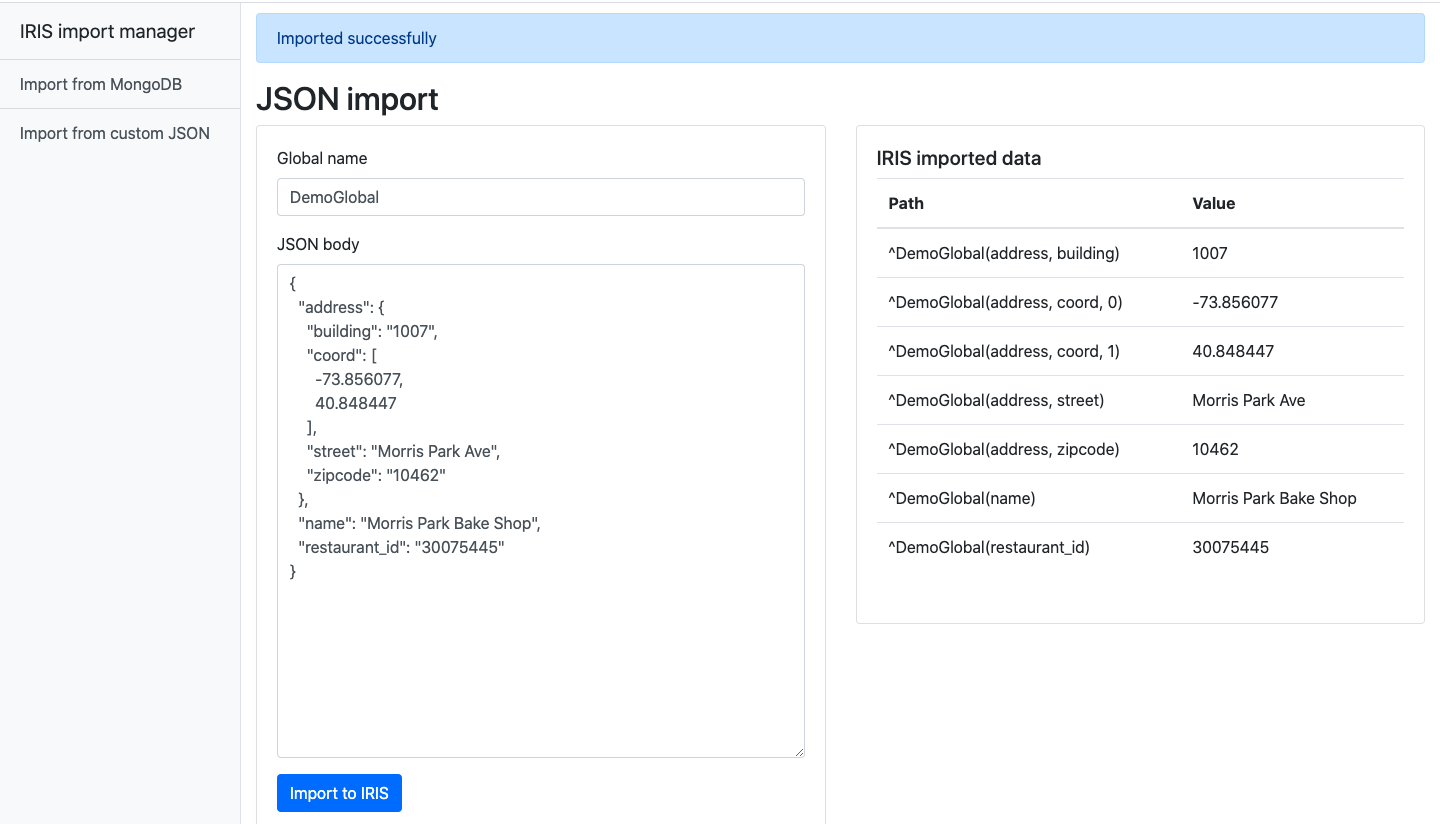
Sometimes you need quickly and easily import data into IRIS. For this, an IRIS import manager has been developed.
This application allows you to import JSON data and also provides a really simple interface for transferring data from MongoDB collections to IRIS globals. It has never been so easy.
Let's look at examples.
Import JSON
Suppose we have data in JSON format and we want to import it into IRIS. To do this, you just need to specify the global name and insert the data. After import, you will see the imported data. If global exists data will be overwritten.
In MX any global can be displayed on a sheet in the form of a table.
We will look at the simplest example (work only with CACHE-2014+ or IRIS)
Upgrade or install MX.
Start mx.xlsb and connect to your namespase with vmx-routines.
After opening first sheet, click button [] ##class(SYS.Stats.Dashboard).Sample()
Then press button [design-mode] (top of screen ).
You will see something like this in the top four lines:
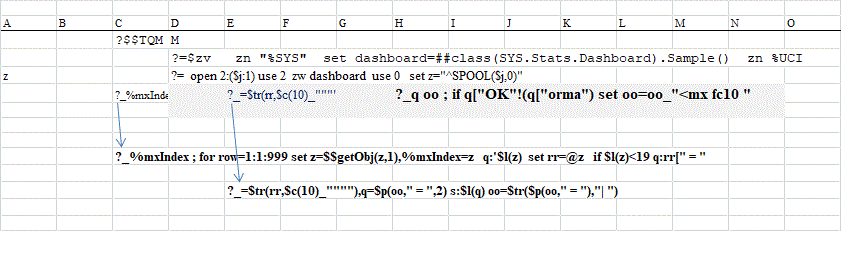
M-Formulas works in cells in the process of opening this sheet, step by step :
I am using the Java Binding to connect a Java Middleware Application to Cache. Originally I was using a CacheListOfDataTypes (JAVATYPE = "java.lang.List") object to bring data back. I was tasked with encrypting the data using AES and I was using the AESCBCEncrypt function on the List elements (up to 20k characters for each element) to bring it back before concatenating it on the middleware. This almost worked. Like 95% of the characters were being decrypted correctly but some text was coming back garbled. I couldn't understand how this was happening.
Hi, Community!
Would you please share your best practices for utilising 3rd party modules (say community solutions, frameworks, development tools/utils).
There are two approaches which I like:
1. New namespace for every new module
So, if you install something you install it in special separate namespace/database. MDX2JSON/DeepSeeWeb case.
If the package is intended to be used in other namespaces, map the packages to %All and have it available in all the namespaces in this Caché/Ensemble.
And there is one more benefit: it is easy to uninstall the module, just delete the namespace/database.
2.
Allow limited durability for demo and development IRIS-Docker-micro-Durability During development of a container based demo I found the need to access a fresh docker
an instance of IRIS image (e.g intersystems/iris-community:2020.2.0.199.0) over and over.
To bypass loading my code repeatedly, I developed this workaround.
The principle of a persistent IRIS database outside the container is unchanged.
But now the whole setup is moved into Dockerfile and docker-compose.yml
Make sure you have git and Docker desktop installed.
One of the topics that comes up often when managing Ensemble productions is disk space:
The database (the CACHE.DAT file) grows in a rate that was unexpected; or the Journal files build up at a fast pace; or the database grows continuously though the system has a scheduled purge of the Ensemble runtime data.
It would have been better if these kind of phenomena would have been observed and accounted for yet at the development and testing stage rather than on a live system.
For this purpose I created a basic framework that could aid in this task.
MX: Mumps & eXcel Joining - But Why?
At medium and small manufacturing enterprises, there are many technological and financial problems for the solution of which Microsoft Office is traditionally used, more precisely its more engineering part: Excel.
This is not only a tribute to tradition, excel is truly an unsurpassed tool for economic analysis and technological calculations. The number of users is in the millions. And these are only legal installations. In addition, there are analogues in the form of Free Office, Open Office and other.
Hi developers!
When @Evgeny Shvarov announced the first InterSystems IRIS Programming Contest, I started looking for new ideas.
I put together a few ideas, and that's what isc-utils is about.
Temperature Scale Conversion
IRISAPP>write ##class(diashenrique.Utils.Temperature).CelsiusToFahrenheit(28)
82.4

IRISAPP>write ##class(diashenrique.Utils.Temperature).CelsiusToKelvin(28)
301.15

IRISAPP>write ##class(diashenrique.Utils.Temperature).FahrenheitToCelsius(82.4)
28

IRISAPP>write ##class(diashenrique.Utils.Temperature).FahrenheitToKelvin(82.4)
301.15

IRISAPP>write ##class(diashenrique.Utils.Temperature).KelvinToCelsius(301.15)
28

IRISAPP>write ##class(diashenrique.Utils.Temperature).KelvinToFahrenheit(301.15)
82.37Hey Developers,
New "Coding Talk" video was specially recorded by @Maks.Atygaevfor the IRIS Programming Contest:
Despite the fact that InterSystems has long recommended using external backup tools, many users have opted to use the internal Online Backup facility, which is included in all distributions of InterSystems products (IRIS Data Platform, Caché, etc.). The reasons why are quite obvious:
Ladies and gentlemen, good news for our town.
It finally happened - M was put in the cell.
And feels great there. Maybe it not a prison but an Excel cell.
Being there, he leads the whole M-gang. As well as conditional formatting in EXCEL.
Close integration of excel with the database provides a new convenient design tool.
Interactive reports, input forms, diagrams are generated only by m-commands in cells, without classical programming.
More detailed on https://github.com/mx-alex/MX
We will monitor the development of the situation and answer your questions.
best wishes
Alex

Dasha.AI is a platform that allows you to create and manage voice interfaces for your applications. One of Dasha’s distinctive features is that most users believe they are talking to a human, not a robot.
Voice is the most natural way for people to interact. Dasha allows to use voice interface to interact with your application as naturally as communication between people.
The voice interface cannot completely replace the traditional user interface of the application, but some tasks could be perfectly solved with the help of the speech interface.
DeepSeeButtons is available on Open Exchange! This tool will generate a diagnostic report of your DeepSee environment.
The report consists of multiple sections. These sections range from System Details to Caché/InterSystems IRIS logs to Cube information. In addition to simply providing information about the environment, some common recommended configurations are checked. If a recommended configuration is not used, an alert is displayed highlighting that the environment configuration does not match the recommended configuration.
Have you ever needed a math function but could not find what you needed and ended up writing your own? Look no further! ObjectScript-Math is here to solve all your math related function needs.
ObjectScript-Math is an Open Source library for ObjectScript Math functions. It is now available on Open Exchange. This library contains a mix of new functions that are not currently available and functions that are available. The existing functions will be wrapped for use from ObjectScript-Math so that all Math functions can have a central location.
This library will continue to grow, so give it a try and give your feedback!
Don't see what you are looking for? Please feel free to submit requests for additional functions or contribute code yourself!
In the previous part of this series, we saw how to reference a web page that will enhance our dashboard experience. Now we will look into referencing data that is already in our cubes.
In this example, we will be referencing the controller object and we will be extracting data from it. This data will then be displayed as text in our Dashboard. In Part 5, we will show how to incorporate this data into other charting libraries.
The controller object contains data from an MDX result set.