#Analytics

4 Followers · 293 Posts

This tag relates to the discussions on the development of analytics and business intelligence solutions, visualization, KPI and other business metrics management.

Article Henry Pereira · Sep 16, 2019 6m read

In an ever-changing world, companies must innovate to stay competitive. This ensures that they’ll make decisions with agility and safety, aiming for future results with greater accuracy.
Business Intelligence (BI) tools help companies make intelligent decisions instead of relying on trial and error. These intelligent decisions can make the difference between success and failure in the marketplace.
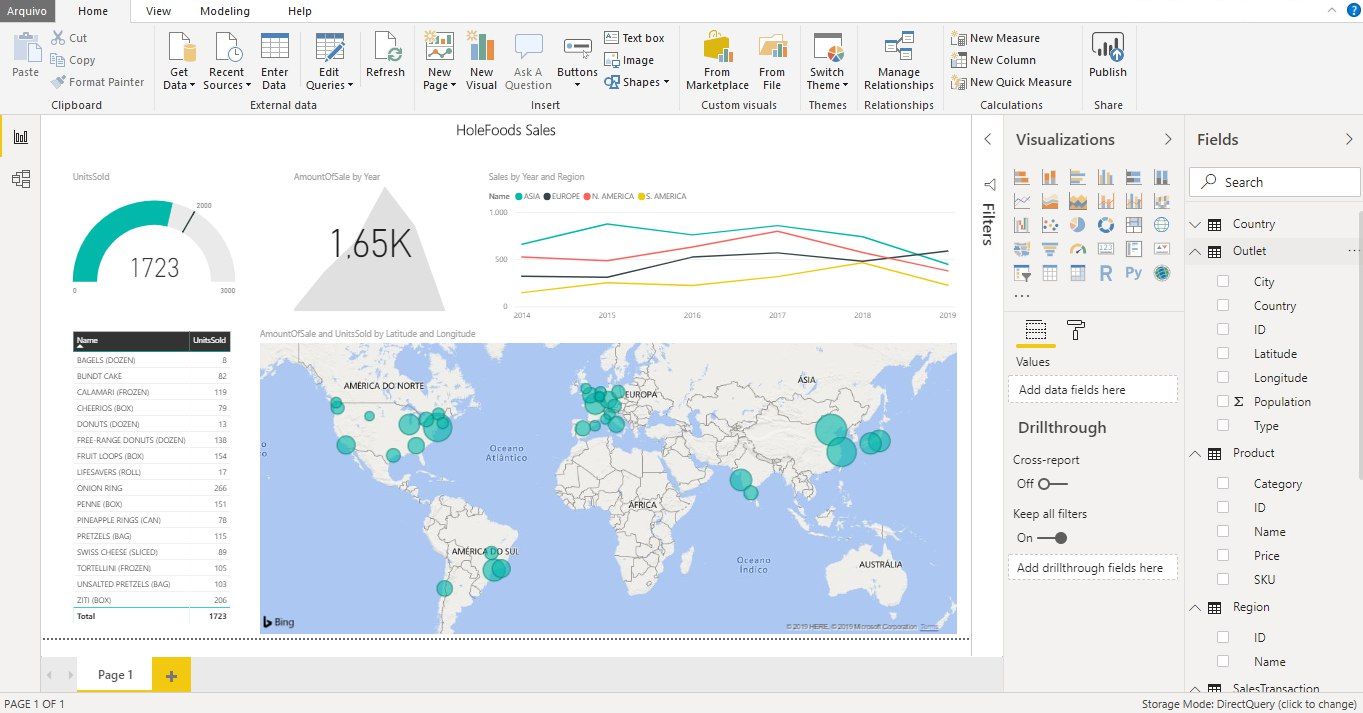
Microsoft Power BI is one of the industry’s leading business intelligence tools. With just a few clicks, Power BI makes it easy for managers and analysts to explore a company’s data. This is important because when data is easy to access and visualize, it’s much more like it’ll be used to make business decisions. 


8
2 3142
Article David E Nelson · Mar 9, 2017 9m read

Apache Spark has rapidly become one of the most exciting technologies for big data analytics and machine learning. Spark is a general data processing engine created for use in clustered computing environments. Its heart is the Resilient Distributed Dataset (RDD) which represents a distributed, fault tolerant, collection of data that can be operated on in parallel across the nodes of a cluster. Spark is implemented using a combination of Java and Scala and so comes as a library that can run on any JVM.

5
1 2851
Article Evgeny Shvarov · Nov 3, 2017 3m read

There are several options how to deliver user interface(UI) for DeepSee BI solutions. The most common approaches are:

  • use native DeepSee Dashboards, get web UI in Zen and deliver it in your web apps.
  • use DeepSee REST API, get and build your own UI widgets and dashboards.

The 1st approach is good because of the possibility to build BI dashboards without coding relatively fast, but you are limited with preset widgets library which is expandable but with a lot of development efforts.

The 2nd provides you the way to use any comprehensive js framework (D3, Highcharts, etc) to visualize your DeepSee data, but you need to code widgets and dashboards on your own.

Today I want to tell you about yet another approach which combines both listed above and provides Angular based web UI for DeepSee Dashboards -  DeepSee Web library.

16
5 2661
Article Zhong Li · Jun 12, 2020 8m read

Keywords:  PyODBC, unixODBC, IRIS, IntegratedML, Jupyter Notebook, Python 3


Purpose

A few months ago I touched on a brief note on "Python JDBC connection into IRIS", and since then I referred to it more frequently than my own scratchpad hidden deep in my PC. Hence, here comes up another 5-minute note on how to make "Python ODBC connection into IRIS".

ODBC and PyODBC seem pretty easy to set up in a Windows client, yet every time I stumbled a bit somewhere on setting up an unixODBC and PyODBC client in a Linux/Unix-style server.

0
1 2211
Question Jean Millette · Apr 26, 2023

Our team has had success creating and publishing Power BI reports using an ODBC connection to an IRIS database, but there have been concerns about the responsiveness of these reports.

As an attempt to improve responsiveness, I'm trying out the "DirectQuery" connection using the InterSystems IRIS connector available in our version of Power BI Desktop (September 2021). 

The version of IRIS I'm connecting with is "IRIS for Windows (x86-64) 2022.

3
0 2164
Article Alessandro Marin · Dec 6, 2016 3m read

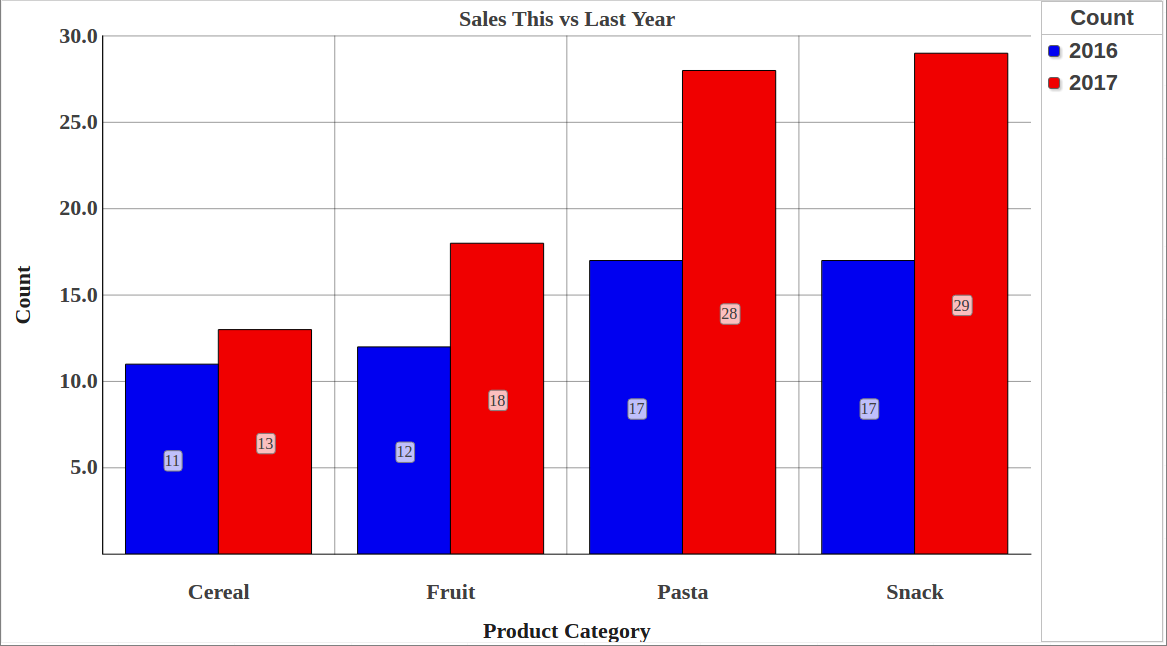
How are we doing THIS year versus the same period LAST year? 
This is a common need in Business Intelligence. In fact, many design specifications for reports make use of a comparison between a selected period (year, quarter, etc) up to a certain date (for example November 15th, 2016) and a summary of the same information for the previous year (i.e. up to November 15th, 2015). 
This post shows how to implement this in DeepSee.

8
0 1975
Article Benjamin De Boe · Jan 31, 2018 4m read

With the release of InterSystems IRIS, we're also making available a nifty bit of software that allows you to get the best out of your InterSystems IRIS cluster when working with Apache Spark for data processing, machine learning and other data-heavy fun. Let's take a closer look at how we're making your life as a Data Scientist easier, as you're probably already facing tough big data challenges already, just from the influx of job offers in your inbox!

2
0 1832
Article Benjamin De Boe · Sep 19, 2017 4m read

Last week, we announced the InterSystems IRIS Data Platform, our new and comprehensive platform for all your data endeavours, whether transactional, analytics or both. We've included many of the features our customers know and loved from Caché and Ensemble, but in this article we'll shed a little more light on one of the new capabilities of the platform: SQL Sharding, a powerful new feature in our scalability story.

11
2 1825
Article Peter Steiwer · Nov 7, 2016 2m read

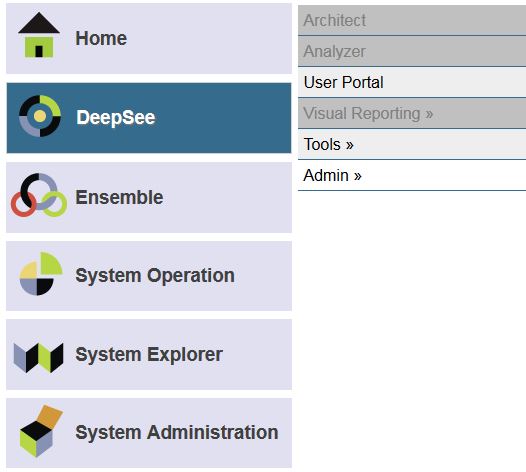
Whether you are accessing DeepSee for the first time ever or you are configuring DeepSee on a new instance, there are two common issues that are encountered after clicking on the “DeepSee” option in the System Management Portal.

Issue #1: Architect/Analyzer is grayed out!

Issue #2: DeepSee must be enabled before use.

Issue #1: Architect/Analyzer is grayed out!

There are two common causes for this problem.

Cause 1 - License

Cause 2 - Security

The first common cause is that the license does not have these DeepSee options enabled.

1
0 1665
Article Niyaz Khafizov · Jul 27, 2018 4m read

Hi all. Today we are going to upload a ML model into IRIS Manager and test it.

Note: I have done the following on Ubuntu 18.04, Apache Zeppelin 0.8.0, Python 3.6.5.

Introduction

These days many available different tools for Data Mining enable you to develop predictive models and analyze the data you have with unprecedented ease. InterSystems IRIS Data Platform provide a stable foundation for your big data and fast data applications, providing interoperability with modern DataMining tools. 

In this series of articles we explore Data mining capabilities available with InterSystems IRIS.

2
2 1545
Article Semion Makarov · Sep 10, 2017 2m read

System Monitor is a flexible and highly configurable tool supplied with Caché (Ensemble, HealthShare), which collects the essential metrics of the operating system and Caché itself. System Monitor also notifies administrators about issues with Caché and the operating system, when one or several parameters reach the admin-defined thresholds.

2
2 1539
Article Andreas Schneider · Feb 22, 2017 2m read

I' have done some tests with Caché and Apache Zeppelin. I want to share my experince to use both systems together. I'll try to describe all steps that are required to config Zeppelin to connect to Caché.
 

What is  Apache Zeppelin?

For all who think: What the heck is Apache Zeppelin?, here some details what the project site (http://zeppelin.apache.org) says:

"A web-based notebook that enables interactive data analytics. You can make beautiful data-driven, interactive and collaborative documents with SQL, Scala and more.

6
0 1520
Article Phillip Booth · Jan 30, 2020 3m read

Over the last couple of weeks the Solution Architecture team has been working to finish off our 2019 workload: this included open-sourcing the Readmission Demo that was brought to HIMSS last year, so we could make it available to anyone looking for an interactive-way of exploring the tooling provided by IRIS.


While in the process of open sourcing the demo we were immediately hit hard with a showstopper.

2
2 1495
Article Nikita Savchenko · Jan 5, 2019 6m read

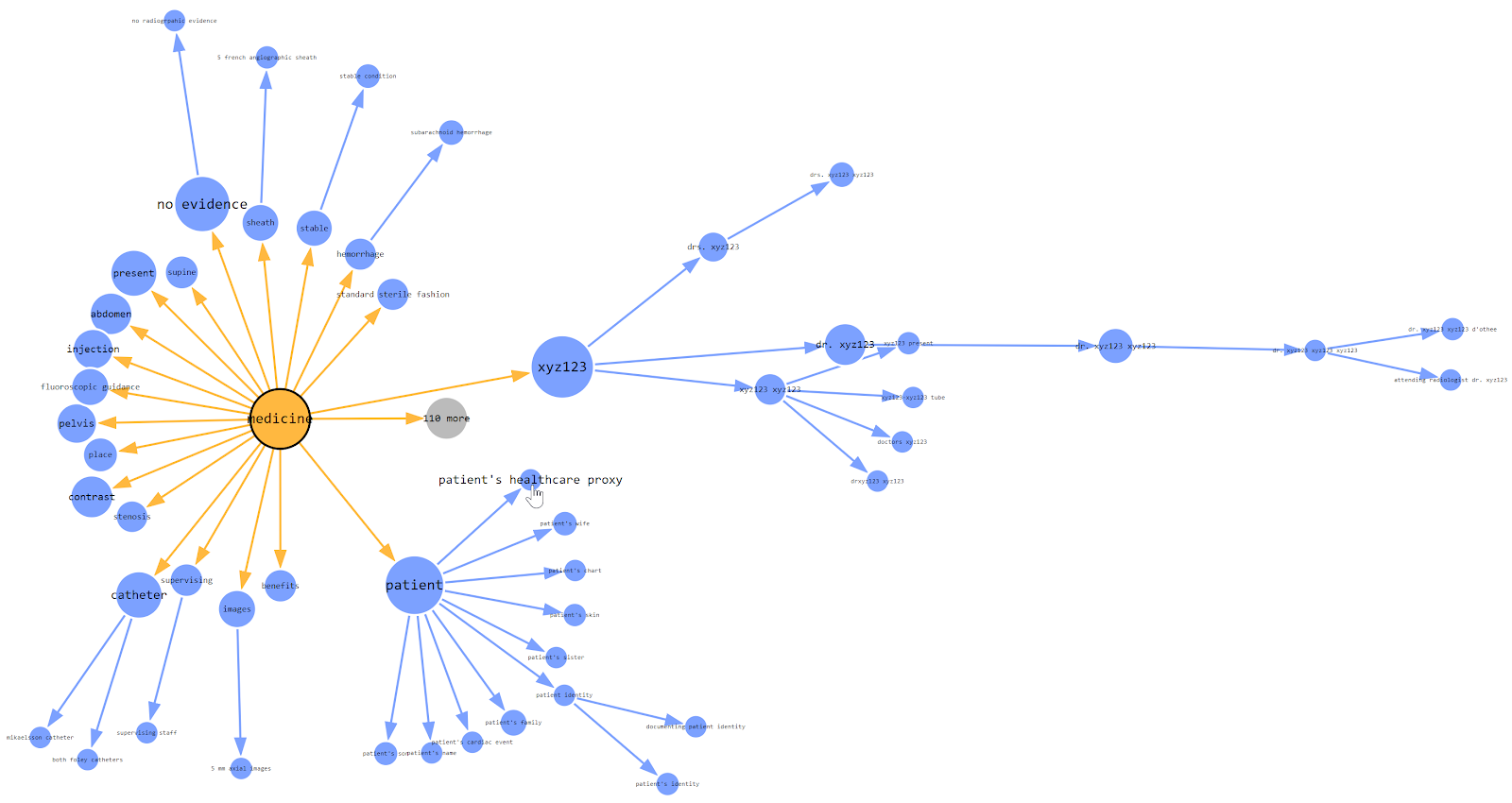
This article introduces InterSystems iKnow Entity Browser, a web application which allows to visualize extracted and organized text data mined from a large number of texts, powered by InterSystems iKnow technology, which is also known as InterSystems Text Analytics in InterSystems IRIS. Feel free to play with the demo of this tool or learn more about it on InterSystems Open Exchange.

I started the development of this project in late 2016. From now on, my iKnow Entity Browser is used around the world by those who use InterSystems technology in their stack and those who do text mining.

6
3 1345
Article Peter Steiwer · Mar 2, 2020 2m read

This error is sometimes seen while viewing a listing in InterSystems IRIS Business Intelligence:
ERROR #5540: SQLCODE: -99 Message: User <USERNAME> is not privileged for the operation (4)  

As the error suggests, this is due to a permission error. To figure out which permissions are missing/needed, we can take a look at the SQL query that is generated. We will use a query from SAMPLES as an example.

SELECT TOP 1000 %ID, DateOfSale, Outlet->City, %EXTERNAL(Channel) AS Channel, Product->Name AS Product, UnitsSold, AmountOfSale AS Revenue, (Discount * 100) || '%' AS Discount, Comment FROM HoleFoods.

0
0 1283
Announcement Daniel Tamajon · May 21, 2018

As a developer, usually I'm concerned about how my code health is, and how the other coders code can affect to my own work.  And I'm quite sure most of us feel very similar.

In our company we use a Static Code Analysis tool to analyze code for different languages to ensure we are writing high quality and easily maintainable code by following a few best practices in terms of code structure and content. And the question was: why should be different for Caché ObjectScript language?

3
4 1236
Article sween · Jul 5, 2022 4m read


How to include IRIS Data into your Google Big Query Data Warehouse and in your Data Studio data explorations.  In this article we will be using Google Cloud Dataflow to connect to our InterSystems Cloud SQL Service  and build a job to persist the results of an IRIS query in Big Query on an interval. 

If you were lucky enough to get access to Cloud SQL at Global Summit 2022 as mentioned in "InterSystems IRIS: What's New, What's Next", it makes the example a snap, but you can pull this off with any publicly or vpc accessible listener you have provisioned instead.

3
0 1198
Article Peter Steiwer · Jun 26, 2020 1m read

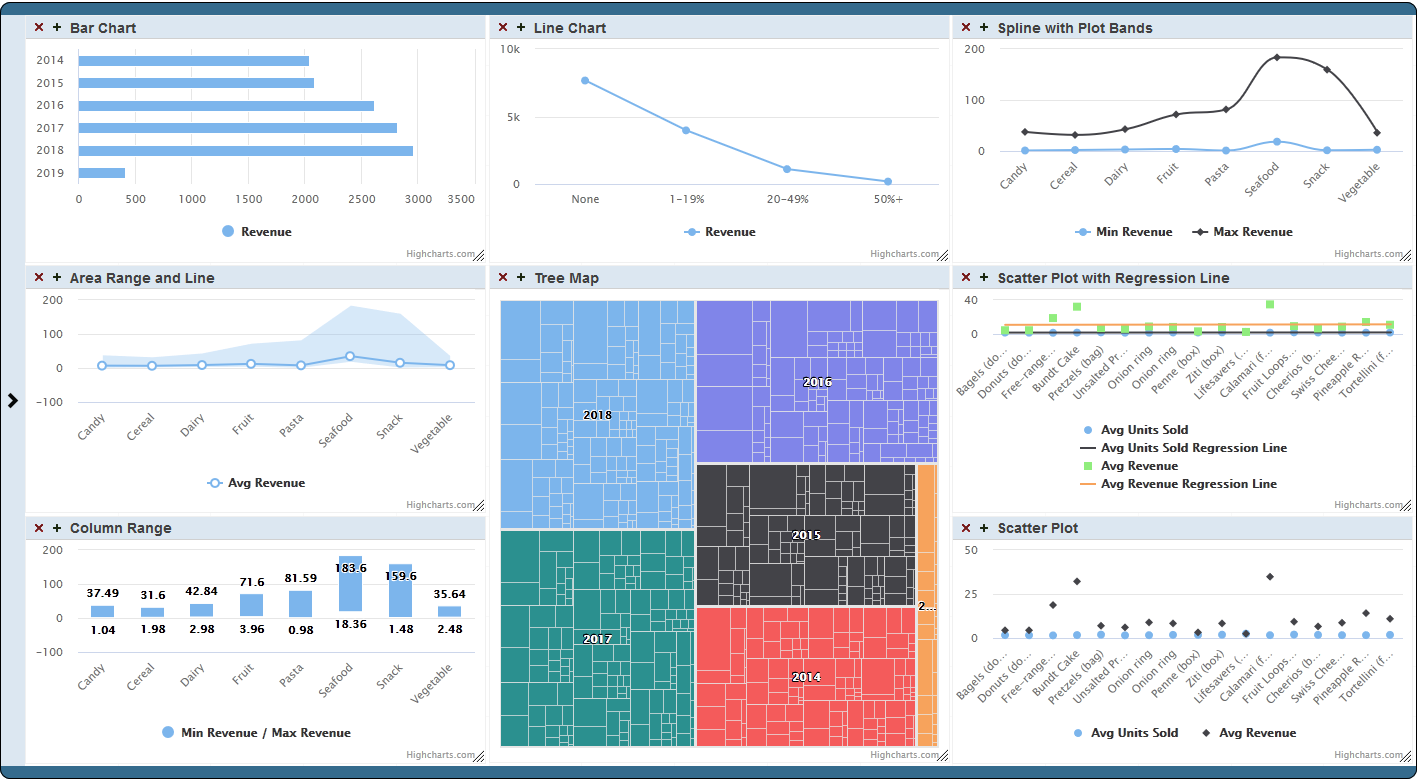
Now available on Open Exchange is a library of third party charts available to use within DeepSee/InterSystems IRIS BI dashboards. To start, simply download and install, select the new portlet as the widget type, then select the chart type that you desire. If you don't find the type of chart you are looking for, you can easily extend the portlet to implement your desired chart type. These new chart types can be used within existing dashboards or you can create new dashboards using them.

0
0 1188
Article Yuri Marx · Aug 8, 2022 24m read

In this article you will have access to the curated base of articles from the InterSystems Developer Community of the most relevant topics to learning InterSystems IRIS. Find top published articles ranked by Machine Learning, Embedded Python, JSON, API and REST Applications, Manage and Configure InterSystems Environments, Docker and Cloud, VSCode, SQL, Analytics/BI, Globals, Security, DevOps, Interoperability, Native API. Learn and Enjoy!


Machine Learning

Machine Learning is a mandatory technology to build advanced data analysis and automate manual activities with excellent efficiency.

6
7 1173
Article Dmitry Maslennikov · Apr 19, 2023 2m read

Apache Superset is a modern data exploration and data visualization platform. Superset can replace or augment proprietary business intelligence tools for many teams. Superset integrates well with a variety of data sources.

And now it is possible to use with InterSystems IRIS as well.

An online demo is available and it uses IRIS Cloud SQL as a data source.

4
0 1142
Article Evgeny Shvarov · Nov 15, 2017 3m read

Hi, Community!

In the second part about DeepSee Web, I’ll describe what customization options you have with DSW.  

There are two types of customizations: widget customization and dashboard panel customization.

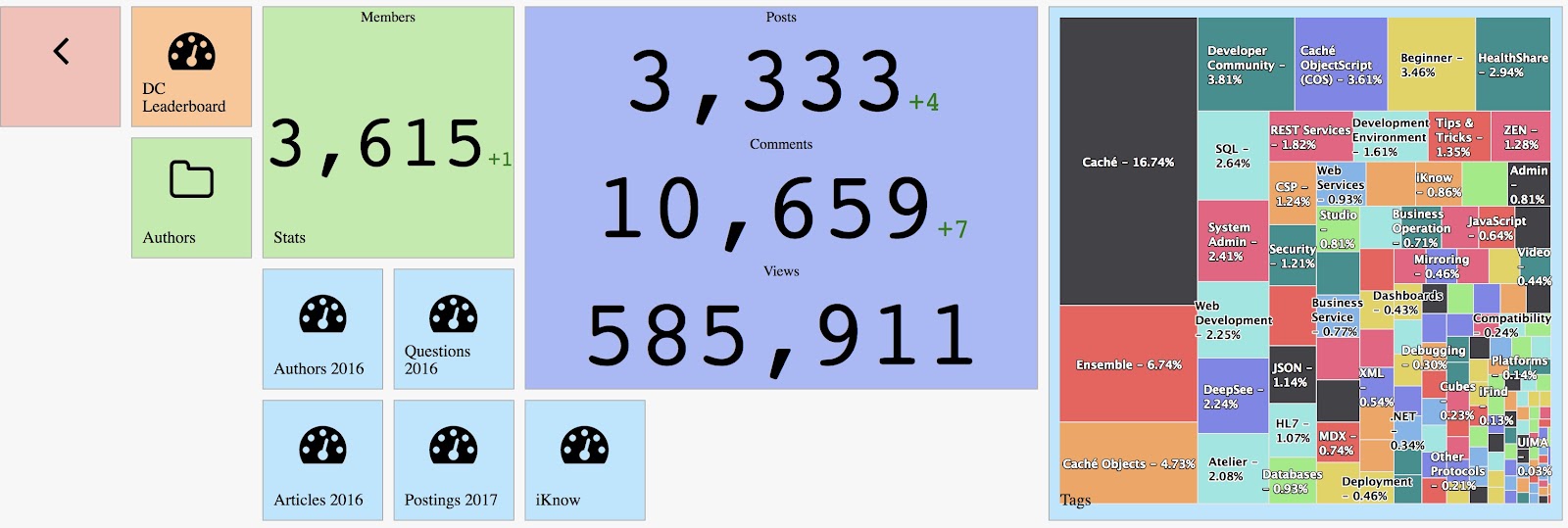
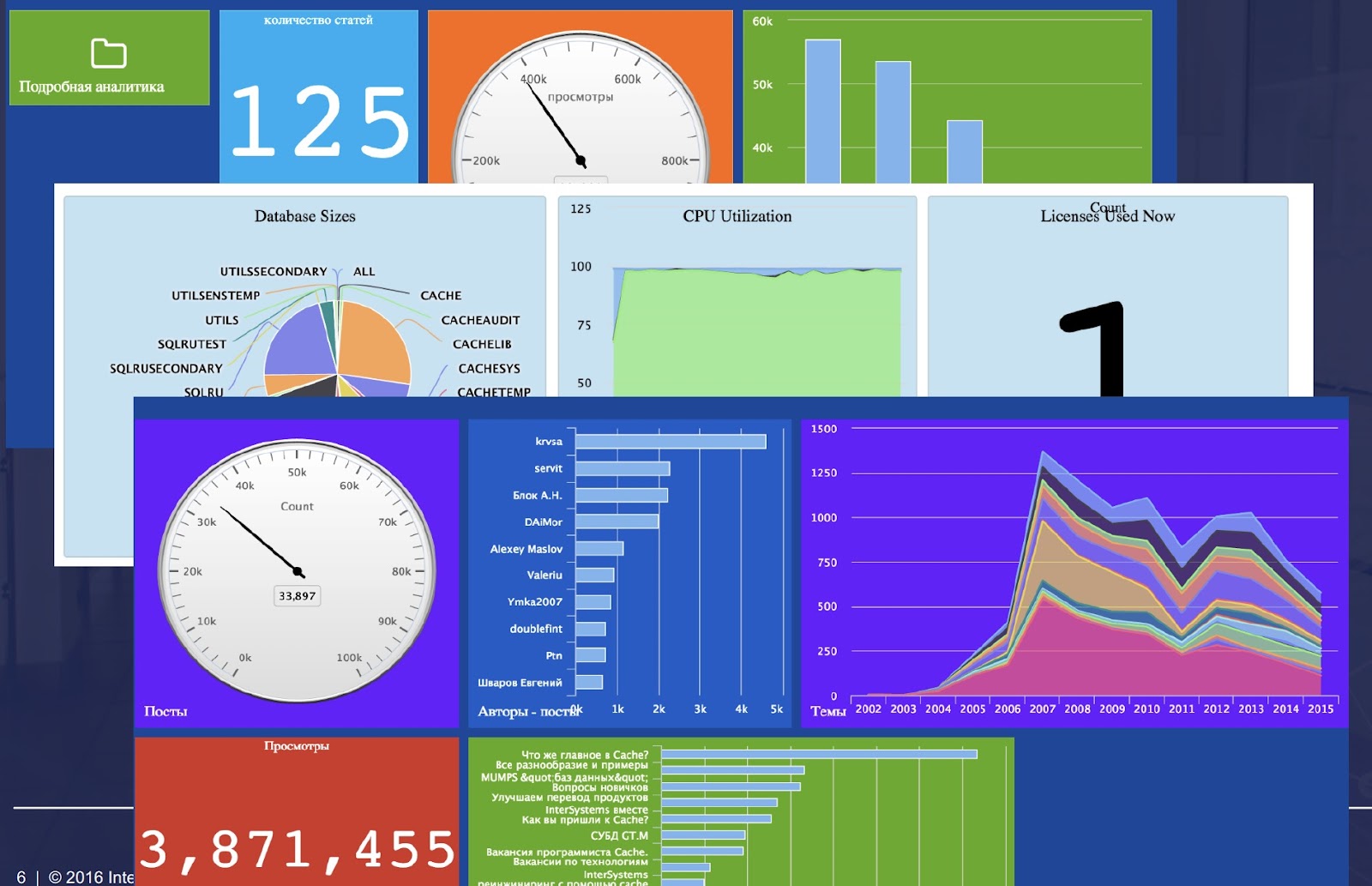
Example of dashboard customization on Developer Community analytics.

5
0 1136
Article Evgeny Shvarov · Mar 20, 2020 3m read

Hi colleagues!

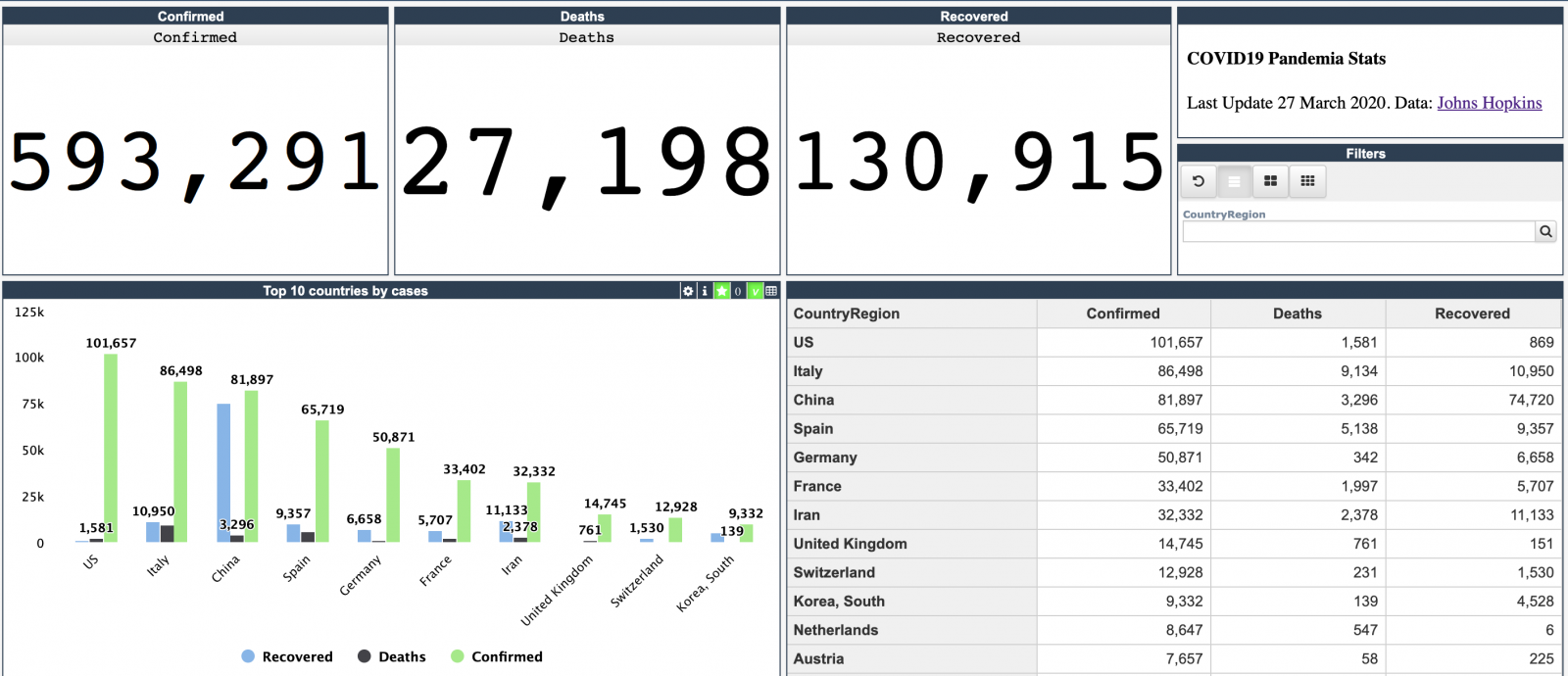
Every day Johns Hopkins University publishes new data on coronavirus COVID-19 pandemic status.

I built a simple InterSystems IRIS Analytics dashboard using InterSystems IRIS Community Edition in docker deployed on GCP Kubernetes which shows key measures of the disease outbreak.

This dashboard is an example of how information from CSV could be analyzed with IRIS Analytics and deployed to GCP Kubernetes in a form of InterSystems IRIS Community Edition.

Added the interactive map of the USA:

13
3 1126
Article Evgeny Shvarov · Feb 20, 2018 3m read

Hi, Community! 

This is the 3rd part of DeepSee Web story - Angular base UI for DeepSee Dashboards, see the beginning here.

By design, DSW provides an implementation for every widget in DeepSee library. But there are some extra features in DSW which make solutions built with DSW dashboards more functional.  This article describes it.

0
1 1098
Article Evgeniy Potapov · Apr 12, 2022 6m read

I was using PowerBI to create regular display data obtained from one popular web sourse with hundreds of thousands of visitors per month and a big number of users.

At the beginning of that visualisation development, I was using direct connection from Power BI to Adaptive Analytics powered by AtScale. Adaptive Analytics is useful for cached data, aggregates and fast data sources switching between development and stage phases.

0
0 1057
Announcement Benjamin De Boe · Jan 8, 2019

Hi, 

As we announced at our Global Summit in October, we are developing dedicated connectors for a number of third-party data visualization tools for InterSystems IRIS. With these connectors, we want to combine an excellent user experience with optimal performance when using those tools to visualize data managed on InterSystems IRIS Data Platform.

3
0 1054
Article Pran Mukherjee · Oct 24, 2022 10m read

Purpose

This set of tools (RanRead, RanWrite, and the combined RanIO) is used to generate random read and write events within a database (or pair of databases) to test the IO speed of IRIS running on a specified hardware setup. While Read operations can be measured in the usual Input/Output operations per second (IOPS) since they're direct disk reads, write events are sent to the database and thus their physical writes are managed by IRIS's write daemon.

Results gathered from the IO tests will vary from configuration to configuration based on the IO sub-system. Before running these tests, ensure corresponding operating system and storage level monitoring are configured to capture IO performance metrics for later analysis. The suggested method is by running the System Performance tool that comes bundled within IRIS. Please note that this is an update to a previous release, which can be found here.

1
1 996