A programming tool or software development tool is a computer program that software developers use to create, debug, maintain, or otherwise support other programs and applications.
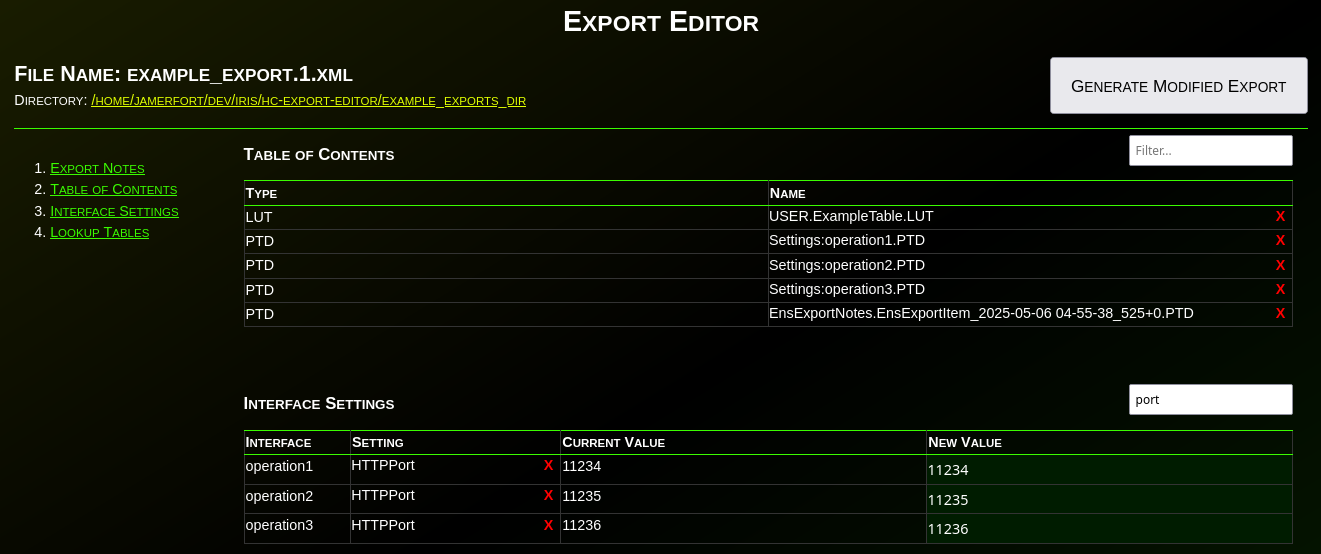
When working with InterSystems Interoperability (Iris / Health Connect / Ensemble), configuration data is often spread across many production items: services, processes, operations, adapters, and their settings.
A common operational or security need is to answer questions like:
Developing and testing REST APIs in InterSystems IRIS often requires a significant amount of boilerplate code. While ObjectScript provides powerful tools for building APIs, writing consistent and repeatable tests can be time‑consuming. This is where IrisOASTestGen comes in.
Let's start by learning about debugging requirements!
Prerequisites
There are two plugins (extensions) for debugging ObjectScript:
The first is part of the InterSystems ObjectScript Extension Pack. The second is Serenji, a standalone plugin that provides an editor, file manager, and debugging functionality. Both plugins can be installed from the plugin store. To activate key functionality, Serenji requires a license. For this article, we'll use the InterSystems ObjectScript Extension Pack to reduce the learning curve. After you've mastered the basics, you can consider purchasing a paid license for Serenji.
In this article, we'll cover a quick start to Git development with the InterSystems Developer Community and version control practices when working with IRIS InterSystems. We'll cover scenarios where we need to export Interoperability classes, globals, and analytics elements such as cubes and dashboards. These scenarios encompass key version control practices with IRIS.
It was encouraging to see more people building VS Code extensions for the recent contest. However I noticed that of of the three extensions requiring credentials with which to make their connections only mine, gj :: dataLoader, leverages the long-established and officially-supported InterSystems Server Manager extension to obtain the connection definitions and to handle credentials securely.
As AI-driven automation becomes an essential part of modern information systems, integrating AI capabilities into existing platforms should be seamless and efficient. The IRIS Agent project showcases how generative AI can work effortlessly with InterSystems IRIS, leveraging its powerful interoperability framework—without the need to learn Python or build separate AI workflows from scratch.
In Part 1, we explored how window functions operate. We learned the logic behind PARTITION BY, ORDER BY, and such functions as ROW_NUMBER() and RANK(). Now, in Part 2, let's delve into more window functions with practical examples.
As I'm sure most of you will be aware, we have an excellent resource available to developers in the Open Exchange, which is a place for Community Members to share open source resources, templates, tools and demos built with or for InterSystems technologies. This has been a massive success, with >1100 projects shared!
This web interface is designed to facilitate the management of Data Lookup Tables via a user-friendly web page. It is particularly useful when your lookup table values are large, dynamic, and frequently changing. By granting end-users controlled access to this web interface (read, write, and delete permissions limited to this page), they can efficiently manage lookup table data according to their needs.
The data managed through this interface can be seamlessly utilized in HealthConnect rules or data transformations, eliminating the need for constant manual monitoring and management of the lookup tables and thereby saving significant time.
Note: If the standard Data Lookup Table does not meet your mapping requirements, you can create a custom table and adapt this web interface along with its supporting class with minimal modifications. Sample class code is available upon request.
Since InterSystems has recently announced the discontinuation of support for InterSystems Studio starting from version 2023.2 in favor of exclusive development of extensions for the Visual Studio Code (VSC) IDE, believing that the latter offers a superior experience compared to Studio, many of us developers have switched or are beginning to use VSC. Many may have wondered how to open the Terminal to perform operations, as VSC does not have an Output panel like Studio did, nor an integrated feature to open the IRIS terminal, except by downloading the plugins developed by InterSystems.
We are excited to announce the general availability of JediSoft IRISsync®, our new synchronization and comparison solution built on InterSystems IRIS technology. IRISsync makes it easy to synchronize and compare IRIS instances.
A benefit of using Doxygenerate is that Doxygen does more than just HTML output. Tweak the Doxyfile that tells Doxygen what to do and you can easily create a PDF. Our example MARINA application yielded a 524-page PDF. Here's what page 94 looks like:
I have been walking through this with a few team members and as such I thought there might be others out there who could use it, especially if you work with HL7 & Ensemble/HealthConnect/HealthShare and never venture out past the Interoperability section.
InterSystems IRIS interoperability production development involves using or writing various types of components. They include services (which handle incoming data), processes (which deal with the data flow and logic), and operations (which manage outgoing data or requests).
Customer support questions span structured data (orders, products 🗃️), unstructured knowledge (docs/FAQs 📚), and live systems (shipping updates 🚚). In this post we’ll ship a compact AI agent that handles all three—using:
🧠 Python + smolagents to orchestrate the agent’s “brain”
🧰 InterSystems IRIS for SQL, Vector Search (RAG), and Interoperability (a mock shipping status API)
I’m pleased to announce the release of tree-sitter-objectscript, a new open-source tree-sitter grammar that brings first-class ObjectScript support to modern editors. If you caught the preview at READY ’25, you’ll be glad to know it’s now up on Github:
Recently, I replaced my old laptop with a new one and had to migrate all my data. I was looking for a guide but couldn’t find anything that explained in detail how to migrate server connections from InterSystems Studio and Visual Studio Code from one PC to another. Simply reinstalling the tools is not enough, and migrating all the connections manually seemed like a waste of time. In the end, I managed to solve the problem, and this article explains how.
Been testing out the Production Validator toolkit, just to see what we can/not do with it. Seems really interesting and there seem to be some use cases for it that can really streamline some upgrades (or at least parts of upgrades) but I was running into so many hurdles with the documentation. I am curious if anyone else has used it.
Word documents are widely used in the market. Users frequently create contracts, memos, resumes, reports, analyses, and other documents that may require data from or captured by InterSystems IRIS. However, IRIS does not have an API, SDK, library, or adapter for this. This limitation no longer exists.
The new Open Exchange library iris4word (https://openexchange.intersystems.com/package/iris4word) delivers an ObjectScript SDK where the developer passes any %DynamicObject as a parameter, a Word file template and then receives a ready document, with the structure and formatting defined in its template.