Scaffolding IRIS REST API Tests with IrisOASTestGen
Project Overview / Introduction
Developing and testing REST APIs in InterSystems IRIS often requires a significant amount of boilerplate code. While ObjectScript provides powerful tools for building APIs, writing consistent and repeatable tests can be time‑consuming. This is where IrisOASTestGen comes in.
IrisOASTestGen is a utility designed to generate the structure of test classes and the supporting utility code directly from an OpenAPI 2.0 specification. It leverages the OpenAPITools openapi‑generator under the hood to scaffold test stubs and helper methods that make it easier to interact with your API endpoints.
It’s important to stress: IrisOASTestGen does not generate complete test logic. Instead, it provides the skeleton — the test class definitions, method signatures, and utility functions — so developers can focus on writing meaningful assertions and scenarios. Think of it as scaffolding: the framework is built for you, but the actual test cases remain in your hands.
💡 This project was inspired by the idea Introduce generated unit tests for REST API calls generated by ^%REST vs Open API spec, originally proposed by @Evgeny.Shvarov.
Demo REST API
For demonstration purposes, a toy API specification was created in the package dc.musketeers.irisOasTestGenDemo.personApi. The server implementation uses the InterSystems %REST.API class. Below is the utility class that sets up the REST application based on the OpenAPI specification (complete code here):
ClassMethod CreateRestApi() As %Status
{
    Set sc = $$$OK
    Try {
        // Create the REST application based on the OpenAPI specification
        Set apiSpecPath = "/home/irisowner/dev/assets/person-api.json"
        Set spec = ##class(%DynamicObject).%FromJSONFile(apiSpecPath)
        $$$ThrowOnError(##class(%REST.API).CreateApplication("dc.musketeers.irisOasTestGenDemo.personApi", spec))

        // Deploy the REST application to the server
        Set restApplication = "dc.musketeers.irisOasTestGenDemo.personApi"
        Set webApplication = "/dc/musketeers/irisOasTestGenDemo/personApi"
        Set authenticationType = $$$AutheUnauthenticated
        #; Set matchRoles = ":%DB_IRISAPP-CODE:%DB_IRISAPP-DATA"
        Set matchRoles = ":%ALL"
        $$$ThrowOnError(##class(dc.musketeers.irisOasTestGenDemo.Utils).DeployApplication(restApplication, webApplication, authenticationType, matchRoles))
    } Catch ex {
        Set sc = ex.AsStatus()
    }
    return sc
}
The actual server implementation can be found in the class dc.musketeers.irisOasTestGenDemo.personApi.impl.
Usage Walkthrough
With the demo REST API in place, let’s walk through how IrisOASTestGen scaffolds the test structure and utilities. Remember: the tool generates test stubs and helper methods, not the actual test logic. You’ll add assertions and scenarios yourself.
1. Generating Test Files
The entry point for generating test scaffolding is:
##class(dc.musketeers.irisOasTestGen.Main).BuildAndDeploy(openapiFile, outputDir, packageName)
Parameters:
openapiFile— path to the OpenAPI specification file.outputDir— optional directory for generated code.packageName— optional package name for generated classes.
For convenience, the demo project includes a helper method:
Class dc.musketeers.irisOasTestGenDemo.personApi.Utils Extends %RegisteredObject
{

ClassMethod Build()
{
    // OpenAPI Spec location
    Set openapiFile = "/home/irisowner/dev/assets/person-api.json"
    // Directory where the files will be written
    Set outputDir = "/home/irisowner/dev/tests"
    // Generated files package name
    Set packageName = "dc.musketeers.irisOasTestGenDemo.personApi.tests"
    // Run the generator
    Write ##class(dc.musketeers.irisOasTestGen.Main).BuildAndDeploy(openapiFile, outputDir, packageName)
}

}
Access the IRIS terminal and execute:
Note: this tutorial expects you had an IRIS container built using the steps detailed here.
ZN "IRISAPP"
Do $SYSTEM.OBJ.Import("/home/irisowner/dev/src/dc/musketeers/irisOasTestGenDemo", "ck")
Do ##class(dc.musketeers.irisOasTestGenDemo.personApi.Utils).CreateRestApi()
Do ##class(dc.musketeers.irisOasTestGenDemo.personApi.Utils).Build()
If all works as expected, you'll see this output:
[main] INFO  o.o.codegen.DefaultGenerator - Generating with dryRun=false
[main] INFO  o.o.c.ignore.CodegenIgnoreProcessor - No .openapi-generator-ignore file found.
[main] INFO  o.o.codegen.DefaultGenerator - OpenAPI Generator: iris-object-script (other)
[main] INFO  o.o.codegen.DefaultGenerator - Generator 'iris-object-script' is considered stable.
[main] INFO  o.o.codegen.TemplateManager - writing file /home/irisowner/dev/tests/./dc/musketeers/irisOasTestGenDemo/personApi/tests/model/Error.cls
[main] INFO  o.o.codegen.TemplateManager - writing file /home/irisowner/dev/tests/./dc/musketeers/irisOasTestGenDemo/personApi/tests/model/Person.cls
[main] WARN  o.o.codegen.utils.ExamplesUtils - No application/json content media type found in response. Response examples can currently only be generated for application/json media type.
[main] INFO  o.o.codegen.TemplateManager - writing file /home/irisowner/dev/tests/./dc/musketeers/irisOasTestGenDemo/personApi/tests/api/PersonApi.cls
[main] INFO  o.o.codegen.TemplateManager - writing file /home/irisowner/dev/tests/./dc/musketeers/irisOasTestGenDemo/personApi/tests/utils/HttpUtils.cls
[main] INFO  o.o.codegen.TemplateManager - writing file /home/irisowner/dev/tests/.openapi-generator-ignore
[main] INFO  o.o.codegen.TemplateManager - writing file /home/irisowner/dev/tests/.openapi-generator/VERSION
[main] INFO  o.o.codegen.TemplateManager - writing file /home/irisowner/dev/tests/.openapi-generator/FILES
############################################################################################
# Thanks for using OpenAPI Generator.                                                      #
# We appreciate your support! Please consider donation to help us maintain this project.   #
# https://opencollective.com/openapi_generator/donate                                      #
############################################################################################

Load of directory started on 12/07/2025 01:54:34

Loading file /home/irisowner/dev/tests/dc/musketeers/irisOasTestGenDemo/personApi/tests/model/Person.cls as udl
Loading file /home/irisowner/dev/tests/dc/musketeers/irisOasTestGenDemo/personApi/tests/model/Error.cls as udl
Loading file /home/irisowner/dev/tests/dc/musketeers/irisOasTestGenDemo/personApi/tests/utils/HttpUtils.cls as udl
Loading file /home/irisowner/dev/tests/dc/musketeers/irisOasTestGenDemo/personApi/tests/api/PersonApi.cls as udl
Load finished successfully.
2. Exploring Generated Files
After running the generator, you’ll find a set of test classes and utilities scaffolded for your API. You can find those files in generated directory tests/dc/musketeers/irisOasTestGenDemo.
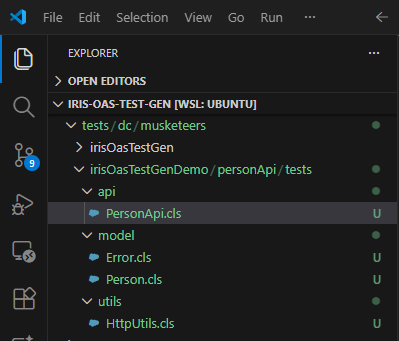
The OpenAPI Tool Generator generates one test class per path described in the paths section of the OpenAPI 2.0 spec.
As our toy example API has just one path, only one test class is created: TestsPersonApi.cls. It has one test for each endpoint and uses the operationId property to name the test.
The tool also generates model classes for data structures defined in the definitions section. In our case, the models Person.cls and Error.cls was created.
Finally, an utility class to abstract HTTP operations is also generated: HttpUtils.cls.
2.1 Test Stub Class
As said, our API has just one path with several operations, so just one test class is generated: TestsPersonApi.cls.
Let's start with the test for operation createPerson. Its OpenAPI 2.0 definition fragment is displayed below:
"post": {
  "tags": [
    "Person"
  ],
  "summary": "Create a new Person record",
  "operationId": "createPerson",
  "consumes": [
    "application/json"
  ],
  "produces": [
    "application/json"
  ],
  "parameters": [
    {
      "name": "person",
      "in": "body",
      "description": "Person object to be created",
      "required": true,
      "schema": {
        "$ref": "#/definitions/Person"
      }
    }
  ],
  "responses": {
    "201": {
      "description": "Person created successfully",
      "schema": {
        "$ref": "#/definitions/Person"
      },
      "headers": {
        "Location": {
          "description": "The full URI of the newly created Person resource. E.g. /dc/musketeers/irisOasTestGenDemo/personApi/1",
          "type": "string"
        }
      }
    },
    "400": {
      "description": "Invalid input",
      "schema": {
        "$ref": "#/definitions/Error"
      }
    }
  }
},
You can see that the generator creates a method called TestCreatePerson() with the stub for you implementation:
Class dc.musketeers.irisOasTestGenDemo.personApi.tests.api.TestsPersonApi Extends %UnitTest.TestCase
{
    /// Test for createPerson
    Method TestCreatePerson()
    {
        // TODO:
        // Set pPerson = ""
        // Set httpResponse = ..CreatePerson(
        //     pPerson
        // )
    }
}
Notice that the method is just a placeholder. IrisOASTestGen gives you the structure; you add the test logic.
2.2 Utility Method
The generator also creates convenience methods for each API operation. For example, CreatePerson():
Class dc.musketeers.irisOasTestGenDemo.personApi.tests.api.TestsPersonApi Extends %UnitTest.TestCase
{

/// Create a new Person record
/// OperationId: createPerson
Method CreatePerson(pPerson As dc.musketeers.irisOasTestGenDemo.personApi.tests.model.Person) As %Net.HttpResponse
{
    Set path = "/"
    Set queryParams = ""
    Set bodyStream = ""
    Set headers = ##class(%ListOfDataTypes).%New()
    Set formParams = ##class(%ListOfDataTypes).%New()
    Set multipartParams = ##class(%ListOfDataTypes).%New()

    // Handle body
    $$$ThrowOnError(pPerson.%JSONExportToStream(.bodyStream))

    Set request = ##class(dc.musketeers.irisOasTestGenDemo.personApi.tests.utils.HttpUtils).%New()
    Set request.BasePath = ..#BasePath
    Set request.HttpRequest.Https = 1
    Set httpResponse = request.SendRequest("POST", path, queryParams, bodyStream, headers, formParams, multipartParams)
    Return httpResponse
}

}
This method abstracts away the HTTP request details, so your tests can focus on assertions.
2.3 Supporting Utilities
The HttpUtils class is also generated, providing a reusable way to send requests:
Class dc.musketeers.irisOasTestGenDemo.personApi.tests.utils.HttpUtils Extends %RegisteredObject
{

Property HttpRequest As %Net.HttpRequest;

Property BasePath As %String;

Method %OnNew() As %Status
{
    Set ..HttpRequest = ##class(%Net.HttpRequest).%New()
    Set ..HttpRequest.Https = 0
    Set ..HttpRequest.Username = "_system"
    Set ..HttpRequest.Password = "SYS"
    Set ..HttpRequest.ContentType = "application/json"
    Return $$$OK
}

/// Common method to execute an HTTP request
Method SendRequest(pMethod As %String, pPath As %String, pQueryParams As %String = "", pBody As %Stream.Object = "", pHeaders As %ListOfDataTypes = "", pFormParams As %ListOfDataTypes = "", pMultipartParams As %ListOfDataTypes = "") As %Net.HttpResponse
{
    Set httpRequest = ..HttpRequest
    Set httpRequest.Server = ..BasePath

    // Apply headers
    If ($IsObject(pHeaders)) && (pHeaders.Count() > 0) {
        For i=1:1:pHeaders.Count() {
            Set headerName = pHeaders.GetAt(i).Name
            Set headerValue = pHeaders.GetAt(i).Value
            Do httpRequest.SetHeader(headerName, headerValue)
        }
    }

    // Apply form parameters (x-www-form-urlencoded)
    If ($IsObject(pFormParams)) && (pFormParams.Count() > 0) {
        For i=1:1:pFormParams.Count() {
            Set formName = pFormParams.GetAt(i).Name
            Set formValue = pFormParams.GetAt(i).Value
            Do httpRequest.InsertFormData(formName, formValue)
        }
        Set httpRequest.ContentType = "application/x-www-form-urlencoded"
    }

    // Apply multipart/form-data parameters
    If ($IsObject(pMultipartParams)) && (pMultipartParams.Count() > 0) {
        For i=1:1:pMultipartParams.Count() {
            Set part = pMultipartParams.GetAt(i)
            // Expect each part to have Name, Value, and optionally Filename/ContentType
            Do httpRequest.InsertFormData(part.Name, part.Value)
        }
        // ContentType will be set automatically to multipart/form-data with boundary
    }

    Set path = $PIECE(pPath, "?", 1)
    Set fullPath = ..BasePath _ path _ pQueryParams

    If (pMethod = "POST") {
        If ($IsObject(pBody)) {
            $$$ThrowOnError(httpRequest.EntityBody.CopyFrom(pBody))
        }
        $$$ThrowOnError(httpRequest.Post(fullPath))

    } ElseIf (pMethod = "GET") {
        $$$ThrowOnError(httpRequest.Get(fullPath))

    } ElseIf (pMethod = "PUT") {
        If ($IsObject(pBody)) {
            $$$ThrowOnError(httpRequest.EntityBody.CopyFrom(pBody))
        }
        Set httpResponse = httpRequest.Put(fullPath)

    } ElseIf (pMethod = "DELETE") {
        Set httpResponse = httpRequest.Delete(fullPath)

    } Else {
        Throw ##class(%Exception.General).%New("Unsupported HTTP method: " _ pMethod)
    }

    Return httpRequest.HttpResponse
}

}
It supports all kind of parameters allowed by OpenAPI 2.0 specification.
3. Implementing a Test
Now let’s implement the TestCreatePerson() method.
The operation definition in the specification defines the allowed input parameters and their expected outputs - with HTTP status codes and data structures. Let's create test code for each of them.
Replace the comments generated scaffold in the method TestCreatePerson() in class dc.musketeers.irisOasTestGenDemo.personApi.tests.api.TestsPersonApi by the following code:
/// Test for createPerson
Method TestCreatePerson()
{
    // Define the valid input Person object
    #Dim person As dc.musketeers.irisOasTestGenDemo.personApi.tests.model.Person = ##Class(dc.musketeers.irisOasTestGenDemo.personApi.tests.model.Person).%New()

    Set person.Name = "John Doe"
    Set person.Title = "Software Engineer"
    Set person.Company = "InterSystems"
    Set person.Phone = "555-123-4567"
    Set person.DOB = $zdateh("2000-01-01", 3)

    // Execute the operation
    Set httpResponse = ..CreatePerson(
        person
    )

    // Parse the JSON Response
    Set responseString = httpResponse.Data.Read()
    #dim createdPerson As dc.musketeers.irisOasTestGenDemo.personApi.tests.model.Person = ##Class(dc.musketeers.irisOasTestGenDemo.personApi.tests.model.Person).%New()
    Set sc = createdPerson.%JSONImport(responseString)

    // 1. Status Code Check
    Do $$$AssertEquals(httpResponse.StatusCode, 201, "CreatePerson: Should return 201 Created")

    // 2. Response Body Type Check
    Do $$$AssertStatusOK(sc, "CreatePerson: Response should be a valid Person object")

    // 3. Response Body Content Check
    Do $$$AssertEquals(createdPerson.Name, person.Name, "CreatePerson: Response body Name should match input Name")

    // Corrected check for the presence of the ID:
    // Assert that the ID property is not an empty string ("") after successful creation.
    Do $$$AssertNotEquals(createdPerson.ID, "", "CreatePerson: Response body should contain a non-empty ID after creation")

    // 4. Response Header Check (Location header)
    Set locationHeader = httpResponse.GetHeader("Location")
    Do $$$AssertNotEquals(locationHeader, "", "CreatePerson: Response should include a Location header")
    Do $$$AssertTrue((locationHeader [ createdPerson.ID), "CreatePerson: Location header should contain the newly created ID")

    // --- Negative case: 400 Bad Request for invalid input ---
    // Create an invalid or incomplete Person object
    #dim invalidPerson As dc.musketeers.irisOasTestGenDemo.personApi.tests.model.Person = ##class(dc.musketeers.irisOasTestGenDemo.personApi.tests.model.Person).%New()

    // Execute the operation with the invalid object
    Set httpResponse = ..CreatePerson(
        invalidPerson
    )

    // --- Parse the JSON Error Response ---
    // Read the response data stream into a string
    Set errorString = httpResponse.Data.Read()
    // Convert the string into a dynamic object
    #dim error As dc.musketeers.irisOasTestGenDemo.personApi.tests.model.Error = ##Class(dc.musketeers.irisOasTestGenDemo.personApi.tests.model.Error).%New()
    Set sc = error.%JSONImport(errorString)

    // --- Assertions for 400 Bad Request ---

    // 1. Status Code Check
    Do $$$AssertEquals(httpResponse.StatusCode, 400, "CreatePerson: Should return 400 Bad Request for invalid input")

    // 2. Response Body Type Check
    Do $$$AssertStatusOK(sc, "CreatePerson: Response should be a valid Error object")

    // 3. Response Body Content Check
    // Verify the structure of the returned Error object matches the implementation:
    // {"code":400,"message":...}
    Do $$$AssertEquals(error.code, 400, "CreatePerson: Error object 'code' should be 400")

    // 4. Error Message Check
    // Verify that the 'message' field is present and is a string (containing the error details).
    Do $$$AssertNotEquals(error.message, "", "CreatePerson: Error object 'message' should be a string containing the error details")
}
4. Running the Tests
After implemented the tests for createPerson operation, let's execute the test suite:
ZN "IRISAPP"
Do ##class(dc.musketeers.irisOasTestGenDemo.personApi.Utils).RunTests()
This is a convenince method which encapsulates the calling to IRIS %UnitTest framework. You can check out its code here.
If all went as expected, you'll see an output with assertions:
...
    dc.musketeers.irisOasTestGenDemo.personApi.tests.api.TestsPersonApi begins ...
      TestCreatePerson() begins ...
        AssertEquals:CreatePerson: Should return 201 Created (passed)
        AssertStatusOK:CreatePerson: Response should be a valid Person object (passed)
        AssertEquals:CreatePerson: Response body Name should match input Name (passed)
        AssertNotEquals:CreatePerson: Response body should contain a non-empty ID after creation (passed)
        AssertNotEquals:CreatePerson: Response should include a Location header (passed)
        AssertTrue:CreatePerson: Location header should contain the newly created ID (passed)
        AssertEquals:CreatePerson: Should return 400 Bad Request for invalid input (passed)
        AssertStatusOK:CreatePerson: Response should be a valid Error object (passed)
        AssertEquals:CreatePerson: Error object 'code' should be 400 (passed)
        AssertNotEquals:CreatePerson: Error object 'message' should be a string containing the error details (passed)
        LogMessage:Duration of execution: .01195 sec.
      TestCreatePerson passed
      ...
    dc.musketeers.irisOasTestGenDemo.personApi.tests.api.TestsPersonApi passed
...
5. Repository Reference
To keep this article concise, the complete implementation of tests is available in the here
Limitations / Roadmap
While IrisOASTestGen provides scaffolding for test classes and utilities, there are some current limitations to be aware of:
- Complex types such as
object,array, andfileare not yet fully supported in generated test scaffolding. - The generated stubs focus on basic request/response structures; developers must still implement the full test logic, including assertions for complex payloads.
- Advanced customization of the generated code relies on mustache templates. These templates can be tailored to specific project needs, but that topic deserves its own deep dive.
Conclusion
IrisOASTestGen is an attempt to streamline the process of setting up test scaffolding for REST APIs in InterSystems IRIS. By generating the structure of test classes and utility methods directly from an OpenAPI 2.0 specification, it removes the repetitive boilerplate work and lets developers focus on what matters most: writing meaningful test logic and assertions.
In this walkthrough, we saw how to:
- Create a demo REST API using
%REST.API. - Generate test scaffolding with
BuildAndDeployor the convenienceBuild()method. - Explore the generated test stubs and utility classes (
TestsPersonApi,CreatePerson(),HttpUtils). - Implement a sample test (
TestCreatePerson()) and run the suite with assertions.
The key takeaway: IrisOASTestGen is a scaffolding tool. It builds the skeleton and equips you with utilities, but the creative responsibility of designing robust test cases remains yours.
For the complete implementation of tests and further examples, check out the project repository here.
Comments
Thank you for introducing, @José Pereira ! Will take a look!
Hi Team!
Installed the extension in VSCode, installed classes via IPM zpm "install iris-oas-test-gen".
Opened Swagger 2.0 spec file, clicked generate, and see the following:

Looks like a connection error. I have VSCode connected to IRIS - it's in a docker contaner.
Any hints how to make the extension see working IRIS?