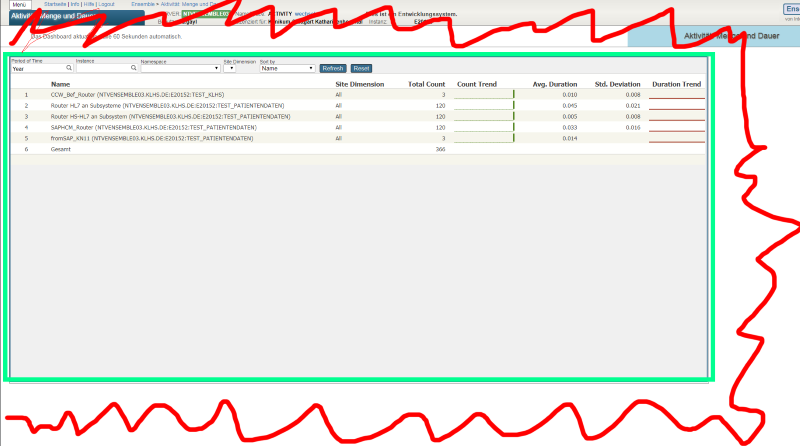
I'm trying to develop monitoring API for the following requirements:
Monitoring is a process of controlling and management of performance and availability of software applications.
I'm trying to develop monitoring API for the following requirements:
I need to develop a tool to help to get what data is being consumed by a certain process, in order to get all data used to build an automated test scenario.
For example, some user process will pull data from ^GLOBAL(1)="dataString", ^GLOBAL(2)="dataString2", ^GLOBAL1(1)="data1String", ^GLOBAL2(4)="data2String4". Amidst all other data on these Globals, I will ignore everything that was not used in the user process, and get the specific keys used on it.
Hello,
In response to the infrastructure needs of our company's service, I've created a small API that sends SNMP queries to InterSystems to visualize relevant data for retrieval when the infrastructure implements monitoring.
However, I'm experiencing a timeout issue when attempting to collect information using an SNMP walk. Here is the code for my API's SNMP service:
import snmp from "net-snmp";
const options = {
port: 161,
retries: 4,
timeout: 3000,
transport: "udp4", // Uniquement udp4 et udp6 possible
trapPort: 162
};
const oids = [ "1.3.6.1.4.1.16563.4.1.15.1.Hello everybody,
In the documentation I read the following:
Alerts are messages generated by production components. InterSystems IRIS automatically writes the alerts to a log file and sends then to the production component named Ens.Alert. If your production does not have a component named Ens.Alert, then InterSystems IRIS writes alerts to the log file but does not send them to any component. The component named Ens.Alert can be of any class. The most frequently used classes for Ens.Alert are:
I am not able to find the log file where the alerts are stored.
Hi all.
A long time ago I enabled Activity Monitoring to be able to save myself headaches in the future when looking at the performance of various message routes through our productions. It's served it's purpose of answering questions on how many messages we process a week etc but I had not had the chance to really dig down into the stats for specific message types or destinations to pin point issues.
That time has come, as I have an outbound that periodically queues up without much rhyme or reason.
When installing IRIS, all the system AUDIT events are not enabled.
What is the fastest way to activate all events?
System > Security Management > System Audit Events
.png)
In the Windows Ressource Manager I can observe multiple parallel processes coming from cache.exe with read operations to journaling files.
All except one of these processes have the same reads(Byte/s). The processes point to different journal files and constantly read between 200 and 3000 Bytes/s.
The corresponding process via PID in the management portal of Caché shows the process %SYS.Monitor.Control.1. In 3 days of uptime on the server it has run 181.632.583 commands and modified 32.140.642 globals.
These processes are not writing to the journal at any point.
My employer set up a web-based HL7 interface monitor dashboard that will display all Ensemble components (Service/Process/Operation) in a Production, their status, and the support information embedded in each interfaces listing on the Monitor. Please see 3 screenshots.
This is part of the URL that we go to when accessing this Web based Monitor: ......57772/csp/healthshare/monitor/Rush.Monitor.Web.Home.cls
I've gone into Studio and I find the "Rush" 'folder' and the "Monitor" 'folder' but then the only thing to navigate to is "WebStudio" and I can never find the "Home.
I'm using the EnumerateJobStatus query of class Ens.Util.Statistics to obtain the LastActivity value of a Business Host.
I would expect that this would return the timestamp of the last message received by the BH, understanding that any connect/disconnect activity would reset that timer. However, the time returned appears to actually be the time at which Ens.MonitorService generated the alert and is not directly related to anything that happened in the BH itself.
In the Business Operation, how do we get to know which source is currently sending primary request if there are multiple requests coming at the same time?
I built a monitoring system in Grafana using the IRIS API /api/monitor/metrics (reading with Prometheus) but I noticed that the RAM usage shown was below that shown by the operating system.
I installed the Zabbix agent and the usage values were higher, but with a line with the same highs and lows but shifted.
The metric in the API is iris_phys_mem_percent_used, described as "Percent of physical memory (RAM) currently in use", in Zabbix it is the Item tag: "component: memory" item: "Memory utilization".
Hi,
i'm with a trouble to take the api/monitor/alerts using prometheus.
i'm using prometheus 3.2.1 with IRIS 2022.1, the api metrics is working fine, but with the alerts, i'm receiving the following error:
.png)
and this is the answer in the request:.png)
it apears the iris is not using the right way to answer the OpenMetrics the way Prometheus want.
Someone already see this?