#Microsoft Windows

3 Followers · 59 Posts

Microsoft Windows is a group of several graphical operating system families, all of which are developed, marketed, and sold by Microsoft.

Official site.

Announcement Rob Tweed · Jun 11, 2020

If you're interested in building a browser-based CRUD application for maintaining data on IRIS, check out the detailed, step-by-step tutorial at:

https://github.com/robtweed/qewd-microservices-examples/blob/master/WIN…

To get a preview of the application you'll build in the tutorial, along with background on its technology stack, watch this video:
https://www.youtube.com/watch?v=d-NICYqv_2s

In summary, the key features and technologies that you'll be using and building out in this tutorial include:

- fully responsive interactive browser-based application - will also display correctly

0
0 1284
Announcement Rob Tweed · May 15, 2020

I've created a new repository that I will use for providing examples of various scenarios and use cases for QEWD

https://github.com/robtweed/qewd-microservices-examples

Initially it contains a example of a scenario I'm often asked about: a set of REST APIs, with JWT support, implemented as a set of QEWD MicroServices, each of which uses Cache or IRIS running on a Windows system.

What I've provided is a detailed, step-by-step guide (with detailed explanations) of how to set up such a system.

The example shows a use case of REST APIs to:

- authenticate / login

- thereafter use a set of CRUD APIs to

0
1 502
Question Eduard Lebedyuk · Mar 6, 2020

Simple problem:

  1. I leave a long-running command in terminal
  2. Switch to another task(s)
  3. Remember that I need to check on my command after a few hours

Is there any way to force terminal to the foreground after current command ends?

This is Windows with cterm/iristerm although Putty/Kitty solution would also be nice.

6
0 712
Article alex kosinets · Apr 20, 2020 1m read

Download  MX  into folder  C:/mx   (if Windows)

Create the REST application MX in IRIS namespace USER:

  • USER> do ^%REST …………
  • USER> do $System.OBJ.ImportDir(“c:/mx”,”vmx.ro”,”ck”,,1)
  • USER> do $System.OBJ.ImportDir("c:/mx","rest.xml","ck",,1)

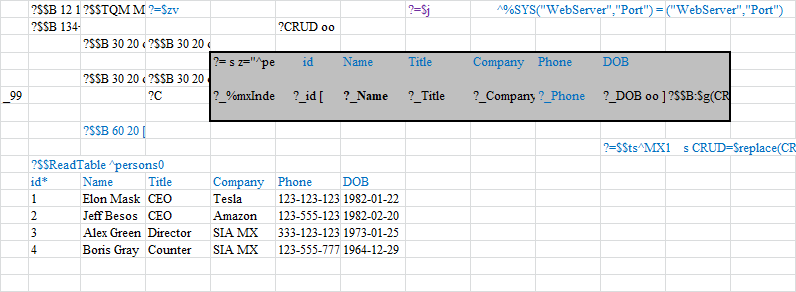
Prepare excel sheet - place on it mx-formulas and mumps-commands:

To connect excel correctly, you must first specify the server address and port in MX_CONFI.xlsb sheet 'connections'. Port see in ^|"%SYS"|%SYS("WebServer","Port").

Run MX.XLSB. Commands written on sheet created a test global on the server and the interface buttons. 

To add a new person to

0
0 893
Question Anzelem Sanyatwe · Feb 19, 2020

Good Day;

looking at disabling Telnet - on Windows - Cache 2012,2017. The security scans don't need it on network.

But still leave users able to use `Terminal - direct - on the box should be fine.

am posting here for quick refs (as this is a common security vulnerability out there).

Regards;

Anzelem.

5
0 1031
Question Mathieu Van Sevenant · Sep 13, 2019

Hello everyone :-)

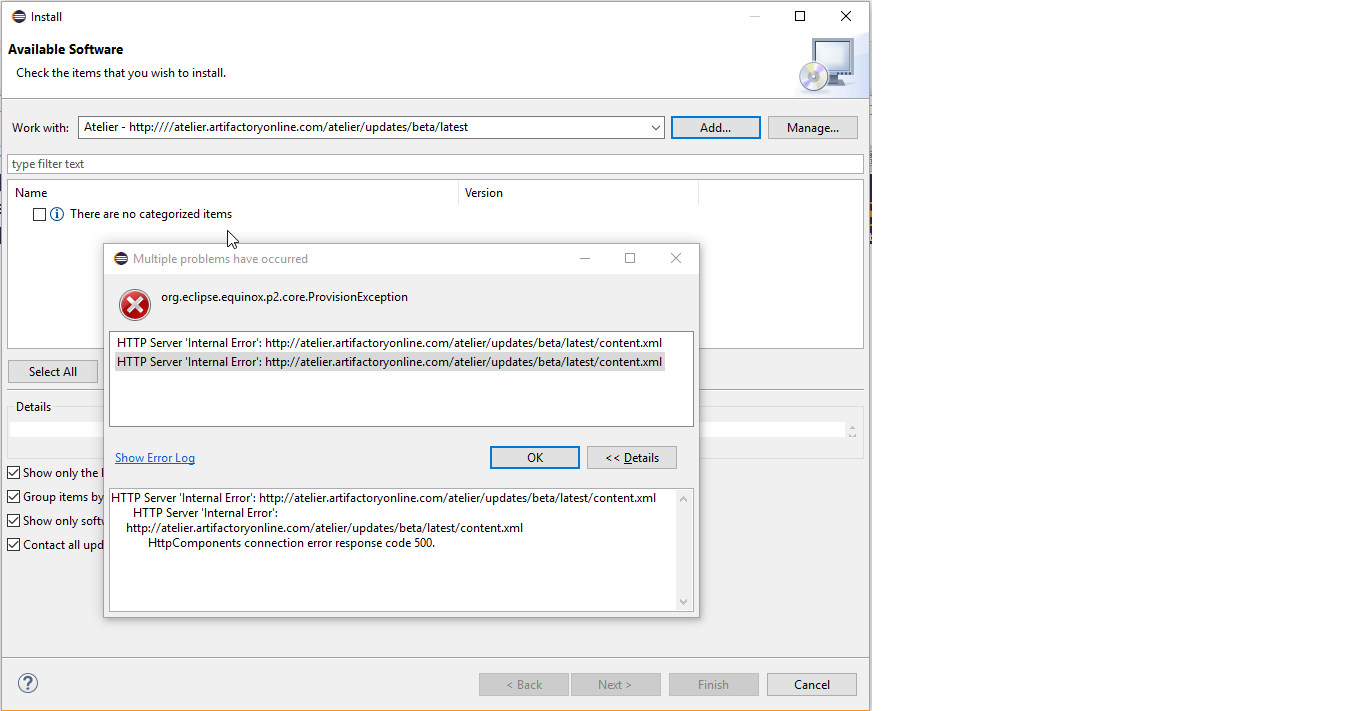
I would like to update Atelier from version 1.0.262 to the 1.3 one. So I clicked on Help --> Check for updates, and I get these first error messages:

"No updates were found in available software sites."

"Some sites could not be found. See the error log for more detail." etc. cf picture below talking about Proxy Authentication.

So I checked those available software sites (tried until now) and also the proxy settings that I am used to work with:

Then I changed the "Active Provider" from Native to Manual with the proxy settings got from a system administrator :

So here is the

5
0 562
Article David E Nelson · Apr 5, 2019 6m read

Now that the InterSystems IRIS Data Platform Community Edition is available on Docker Hub (https://hub.docker.com/_/intersystems-iris-data-platform), it seems like a great time to try InterSystems IRIS in a container. For some time already, the community edition has been available in the cloud, for example on AWS (https://community.intersystems.com/post/free-iris-community-edition-aws), but maybe it would be nice to try it locally as well.Fellow Windows users are no doubt used to eye rolling, being told “YMMV”, etc., whenever they mention using Docker for Windows.

5
2 1334
Article Chao Liang · Dec 24, 2018 5m read

Terminal scripts can be used to run pre-designed commands on the terminal, like a batch file.  You can write anything that can be executed on terminal, like for loop, if else and so on,  inside Terminal scripts. In this article, I will show you how to call Terminal scripts, how to use parameters in Terminal scripts and how to avoid session disconnected when running Terminal scripts. If you have any information about how to use Terminal scripts or you have any feedback, please feel free to leave a comment.

1. Running Terminal scripts in Cache or IRIS

If you are using Cache on Windows system, you

6
2 3824
Question Thembelani Mlalazi · Apr 9, 2019

I have an xml that has non standard characters and I would like to transform it with xslt  so that those characters render in the format  &#nnn here is what I have so far any help appreciated 

xslt

<!--?xml version="1.0"?-->
<xsl:transform version="1.0" xmlns:xsl="http://www.w3.org/1999/XSL/Transform">
<xsl:output encoding="Windows-1252" indent="yes" omit-xml-declaration="yes" method="xml">
>  <xsl:template match="/Recordset">
    <recordset><xsl:apply-templates></xsl:apply-templates></recordset>
  </xsl:template>
  <xsl:template match="*|@*">
    <xsl:copy>
      <xsl:apply-templates
6
0 1777
Question Scott Roth · Jan 14, 2019

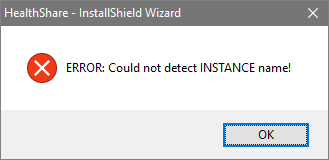
I loaded 2017.2 onto a windows desktop that I was going to use for testing. I need to now uninstall 2017.2 but when I do I get a ERROR saying it can not find the INSTANCE name, when there is HEALTHSHARE defined.

Has anyone else had this issue? I would like to uninstall this version and start over from scratch without having to re-image my machine.

Thanks

Scott

1
1 769
Question John Kumpf · Dec 6, 2018

Hi guys,

Mostly the title.  Let's say my commands are stored in a text file "inFile".  Here was my best guess:

<dir to iris> console IRIS2018 <inFile

For reference, here's an example of the analogous structure that works on Cache:

C:\InterSystems\Cache2018\bin\cache -s C:\InterSystems\Cache2018\mgr -U <namespace to start as> <inFile

I think the problem is this:  When the Cache prompt is started, it opens in the same terminal as the line that started it, so passing inFile to standard input effectively types out inFile's lines as login info or commands in Cache.

1
0 1150
Question Sabarinathan M · Mar 13, 2018

Hi All,

I need some help with sending PDF files to printer using cache instead of using third party tools(Adobe, foxit reader, etc..).
Sometime i getting access issue with the exe files.

Can able to send text data to printer using below code.

Set Dev="|PRN|PrinterName"
OPEN Dev:(/DATATYPE="TEXT"):80
USE Dev Write "Test printing",!
CLOSE Dev


Any suggestions on sending PDF to printer?

3
0 1006
Question Daniel Martinez Contador · Sep 12, 2018

I'm new to Iris, trying to follow this guide ( https://community.intersystems.com/post/k-means-clustering-iris-dataset ) about using clustering. I've followed all instructions until showing the data. At that point, `dataFrame.show()` fails with `java.sql.SQLException: Access Denied`.

I'm using IRIS 2018.12.609.0 on Windows 10 Pro 64 bits. Python is 3.6.6, PySpark is 2.3.1, installed from Anaconda (Python 3.6.6 |Anaconda, Inc.| (default, Jun 28 2018, 11:27:44) [MSC v.1900 64 bit (AMD64)] on win32).

Along the road I had problems with Hadoop winutils, solved using information here (

2
0 1773
Question Brian Downing · Jan 8, 2018

This is probably a very naive question but :
Is it possible to create a Windows executable file from a Cache MUMPS (COS) routine, such that the routine can be run directly from Windows ?
If so, could some kind soul direct me to a source of information that describes the process.
I am using the free Intersystems Cache installation (CachePCkit V2017.1) on Windows 10 for my own use & personal development.

Thanks

13
0 1531
Question Brian Downing · Jan 7, 2018

I am using the free Intersystems Cache installation (CachePCkit V2017.1)  on Windows 10 for my own use & personal development.
I am writing routines in Studio & running them in the Cache terminal TRM:3672 (TRYCACHE).
From a routine, how do I control print position within the terminal screen. I have tried using $X and $Y but this does not work and I cannot find what I need within the Cache terminal documentation.

Hope this question is not too simplistic for Members.
Any suggestion would be appreciated.

4
2 737
Article Ben Spead · Sep 6, 2017 1m read

This 'feature' have been around for a long time, but I don't see any articles on it so I thought I would make everyone aware.

A method is provided to customize the appearance of the Cache cube icon in the system tray so different instances can be visually distinguished. When csystray.exe, the Cache/Ensemble cube program, starts, it will look for files named "up.ico" and "down.ico" in the \bin directory below the instance installation directory. If these .ico files are present, csystray.exe will load the icons and display them in place of the default blue and gray Cache/Ensemble cube icons.

5
1 1426
Article John Murray · Aug 15, 2017 1m read

DC readers running Caché etc on Windows, configuring the Telnet service to use SSL/TLS, and using the Caché Telnet client (CTerm.exe) to make the Telnet connections may like to know that there's a fault in 2017.1 and 2017.1.1 which prevents CTerm.exe from establishing the secure connection.

Workaround is to use a pre-2017.1 kit to install on your client machines (e.g. 2016.2.2), or to fetch the bin\cconnect.dll from an earlier version (I used 2016.2.2) and use it as a replacement for the 2017.1 / 2017.1.1 copy.

The issue is known to InterSystems  under ProdLog #146698 and is fixed by RFD1899,

0
0 620
Question Alexi Demetriou · Jul 13, 2017

Hello, I am writing to request assistance on an issue I appear to be having when accessing Ensemble. I have it running on a Windows virtual machine, on a Mac laptop, and am trying to access it through the emergency ID account. When starting Ensemble through the command line window using ccontrol start ENSEMBLE /Em... I get an error and Ensemble does not start. Below is the error message I am getting when checking the logs:

07/13/17-09:30:46:789 (4848) 2 Failed to allocate 422MB shared memory: 304MB global buffers, 35MB routine buffers
07/13/17-09:30:46:800 (4848) 2 Unable to allocate shared

2
0 1036
Article Timur Safin · Jan 16, 2017 15m read

Have you ever thought what could be a reason why some development environment (database, language) would eventually become popular? What part of this popularity could be explain as language quality? What by new and idioms approaches introduced by early language adopters? What is due to healthy ecosystem collaboration? What is due to some marketing genius?

When I was working for Intersystems as Sales Engineer in their Russian office, we have discussed these things many times: we have experimented with meetups, new forms of working with IT community; we have seeded and curated forums and

2
2 1479
Question Wolf Koelling · Dec 16, 2016

Does anybody else have problems installing the  Caché 2017.1 FT for Win_x64?

I'm getting an error "Unable to execute the required file: The following system error has occurred: The system cannot find the file specified. (2)"

This is happening with the very latest version (build 726) and the previous one ( build 720), whereas the builds before were fine.

I've uninstalled Caché to see whether it was an upgrade vs clean install problem but it makes no difference.

5
0 647
Question Thomas Chericka · Dec 8, 2016

Hi,

Thanks for your time.

Plain $ZF(-1) and $ZF(-2) calls from Cache Studio or Terminal have stopped launching the OS shell from Win10.

cmd (Windows Command Prompt) should be launched.

Configuration:

Windows 10 Anniversary Update, Ensemble 2016.2.0.585.0 Developer Edition x64

Is this common? I have enabled both %Developer role and a Cache CallOut privilege for all users that operate in this scenario.

In Terminal, W $ZF(-1) prints -1, W $ZF(-2) prints -1

In Studio, W $ZF(-1) hangs the IDE, W $ZF(-2) prints 0

In all four cases, cmd (Windows Command Prompt) is not launched!

Any ideas, anybody?

Thanks in

2
0 1412
Question Andreas Zuckerhut · Apr 13, 2016

Greetings.

I'm currently struggling with launching a routine from the command prompt using ccontrol.

Basically I have a routine with a parameter which works fine using the following:
ccontrol cterminal ^ANDYTST(\"c:\temp\\\") USER

This receives c:\temp\ then in the routine.
However, when there is a space inside the parameter it assumes that it receives a script.
I can still run it using ccontrol terminal, but that then tells me the argument is invalid.
Therefore, is there something like a placeholder for whitespaces?
And, is it possible to hand it the credentials?
Or is there a better way to launch a

3
0 1472
Article John Murray · Mar 6, 2016 2m read

When my COS code is executing in a Caché process it might want to interact with the host operating system. For the purpose of this post I'm focusing on a Windows host, but much of it applies to other host OS platforms as well.

A common example of host OS interaction is when my process wants to read from or write to a file. What credentials will apply when Windows is checking whether or not to allow me access to the file?

To answer that we need to consider another question. How did our process start?

If we're in an interactive terminal session, perhaps we launched this from the Caché cube on the

6
0 1143
Article Steve Glassman · Mar 4, 2016 1m read

I am pleased to announce the next 2016.2 field test kit, 2016.2.0.605.0.

There are about a hundred changes from the previous field test kit, including the following fixes to problems found by those using the kits in the field:

  • DLP3516, which fixes a problem in the Demo.Document.Data.Loader class
  • RJW2416, which fixes a problem with the telnet client disconnecting on Windows

One additional change of note: in this kit we have changed the on-disk format for DOCUMENT data.

0
0 364