In this article, I am going to give some examples to get your own docker image with InterSystems Caché/Ensemble.
System administration refers to the management of one or more hardware and software systems.
In this article, I am going to give some examples to get your own docker image with InterSystems Caché/Ensemble.
If you do not have direct access to the server that runs your IRIS Docker container
you still may require access to the container outside "iris session" or "WebTerminal".
With an SSH terminal (PuTTY, KiTTY,.. ) you get access inside Docker, and then, depending
on your needs you run "iris session iris" or display/manipulate files directly.
Greetings, InterSystems community!
I am pleased to announce that the web terminal project, Caché WebTerminal version 4 gets its release! After long period of enhancing this web application from 2013, it came to the version 4, which features major stability and security improvements, intelligent autocomplete and syntax highlighting, convenient SQL mode and a lot of other useful features.
The goal of this article is to spread the knowledge about this project over the InterSystems community.
Hi, this post was initially written for Caché. In June 2023, I finally updated it for IRIS. If you are revisiting the post since then, the only real change is substituting Caché for IRIS! I also updated the links for IRIS documentation and fixed a few typos and grammatical errors. Enjoy :)
In this post, I show strategies for backing up InterSystems IRIS using External Backup with examples of integrating with snapshot-based solutions. Most solutions I see today are deployed on Linux on VMware, so a lot of the post shows how solutions integrate VMware snapshot technology as examples.
I am working with a client to try and export a set of tasks defined in the Task Manager from one system to another. I am not seeing any API for this. I can query this information in SQL. So I tried to use the Data Export Wizard from the System Management portal in the SQL window. Export was fine. Importing failed with a "can't insert into read only field" error. Looking at the class definition does not help since the implementation details are not visible.
So how would one accomplish this? Export scheduled tasks from one system to another?
Hi, everyone!
I want to share a personal project that started with a simple request at work:
Is it's possible to know how many Caché licenses we are using?
Reading other articles here in the community, I found this excellent article by David Loveluck
APM - Using the Caché History Monitor
https://community.intersystems.com/post/apm-using-cach%C3%A9-history-monitor
So, using David's article, I started using Caché History Monitor and to show all that information.
When facing the question: Which cool tech should I use?
With the launch of InterSystems IRIS Data Platform, we provide our product even in a Docker container. But what is a container?
The fundamental container definition is that of a sandbox for a process.
Containers are software-defined packages that have some similarities to virtual machines (VM) like for example they can be executed.
Containers provide isolation without a full OS emulation. Containers are therefore much lighter than a VM.
We're looking to create a quick and simple test to see if all firewalls are open on 1972 between a linux based web server VM and a VM running InterSystems IRIS. Does anyone have any ideas for a quick command that can be run from UNIX console that will provide confirmation that traffic is able to get to 1972 on an IRIS machine?
BTW - I don't think it makes any difference but the IRIS machine is running Windows
Hi Community!
Suppose you have a working system on 8-bit Caché database and need to transfer the solution to Unicode database.
How do you manage that?
For practical reasons, it may be desirable that after a Linux server restart, the IRIS instance is automatically started.
Below you will find the steps to follow to automate the startup of IRIS during a reboot of the Linux server, via systemd :
1. Create an iris.service file in /etc/systemd/system/iris.service containing the following information
[Unit]
Description=InterSystems IRIS Data Platform
After=network.Since IRIS 2020.1, changed the way how embedded SQL compiled. Now it compiles upon the first execution of such queries.
Is there any way, I could switch that feature back to the previous behavior, or get some more control over it?
We deliver our software as deployed, and we would like to have it well prepared. Another solution would suit us, if we could change the generated classname of the cached query to something which we would be possible to map. At the moment it generates classes %sqlcq.NAMESPACE, but our customers may use different namespaces.
Hi Community!
How can I know the port of management portal e.g. from terminal?
The one which looks like
localhost:port/csp/sys/exp/%25CSP.Portal.Home.zen
in browser?
I'm working on a proposal for a deployment tool development project and I was wondering if anyone had any experience with such a thing.
We use Healthshare and implementations for new clients are tedius and lengthy. Lots of ensemble service, registry value, lookup tables, namespaces and other things have to be created and configured.
I would like to create a Zen or CSP page based deployment tool that can do all this with a few parameters and some custom code.
Has anyone done this? What are some pitfalls you ran into? Any unique ideas you included? Other general thoughts?
This post is dedicated to the task of monitoring a Caché instance using SNMP. Some users of Caché are probably doing it already in some way or another. Monitoring via SNMP has been supported by the standard Caché package for a long time now, but not all the necessary parameters are available “out of the box”. For example, it would be nice to monitor the number of CSP sessions, get detailed information about the use of the license, particular KPI’s of the system being used and such. After reading this article, you will know how to add your parameters to Caché monitoring using SNMP.
Your application is deployed and everything is running fine. Great, hi-five! Then out of the blue the phone starts to ring off the hook – it’s users complaining that the application is sometimes ‘slow’. But what does that mean? Sometimes? What tools do you have and what statistics should you be looking at to find and resolve this slowness? Is your system infrastructure up to the task of the user load? What infrastructure design questions should you have asked before you went into production? How can you capacity plan for new hardware with confidence and without over-spec'ing? How can you stop the phone ringing? How could you have stopped it ringing in the first place?
Currently, we are utilizing batch jobs at the OS level to kick off routines that watch for files. We are trying to convert these processes to be performed by the Task Manager.
The routines have while loops and perform while loops so long as the time parameters are being met.
What's the best way to ensure Task Manager kicks them off after the completion of the shutdown/backup/start process is performed, which we do nightly? I want to ensure that it starts it regardless of the time that we've set.
We are currently using different iterations of Ens.Director.EnableConfig items to start/stop objects within the Interoperability Namespace. We are looking for ways to minimize our downtime as we move from AIX to a new section of our Network and Red Hat Servers.
Besides using Ens.Director.EnableConfig item and waiting for a response, or just disabling the objects through the Namespace class file, is there a quicker way to stop Services and Operations to ensure the TCP disconnect is sent to those endpoints so we can move the networking rules to ensure they point to new servers?
I need to develop a tool to help to get what data is being consumed by a certain process, in order to get all data used to build an automated test scenario.
For example, some user process will pull data from ^GLOBAL(1)="dataString", ^GLOBAL(2)="dataString2", ^GLOBAL1(1)="data1String", ^GLOBAL2(4)="data2String4". Amidst all other data on these Globals, I will ignore everything that was not used in the user process, and get the specific keys used on it.
++ Update: August 1, 2018
The use of the InterSystems Virtual IP (VIP) address built-in to Caché database mirroring has certain limitations. In particular, it can only be used when mirror members reside the same network subnet. When multiple data centers are used, network subnets are not often “stretched” beyond the physical data center due to added network complexity (more detailed discussion here). For similar reasons, Virtual IP is often not usable when the database is hosted in the cloud.
Network traffic management appliances such as load balancers (physical or virtual) can be used to achieve the same level of transparency, presenting a single address to the client applications or devices. The network traffic manager automatically redirects clients to the current mirror primary’s real IP address. The automation is intended to meet the needs of both HA failover and DR promotion following a disaster.
Coming back to the topic of how to minimize journals.
Monitoring your IRIS deployment is crucial. With the deprecation of System Alert and Monitoring (SAM), a modern, scalable solution is necessary for real-time insights, early issue detection, and operational efficiency. This guide covers setting up Prometheus and Grafana in Kubernetes to monitor InterSystems IRIS effectively.
This guide assumes you already have an IRIS cluster deployed using the InterSystems Kubernetes Operator (IKO), which simplifies deployment, integration and mangement.
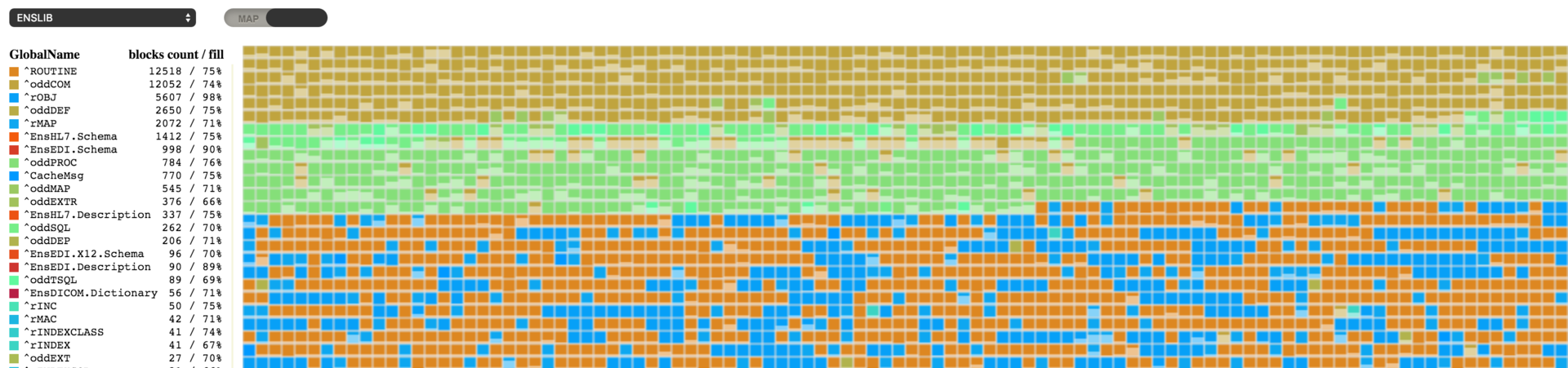
This is the third article (see Part 1 and Part 2) where I continue to introduce you to the internal structure of Caché databases. This time, I will tell you a few interesting things and explain how my Caché Blocks Explorer project can help make your work more productive.
(I wasn't able to find this in the docs or the Community, so feel free to point me to a reference that I missed)
How can I determine the effective User and Group that will be used when an InterSystems IRIS process is doing file I/O on the file system for UNIX? Bonus points if you can tell me how to do it from within InterSystems IRIS as well as from the host OS.
Thanks!
Hi.
What is the distinction between Ens.Util.Tasks.PurgeMessageBank and Ens.Util.Tasks.Purge
http://docs.intersystems.com/latest/csp/documatic/%25CSP.Documatic.cls?…
Tks.
Question:
My journal files are growing rapidly - what could be the cause? How can I minimize the phenomena?
This time I want to talk about something not specific to InterSystems IRIS, but that I think is important if you want to work with Docker and your server at work is a PC or laptop with Windows 10 Pro or Enterprise.
As you likely know, containers technology comes basically from Linux world and, nowadays, is on Linux hosts were it shows maximum potential. Those who use Windows on a normal basis see that both, Microsoft and Docker, have done important efforts during these last years that allow us to run containers based on Linux images on our Windows system in a really easy way... but it's something not supported for production systems and, this is the big problem, is not reliable if we want to keep persistent data outside of containers, in the host system,... mostly due to the big differences between Windows and Linux file systems. In the end, Docker for Windows itself uses a small linux virtual machine (MobiLinux) to run the containers... it does it transparently for the windows user... and it works perfectly well if, as I said, you don't require that your databases survive longer than the container...
Well,...let's get to the point,... the point is that many times, to avoid issues and simplify, we need a full Linux system and, if our server is based on Windows, the only way of having it is through a virtual machine. At least till WSL2 in Windows is released, but that will be another story and sure it'll take a bit of time to become robust enough.
In this article, I'll tell you, step by step, how to install an environment where you'll be able to work, if you need it, with Docker containers on an Ubuntu system in your Windows server. Let's go...

In some project, I found the need to use SMIME format https://www.ietf.org/rfc/rfc3851.txt, basically is an standard used to wrap a message together with its signature using a certificate (usually X509). Ensemble don't have a single class to do that but inside the Ensemble installation we have the openssl utility, so in this example I use the "openssl smime" command to sign or verify a message.
The example has two Business Process that able to sign or verify and in order to test I made a simple production.
Hope this helps
Hi all, I'm running into an issue with the installation, it seems like almost everything is working alright but upon trying to actual access the Management Portal, the site cannot be reached. I've noticed that the terminal indicates that Sign-on is inhibited.
To add some context, I've installed Cache following the Unix instructions for MacOS (El Capitan). I can share the log or any other info that may be helpful. Here is some of the terminal output from the installation if it would prove at all helpful.
We are trying to script a High Availability Shutdown/Start script in case we need to fail over to one of our other servers we can be back up within mins. Is there a way to configure the startup procedure to Automatically Stop/Start the JDBC server when shutting down or starting up cache? is there an auto setting we can change?
Thanks
Scott Roth
The Ohio State University Wexner Medical Center
I'm trying to setup a new accesss role for the company support team to use the message viewer and production config page to trace the errors that eventually could occurr on the production integrations.