Hi Community,
I'm pleased to announce DEVBOX, the code anywhere IDE for IRIS.
Please watch the video and let me know what you think. Would you use it?
All the best,
Sean.
A programming tool or software development tool is a computer program that software developers use to create, debug, maintain, or otherwise support other programs and applications.
Hi Community,
I'm pleased to announce DEVBOX, the code anywhere IDE for IRIS.
Please watch the video and let me know what you think. Would you use it?
All the best,
Sean.
Now the Classes/Rutines/DeepSee files will be automatically exported to the working directory after saving or compiling and files will be automatically deleted .
To install isc-dev , you just need to download and import the file isc-dev.xml from last release.
Some ways to import isc-dev .xml file:
NS>do $system.OBJ.Load("yourpath/isc-dev.xml","ck")
NS>zpm
zpm: NS>install isc-dev
NS>do ##class(dev.code).workdir("/path/to/your/working/directory/src/")
dev.FileManExtension class as the main one and save it..png)
A password manager is an important security tool that allows users to store and manage their passwords without the need to remember or write them down in insecure places. In this article, we will explore the development of a simple password manager using the Flask framework and the InterSystems IRIS database.
Our password manager application will provide the following key features:
If you ever wondered how to debug some requests that are being made to or from IRIS, well here is a little tutorial on how to do that.
During a complex project, usually you get the specifications and implement the communication between IRIS and other things based on that. But from the paper to the real world there's usually a huge gap and you need to know why you are receiving an error on a parameter, on a header, you are not receiving the data and so on.
Strap on this jetpack to boost your developer experience in Visual Studio Code.
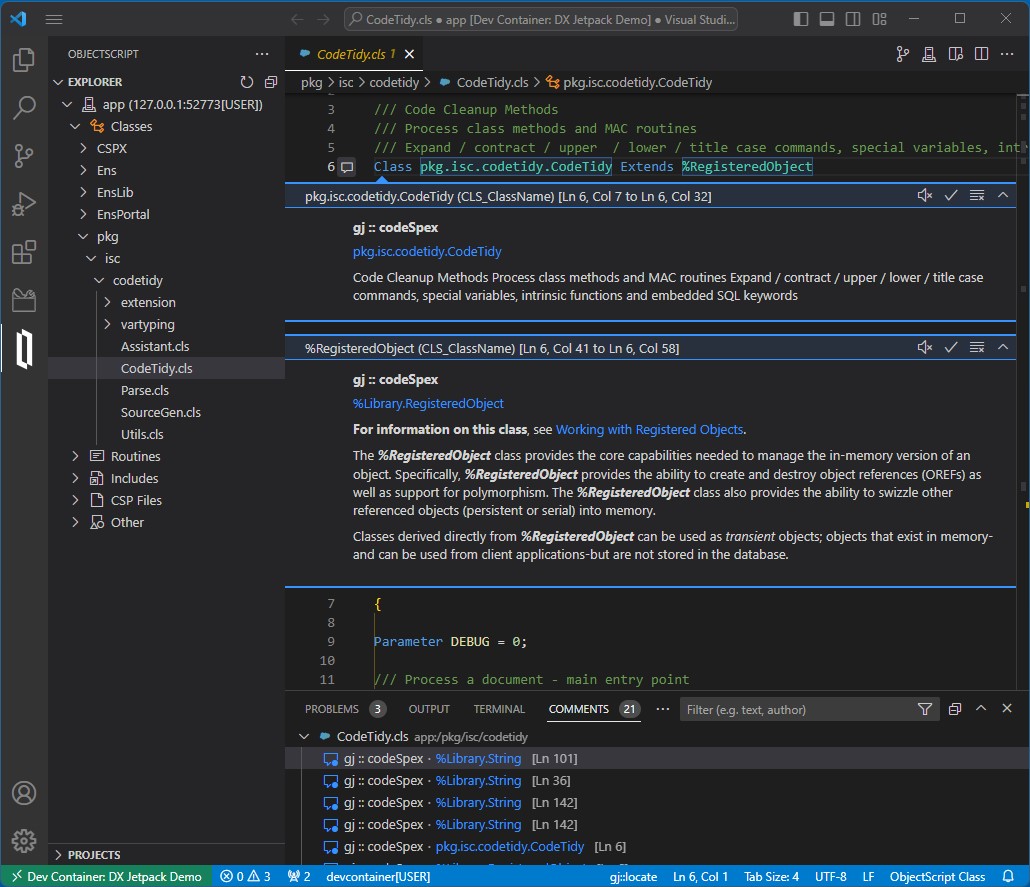
DX Jetpack for VS Code was my entry for the 2023 Developer Tools Contest, where it achieved 2nd place in the Experts vote and 5th place in the Community vote. It is an extension pack for VS Code, bundling three entirely new extensions created by me, plus a couple that we at George James Software published previously.
The new extensions are:
If you're reluctant to install DX Jetpack right away, why not try it using a dev container? In the dev container is an InterSystems IRIS Community environment augmented with InterSystems Package Manager (IPM) and the isc-codetidy package.
Let me introduce my new project, which is irissqlcli, REPL (Read-Eval-Print Loop) for InterSystems IRIS SQL
Install it with pip
pipinstallirissqlcliOr run with docker
dockerrun-itcaretdev/irissqlcliirissqlcliiris://_SYSTEM:SYS@host.docker.internal:1972/USERConnect to IRIS
$ irissqlcli iris://_SYSTEM@localhost:1972/USER -W
Password for _SYSTEM:
Server: InterSystems IRIS Version 2022.3.0.606 xDBC Protocol Version 65
Version: 0.1.0
[SQL]_SYSTEM@localhost:USER> select $ZVERSION
+---------------------------------------------------------------------------------------------------------+
| Expression_1 |
+---------------------------------------------------------------------------------------------------------+
| IRIS for UNIX (Ubuntu Server LTS for ARM64 Containers) 2022.3 (Build 606U) Mon Jan 30202309:05:12 EST |
+---------------------------------------------------------------------------------------------------------+
1 row in set
Time: 0.063s
[SQL]_SYSTEM@localhost:USER> help
+----------+-------------------+------------------------------------------------------------+
| Command | Shortcut | Description |
+----------+-------------------+------------------------------------------------------------+
| .exit | \q | Exit. |
| .mode | \T | Change the table format used to output results. |
| .once | \o [-o] filename | Append next result to an output file (overwrite using -o). |
| .schemas | \ds | List schemas. |
| .tables | \dt [schema] | List tables. |
| \e | \e | Edit command with editor (uses $EDITOR). |
| help | \? | Show this help. |
| nopager | \n | Disable pager, print to stdout. |
| notee | notee | Stop writing results to an output file. |
| pager | \P [command] | Set PAGER. Print the query results via PAGER. |
| prompt | \R | Change prompt format. |
| quit | \q | Quit. |
| tee | tee [-o] filename | Append all results to an output file (overwrite using -o). |
+----------+-------------------+------------------------------------------------------------+
Time: 0.012s
[SQL]_SYSTEM@localhost:USER>1.1 I met a few project that their interface servers were crashed. Cutoms wanted resume server as fast as we can. their servers are running at lan,and they can't use git,there are some namesapce in the server running different service,and usualy there is only one server.
1.2 In the message,it has property in type of characterstream,as you know,the message search page doesn't support filtering with property of characterstream,so it's so hard to find the messge you want.
1.3 Other workmate may update the code on the server,and mybe their is something wrong.
Once again I had a challenge that costed me some time and a lot of testing to reach the best solution. And now that I've managed to solve it, I'd like to share a little bit of my knowledge.
In a namespace there were a lot of similar classes, so to make them simpler there were a superclass with comon properties. Also, there are relationships between them. I had to export one of them to JSON, but I couldn't change the superclasses, or I would break down the flow of many other integrations.
Messages.log file contains lots of useful information about IRIS. Sometimes the file gets big, and it is not easy to get to the data I am interested to review. It would be nice to jump to a specific date and time we suspect a problem may have started.
Whenever I need support from InterSystems, WRC will ask to send them messages.log file. Dependent on where IRIS is deployed, it may be cumbersome to obtain messages.log file for sending it to InterSystems.
My team works on deploying IRIS containers in Kubernetes in the cloud.
Hi Developers!
Here is the score of technical bonuses for participants' applications in the InterSystems Developer Tools Contest 2023!
I just released an update of the gj :: codeSpex extension containing a new feature - Exclusions.
There's now a short video demonstrating how exclusions can help you focus on the packages you're less familiar with. The video also illustrates how with the ObjectScript Class View extension you can easily explore the inheritance of your classes.
Both extensions are members of the DX Jetpack, my entry in the 2023 Developer Tools contest. Voting closes very soon, so if you like what I've created please encourage me to do more by VOTING FOR ME here.
If you haven’t already please give @John Murray your vote in the Developer Tool contest >> http://bit.ly/3XcxyeS
🚀 DX Jetpack boosts your developer experience when using VS Code with InterSystems platforms. 🚀
This extension pack includes:
gj :: codeSpex - showing help using VS code's commenting feature.
ObjectScript class view - View and navigate all class members plus where they are inherited from.
ServerDiff - See the difference between the code you are editing in VS Code and the server copy.
You can vote here >> http://bit.ly/3XcxyeS
Here're the technology bonuses for the InterSystems Developer Tools Contest 2023 that will give you extra points in the voting:
See the details below.
Embedded Python - 3 points
Use Embedded Python in your application and collect 3 extra points. You'll need at least InterSystems IRIS 2021.2 for it.
Listen to CEO George James chat with Derek Robinson, host of the InterSystems DataPoints podcast talk about source control, developer tools and how our solutions are beneficial for InterSystems IRIS users.
In this short 17 minute episode, George and Derek discuss our work with developer tools, and how choosing the right source control can provide users with a seamless solution - which is why Deltanji is seen as the go-to source control for InterSystems IRIS users.
Listen now on the InterSystems website > https://bit.ly/3Jp5py5
or wherever you get your podcasts - just search for 'InterSystems DataPoints'.
Hey Developers,
We'd like to invite you to join our next contest dedicated to creating useful tools to make your fellow developers' lives easier:
🏆 InterSystems Developer Tools Contest 🏆
Submit an application that helps to develop faster, contributes more qualitative code, and helps in testing, deployment, support, or monitoring of your solution with InterSystems IRIS.
Duration: January 23 - February 12, 2023
Prize pool: $13,500
Hi Community!
I want to share with you mi first Open Exchange application.
It's a tool to made our developments easier. It's a micro service in a IRIS docker that help us in our new features giving us a way to add short links in our SMS, Email campaigns and for links of the different stores for our apps.
It's very easy to use it.
Simply clone this repo:
https://github.com/daniel-aguilar-garcia/cos-url-shortener.git
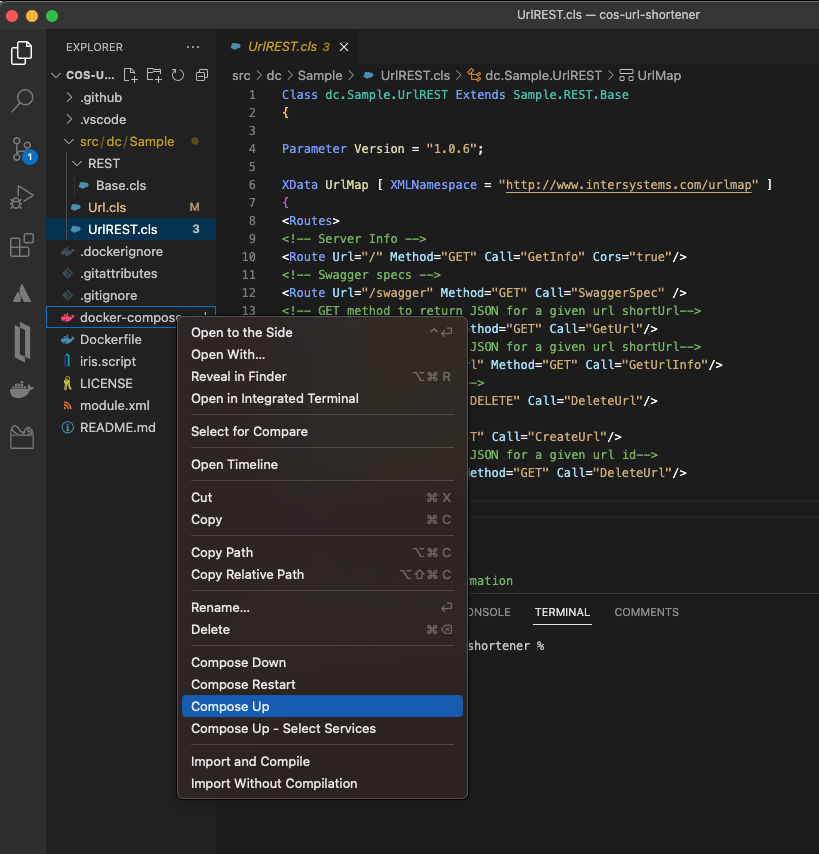
Open the folder in VSCode and start the docker.
After that you can create short link version of any link via api request.
The power of the presented tool becomes visible with a large JSON file.
The example I have prepared is composed of the daily results of AoC 2023.
Anonymization makes it usable for demo purposes.
The similarity between JSON objects + arrays and Globals in IRIS or Caché is evident.
With small and medium size JSON objects navigation across %Dynamic Objects is comfortable.
But with large and/or deep cascaded objects it becomes a challenge.
The presented tool offers 3 variants
Suppose you have developed your own app with InterSystems technologies stack and now want to perform multiple deployments on the customers' side. During the development process you've composed a detailed installation guide for your application, because you need to not only import classes, but also fine-tune the environment according to your needs.
To address this specific task, InterSystems has created a special tool called %Installer. Read on to find out how to use it.
Thank you to everyone who joined our User Group Session yesterday!
It was great showing off the new Deltanji Production Component driver that facilitates source control of interoperability productions, and we had some really insightful discussions as well.
If you missed out on the session and would like a copy of the recording, feel free to drop me a message.
Hi developers!
If you missed our presentation at the InterSystems UK&I Summit and our demo during the Source Control roundtable, but you still want to find out more about source control for Interoperability Productions... there’s another chance to see it at our User Group Session next Thursday, November 3rd at 3pm (GMT).
The new driver enables highly granular management of Interoperability Productions with tight integration into the InterSystems IRIS management management portal.
Sign up via eventbrite here >> https://bit.ly/3yqzfvS
YASPE is the successor to YAPE (Yet Another pButtons Extractor). YASPE has been written from the ground up with many internal changes to allow easier maintenance and enhancements.
YASPE functions:
YASPE is written in Python and is available on GitHub as source code or for Docker containers at:
We’ll be hosting our bi-annual virtual User Group Session on Thursday, November 3rdat 3pm (GMT). We will demonstrate the new Production component driver for Deltanji - it enables highly granular management of Interoperability Productions with tight integration into the management portal.
The session is also an opportunity for us to help to problem-solve any issues you're having, and a chance for you to offer your feedback on our tools.
Those interested in finding out more about Deltanji source control are welcome to join us too.
Sign up for free on Eventbrite >> https://bit.ly/3yBVYVO

Hey DC Members!
Get an overview of the new and enhanced capabilities of the language SDKs:
In this article I'll show you how you can easily convert between many different document formats, these to be precise:
and many more, check out this table. We'll use LibreOffice as a conversion engine.
This GitHub is the simplest way to scrap using IRIS and Python, all of that already incorporated in an IRIS PRODUCTION.
From here you can build any IRIS production in full Python or in ObjectScript as this module is interoperable.
See for more information
| IrisStat options | |
| a | All |
| b | bits |
| c | counters |
| d | dump processes |
| e | error log |
| f | global module flags |
| g | ^GLOSTAT info |
| h | irisstat usage |
| j | journal |
| k | prefetch daemons |
| l | LRU global buffers |
| m | GFILETAB |
| n | network |
| o | clear irisstat |
| p | processes |
| q | hibernation semaphores |
| s | irisstat exe directory |
| t | run irisstat in loop |
| u | locks |
| v | Check versions |
| w | write daemon queues |
| B | Blocks in GBFSPECQ |
| C | inter-job comms |
| D | sample block collisions |
| E | cluster status |
| G | |
Has anyone had any success reading barcodes from PDFs or images in a Cache/IRIS application? I've been looking at some possible solutions for this, including the open source ZXing libraries. I know we have the ability to create them in Zen and Intersystems Reports, but as far as I know, there's nothing built in to actually read data from a barcode. If anyone has suggestions on how to go about this, I'd love to hear them.
In our specific case, we print reports with a Code 128 barcode on them.
Following this GitHub we will see how the FIX protocol can be implemented easily using IRIS and Python.
If you don't have much time focus on the Send a Quote before the Order part near the end, as it will, in a matter of minute, tell you how to send a Quote Request followed by an Order Request and show you the result from the server, and that in no more than five clicks.
Implementation of the fix protocol using an IRIS python container for the initiator and a regular python container for the acceptor.
Hi! As a developer who was forced to move from Mac to Windows (temporary) I found some things a bit confusing. In this article I would like to talk about some tweaks I made to make my experience smoother. I think it can help not only Mac users who need to use Windows environment (for ex. in VMs), but also can help some Windows users to make some things more convenient. Of course, all the points are subjective, the best setup is one that works for you.
All the tweaks are related to Windows 10 as I don’t have an access to Windows 11 at the moment.