#System Administration

8 Followers · 546 Posts

System administration refers to the management of one or more hardware and software systems.

Documentation on InterSystems system administration.

Article Steven LeBlanc · Jan 28, 2016 1m read

This is a sample Ensemble/Health Connect production which demonstrates how to receive an HL7 order (ORM) inbound from a file, extract fields (in this case, basic demographic information), and insert those into a table in an external SQL database via ODBC.  

Included in the zip file:

  • Exported code
  • Sample ORM message
  • 'How to configure' doc 
3
0 1719
Question Bob Felbol · Apr 4, 2018

Hi.

The message is received a few times a day.

On documentation, this ^ISCSOAP^is log to service SOAP, but why send to cconsole.log?

04/04/18-01:00:00:597 (10608) 2 ^ISCSOAP in Namespace %SYS has been active for 348 day(s).
04/04/18-01:00:00:598 (10608) 2 ^ISCSOAP in Namespace X has been active for 165 day(s).

Help-me.

Tks

6
0 1525
Article John Murray · Nov 7, 2016 1m read

I'm pleased to see this in the documentation of the just-published 2017.1 Field Test of Ensemble:

"In certain circumstances, it is useful to create namespaces that are not enabled for Ensemble. In this release you can do this by clearing the Make this an Ensemble namespace checkbox when creating a new namespace. "

1
0 656
Article Murray Oldfield · Mar 11, 2016 8m read

In the last post we scheduled 24-hour collections of performance metrics using pButtons. In this post we are going to be looking at a few of the key metrics that are being collected and how they relate to the underlying system hardware. We will also start to explore the relationship between Caché (or any of the InterSystems Data Platforms) metrics and system metrics. And how you can use these metrics to understand the daily beat rate of your systems and diagnose performance problems.

10
2 4282
Question Mack Altman · Mar 19, 2018

Currently, we are running 2014.1 on two different servers (OpenVMS, RHEL). The plan is to transition from OpenVMS to RHEL, but our Write Daemon is in a Troubled state on both servers.

On the OpenVMS server, we have a WIJ file that's 26G and can grow to 40G (size of database cache). Since it hasn't grown to 40G, we don't believe the size of the WIJ file to be the issue.

What else should we be looking at regarding the performance of the Write Daemon?

1
0 1059
Article Mark Connelly · Mar 9, 2018 3m read

I wanted to see some alerts that occur in my Productions in a Mobile Device, I came across Pushover.net recently that although has an upfront cost  $5 you can send as many messages as you like after that, there is a 7 day free trial to check it out.

To Integrate this with a production I did the following.

Create an account and set up a device on https://pushover.net/

Record the following API Keys from the web site on the main page you will see

Your User Key   example: ueh3t7478foi3ruf2ogb3syu4fs34s

You then need to create an application I set

Name : Cache

Type : Application

5
0 1380
Question Alexey Maslov · Mar 6, 2018

I have one in my testing environment. According to https://community.intersystems.com/post/licensing-ubuntu-and-suse-20171-and-later, I should move to native Ubuntu build with 2017.2. So I downloaded Cache for UNIX (Ubuntu Server LTS for x86-64) 2017.2.1 and tried to update my existing 2015.1.4 installation. What I got was:

Upgrade from lnxsusex64 platform is not allowed.

No packages will be installed.

Meanwhile new Cache 2017.2 instance was installed without any problem.

The question is: how to upgrade an existing one?

4
0 443
Question Rick Clayton · Jan 19, 2018

I am setting up a new Caché instance and I have managed to configure it where Caché username/password is required to initiate the Caché session:

csdfalsdkfjf@fra23e234sco:/opt/labmed/test/test81/proc$ csession cache1

Node: frxxco, Instance: CACHE1

Username: 

I cannot find the setting in the management console that allows for unauthenticated login to a Caché session.  Any help is much appreciated.

4
0 1803
Article Luca Ravazzolo · Feb 2, 2018 4m read

Container Images

In this second post on containers fundamentals, we take a look at what container images are.

What is a container image?

A container image is merely a binary representation of a container.

A running container or simply a container is the runtime state of the related container image.

Please see the first post that explains what a container is.

1
0 2493
Question John Nurmi · Jan 2, 2018

I am wondering about upgrading our Healthshare mirrored environment to the latest release. Has anyone upgraded recently to what version and what kind of effort was put into it. I am thinking it will take 2 analysts full time for 3 months. Am I out of the ball park on this estimate? We have bout 600 operations, Processes and services. What are some of the benefits we get from upgrading and what are some of the problems you ran into during the upgrade? Any information you have to share would be greatly appreciated. Thanks

2
0 449
Question Scott Roth · Jan 30, 2018

We have noticed in the course of the last 18 days our CACHE.dat has grown by 20 GB. Is there a way we can break down the data in CACHE.dat to see what could be growing in size?

Let me state it another way.....Is there a way to see what space an Operation/Service/Process is taking up within a certain Production?

Thanks

Scott Roth

The Ohio State University Wexner Medical Center

3
0 1593
Question Mack Altman · Oct 11, 2017

We will be transitioning from a server running HP OpenVMS to one running RHEL 7. The main question some of the team had was what would be the best method for moving the globals to the new system.

Also, I was wondering if any others have transitioned from OpenVMS to RHEL. If so, were there any kinks that we should be aware of prior to transition?

2
0 1014
Question Kurro Lopez · Jan 10, 2018

Hi all,

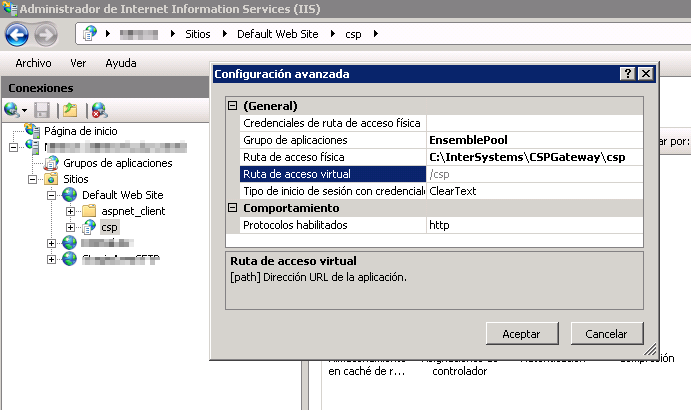
I've configured my Ensemble instance to use IIS 7, according to the instructions CSP Gateway configuration Guide and I've configure the CSP Virtual application.

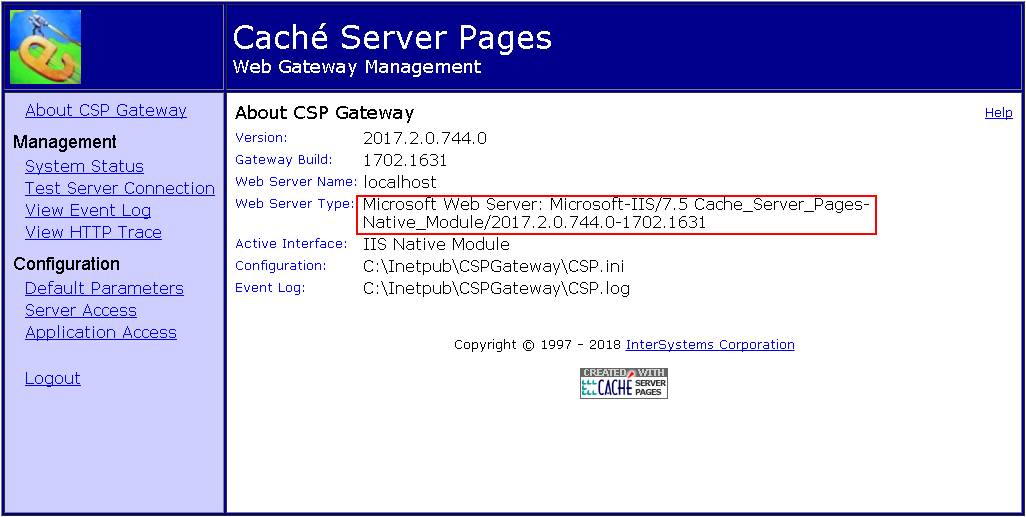
All the process about Native modules is done.

If I open http://localhost/csp/bin/Systems/Module.cxw I see that it is using the IIS as I expected.

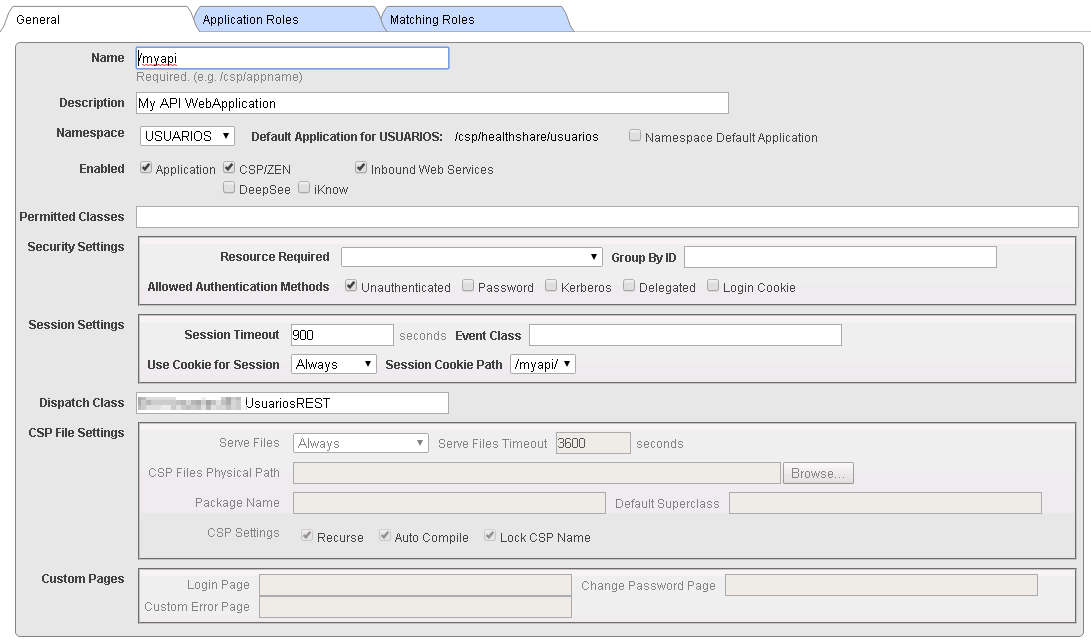
I've created a WebApi and I've deployed in my server

If I call the check method it works 

however, if I call it directly (localhost/myapi/check) it doesn't work.

Error HTTP 404.0 - Not Found

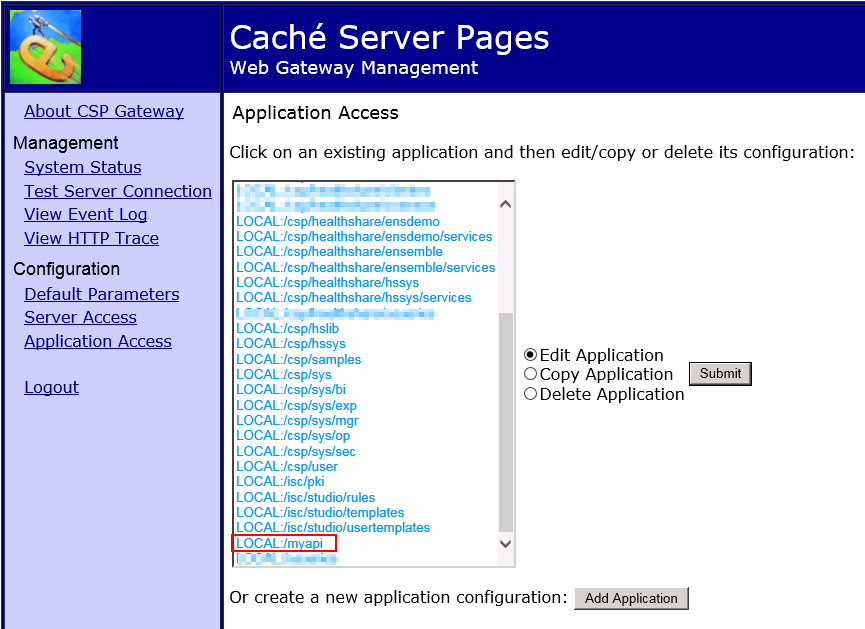
If I check the list of application access in the CSP Web Gateway management, it is in the list.

7
0 1544
Article Dmitry Maslennikov · Dec 4, 2015 1m read

Database Blocks Explorer for InterSystems Caché

Key features

Tree explorer
  • Shows tree of database blocks;
  • Export tree as SVG or PNG image;
  • Shows every node in the block;
  • Open any block just by clicking on node in parent block;
  • Reload block info by clicking at the same node second time;
  • Zoom in and out, fit and navigator;
  • Easy way to switch between view modes (tree/map);
Fragmentation map
  • Shows every block with the same colour for every globals;
  • Legend for globals;

Installation

Minimal supported version is 2015.3 or 2016.1.

8
0 557
Question Mikhail Khomenko · Jan 3, 2018

Hi, all!
As I know, InterSystems recommends the use of Huge Pages. And if count of Huge Pages is enough, we'll see (in cconsole.log) something like this during Cache startup:

12/29/17-14:40:50:360 (3625) 0 Allocated 4630MB shared memory using Huge Pages: 4096MB global buffers, 256MB routine buffers

But if count of Huge Pages is not enough for location of all Globals and Routines caches, Cache won't use Huge Pages.

The question is: does it exist any metrics (API) in Cache (not in OS), that can show us if Cache uses (or not) Huge Pages currently?
Thanks!

2
0 1298
Question Rick Clayton · Dec 17, 2017

I am trying to install cache 2017.2 on vagrant/VirtualBox and Ubuntu. I have tried both Linux precise64 3.2.0-23-generic #36-Ubuntu and Linux vagrant-ubuntu-trusty-64 3.13.0-137-generic #186-Ubuntu. I am getting an error that i can’t figure out. I have done this:

sudo apt-get install build-essential
sudo apt-get install software-properties-common python-software-properties
sudo add-apt-repository ppa:ubuntu-toolchain-r/test
sudo apt-get install libstdc++6
sudo apt-get install gcc-4.9 g++-4.9
sudo apt-get update
sudo apt-get upgrade
2
0 823
Question Sankar Manogaran · Dec 13, 2017

HI,

We are using Cache 5.0.15 version. We are facing <DISKHARD> error. I tried to copy the dat file, I am getting cyclic redudancy error. I did run the integrity check and repair utility . Nothing works. Now My question is how to recover the dat file with data.

Thanks in Advance! Sankar

1
0 186