In this article I would like to present the RESTForms project - generic REST API backend for modern web applications.

The idea behind the project is simple -after I wrote several REST APIs I realized that generally, REST API consists of two parts:

  • Work with persistent classes
  • Custom business logic

And, while you'll have to write your own custom business logic, RESTForms provides all things related to working with persistent classes right out of the box.
Use cases

  • You already have a data model in Caché and you want to expose some (or all) of the information in a form of REST API
  • You are developing a new Caché application and you want to provide a REST API
12 23
3 5.4K
Article
· Jan 2, 2022 3m read
DB Migration using SQLgateway

Thanks to @Yuri Marx we have seen a very nice example for DB migration from Postgres to IRIS.
My personal problem is the use of DBeaver as a migration tool.
Especially as one of the strengths of IRIS ( and also Caché) before is the availability of the
SQLgateways that allow access to any external Db as long as for them an access usinig
JDBC or ODBC is available. So I extended the package to demonstrate this.

12 3
2 879

In recent versions of IRIS, a powerful new data loading command has been introduced to SQL: LOAD DATA. This feature has been highly optimized to import data into IRIS extremely fast, allowing hundreds of gigabytes of data to be inserted in seconds instead of hours or days.

This is a very exciting improvement. However, a big problem in the data loading experience still exists. Namely, the time and hassle it takes to:

12 7
1 1K

++Update: August 2, 2018

This article provides a reference architecture as a sample for providing robust performing and highly available applications based on InterSystems Technologies that are applicable to Caché, Ensemble, HealthShare, TrakCare, and associated embedded technologies such as DeepSee, iKnow, Zen and Zen Mojo.

Azure has two different deployment models for creating and working with resources: Azure Classic and Azure Resource Manager. The information detailed in this article is based on the Azure Resource Manager model (ARM).

12 4
0 12.6K
Article
· Apr 26, 2017 2m read
How to install and use TFS in Atelier

Hi,

This is a quick tutorial how to install and use TFS in Atelier. It is based on my self experience and some tricks that I 've noted.

If you are used to using visual studio maybe you feel that is a bit slow and heavy, but you have the same TFS panel as you have in Visual Studio, so don't need any special "training" to use it smiley

12 3
2 1.4K

Here you'll find a simple program that uses Python in an IRIS environment and another simple program that uses ObjectScript in a Python environment. Also, I'd like to share a few of the troubles I went trough while learning to implement this.

Python in IRIS environment

Let's say, for example, you're in an IRIS environment and you want to solve a problem that you find easy, or more efficient with Python.

You can simply change the environment: create your method as any other, and in the end of it's name and specifications, you add [ Language = python ]:

11 9
5 2.4K

Adding VSCode into your IRIS container

One of the easiest ways to setup repeatable development environments is to spin up containers for them. I find that when iterating quickly, it was very convenient to host a vscode instance within my development container. Thus, I have created a quick container script to add a browser-based vscode into an IRIS container. This should work for most 2021.1+ containers. My code repository can be found here

11 5
0 1K

Using embedded Python while building your InterSystems-based solution can add very powerful and deep capabilities to your toolbox.

I'd like to share one sample use-case I encountered - enabling a CDC (Change Data Capture) for a mongoDB Collection - capturing those changes, digesting them through an Interoperability flow, and eventually updating an EMR via a REST API.

11 2
2 612

Suppose you have an application that allows users to write posts and comment on them. (Wait... that sounds familiar...)

For a given user, you want to be able to list all of the published posts with which that user has interacted - that is, either authored or commented on. How do you make this as fast as possible?

Here's what our %Persistent class definitions might look like as a starting point (storage definitions are important, but omitted for brevity):

11 3
5 536

Hyper-Converged Infrastructure (HCI) solutions have been gaining traction for the last few years with the number of deployments now increasing rapidly. IT decision makers are considering HCI when scoping new deployments or hardware refreshes especially for applications already virtualised on VMware. Reasons for choosing HCI include; dealing with a single vendor, validated interoperability between all hardware and software components, high performance especially IO, simple scalability by addition of hosts, simplified deployment and simplified management.

11 7
1 3.8K

In today's data landscape, businesses encounter a number of different challenges. One of them is to do analytics on top of unified and harmonized data layer available to all the consumers. A layer that can deliver the same answers to the same questions irrelative to the dialect or tool being used.

11 2
1 523

Released with no formal announcement in IRIS preview release 2019.4 is the /api/monitor service exposing IRIS metrics in Prometheus format. Big news for anyone wanting to use IRIS metrics as part of their monitoring and alerting solution. The API is a component of the new IRIS System Alerting and Monitoring (SAM) solution that will be released in an upcoming version of IRIS.

11 2
7 2.2K

csp-log-tutorial

Prerequisites

Make sure you have git installed.

I created a git folder inside the IRIS mgr directory. I right clicked the git folder and chose Git Bash Here from the context menu.

git clone https://github.com/oliverwilms/csp-log-tutorial.git

Clone my csp-log-tutorial GitHub repo if you like to try it out for yourself.

11 1
0 405

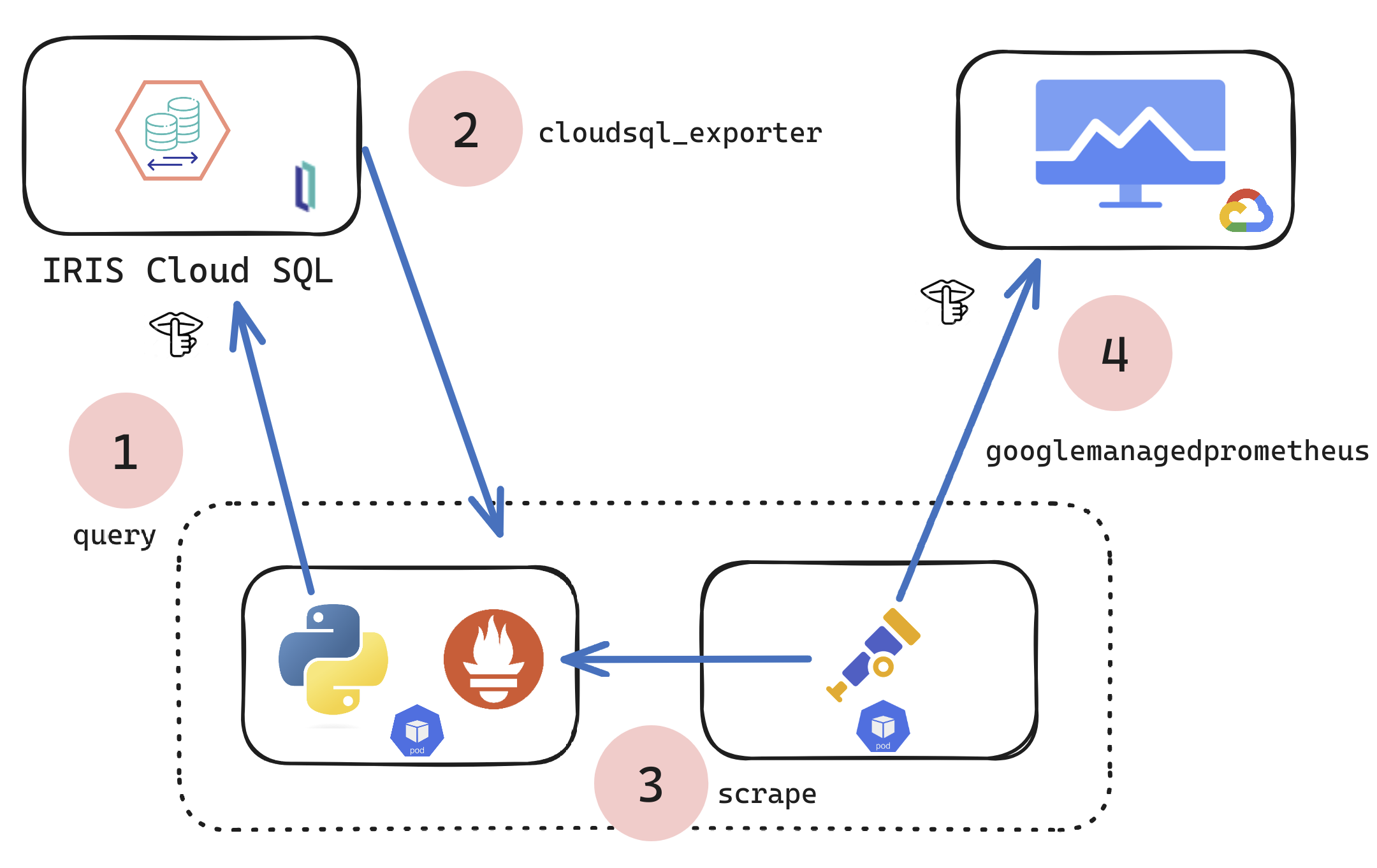
If you are a customer of the new InterSystems IRIS® Cloud SQL and InterSystems IRIS® Cloud IntegratedML® cloud offerings and want access to the metrics of your deployments and send them to your own Observability platform, here is a quick and dirty way to get it done by sending the metrics to Google Cloud Platform Monitoring (formerly StackDriver).
11 1
2 368
Article
· Jun 12, 2023 3m read
LangChain fixed the SQL for me

This article is a simple quick starter (what I did was) with SqlDatabaseChain.

Hope this ignites some interest.

Many thanks to:

sqlalchemy-iris author @Dmitry Maslennikov

Your project made this possible today.

The article script uses openai API so caution not to share table information and records externally, that you didn't intend to.

A local model could be plugged in , instead if needed.

10 7
3 3.7K

The IKO will dynamically provision storage in the form of persistent volumes and pods will claim them via persistent volume claims.

But storage can come in different shapes and sizes. The blueprint to the details about the persistent volumes comes in the form of the storage class.

This raises the question: we've deployed the IrisCluster, and haven't specified a storage class yet. So what's going on?

You'll notice that with a simple

10 1
1 421
Article
· Jan 8, 2024 9m read
IRIS Document Database (DocDB)

InterSystems IRIS Document Database (DocDB) offers a flexible and dynamic approach to managing database data. DocDB embraces the power of JSON (JavaScript Object Notation), providing a schema-less environment for storing and retrieving data.

It is a powerful tool, enables developers to bypass a ton of boiler plate code in interaction with existing applications, serialization, pagination and integration. the seamless flow of DocDB with Interoperability Rest services and operations, gives a big leap in API production and management.

for full DocDB documentation Here. in the context of this article i will showcase a use case in which DocDB will make a perfect fit.

10 1
0 820

Let me introduce my new project, which is irissqlcli, REPL (Read-Eval-Print Loop) for InterSystems IRIS SQL

  • Syntax Highlighting
  • Suggestions (tables, functions)
  • 20+ output formats
  • stdin support
  • Output to files

Install it with pip

pip install irissqlcli

Or run with docker

docker run -it caretdev/irissqlcli irissqlcli iris://_SYSTEM:SYS@host.docker.internal:1972/USER

Connect to IRIS

$ irissqlcli iris://_SYSTEM@localhost:1972/USER -W
Password for _SYSTEM:
Server:  InterSystems IRIS Version 2022.3.0.606 xDBC Protocol Version 65
Version: 0.1.0
[SQL]_SYSTEM@localhost:USER> select $ZVERSION
+---------------------------------------------------------------------------------------------------------+
| Expression_1                                                                                            |
+---------------------------------------------------------------------------------------------------------+
| IRIS for UNIX (Ubuntu Server LTS for ARM64 Containers) 2022.3 (Build 606U) Mon Jan 30 2023 09:05:12 EST |
+---------------------------------------------------------------------------------------------------------+
1 row in set
Time: 0.063s
[SQL]_SYSTEM@localhost:USER> help
+----------+-------------------+------------------------------------------------------------+
| Command  | Shortcut          | Description                                                |
+----------+-------------------+------------------------------------------------------------+
| .exit    | \q                | Exit.                                                      |
| .mode    | \T                | Change the table format used to output results.            |
| .once    | \o [-o] filename  | Append next result to an output file (overwrite using -o). |
| .schemas | \ds               | List schemas.                                              |
| .tables  | \dt [schema]      | List tables.                                               |
| \e       | \e                | Edit command with editor (uses $EDITOR).                   |
| help     | \?                | Show this help.                                            |
| nopager  | \n                | Disable pager, print to stdout.                            |
| notee    | notee             | Stop writing results to an output file.                    |
| pager    | \P [command]      | Set PAGER. Print the query results via PAGER.              |
| prompt   | \R                | Change prompt format.                                      |
| quit     | \q                | Quit.                                                      |
| tee      | tee [-o] filename | Append all results to an output file (overwrite using -o). |
+----------+-------------------+------------------------------------------------------------+
Time: 0.012s
[SQL]_SYSTEM@localhost:USER>

10 20
2 935
Article
· Aug 26, 2016 8m read
Enterprise Monitor and HealthShare

Enterprise Monitor is a component of Ensemble and can help organizations monitor multiple productions running on different namespaces within the same instance or namespaces running on multiple instances.

Documentation can be found at:

http://docs.intersystems.com/ens20161/csp/docbook/DocBook.UI.Page.cls?KEY=EMONITOR_all#EMONITOR_enterprise

In Ensemble 2016.1 there were changes made to make this utility work with HealthShare environments.

This article will:

  • Show how to set up Enterprise Monitor for HealthShare sites
  • Show some features of Enterprise Monitor
  • Show some features of Enterprise Message Viewer

For this article, I used the following version of HealthShare:

Cache for Windows (x86-64) 2016.1 (Build 656U) Fri Mar 11 2016 17:42:42 EST [HealthShare Modules:Core:14.02.2415 + Linkage Engine:14.02.2415 + Patient Index:14.02.2415 + Clinical Viewer:14.02.2415 + Active Analytics:14.02.2415]

10 2
0 1.6K