InterSystems Data Platforms and performance – Part 9 InterSystems IRIS VMware Best Practice Guide
This post provides guidelines for configuration, system sizing and capacity planning when deploying IRIS and IRIS on a VMware ESXi. This post is based on and replaces the earlier IRIS-era guidance and reflects current VMware and InterSystems recommendations.
Last update Jan 2026. These guidelines are a best effort, remember requirements and capabilities of VMware and IRIS can change.
I jump right in with recommendations assuming you already have an understanding of VMware vSphere virtualization platform. The recommendations in this guide are not specific to any particular hardware or site specific implementation, and are not intended as a fully comprehensive guide to planning and configuring a vSphere deployment -- rather this is a check list of best practice configuration choices you can make. I expect that the recommendations will be evaluated for a specific site by your expert VMware implementation team.
A list of other posts in the InterSystems Data Platforms and performance series is here.
Are InterSystems' products supported on ESXi?
It is InterSystems policy and procedure to verify and release InterSystems’ products against processor types and operating systems including when operating systems are virtualised. For specifics see InterSystems Supported Technologies.
Note: If you do not write your own applications you must also check your application vendors support policy.
Supported Hardware
VMware virtualization works well for IRIS when used with current server and storage components. IRIS using VMware virtualization has been deployed succesfully at customer sites and has been proven in benchmarks for performance and scalability. There is no significant performance impact using VMware virtualization on properly configured storage, network and servers with later model Intel Xeon processors and AMD EPYC processors.
Generally IRIS and applications are installed and configured on the guest operating system in the same way as for the same operating system on bare-metal installations.
It is the customers responsibility to check the VMware compatibility guide for the specific servers and storage being used.
Virtualised architecture
I see VMware commonly used in two standard configurations with IRIS applications:
- Where primary production database operating system instances are on a ‘bare-metal’ cluster, and VMware is only used for additional production and non-production instances such as web servers, printing, test, training and so on.
- Where ALL operating system instances, including primary production instances are virtualized.
This post can be used as a guide for either scenario, however the focus is on the second scenario where all operating system instances including production are virtualised. The following diagram shows a typical physical server set up for that configuration.
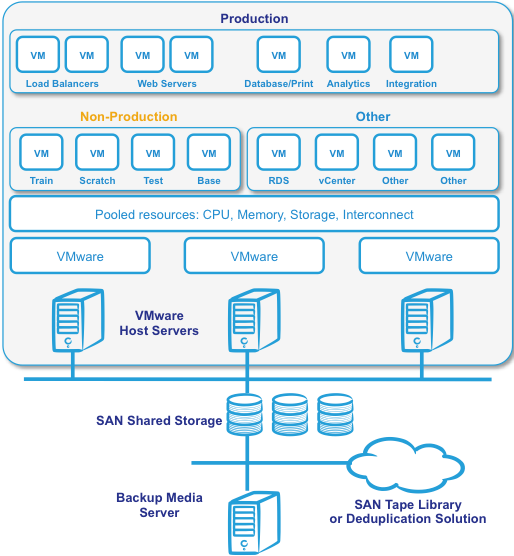
Figure 1. Simple virtualised IRIS architecture
Figure 1 shows a common deployment with a minimum of three physical host servers to provide N+1 capacity and availability with host servers in a VMware HA cluster. Additional physical servers may be added to the cluster to scale resources. Additional physical servers may also be required for backup/restore media management and disaster recovery.
For recommendations specific to VMware vSAN, VMware's Hyper-Converged Infrastructure solution, see the following post: Part 8 Hyper-Converged Infrastructure Capacity and Performance Planning. Most of the recommendations in this post can be applied to vSAN -- with the exception of some of the obvious differences in the Storage section below.
VMWare versions
The following table shows key recommendations for IRIS:
| Item | Recommendation |
|---|---|
| ESXi: | Minimum vSphere 7.x or 8.x |
| vCenter: | Required (VCSA preferred) |
| Licensing: | Enterprise Plus strongly recommended. Contact VMware. |
- DRS, HA, vMotion, vDS, and storage APIs are mandatory for production IRIS.
- “Free” ESXi is not suitable for enterprise IRIS deployments.
vSphere is a suite of products including vCenter Server that allows centralised system management of hosts and virtual machines via the vSphere client.
VMware has several licensing models; ultimately choice of version is based on what best suits your current and future infrastructure planning. Contact Broadcom for the latest VMware licensing choices.
ESXi Host BIOS settings
The ESXi host is the physical server. Before configuring BIOS you should:
- Check with the hardware vendor that the server is running the latest BIOS
- Check whether there are any server/CPU model specific BIOS settings for VMware.
Default settings for server BIOS may not be optimal for VMware. The following settings can be used to optimize the physical host servers to get best performance. Not all settings in the following table are available on all vendors’ servers.
| Setting | Required Value |
|---|---|
| All CPU cores: | Enabled |
| Hyper-Threading: | Enabled |
| Turbo Boost: | Enabled |
| NUMA: | Enabled |
| Hardware Virtualization (VT-x / AMD-V): | Enabled |
| Power Management: | OS / ESXi controlled |
| Unused devices: | Disabled |
AMD EPYC note (Zen 3/4/5):
- Review NUMA Per Socket (NPS) settings.
- NPS=1 or NPS=2 is typically optimal for IRIS database workloads.
Memory
The following key rules must be considered for memory allocation:
| Rule | Recommendation |
|---|---|
| VM Memory Sizing: | Size vRAM to fit within physical memory available |
| Production Database VMs: | Reserve 100% memory (full reservation) |
| Memory Overcommitment: | Avoid for production; acceptable for non-production |
| NUMA Consideration: | Ideally size VMs to keep memory local to NUMA node |
| VMware Tools: | Must be installed for memory management features |
| Large Pages: | Enable for database VMs |
| Swap: | Avoid any swapping for production database VMs |
Mandatory
All production IRIS database VMs MUST have 100% memory reservation.
Failure to do this causes:
- Shared memory swapping
- Severe and unpredictable latency
- Database instability
When running multiple IRIS instances or other applications on a single physical host VMware has several technologies for efficient memory management such as transparent page sharing (TPS), ballooning, swap, and memory compression. For example when multiple OS instances are running on the same host TPS allows overcommitment of memory without performance degradation by eliminating redundant copies of pages in memory, which allows virtual machines to run with less memory than on a physical machine.
Note: VMware Tools must be installed in the operating system to take advantage of these and many other features of VMware.
Although these features exist to allow for overcommitting memory, the recommendation is to always start by sizing vRAM of all VMs to fit within the physical memory available. Especially important in production environments is to carefully consider the impact of overcommitting memory and overcommit only after collecting data to determine the amount of overcommitment possible. To determine the effectiveness of memory sharing and the degree of acceptable overcommitment for a given IRIS instance, run the workload and use Vmware commands resxtop or esxtop to observe the actual savings.
A good reference is to go back and look at the fourth post in this series on memory when planning your IRIS instance memory requirements. Especially the section "VMware Virtualisation considerations" where I point out:
Set VMware memory reservation on production systems.
You must avoid any swapping for shared memory. Reserve the full production database VMs memory (100% reservation) to guarantee memory is available for your IRIS instance so there will be no swapping or ballooning which will negatively impact database performance.
Notes: Large memory reservations will impact vMotion operations so it is important to take this into consideration when designing the vMotion/management network. A virtual machine can only be live migrated, or started on another host with Vmware HA if the target host has free physical memory greater than or equal to the size of the reservation. This is especially important for production IRIS VMs. For example pay particular attention to HA Admission Control policies.
Ensure capacity planning allows for distribution of VMs in event of HA failover.
For non-production environments (test, train, etc) more aggressive memory overcommitment is possible, however do not over commit IRIS shared memory, instead limit shared memory in the IRIS instance by having less global buffers.
Current Intel processor architecture has a NUMA topology. Processors have their own local memory and can access memory on other processors in the same host. Not surprisingly accessing local memory has lower latency than remote. For a discussion of CPU check out the third post in this series including a discussion about NUMA in the comments section.
As noted in the BIOS section above a strategy for optimal performance is to ideally size VMs only up to maximum of number of cores and memory on a single processor. For example if your capacity planning shows your biggest production IRIS database VM will be 14 vCPUs and 112 GB memory then consider whether a a cluster of servers with 2x 16-core processor and 256 GB memory is a good fit.
Ideally size VMs to keep memory local to a NUMA node. But dont get too hung up on this.
If you need a "Monster VM" bigger than a NUMA node that is OK, VMware will manage NUMA for optimal performance. It also important to right-size your VMs and not allocate more resources than are needed (see below).
CPU
The following key rules should be considered for virtual CPU allocation:
| Rule | Guidance |
|---|---|
| Initial sizing: | Match bare-metal core count |
| vCPU oversizing: | Avoid |
| Hyper-Threading: | Does not double capacity |
| CPU Ready: | Must remain low |
| Consolidation: | Only after measurement |
Key rule
1 physical core (with HT) ≈ 1 vCPU
Hyper-Threading typically provides ~20–30% uplift, workload-dependent.
Processor selection
-
Prefer high-frequency CPUs
- AMD EPYC “F” series
- Intel Xeon Gold / Platinum high-GHz SKUs
-
Avoid excessive core counts at low clock speeds for DB servers
Production IRIS systems should be sized based on benchmarks and measurements at live customer sites. For production systems use a strategy of initially sizing the system the same as bare-metal CPU cores and as per best practice monitoring to see if virtual CPUS (vCPUs) can be reduced.
Hyperthreading and capacity planning
A good starting point for sizing production database VMs based on your rules for physical servers is to calculate physical server CPU requirements for the target processor with hyper-threading enabled then simply make the transaltaion:
One physical CPU (includes hyperthreading) = One vCPU (includes hyperthreading).
A common misconception is that hyper-threading somehow doubles vCPU capacity. This is NOT true for physical servers or for logical vCPUs. Hyperthreading on a bare-metal server may give a 30% uplift in performance over the same server without hyperthreading, but this can also be variable depending on the application.
For initial sizing assume is that the vCPU has full core dedication. For example; if you have a 32-core (2x 16-core) server – size for a total of up to 32 vCPU capacity knowing there may be available headroom. This configuration assumes hyper-threading is enabled at the host level. VMware will manage the scheduling between all the applications and VMs on the host. Once you have spent time monitoring the appliaction, operating system and VMware performance during peak processing times you can decide if higher consolidation is possible.
Licencing
In vSphere you can configure a VM with a certain number of sockets or cores. For example, if you have a dual-processor VM (2 vCPUs), it can be configured as two CPU sockets, or as a single socket with two CPU cores. From an execution standpoint it does not make much of a difference because the hypervisor will ultimately decide whether the VM executes on one or two physical sockets. However, specifying that the dual-CPU VM really has two cores instead of two sockets could make a difference for software licenses.
Storage
This section applies to the more traditional storage model using a shared storage array. For vSAN recommendations also see the following post: Part 8 Hyper-Converged Infrastructure Capacity and Performance Planning
The following key rules should be considered for storage:
| Area | Requirement |
|---|---|
| Sizing metric: | IOPS and latency, not GB |
| Production disks: | Thick-provisioned, eager-zeroed |
| Disk controllers: | Multiple PVSCSI |
| I/O separation: | DB data vs journals vs backups |
| VMFS vs RDM: | VMFS preferred |
| VAAI: | Required where supported |
Best practice
-
Separate physical disk groups (or tiers) for:
- Random DB I/O
- Sequential journal / backup I/O
-
Datastore separation alone is insufficient without physical isolation.
-
NVMe is strongly recommended for IRIS journal performance and in general.
-
Avoid thin-on-thin provisioning (array + VM).
Size storage for performance
Bottlenecks in storage is one of the most common problems affecting IRIS system performance, the same is true for VMware vSphere configurations. The most common problem is sizing storage simply for GB capacity, rather than allocating a high enough number of IOPS. Storage problems can be even more severe in VMware because more hosts can be accessing the same storage over the same physical connections.
VMware Storage overview
VMware storage virtualization can be categorized into three layers, for example:
- The storage array is the bottom layer, consisting of physical storage presented as logical disks (storage array volumes or LUNs) to the layer above.
- The next layer is the virtual environment occupied by vSphere. Storage array LUNs are presented to ESXi hosts as datastores and are formatted as VMFS volumes.
- Virtual machines are made up of files in the datastore and include virtual disks are presented to the guest operating system as disks that can be partitioned and used in file systems.
VMware offers two choices for managing disk access in a virtual machine—VMware Virtual Machine File System (VMFS) and raw device mapping (RDM), both offer similar performance. For simple management VMware generally recommends VMFS, but there may be situations where RDMs are required. As a general recommendation – unless there is a particular reason to use RDM choose VMFS, new development by VMware is directed to VMFS and not RDM.
###Virtual Machine File System (VMFS)
VMFS is a file system developed by VMware that is dedicated and optimized for clustered virtual environments (allows read/write access from several hosts) and the storage of large files. The structure of VMFS makes it possible to store VM files in a single folder, simplifying VM administration. VMFS also enables VMware infrastructure services such as vMotion, DRS and VMware HA.
Operating Systems, applications, and data are stored in virtual disk files (.vmdk files). vmdk files are stored in the Datastore. A single VM can be made up of multiple vmdk files spread over several datastores. As the production VM in the diagram below shows a VM can include storage spread over several data stores. For production systems best performance is achieved with one vmdk file per LUN, for non-production systems (test, training etc) multiple VMs vmdk files can share a datastore and a LUN.
When deploying IRIS typically multiple VMFS volumes mapped to LUNs on separate disk groups are used to separate IO patterns and improve performance. For example random or sequential IO disk groups or to separate production IO from IO from other environments.
The following diagram shows an overview of an example VMware VMFS storage used with IRIS:
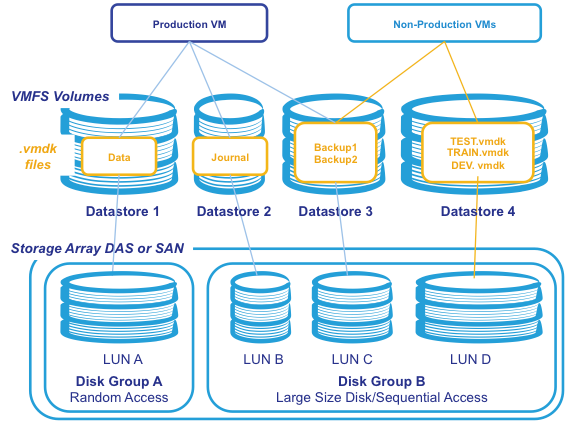
Figure 2. Example IRIS storage on VMFS
RDM
RDM allows management and access of raw SCSI disks or LUNs as VMFS files. An RDM is a special file on a VMFS volume that acts as a proxy for a raw device. VMFS is recommended for most virtual disk storage, but raw disks might be desirable in some cases. RDM is only available for Fibre Channel or iSCSI storage.
VMware vStorage APIs for Array Integration (VAAI)
For the best storage performance, customers should consider using VAAI-capable storage hardware. VAAI can improve the performance in several areas including virtual machine provisioning and of thin-provisioned virtual disks. VAAI may be available as a firmware update from the array vendor for older arrays.
Virtual Disk Types
ESXi supports multiple virtual disk types:
Thick Provisioned – where space is allocated at creation. There are further types:
- Eager Zeroed – writes 0’s to the entire drive. This increases the time it takes to create the disk, but results in the best performance, even on the first write to each block.
- Lazy Zeroed – writes 0’s as each block is first written to. Lazy zero results in a shorter creation time, but reduced performance the first time a block is written to. Subsequent writes, however, have the same performance as on eager-zeroed thick disks.
Thin Provisioned – where space is allocated and zeroed upon write. There is a higher I/O cost (similar to that of lazy-zeroed thick disks) during the first write to an unwritten file block, but on subsequent writes thin-provisioned disks have the same performance as eager-zeroed thick disks
In all disk types VAAI can improve performance by offloading operations to the storage array. Some arrays also support thin provisioning at the array level, do not thin provision ESXi disks on thin provisioned array storage as there can be conflicts in provisioning and management.
Other Notes
As noted above for best practice use the same strategies as bare-metal configurations; production storage may be separated at the array level into several disk groups:
- Random access for IRIS production databases
- Sequential access for backups and journals, but also a place for other non-production storage such as test, train, and so on
Remember that a datastore is an abstraction of the storage tier and, therefore, it is a logical representation not a physical representation of the storage. Creating a dedicated datastore to isolate a particular I/O workload (whether journal or database files), without isolating the physical storage layer as well, does not have the desired effect on performance.
Although performance is key, choice of shared storage depends more on existing or planned infrastructure at site than impact of VMware. As with bare-metal implementations FC SAN is the best performing and is recommended. For FC minimum of 8Gbps adapters are the recommended minimum. iSCSI storage is only supported if appropriate network infrastructure is in place, including; minimum 10Gb Ethernet and jumbo frames (MTU 9000) must be supported on all components in the network between server and storage with separation from other traffic.
Use multiple VMware Paravirtual SCSI (PVSCSI) controllers for the database virtual machines or virtual machines with high I/O load. PVSCSI can provide some significant benefits by increasing overall storage throughput while reducing CPU utilization. The use of multiple PVSCSI controllers allows the execution of several parallel I/O operations inside the guest operating system. It is also recommended to separate journal I/O traffic from the database I/O traffic through separate virtual SCSI controllers. As a best practice, you can use one controller for the operating system and swap, another controller for journals, and one or more additional controllers for database data files (depending on the number and size of the database data files).
Aligning file system partitions is a well-known storage best practice for database workloads. Partition alignment on both physical machines and VMware VMFS partitions prevents performance I/O degradation caused by I/O crossing track boundaries. VMware test results show that aligning VMFS partitions to 64KB track boundaries results in reduced latency and increased throughput. VMFS partitions created using vCenter are aligned on 64KB boundaries as recommended by storage and operating system vendors.
Networking
The following key rules should be considered for networking:
| Requirement | Guidance |
|---|---|
| Adapter: | VMXNET3 only |
| VMware Tools: | Mandatory |
| Traffic separation: | Mgmt / vMotion / Storage / App |
| Switch type: | Distributed vSwitch |
| Bandwidth: | ≥10 Gb minimum |
- For large-memory IRIS VMs, consider 25 Gb+ for vMotion networks.
- Intra-host VM traffic is significantly faster; use DRS affinity rules carefully.
As noted above VMXNET adapaters have better capabilities than the default E1000 adapter. VMXNET3 allows 10Gb and uses less CPU where as E1000 is only 1Gb. If there is only 1 gigabit network connections between hosts there is not a lot of difference for client to VM communication. However with VMXNET3 it will allow 10Gb between VMs on the same host, which does make a difference especially in multi-tier deployments or where there is high network IO requirements between instances. This feature should also be taken into consideration when planning affinity and antiaffinity DRS rules to keep VMs on the same or separate virtual switches.
The E1000 use universal drivers that can be used in Windows or Linux. Once VMware Tools is installed on the guest operating system VMXNET virtual adapters can be installed.
The following diagram shows a typical small server configuration with four physical NIC ports, two ports have been configured within VMware for infrastructure traffic: dvSwitch0 for Management and vMotion, and two ports for application use by VMs. NIC teaming and load balancing is used for best throughput and HA.
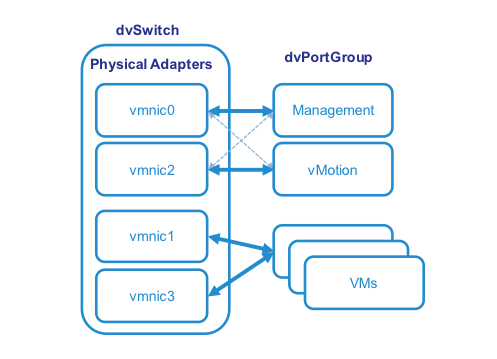
Figure 3. A typical small server configuration with four physical NIC ports.
Guest Operating Systems
The following are recommended:
| Item | Recommendation |
|---|---|
| OS: | RHEL 8 / 9 (or equivalent) |
| Architecture: | 64-bit only |
| VMware Tools: | Installed and current |
| Time sync: | NTP (not VMware Tools) |
| OS tuning: | Same as bare-metal IRIS |
It is very important to load VMware tools in to all VM operating systems and keep the tools current.
VMware Tools is a suite of utilities that enhances the performance of the virtual machine's guest operating system and improves management of the virtual machine. Without VMware Tools installed in your guest operating system, guest performance lacks important functionality.
Its vital that the time is set correctly on all ESXi hosts - it ends up affecting the Guest VMs. The default setting for the VMs is not to sync the guest time with the host - but at certain times the guest still do sync their time with the host and if the time is out has been known to cause major issues. VMware recommends using NTP instead of VMware Tools periodic time synchronization. NTP is an industry standard and ensures accurate timekeeping in your guest. It may be necessary to open the firewall (UDP 123) to allow NTP traffic.
DNS Configuration
If your DNS server is hosted on virtualized infrastructure and becomes unavailable, it prevents vCenter from resolving host names, making the virtual environment unmanageable -- however the virtual machines themselves keep operating without problem.
| Rule | Requirement |
|---|---|
| DNS availability: | Mandatory for vCenter |
| DNS redundancy: | Required |
| Failure testing: | Required |
Virtual machines continue running without DNS, but management does not.
Best practice
- Ensure at least one DNS resolver exists outside the vSphere failure domain.
High Availability
High availability is provided by features such as VMware vMotion, VMware Distributed Resource Scheduler (DRS) and VMware High Availability (HA). IRIS Database mirroring can also be used to increase uptime.
It is important that IRIS production systems are designed with n+1 physical hosts. There must be enough resources (e.g. CPU and Memory) for all the VMs to run on remaining hosts in the event of a single host failure. In the event of server failure if VMware cannot allocate enough CPU and memory resources on the remaining server VMware HA will not restart VMs on the remaining servers.
vMotion
vMotion can be used with IRIS. vMotion allows migration of a functioning VM from one ESXi host server to another in a fully transparent manner. The OS and applications such as IRIS running in the VM have no service interruption.
When migrating using vMotion, only the status and memory of the VM—with its configuration—moves. The virtual disk does not need to move; it stays in the same shared-storage location. Once the VM has migrated, it is operating on the new physical host.
vMotion can function only with a shared storage architecture (such as Shared SAS array, FC SAN or iSCSI). As IRIS is usually configured to use a large amount of shared memory it is important to have adequare network capacity available to vMotion, a 1Gb nework may be OK, however higher bandwidth may be required or multi-NIC vMotion can be configured.
DRS
Distributed Resource Scheduler (DRS) is a method of automating the use of vMotion in a production environment by sharing the workload among different host servers in a cluster. DRS also presents the ability to implement QoS for a VM instance to protect resources for Production VMs by stopping non-production VMs over using resources. DRS collects information about the use of the cluster’s host servers and optimize resources by distributing the VMs’ workload among the cluster’s different servers. This migration can be performed automatically or manually.
IRIS Database Mirror
For mission critical tier-1 IRIS database application instances requiring the highest availability consider also using InterSystems synchronous database mirroring. Additional advantages of also using mirroring include:
- Separate copies of up-to-date data.
- Failover in seconds (faster than restarting a VM then operating System then recovering IRIS).
- Failover in case of application/IRIS failure (not detected by VMware).
vCenter Appliance
The vCenter Server Appliance is a preconfigured Linux-based virtual machine optimized for running vCenter Server and associated services. I have been recommending sites with small clusters to use the VMware vCenter Server Appliance as an alternative to installing vCenter Server on a Windows VM. In vSphere 6.5 the appliance is recommended for all deployments.
Summary
This post is a rundown of key best practices you should consider when deploying IRIS on VMware. Most of these best practices are not unique to IRIS but can be applied to other tier-1 business critical deployments on VMware.
If you have any questions please let me know via the comments below.
Comments
Good Day Murray;
Anything to look out for VMs hosting Ensemble Databases on vMware being part of VMware Site Recovery Manager
making use of vSphere Replication? Can it be alone be safely used to boot up the VM on the other site?
Regards;
Anzelem.