Hey Community!
We're happy to share a new video from our InterSystems Developers YouTube:
⏯ Partnering For Success - Collaborative Innovations in Interoperability @ Ready 2025
We are a technology company genuinely Brazilian, with a qualified, multidisciplinary and agile team. We offer effective solutions for integrating systems, outsourcing, strategic interoperability, application development, support and consultancy services in information technology.
There are more than 1,500 projects delivered and more than 100 clients in Brazil and in Latin America, in the most diverse segments: healthcare, retail, industry, services and others.
Do you want to know our solutions better? Click here and contact our team?
Hey Community!
We're happy to share a new video from our InterSystems Developers YouTube:
⏯ Partnering For Success - Collaborative Innovations in Interoperability @ Ready 2025
Hey Developers,
Enjoy the new video on InterSystems Developers YouTube
⏯ Inside Vector Search - Technical Innovations In InterSystems IRIS @ READY 2025
In my last article I've talked about returning values with Python. But returning them is simple, what can make it harder is what I'm going to talk about today: where the value is treated.
Following the example of the last aricle, we have the method:
ClassClassMethodAs
Then, we'll have as a return a Python object, that IRIS interprets as the class %SYS.Python. So if I call the method with two values, like this:
"Hello"we'll have as returnValue something like "1@%SYS.Python".
Last year I made an article for starters on using embedded python. Later, it started a little discussion on how to return values with python and I found some interesting observations that are worth writing a little article. Also, hopefully I can reach more people by writing this.
There are two things you'll need to care about when returning a value with python. The first is the type you're trying to return and the second is where you're returning it.
Here you'll find a simple program that uses Python in an IRIS environment and another simple program that uses ObjectScript in a Python environment. Also, I'd like to share a few of the troubles I went trough while learning to implement this.
Let's say, for example, you're in an IRIS environment and you want to solve a problem that you find easy, or more efficient with Python.
Let’s imagine that you are a Python developer or have a well-trained team specialized in Python, but the deadline you got to analyze some data in IRIS is tight. Of course, InterSystems offers many tools for all kinds of analyses and treatments. However, in the given scenario, it is better to get the job done using the good old Pandas and leave the IRIS for another time.
For the abovementioned situation and many other cases, you might want to fetch tables from IRIS to manage data outside InterSystems’ products.
The first thing that comes to mind when we think about combining Flask with IRIS is a portal to interact with your clients and partners. A good example would be a website for patients to access their clinical exams. Of course, this case would require a whole new layer of security, which we did not cover in our last article. However, we can effortlessly add it with Werkzeug, for instance.
This app offers an easy interface to analyze storage:
Follow the instructions on the README file from the GitHub repository, and configure the settings to connect to your instance.
Since it was built with Python and Django, you can easily add specific analysis methods in the api/methods.py and use the views on views.py to display them.
In some of the last few articles I've talked about types between IRIS and Python, and it is clear that it's not that easy to access objects from one side at another.
Fortunately, work has already been done to create SQLAlchemy-iris (follow the link to see it on Open Exchange), which makes everything much easier for Python to access IRIS' objects, and I'm going to show the starters for that.
Thank you @Dmitry Maslennikov !
Today we continue expanding our last article by sharing information about some features we added to our portal. We will include a pinch of CSS to visualize the available data better and export it. Finally, we will study how to add some filtering and ordering options. By the end of this article, you should be able to display a complete simple query beautifully.
Introducing Django
Django is a web framework designed to develop servers and APIs, and deal with databases in a fast, scalable, and secure way. To assure that, Django provides tools not only to create the skeleton of the code but also to update it without worries. It allows developers to see changes almost live, correct mistakes with the debug tool, and treat security with ease.
To understand how Django works, let’s take a look at the image:
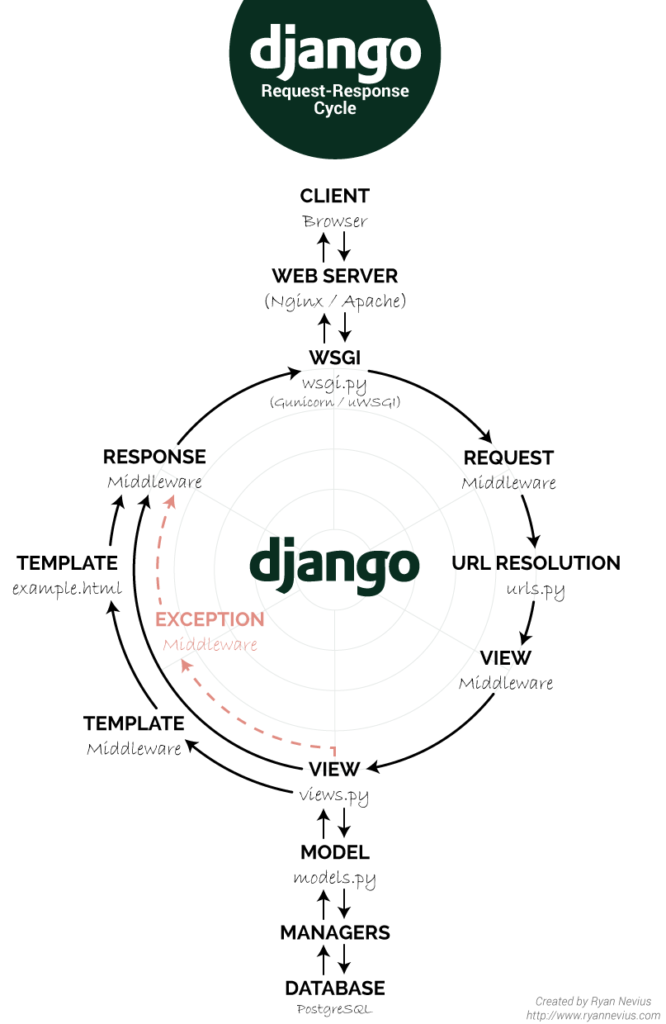
In the last article, we talked about a few starters for Django. We learned how to begin the project, ensure we have all the requisites, and make a CRUD. However, today we are going a little further.
Sometimes we need to access more complex methods, so today, we will connect IRIS to a Python environment, build a few functions and display them on a webpage. It will be similar to the last discussion, but further enough for you to make something new, even though not enough to feel lost.
Being a programmer nowadays is basically the geek version of being a polyglot. Of course, most of us here, in the InterSystems Community, “speak ObjectScript”. Howeever, I believe this wasn’t the first language for many people. For instance, I had never heard about it prior to getting the appropriate training at Innovatium.
This article is intended to be a simple tutorial on how to create ODBC connections and working with them, since I found starting with them a little bit confused, but I had amazing people to take my hand and walk me through it, and I think everyone deserves that kind of help too.
I'm going to divide each little part in sections, so feel free to jump to the one you feel the need to, although I recommend reading everything.
I'm going to use the sample data created in a previous article, Quick sample database tutorial: Samples.PersistentData, with the properties Name and Age.
This is a simple tutorial on the quickest way I found to create a sample database for any purposes such as testing, making samples for tutorials, etc.
Now you have a new namespace in a faster way than creating it from the Management Portal - which of course offers way more configuration options.
To select it, quit the SQL Shell writing "q" and then typing 'zn "namespaceName"'.
Once again I had a challenge that costed me some time and a lot of testing to reach the best solution. And now that I've managed to solve it, I'd like to share a little bit of my knowledge.
In a namespace there were a lot of similar classes, so to make them simpler there were a superclass with comon properties. Also, there are relationships between them. I had to export one of them to JSON, but I couldn't change the superclasses, or I would break down the flow of many other integrations.
Recently I had the challenge to create a secure authentication method to authorize access to some data, but unfortunately I had zero experience with those security configurations and I felt that I was missing some basic concepts to have a better understanding of the official documentation.
After studying and managing to deliver the classes that I was asked to develop, I'd like to share a little bit of my new knowledge, which helped me follow the topics in the documentation.
I recently started to study interoperability and I found the official documentation very helpful in understanding how it works, though I still had some trouble implementing it myself. With the help I got from my coworkers, I managed to create a Demo of a system and learn through practice. Because of that, I decided to write this to help others with "getting their hands dirty" and share the help I got.