I was thinking about how to create a new parameter in a method, similar to Output or ByRef...
What documentation can I read to learn more about this?
I want to create a parameter customized.
A programming tool or software development tool is a computer program that software developers use to create, debug, maintain, or otherwise support other programs and applications.
I was thinking about how to create a new parameter in a method, similar to Output or ByRef...
What documentation can I read to learn more about this?
I want to create a parameter customized.
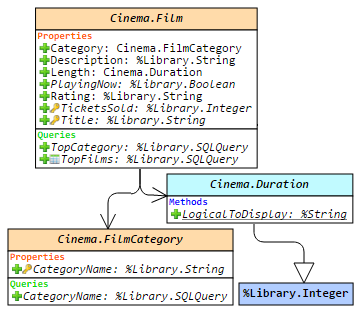 Hello!
This article is a small overview of a tool that helps to understand classes and their structure inside the InterSystems products: from IRIS to Caché, Ensemble, HealthShare.
In short, it visualizes a class or an entire package, shows the relations between classes and provides all the possible information to developers and team leads without making them go to Studio and examine the code there.
If you are learning InterSystems products, reviewing projects a lot or just interested in something new in InterSystems Technology solutions — you are more than welcome to read the overview of ObjectScript Class Explorer!
When developing a new Interoperability Production, it is quite natural that settings are initially added in the Production.
However, as soon as you want to move the Production from development to a test or staging environment, it becomes clear that some settings like HTTP Servers, IP addresses and/or ports need to be changed. In order to avoid these settings being overwritten during a redeployment later on, it is essential that you move these settings from the Production to the System Default settings.
The InterSystems platforms have always offered dynamic documentation of the packages and classes in a namespace, a feature known informally as Documatic. But what if you need to publish this class reference information on a website without requiring the site to be connected to an IRIS server containing the actual classes?
For my entry to the December 2024 Developer Community “Bringing Ideas to Reality” contest I decided to implement the idea of a generator that produces a static set of class reference pages
Monitor incremental changes in the database through scheduled tasks, display change trends through charts, set alarm thresholds, and write information to messages.log
Docker or ZPMMake sure you have git and Docker desktop installed.
git clone https://github.com/Sara771dev/Database-Size-Monitoring.git
The latest "Bringing Ideas to Reality" InterSystems competition saw me trawling through the ideas portal for UI problems to have a go at.
Hi Community, OpenAPI-Client Gen has just released, this is an application to create an IRIS Interoperability Production client from Swagger 2.0 specification. Instead of the existing tool ^%REST that creates a server-side REST application, OpenAPI-Client Gen creates a complete REST Interoperability Production client template.
Install by ZPM:
zpm "install openapi-client-gen"
How to generate production from Swagger document? It's very simple.
Open a terminal and execute:
Set sc = ##class(dc.openapi.client.Spec).generateApp(<applicationName>, <Your Swagger 2.0 document>>)
Hi Community!
Suppose you have a working system on 8-bit Caché database and need to transfer the solution to Unicode database.
How do you manage that?
There are many applications for working with HL7 V2 messages, but the tools for working with XML in IRIS Management Portal and Cache Studio are limited. While plenty of external utilities and IDEs work with XML messages and even C-CDA documents, there is a compelling case for being able to test directly against the IRIS C-CDA framework.
Testing within the IRIS environment provides the necessary context:
Please allow me to introduce you to a new way of interacting with IPM (InterSystems Package Manager), also known as ZPM,directly from inside Visual Studio Code.
First, install into VS Code the free InterSystems Package Manager extension, published to Marketplace by George James Software. A quick way is to use the search field in VS Code's Extensions view and look for 'ipm zpm' (without the quotes). Alternatively browse to https://marketplace.visualstudio.com/items?itemName=georgejames.iris-pa…
Here's a short video showing the extension in action.
Hi everyone,
In this article, I’m excited to introduce CodeInspector, a tool designed to simplify code validation by applying custom rules tailored to your development requirements. Whether you're managing a large codebase or working in an agile environment, CodeInspector helps ensure code quality by offering flexibility and adaptability to specific project needs.
The idea behind CodeInspector was to build a tool that is both easy to implement and adaptable to different business contexts.
If you are using the client-side development paradigm (i.e. editing code in local files that get imported and compiled onto the IRIS server your `objectscript.conn` settings point to) you can now use IPM in VS Code to manage the packages in your IRIS target by launching it from the Explorer view. Just make sure the extension you are using is at least version 1.0.4, then use this button:
.png)
Thanks to @Evgeny.Shvarovfor suggesting this enhancement, which is particularly useful when using Docker.
See the new team members in action:
Try them online for yourself:
https://gitpod.io#snapshot/b31bdf9c-4657-402a-a2d
Get it from the Extensions view inside VS Code, or here in Marketplace.
Vote for it here in the current Developer Tools 2024 contest (voting ends: 29 Sep, 2024, 11:59:59 PM EST).
Discuss it below.
Most of all, enjoy DX Jetpack with its added booster rockets!
Here are the technology bonuses for the InterSystems Developer Tools Contest 2024 that will give you extra points in the voting:
See the details below.
Hi, I am considering making my own swagger json generation based on my rest api implementing the %CSP.REST class.
Before I begin, I was wondering if there is already some kind of support, perhaps in IRIS already, or some tools that might help me.
George James Software is excited to announce that a new version of Deltanji source control is now available.
Key updates in version 8 include:
- UI refresh with a modern look and feel
- UX updates that provide a smoother and cleaner user experience
- Task Server II which is simpler to configure and provides more security granularity and control.
Check out the release notes here.
Deltanji 8 is available now, so if you're a user looking to upgrade, please email support@georgejames.com.
If you're not a user but want to learn more about Deltanji, we'd love to give you a demo.
I have been using embedded python for more than 2 years now on a daily basis. May be it's time to share some feedback about this journey.
Why write this feedback? Because, I guess, I'm like most of the people here, an ObjectScript developer, and I think that the community would benefit from this feedback and could better understand the pros & cons of chosing embedded python for developing stuff in IRIS. And also avoid some pitfalls.

From time to time we develop an Ensemble Production with simple SQL Inbound data from external databases, we need to develop a few new classes. There are at least:
This article introduces using the langchain framework supported by IRIS for implementing a Q&A chatbot, focusing on Retrieval Augmented Generation (RAG). It explores how IRIS Vector Search within langchain-iris facilitates storage, retrieval, and semantic search of data, enabling precise and up-to-date responses to user queries. Through seamless integration and processes like indexing and retrieval/generation, RAG applications powered by IRIS enable the capabilities of GenAI systems for InterSystems developers.
Hi all,
I was wondering if there is a way to modify the results you get in the code assist in Visual Studio Code. Ideally even per class or package.
For example: the code below is for a custom component of a framework. From all the options listed I'm only interested in my own property "Title" and I don't want to see any %-methods or auto-generated methods like "TitleSet" and "TitleGet".
.png)
I have been looking at the %Api.Atelier classes, but it seems that it's only calling a list of deprecated methods when opening this list.
In the next few weeks, my coworkers are planning to start using VSCode to code with InterSystems' products. Among the many advantages of that, I would emphasize being able to connect with other technologies, such as GitHub, with ease. Besides, VSCode also offers an extensive extensions store, where you can find many free add-ons that make coding faster and more efficient. Last but not least, to conquer the heart of every developer, it is open source.
With that being said, let's start the tutorial. Feel free to skip some steps if you're comfortable doing them alone.
Your may not realize it, but your InterSystems Login Account can be used to access a very wide array of InterSystems services to help you learn and use InterSystems IRIS and other InterSystems technologies more effectively. Continue reading to learn more about how to unlock new technical knowledge and tools using your InterSystems Login account. Also - after reading, please participate in the Poll at the bottom, so we can see how this article was useful to you!
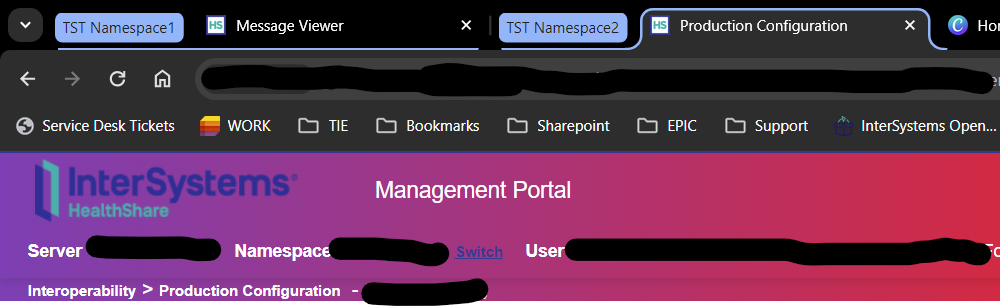
Do you ever spend an age entering criteria in the message viewer page, trying to find a message just to realise you're in the wrong instance of IRIS?
Or get lost in a sea of message tabs struggling to spot that Visual Trace page your were JUST looking at?
Well, have you tried the IRIS WHIZ browser extension and its suite of tools designed to help you avoid such unpleasantness?
clinFHIR is a web application that has been developed pretty much over the same time as FHIR has.
Originally developed to help clinicians visualize FHIR (hence the ‘clin’ in the name) it has become more widely used by the FHIR community for learning FHIR and assisting with design. It is maintained by David Hay - one of the FHIR Management Group co-chairs with support from InterSystems, which is much appreciated!
There are 4 modules that may be of interest to participants in the upcoming Interoperability contest.
I’ve created a longer post on google docs that goes into a little more details of these modules, with links to other resources such as my blog and the R4 Specification and R5 FHIR specification. I’ll be enhancing that over time - feel free to comment.
A note with regard to FHIR versions. The latest version is R5 (release 5), though many in the community still use R4. In most cases, if you're not sure then use R4. If you're not sure which version a FHIR Server supports, examine its CapabilityStatement which you can get from the server endpoint [host]/metadata
I should also point out that clinFHIR doesn’t currently use SSL. It is on the roadmap, but there are a few issues to work through. The consequence of this is that if you enter ‘clinfhir.com' into the browser, it may not find it. You sometimes have to specify http://clinfhir.com/ .
If you need further assistance, I would alway recommend using the FHIR chat, and if your question / comment / suggestion is related to clinFHIR then there’s a specific stream there.
Is it planned that LOAD DATA takes into account several DATE/DATETIME formats with, for example, a parameter indicating the format used in the source data?
example :
LOAD DATA .../...
USING
{
  "from": {
    "file": {
"dateformat": "DD/MM/YYYY"Does anyone have an effective tool for anonymizing/deidentifying CCDAs for testing purposes?
Hi community!
In this article, I'm excited to introduce my latest application, Journal File Indexer. The development of this application is rooted in the portal idea DPI-I-270.
In short, this application lets you load and index a log file in a database.
If you've ever used the log file search function in the management portal, you may have encountered a timeout error or even a blank page. This problem usually occurs when searching a large journal file. Journal File Indexer solves this problem by considerably increasing the speed of searches once the file has been loaded into the database.
Another problem arises during the restoration process. When searching for global entries in a log file to restore old or new values, the management portal doesn't have this specific functionality. A routine must therefore be coded to achieve this. Journal File Indexer comes to the rescue, incorporating a restore function!
In our previous post, we discussed the motivation for developing a chatbot agent with access to FHIR resources. In this post, we will dive into the high-level design aspects of integrating a Streamlit-based chat interface with a Java SpringBoot backend, and enabling a LangChain agent with access to FHIR (Fast Healthcare Interoperability Resources) via APIs.
GmOwl is a solution that offers an organized and engaging learning platform. It was developed to cater to the increasing need, for learning tools providing a versatile quiz environment that meets users requirements.
The main objective of GmOwl is to deliver an user experience for individuals participating in quizzes while giving administrators comprehensive control, over content and user engagement.
GmOwl uses Java EE with MVC template, and the InterSystems IRIS database is used to store data. The InterSystems JDBC Driver is used to connect to the database.
Hello,
First of all thanks for your time, thoughts, teaching and help:
We wonder how could we get the metrics from http://[Ip]:[Port]/api/monitor/metrics and use them in Kibana to chart statistics.
We would like to ask you how do you use the api monitor metrics, and as a second question, how would you suggest to utilize them in a third party software as Kibana to chart them.
We have thought to do the following:
1. Retrieve Metrics from Intersystems HealthShare API: Use a tool or script to make requests to the Intersystems HealthShare REST API and obtain the list of metrics.