InterSystems Management Portal is a web application that lets you perform system administration and management tasks for the InterSystems Data Platform.
Friends , can anyone help in how to kill instances of a business process? We have searched the documentation and looked in the Production, We am not seeing how to perform this task.
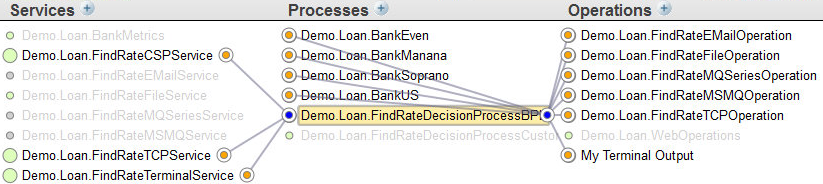
I am currently creating some documentation for my team. I need to show every connections between my business process, business services, and operations . All I can have is only one link like this screenshot :
Time after time on CSP Session page of our Cache 2017.2.1 installation I see that all licenses are consumed by CSP sessions of /csp/sys, /csp/sys/op/and /csp/sys/mgr applications which I assume are sessions of Management Portal. The problem is that there are only few of us accessing the Portal and as we test by browsing Portal, we can't reproduce the problem.
Is there any way to see client IP of CSP session? Any other way to approach the problem?
The problem looks very similar to the Forefox-related one but we don't use Forefox.
Hi! I have a local project written on Cache and Atelier on my PC. I need to move it to notebook. Tried to export globals, classes, MAC-programms and csp with frontend stuff, but after I created my apps on notebook and imported my set, it just didn't work. I think it's because I have some settings on Management Portal, so how can I export portal settings and what I should export to have my working apps on another computer?
New Windows 10 Cache [ TRYCACHE] successfully installed - but unable to log onto the Management Portal . What "User Name" and "Password" are being asked for? No opportunity to specify the sources. Thanks.
I recently encountered a issue with Caché and I can't figure out where the problem is coming from.
I noticed that the license limit (200) was reached whenever I was opening my Studio (so it seems). When this occurs, I restart Caché (with the Cube in the Taskbar), and the number of license used is back to 1%, but grows back after. The time taken before the number of license grows back again looks pretty random.
Hi all, This is a bit embarrassing, and not that critical. I have a local instance of Caché 2016 on my computer, for playing around with. I was attempting to set up two-factor authentication on this instance, and I thought I simply disabled all users except for my own user and enabled two-factor for this user. The next time I tried to login to the Management portal, I received a Server Availability Error:
Recently, we scheduled two tasks (1008 and 1009) within Task Manager. Task ID 1008 is set to run after Purge Tasks (%SYS-ID:3), and Task 1009 is set to run at 7:00:00 each day.
In attempt to provide as much detail as possible, each of the tasks are as follows:
I was wondering if there was a supported way of editing the Title bar of the management portal so that at a glance it is clear as to what environment is being worked on. This would be in addition to the namespace and server name being displayed.
Ideally I would like to make it clear at a glance that a user is working within the Dev or Live environment.
Currently, we are utilizing batch jobs at the OS level to kick off routines that watch for files. We are trying to convert these processes to be performed by the Task Manager.
The routines have while loops and perform while loops so long as the time parameters are being met.
What's the best way to ensure Task Manager kicks them off after the completion of the shutdown/backup/start process is performed, which we do nightly? I want to ensure that it starts it regardless of the time that we've set.
My boss would like to change the Ensemble logo that one sees in the mangement portal, because it's part of the DeepSee Anaylzer.
I can see where it lives on the generated html.
I kow that you can set the logo for the User POrtal settings in DeepSee -- you can specifiy a URL for your logo. But we'd like to go one stee further and change the Ensemble by InterSystems to our own logo / company name.
Is it possible to change this in the code? Is there a Configuration setting to change this?
we´re looking for a way to determine, if the System Management Portal (SMP) is only accessible through ssl/tls -> https. One of our applications send daily reports via email and places some dynamically created links within it. The application runs on the instance being monitorred (Ensemble-Productions).
Since we migrate some of our customers systems to use https for the SMP connection, we need to generate those links with https:// instead of http://. Our application is characterized as kind of a lib so we use it for many of our clients systems.
When turning on the “Archive IO” option within the business operations, it provides us the capability of seeing the input and output communication with external systems. For instance, watching the messages sent out + ACK message sent back .
Our production has got a scheduled task that runs daily (by default I guess, as many others) and is in charge of purging “Errors and log files”. And this is likely to be linked to the “Archive IO” feature, right?
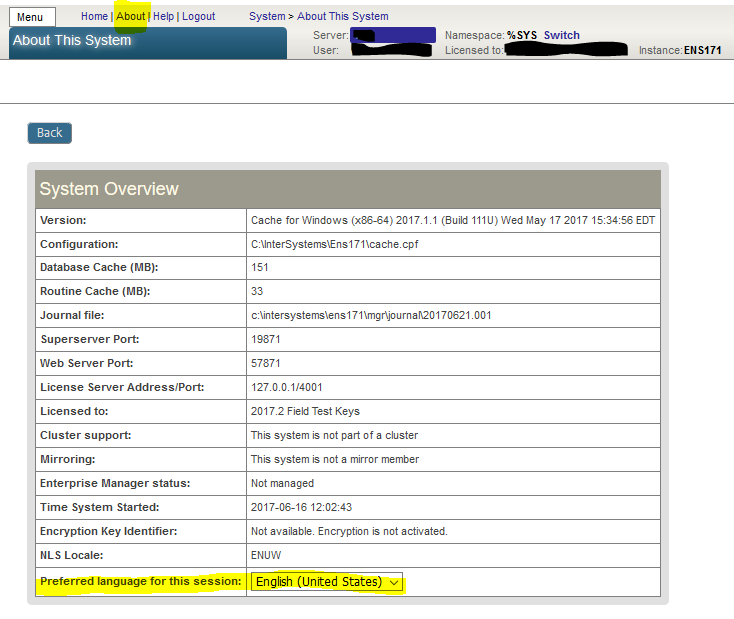
Recently I was conducting a remote support session with a site. The desktop they were sharing with me was on a PC configured with German as the native language. Since my German is rather rusty, and virtually non-existent when it comes to computing terms, I was glad to be able to switch the Portal session into English.
This is done from the page that appears when you use the About link:
https://www.youtube.com/embed/ib401fllsYg [This is an embedded link, but you cannot view embedded content directly on the site because you have declined the cookies necessary to access it. To view embedded content, you would need to accept all cookies in your Cookies Settings]
I'm unable to locate a set of instructions that would allow me to encrypt the traffic to/from the Cache' Management Portal (that is - run it over HTTPS)
I am referring to the Management portal as hosted by the private Apache Web server instance installed with Cache. (I know how to do this for regular web sites hosted on, for example, IIS).
I would imagine the steps would involve, (a) enable SSL on that apache instance and (b) deploy certificates into the Apache web server.
Does anyone have a step-by-step guide on how this is accomplished ?
Do you need to give additional users access to the Management Portal to help maintain and monitor your system? You may be wondering what’s the best way to:
Hey all! I'd like to collect some feedback regarding searching for messages using the Message Viewer. I'd like to find out what things regarding the Message Viewer you all in the community have found difficult/confusing/poorly documented. This can of course include things that you don’t know how to do yet, but would like to learn about.
Prompted by this post about accessing a global at its original location after you have changed a mapping, here's a tip about one specific dropdown in Portal that's sometimes useful.
User interfaces such as Portal often give us multiple ways of doing a task. Sometimes we stick with habits and don't realize that another way might save us time.
Here's one that I learned by watching someone else using Portal.
Use the Search box to get quickly to a page that may otherwise be several layers deep in the Portal hierarchy. For example, suppose I want to check the status of the ECP networking:
I have a user with %All, and a user with %Admin_Task. The %All user can use SQL to view the %SYS_Task.HIstory table. The user with %Admin_Task does not have the privileges to see the same table.
What priv (or privs) is (or are) needed to view the %SYS_Task.History table? I just want to start with 'Select * from %SYS_Task.History'.
I've tried %Admin_Manage and %Admin_Operate. I must be close.
This article contains the tutorial document for a Global Summit academy session on Text Categorization and provides a helpful starting point to learn about Text Categorization and how iKnow can help you to implement Text Categorization models. This document was originally prepared by Kerry Kirkham and Max Vershinin and should work based on the sample data provided in the SAMPLES namespace.
Hi,
We have been upgrading our application to ensemble 2016.1.1. I have moved my data to a particular namespace which i have created and now in management portal i have been getting an error message "namespace does not support Ensemble". Please give solutions to resolve this issue.