Hello Community,
I got the below error while creating a new database.
.png)
System administration refers to the management of one or more hardware and software systems.
Hello Community,
I got the below error while creating a new database.
Will it hurt anything if I disable the user that installed IRIS, within IRIS? Does this cause a problem with background processes running or with the restart? I know the _Ensemble user is used to start/stop/restart objects within IRIS, just didn't see anything in the documentation about the user that installed IRIS.
Thanks
Scott
I am trying to move us to Securing the Management Portal using Apache and the Web Gateway.
Our Development environment/namespace only has 1 server, but both Test and Production have failover/DR mirroring containing 3 servers for Test, and 3 additional servers for Production.
In Test and Production, the mirroring is setup using an Arbiter and the VIP address is controlled at the Hardware level.
We are back to %SYS once again! Since we covered managing users and resources in the last two articles, we can finally move on to roles. As you may have guessed, there are a lot of methods of managing them that you have already seen in our previous writings. However, we can still encounter key differences in this particular class.
Before we begin, bear in mind that this is another class that should not be manipulated through direct SQL access. In newer versions of IRIS, you will find a NoSQL trigger that will prevent you from doing that anyway.
I recently started work on trying to Tighten Security in our Development Instance of IRIS that is running based on recommendations from our Audit as you might of seen from my other posts. I am currently trying to get into the Private Web Gateway Manager within IRIS as CSPSystem, but when I attempt to sign in nothing happens.
I went through and reset the password in the CSP.ini and within IRIS for CSPSystem. I made sure it had the new GatewayRole per suggested
I am trying to lock down security within our Development environment per requirements from a Security Audit that was done earlier this year. I need to try to limit access at a public level, access to cache users, and exposure.
I installed IRIS with the Lockdown method, and have configured my web applications, services, resources, etc.
When I go into my namespace, I am constantly presented with the following error when I try to start or stop an Object...
Cannot login as IRIS manager. Please confirm the '_Ensemble' user is enabled and is assigned the '%All' role.
We currently have a couple of Shell scripts we have written to EnableConfigItem from a Unix (Red Hat) command line, so we can control when a Service/Operation is running via the cron in Unix. We do this by calling
:>iris session xxxxxusing _system user.
During our Security audit it was mentioned that we need to lock down some of the cache users.
On Linux, use the iris command to execute a routine or method from a shell and get the return value.
For more information, please refer to the document "About Instance Connections".
An example of a command is as follows.
iris terminal instname [arguments]The return value of a shell script can be specified using a special variable using the Terminate() method of the %SYSTEM.Process class when the process ends, rather than by specifying an argument in the QUIT or RETURN command that is specified when a routine or method ends. Use the method of returning a value to $?
Using the Windows Subsystem for Linux (WSL2), is it possible to install IRIS and run it from there? I am wanting to test IAM, but unable to run Docker Desktop on my VM, and do not have access to a Linux machine to install and test with.
Thanks
Scott
Is there any built-in functionality to send out an email or a text message when a mirror member fails?
I'm at a loss with configuring the IRIS ODBC driver (v02.10) on my Amazon Linux machine, connecting to a REMOTE IRIS backend. It should be simplified by not requiring a DSN (the app uses a DSN-less connection and generates the connection string). I have
My original ZAUTHENTICATE.mac to use Delegated sign on did not include GetCredentials(), however I am being told it probably should have it so I am eliminate an error I am seeing when trying to troubleshoot the ZAUTHENTICATION. I am trying to add the GetCredentials() from the documentation to the existing ZAUTHENTICATE.mac but I am getting an error
GetCredentials(ServiceName,Namespace,Username,Password,Credentials) Public {

  // For console sessions, authenticate as _SYSTEM.If
ERROR: ZAUTHENTICATE.int(74) #1044: PUBLIC label not allowed : 'Public' : Offset:74 [GetCredentials^ZAUTHENTICATE]
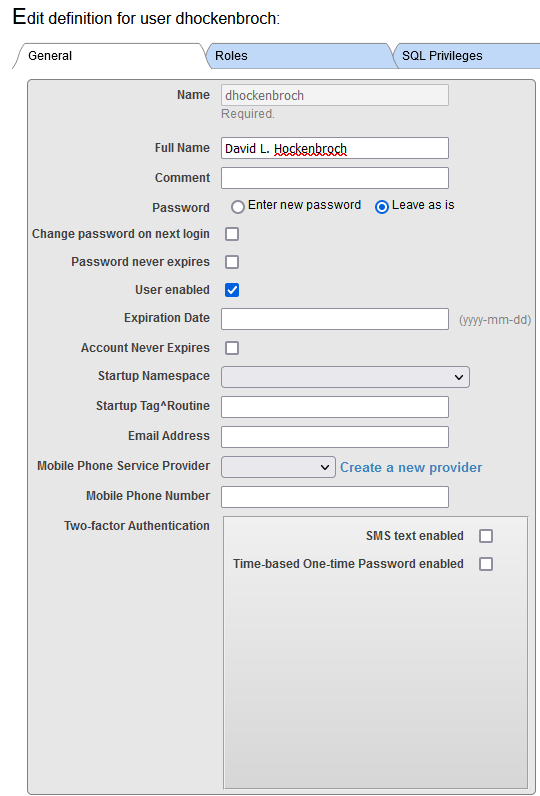 Have you ever thought of creating your own systems for editing users or, perhaps, even an API that you can call? Today, you’re going to join me in the %SYS namespace and get to know Security.Users!
This class has forty properties, many of which you’ve seen before in the System Management Portal. There are class methods for manipulating most of those properties. Every method in this class is a class method, and in most of them, the username is passed as an argument. These methods can be used when you do not want to open and directly manipulate the user’s objects, which is a bad idea anyway!
Hi Everyone
I'm just wondering if anyone might have a list (or the experience to make a list) of the most often used / useful Reply Code Actions?
In the Help section of Health Connect Management Portal, it lists
'E=F' and ':?R=RF,:?E=S,:~=S,:?A=C,:*=S,:I?=W,:T?=C'
as the default options, though I'm curious if anyone else has found other codes or strings of codes useful?
Thanks in advance.
Best wishes
Robert
Currently we are using Delegated Authentication using ZAUTHENTICATE to look at the groups that are associated with a user and if it matches a role within IRIS, to assign the user to that role within IRIS.
Instead of using ZAUTHENTICATE as custom code, I am looking to use the built-in LDAP Authentication instead. Since I already have two AD Groups called (Access.Ensemble.Developer.User and Access.Ensemble.DataLookup.User) is it possible to config the built in LDAP functionality to look for these groups and assign the users to the correct roles within IRIS without the custom ZAUTHENTICATE?
When installing IRIS, all the system AUDIT events are not enabled.
What is the fastest way to activate all events?
System > Security Management > System Audit Events
.png)
You can see the free available space for the database using the radio button "Free Space View" in Management Portal: System Operation > Databases.
And it can be obtained programmatically by the FreeSpace query of the system class SYS.Database.
.png)
It sometimes happens that due to an adverse event the AUDIT database (IRISAUDIT) has grown to such proportions that the disk it resides on is full and the daily purge cannot be expected to reclaim disk space.
As IRISAUDIT is a system database required at startup, there is no question of attempting to restart IRIS after simply deleting IRIS.DAT from the <IRIS ROOT>/mgr/irisaudit/ database, nor of hot swapping, by system manipulations trying to dismount, replace, remount, since it is simply not possible to dismount it.
It can be obtained using AllFields query of %SYS.ProcessQuery class.
For the details, please refer to the document Process (Job)【IRIS】/Process (Job).
An example of execution in the terminal is as follows.
USER>set##classFor example, the same as a method.
##class※Use this method if you want to compare databases that have been replicated using mirroring, shadowing, or some other mechanism.
You can use the DATACHECK utility to compare global variables. Please refer to the document below.
Overview of DataCheck [IRIS]
***
Routine comparisons use the system routine %RCMP or the Management Portal.
Below is how to use it in the Management Portal.
.png)
You can search for a specific global variable in the journal file using the ByTimeReverseOrder query of the %SYS.Journal.File class and the List query of the %SYS.Journal.Record class.
The role of each query is as follows.
A) %SYS.Journal.File query of the ByTimeReverseOrder class
You can get the journal file name. Results are returned in descending order of journal file name.
USER>set##classYou can get journal records for a specific journal file.
If you use 2022.2.0+ , you can run the query with %SQL.Statement.
USER>Hi Community,
Watch this video to see how to expand or truncate a database using the Management Portal in InterSystems IRIS data platform, and learn about the best times to do each:
Coming back to the topic of how to minimize journals.
I am often asked to review customers' IRIS application performance data to understand if system resources are under or over-provisioned.
This recent example is interesting because it involves an application that has done a "lift and shift" migration of a large IRIS database application to the Cloud. AWS, in this case.
A key takeaway is that once you move to the Cloud, resources can be right-sized over time as needed. You do not have to buy and provision on-premises infrastructure for many years in the future that you expect to grow into.
Continuous monitoring is required. Your application transaction rate will change as your business changes, the application use or the application itself changes. This will change the system resource requirements. Planners should also consider seasonal peaks in activity. Of course, an advantage of the Cloud is resources can be scaled up or down as needed.
For more background information, there are several in-depth posts on AWS and IRIS in the community. A search for "AWS reference" is an excellent place to start. I have also added some helpful links at the end of this post.
AWS services are like Lego blocks, different sizes and shapes can be combined. I have ignored networking, security, and standing up a VPC for this post. I have focused on two of the Lego block components;
Is it possible to abort system start during SYSTEM^%ZSTART?
If some conditions are not met, I want to shut down IRIS instead of continuing with the startup.
We are currently using different iterations of Ens.Director.EnableConfig items to start/stop objects within the Interoperability Namespace. We are looking for ways to minimize our downtime as we move from AIX to a new section of our Network and Red Hat Servers.
Besides using Ens.Director.EnableConfig item and waiting for a response, or just disabling the objects through the Namespace class file, is there a quicker way to stop Services and Operations to ensure the TCP disconnect is sent to those endpoints so we can move the networking rules to ensure they point to new servers?
In Windows, set the processes with the following image names as monitoring targets.
[irisdb.exe]
contains important system processes.
* Please refer to the attachment for how to check important system processes that should be monitored.
[IRISservice.exe]
This is the process for handling IRIS instances via services.
When this process ends, it does not directly affect the IRIS instance itself, but stopping IRIS (stopping the service) is no longer possible.
[ctelnetd.exe]
%Service_Telnet Starts when the service is enabled and becomes a daemon process to access IRIS via Telnet.
Migrating data to another system takes two steps.
To migrate the class definition to another system, export it to a file in XML format or UDL format (extension .cls).
The export procedure in Studio is as follows.
Tools > Export
> Select multiple classes you want to migrate with the [Add] button
> Check [Export to local file]
> Confirm that the file type is XML, enter a file name, and click [OK].
After this, import the exported XML and UDL files in the studio on another system. The import procedure in Studio is as follows.
When you install an IRIS or Caché instance on Windows Server, you'll usually need to install it under a specific user account that has network access permissions. This is very handy when you needs to access network resources for creating files or directly accessing printers.
TL;DR: see key takeaways at the bottom!
When you need to change the Windows user account the IRIS/Caché service is running as, you can configure (after installation):
<install-dir>\bin\IRISinstall.exe setserviceusername <instance-name> <username> <password>