Today I helped someone solve a mystery. He had been trying to use the -U namespace argument of a csession command to specify the namespace in which to run a particular routine, and was puzzled when the routine could not be found.
Since most of our customers moved to Caché 2015.1, some admins became abused with CPUPct warnings (sometimes alerts) in console log without other signs of lacking CPU power. Documentation states that:
I'm looking for some field experiences, lessons learned, or actual deployed solutions to the problem of replicating non-CACHE.DAT data in a mirrored Cache environment.
I want to online backup one Caché database by windows bat, I find some article from the online documentation about terminal script and the ^DBACK tool and External Entry Points for ^DBACK, so I can invoke the External Entry Points for ^DBACK from terminal script like this: send: Do BACKUP^DBACK<CR>
Is there other better way for backup database from bat/script?
Our environment has multiple instances of HealthShare installed and most are on separate VMs/servers. Does anyone have any ideas on how to efficiently manage user accounts across all of these multiple instances of HealthShare? As you can imagine, creating 10 separate Cache accounts on each instance during onboarding of new associates is cumbersome and tedious as is disabling them. We have yet to integrate with AD but we do have a Cyberark initiative under way but it is in the very early stages.
A few years ago InterSystems announced a tool to help Caché system managers on sites with a large number of Caché instances. It was called Enterprise Manager.
When I recently searched for information about it I didn't have much success.
Have you ever thought about leveraging IIS (Internet Information Services for Windows) to improve performance and security for your Caché web applications? Are you worried about the complexity of properly setting up IIS?
See the webinar Configuring a Web Server presented by @Kyle.Baxter, InterSystems Senior Support Specialist. Learn how to install IIS, set up it up to work with the CSP Gateway, and configure the CSP Gateway to talk to Caché.
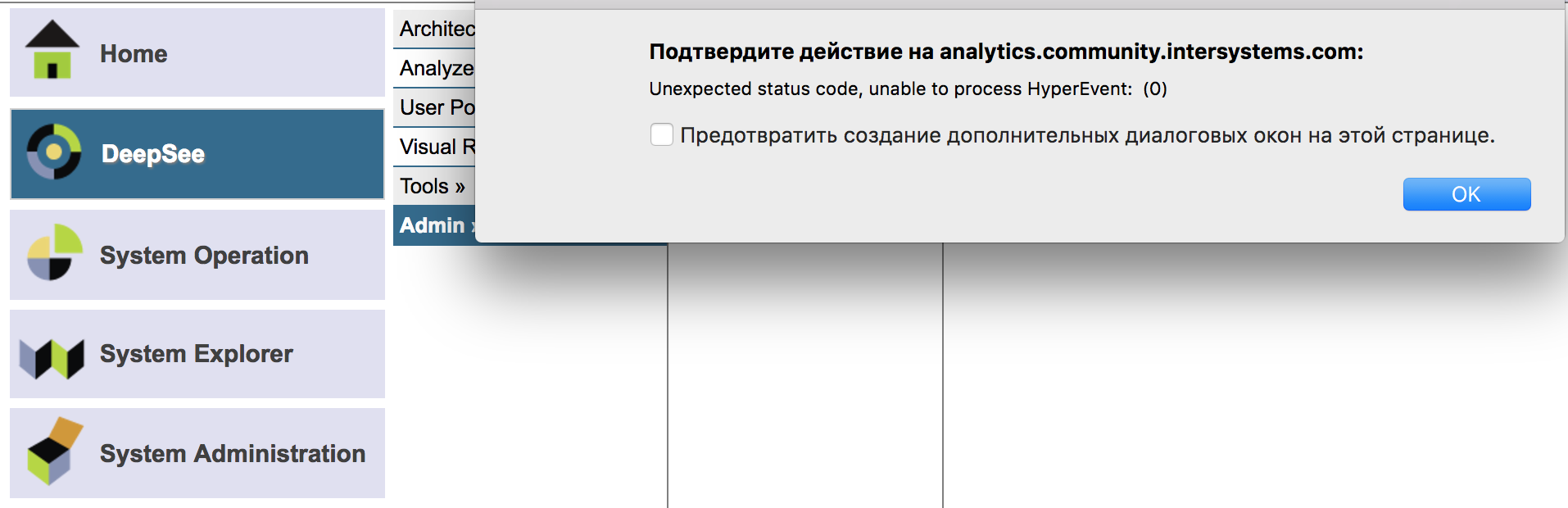
Sometimes when I have Zen page in a browser (e.g. Management Portal page) and when my Internet connection interrupts, I see the alert window on the page, something like this screenshot:
Is there any setting for the CSP web app to prevent this alerts from popping up?
During startup a Caché/Ensemble/HealthShare instance must consult a parameter file to get some information it needs at the early stages of startup. By default it uses the file called cache.cpf, but by adding an extra argument to the ccontrol start command you can make it use an alternative file.
Usually I recommend to set the global buffer (GB) as large as possible in order to maintain in memory more globals as possible. I don't know if this is a standard recommendation, but I want to discuss what should be the best buffer size for a Ensemble instance that only process messages.
I have a problem with an Ensemble instance on Windows to access to a network shared directory. Ensemble service (services.msc) is executed with a user which has access to this network shared directory :
- When I try to copy or access files from a terminal ==> this is OK : the command w ##class(%SYS.ProcessQuery).%OpenId($Job).OSUserName returns the user defined in Ensemble service logon screen.
NB. Please be advised that PKI is not intended to produce certificates for secure production systems. You should make alternate arrangements to create certificates for your productions. NB. PKI is deprecated as of IRIS 2024.1: documentation and announcement.
Currently, we have an application running in one namespace ("Database B") that has globals and routines mapped to another database ("Database A"). After enforcing clean up on Database A, we found that 90% of the disk is free. We would like to compact Database A and release the unused space. However, we are running OpenVMS, which seems to be the issue.
For databases consisting of only globals, we are able to use ^GBLOCKCOPY; however, we need to ensure that the routines and mappings are also copied.
I have been asked to assist in the planning of the a new server for our database, which we will be changing operating systems from OpenVMS to Linux (RedHat distribution). However, its difficult to find material regarding what would be recommended, which is likely due to the database being proprietary.
In looking at the information provided below and hoping to decrease processing time, would anyone be able to recommend type of configuration we should have for the new Linux server? Please feel free to ask any clarifying questions.
Hi All, When i try to run the CSP from Studio it shows "Server Availability Error" and management portal and documents also throw a same error.how to recover it.
We know there are numerous ways to backup cache/ensemble with VMware, but we are not in a state to do that and can't do shadowing because the lack of resources. Anyways how can i backup cache to a drive mounted as network share.
Can someone direct me to where in the documentation we can find how consumption may be calculated for global storage?
Caché Version
2010.1
Operating System
HP OpenVMS 8.4
EDIT: After receiving some responses, it seems I was unclear in my initial inquiry. I am looking to determine our rate of consumption of storage; however, I am having some difficulty in doing that.
Recently I started working with GitLab - GitHub self-hosted foss alternative. So far so good, liked the UI, ease of administration, and available functionality (I was on Phabricator previously, and still use it for repo mirroring).
GitLab has GitLab CI (GitLab Continuous Integration) which looks promising (pluggable docker/vm/ds to run code) , but I wondered if someone uses it already and can share scripts for it?