Hey Community!
We're happy to share a new video from our InterSystems Developers YouTube:
⏯ Document Server: Improving Performance While Reducing Stored Data @ Ready 2025
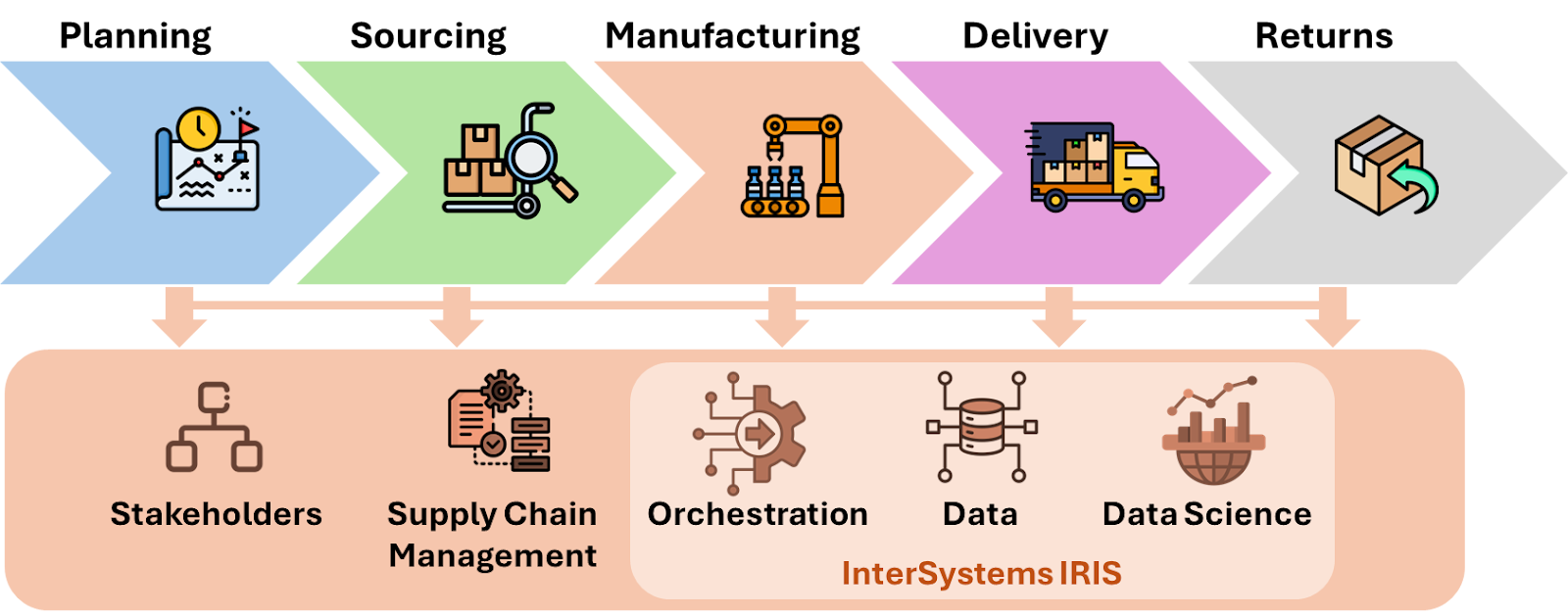
InterSystems IRIS is a Complete Data Platform
InterSystems IRIS gives you everything you need to capture, share, understand, and act upon your organization’s most valuable asset – your data.
As a complete platform, InterSystems IRIS eliminates the need to integrate multiple development technologies. Applications require less code, fewer system resources, and less maintenance.
Hey Community!
We're happy to share a new video from our InterSystems Developers YouTube:
⏯ Document Server: Improving Performance While Reducing Stored Data @ Ready 2025
Window functions in InterSystems IRIS let you perform powerful analytics — like running totals, rankings, and moving averages — directly in SQL.
They operate over a "window" of rows related to the current row, without collapsing results like GROUP BY.
This means you can write cleaner, faster, and more maintainable queries — no loops, no joins, no temp tables.
In this article let's understand the mechanics of window functions by addressing some common data analisys tasks.
SQL window functions are a powerful tool for data analysis.
They
The Interoperability user interface now includes modernized user experiences for the DTL Editor and Production Configuration applications that are available for opt-in in all interoperability products. You can switch between the modernized and standard views. All other Interoperability screens remain in the Standard user interface. Please note that changes are limited to these two applications and we identify below the functionality that is currently available.
To try out the new screens prior to upgrading, you can download the 2025.1 version from our community kit webpage here: https://evalua
When exporting using the Export() method of the %Library.Global class, if the export format (fourth argument: OutputFormat) is set to 7, "Block format/Caché block format (%GOF)," mapped globals cannot be exported (only globals in the default global database of the namespace are exported). To export mapped globals in "Block format/Caché block format (%GOF)," specify the database directory to which you want to map them in the first parameter of %Library.Global.Export().
An example of execution is shown below.
What is XML?
XML(eXtensible Markup Language) is a flexible, text-based, andplatform-independentformat used to store and transport data in a well-structured way that is both human- and machine-readable. XML permits users to define custom tags to describe the meaning and organization of their data. For example: <book><title>The Hitchhiker's Guide</title></book>.
An XML document is self-descriptive and structured as a hierarchical tree of elements.Every document has a single root element that encapsulates all other content.
InterSystems IRIS Adaptive Analytics version 2025.4.1 is now available from the InterSystems Software Distribution page. This release includes AtScale 2025.4.1 and is compatible with the existing Adaptive Analytics User-Defined Aggregate Function (UDAF) file - 2024.1. New features included in AtSCale's 2025 releases include:
For
ObjectScript doesn't include any built-in method for appending one JSON dynamic array to another. Here's a code snippet I use that's equivalent to the JavaScript concat() method.
Call it with any number of arguments to concatenate them into a new array. If an argument is a dynamic array, its elements will be added. Otherwise the argument itself will be added.
while iter.Hey Community!
We're happy to share a new video from our InterSystems Developers YouTube:
For one of our customers I had to integrate with the AFAS imageconnector endpoint /imageconnector/{imageId}?format={format}. This endpoint returns in a json message with the image as a base64-encoded string property, in addition to the mimetype for the image:
/// Image Object
Class Mycustomer.Model.AfasGet.Image Extends (%SerialObject, %XML.Adaptor, %JSON.Adaptor)
{
/// file data (base64 encoded)
Property Filedata As %String(%JSONFIELDNAME = "filedata");
/// MimeType e.g. "image/jpeg"
Property MimeType As %String(%JSONFIELDNAME = "mimetype");
}
In the Message class, we tried handling this
So, you checked your server and saw that IRISTEMP is growing too much. There's no need to panic. Let’s investigate the issue before your storage runs out.
Before assuming IRISTEMP is the problem, let’s check its actual size.
Run the following command in the IRIS terminal:
%SYS>do ^%FREECNTWhen prompted, enter:
Database directory to show free space for (*=All)? /<your_iris_directory>/mgr/iristemp/If the output shows very low free space, IRISTEMP is filling up your storage like an overstuffed closet. But if the free space is fine, yet
My guess is that most IRIS developers create their applications using its native ObjectScript language or, if using an external language, then most likely using either Java, Python or perhaps C++.
I suspect that only a minority have considered using JavaScript as their language of choice, which, if true, is a great shame, because, In my opinion and experience, JavaScript is the closest equivalent to ObjectScript in terms of its ability to integrate with the IRIS's underlying multi-dimensional database.
In this article I'd like to lay out the case for JavaScript as a first-class
Hello
This article follows up on the question I had asked the community UDP Adapter not working
In this article, I will present to you
1) What is "UDP"?
2) The current state of Iris with UDP
3) My solution with the UDP adapter
UDP stands for User Datagram Protocol. It is one of the core protocols of the Internet Protocol (IP) suite, used for transmitting data over a network. Here are some key features of UDP:
IRIS offers a dedicated feature for storing and retrieving JSON documents using DocDB, without requiring a predefined schema.
Developers often need a quick and intuitive way to browse, create, and edit documents without switching between multiple tools or writing repetitive code. To solve this, I creatediris-docdb-ui — a CSP-based open-source application that provides a clean, responsive interface for interacting with DocDB effortlessly.
Over time, while I was working with Interoperability on the IRIS Data Platform, I developed rules for organizing a project code into packages and classes. That is what is called a Naming Convention, usually. In this topic, I want to organize and share these rules. I hope it can be helpful for somebody.
Disclaimer: This guide is a good fit for Interoperability projects.When you have integrations, data flows, when you use IRIS for ETL processes, etc.Overall, when your code is combined with Productions.
Hey Community,
Enjoy the new video on InterSystems Developers YouTube:
⏯ Analytics and AI with InterSystems IRIS - From Zero to Hero @ Ready 2025
For example, I'm creating a customer at front end interface. I want to list down all the routines and child sub routines that are called at backend in mumps/cache. What's the best way to do it?
Only method/routine executed as "do Method..." is included into $ESTACK.
How can I modify a method or routine that returns a value so it can be included in $ESTACK?
Example upon executing via Studio Debug ($ESTACK is converted to string with ">" delimiter):
Expected: stackstr = %Debugger.System.DebugStub > LogGenerate > Entry > DirChain > Attributes > LogNew > LogSize > LogFormat > LogWrite
Processes DirChain, LogNew, LogSize, LogFormat are executed as "If Method..."
Process Attributes is executed as "set a = Attributes..."
Current: stackstr = %Debugger.System.DebugStub >
Hi All,
First I want give a Shout Out to @Theo Stolker and @Rupert.Young. Because they helped me with the solution.
When you're using the EnsLib.SQL.Snapshot as a Property in the Response Message to return Snapshot data (,e.g.: from Business Operation to Business Process,) the Snapshot data won't be cleaned with the Purge messages task/service.
Class ResponseMessage Extends Ens.Response
{
Property SnapshotProp As EnsLib.SQL.Snapshot;
}
The data will be stuck in the global: ^Ens.AppData. You can find it with this query in System>Globals: ^Ens.AppData("EnsLib.SQL.Snapshot",
.png)
The reference is
Hey Community!
We're happy to share a new video from our InterSystems Developers YouTube:
⏯ Source Control Interoperability Productions in a Decomposed Format @ Ready 2025
Hi everyone,
I'm dealing with a situation where LOAD DATA operations — especially large batches with data inconsistencies — are consuming a lot of disk space. I've noticed that the same error messages are being repeatedly logged in the %SQL_Diag.Result and %SQL_Diag.Message tables, which is significantly increasing the size of the database.
One idea was to move these diagnostic tables to a separate database with a configured size limit, but before going down that path, I'd like to ask:
Is there a simpler or more efficient way to handle this?
For example:
Environment:
Targeted *.inc file (with hundreds of defined macros) is in use throughout the application and included into every class declaration.
Statement "set a = $$$TestIf(3)" is included into a classmethod with no other code in. Expected output 5
Same macro options in *.inc:
#define TestIf(%arr) if %arr>0 QUIT 5
#define TestIf(%arr) if (%arr>0) {QUIT 5}
Issue:
failure to compile class with the same error on all tried definition options as:
.png)
HTTP and HTTPS with REST API
Hello
The HTTP protocol allows you to obtain resources, such as HTML documents. It is the basis of any data exchange on the Web and a client-server protocol, meaning that requests are initiated by the recipient, usually a Web browser.
REST APIs take advantage of this protocol to exchange messages between client and server. This makes REST APIs fast, lightweight, and flexible. REST APIs use the HTTP verbs GET, POST, PUT, DELETE, and others to indicate the actions they want to perform.
When we make a call to a RESt API, what actually happens is an HTTP call. The API receives this call and according to the requested verb and path, the API performs the desired action. In the case of the Iris implementation we can see this clearly in the URLMap definition area:
In InterSystems IRIS 2024.3 and subsequent IRIS versions, the AutoML component is now delivered as a separate Python package that is installed after installation. Unfortunately, some recent versions of Python packages that AutoML relies on have introduced incompatibilities, and can cause failures when training models (TRAIN MODEL statement). If you see an error mentioning "TypeError" and the keyword argument "fit_params" or "sklearn_tags", read on for a quick fix.
Yes, yes! Welcome! You haven't made a mistake, you are in your beloved InterSystems Developer Community in Spanish.
You may be wondering what the title of this article is about, well it's very simple, today we are gathered here to honor the Inquisitor and praise the great work he performed.
Perfect, now that I have your attention, it's time to explain what the Inquisitor is. The Inquisitor is a solution developed with InterSystems technology to subject public contracts published daily on the platform https://contrataciondelestado.es/ to scrutiny.
Although the
Am also asking this question on the extension's GitHub page: Request textDocument/documentSymbol failed. Error: name must not be falsy · intersystems-community/vscode-objectscript · Discussion #1530 - but suspect more eyes will see it here, which might help gather additional information.
Tried to compile some legacy ObjectScript code via Import/Compile in VS Code using the vscode-objectscript extension. Getting an error, and the content of the file is left changed on the filesystem simply by being compiled.
We think the error occurs
We require automatic injection of security predicates at runtime, depending on the user or API token. Is there a supported or hackable mechanism to manipulate SQL parsing/compilation before execution?
Hi,
We very much appreciate the interest in the Developer Community for IRIS Vector Search and hope our technology has helped many of you build innovative applications or advanced your R&D efforts. With a dedicated index, integrated embeddings generation, and deep integration with our SQL engine now available in InterSystems IRIS, we're looking at the next frontier, and would love to hear your feedback on the technology to prioritize our investments.
If you used Vector Search already and could spare 10 minutes of your busy schedule, here's a brief survey on your use of the technology so far,

Run InterSystems IRIS inside of Home Assistant, as an add-on. Before you dismiss this article possibly under the guise that this is just a gimmick, Id like you to step back and take a look at how easy it is to launch IRIS based applications using this platform. If you look at Open Exchange, you will see dozens of dozens of applications worthy of launching while they are basically hung out to dry as gitware, and launchable if you want to get into a laptop battle with containerd or Docker. With a simple git repo, and a specification, you can now build your app on IRIS, and make it launchable through a marketplace with limited hassle to your end users. Run it along side Ollama and the LLM/LAM implementations, expose anything in IRIS as a sensor or expose an endpoint for interaction in your IRIS app to interact with anything you've connected to HAOS. Wanna restart an IRIS production with a flick of a physical switch or Assisted AI? You can do it with this add-on, or your own, right alongside the home automation hackers.
The first part of this article provides all the background information. It also includes links to the DATATYPE_SAMPLE database, which you can use to follow along with the examples.
In that section, we explored an error type ("Access Failure") that is easy to detect, as it immediately triggers a clear error message when attempting to read the data via the database driver.
The errors discussed in this section are more subtle and harder to detect. I’ve referred to them as “Silent Corruption” and “Undetected Mutation”
Let’s start with “Silent Corruption”:
In the Employee table of the DATATYPE_SAMPLE d