#Development Environment

5 Followers · 381 Posts

An integrated development environment (IDE) is a software application that provides comprehensive facilities to computer programmers for software development.

The official IDE for InterSystems Data Platform products is Atelier.

Announcement Laurel James (GJS) · Jun 15, 2021

gj :: locate was the entry from George James Software for the Developer Tools competition back in April 2021. When an ObjectScript error is reported, gj :: locate takes the .int line location and navigates you directly to the line in the source file where the error originated. Over the past few months we've found it a very useful tool when it comes to debugging, especially when used alongside the Serenji debugger in Visual Studio Code.

Our first update, version 1.1.0, now includes support for multi-root workspaces. This enables gj :: locate to be used with every workspace folder. If your VS Code workspace has more than one root level folder, connecting to different namespaces or perhaps different servers, then gj :: locate will determine which workspace folder is current and locate the source code in that folder. If your workspace doesn't have any files open then gj :: locate will prompt you to select a folder from a pick-list.

This will particularly benefit VS Code power users who have workspaces with simultaneous connections to multiple namespaces, on multiple different IRIS and Caché servers.

If you would like to try it out then you can download it from the VS Code marketplace. Or if you’re already a user, then gj :: locate will automatically update. Let us know how you're getting on with it!

0
1 227
Announcement Laurel James (GJS) · Jun 10, 2021

We’ve published an update to the Serenji debug extension for Visual Studio Code, making it ready for the Workplace Trust feature in VS Code 1.57.

This allows the Serenji ObjectScript editor to work without restrictions across all workspaces and, by bringing it in line with the VS Code update, only allows the debugging feature to be used in trusted workspaces.

0
1 165
Article Jose-Tomas Salvador · Apr 8, 2020 6m read

This time I want to talk about something not specific to InterSystems IRIS, but that I think is important if you want to work with Docker and your server at work is a PC or laptop with Windows 10 Pro or Enterprise.

As you likely know, containers technology comes basically from Linux world and, nowadays, is on Linux hosts were it shows maximum potential. Those who use Windows on a normal basis see that both, Microsoft and Docker, have done important efforts during these last years that allow us to run containers based on Linux images on our Windows system in a really easy way... but it's something not supported for production systems and, this is the big problem, is not reliable if we want to keep persistent data outside of containers, in the host system,... mostly due to the big differences between Windows and Linux file systems. In the end, Docker for Windows itself uses a small linux virtual machine (MobiLinux) to run the containers... it does it transparently for the windows user... and it works perfectly well if, as I said, you don't require that your databases survive longer than the container...

Well,...let's get to the point,... the point is that many times, to avoid issues and simplify, we need a full Linux system and, if our server is based on Windows, the only way of having it is through a virtual machine. At least till WSL2 in Windows is released, but that will be another story and sure it'll take a bit of time to become robust enough.

In this article, I'll tell you, step by step, how to install an environment where you'll be able to work, if you need it, with Docker containers on an Ubuntu system in your Windows server. Let's go...

11
3 29865
Question David Hockenbroch · May 18, 2021

 I'm trying to set up VS Code for ObjectScript using the instructions found here. I've got both Cache 2018.1.2.309.0 and IRIS 2020.1.0.215.0. When I try to connect to either one of them the connection fails, and I get a notification in the bottom right corner that says "Unexpected token < in JSON at position 0". I've checked the JSON settings file that VS Code uses, and they're fine and formatted properly. All of the settings I've entered are correct. I suspect that there's a response coming back from the server that VS Code is expecting to be JSON, but isn't. It pops up any time I click on

20
0 6158
Article Robert Cemper · Apr 26, 2021 3m read

Why SSH ?

If you do not have direct access to the server that runs your IRIS Docker container
you still may require access to the container outside "iris session" or "WebTerminal".
With an SSH terminal (PuTTY, KiTTY,.. ) you get access inside Docker, and then, depending
on your needs you run "iris session iris" or display/manipulate files directly.

Note: 
This is not meant to be the default access for the average application user
but the emergency backdoor for System Management, Support, and Development.
34
0 1334
Announcement George James · Apr 16, 2021

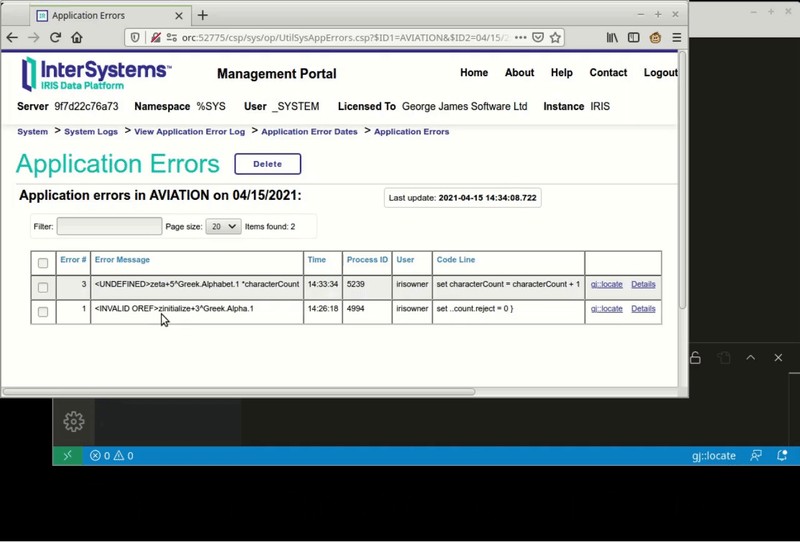
Announcing gj :: locate.  A simple extension for VS Code that will help you get to the source of your errors.

In VS Code, using either the Serenji extension or the basic InterSystems objectscript extension, this small add-on will open the appropriate class or routine and position you at the exact line where an error occurred.

No more tedious counting of lines to find <UNDEFINED>zCredit+206^Ledger.Invoice.1.  Instead, with gj :: locate you can get there with just a couple of clicks.

This 20 second video tells it all:


Download now and enjoy getting to the source of your errors.

2
2 341
Article Laurel James (GJS) · Apr 20, 2021 3m read

You may think it isn’t too difficult to get from label+offset^routine to the actual source line responsible for the error.  For an expert it isn't that hard... most of the time.  But there are enough oddities and special rules that even an expert can get it wrong, whilst spending a lot of time trying to get there.

gj :: locate is the latest tool from George James Software – it debugs any error, class or routine by converting the location of an error in compiled .int code to the corresponding location in your source, and then taking you right there.

Image this scenario…

0
1 362
Article Yuri Marx · Nov 25, 2020 1m read

Hi Community,

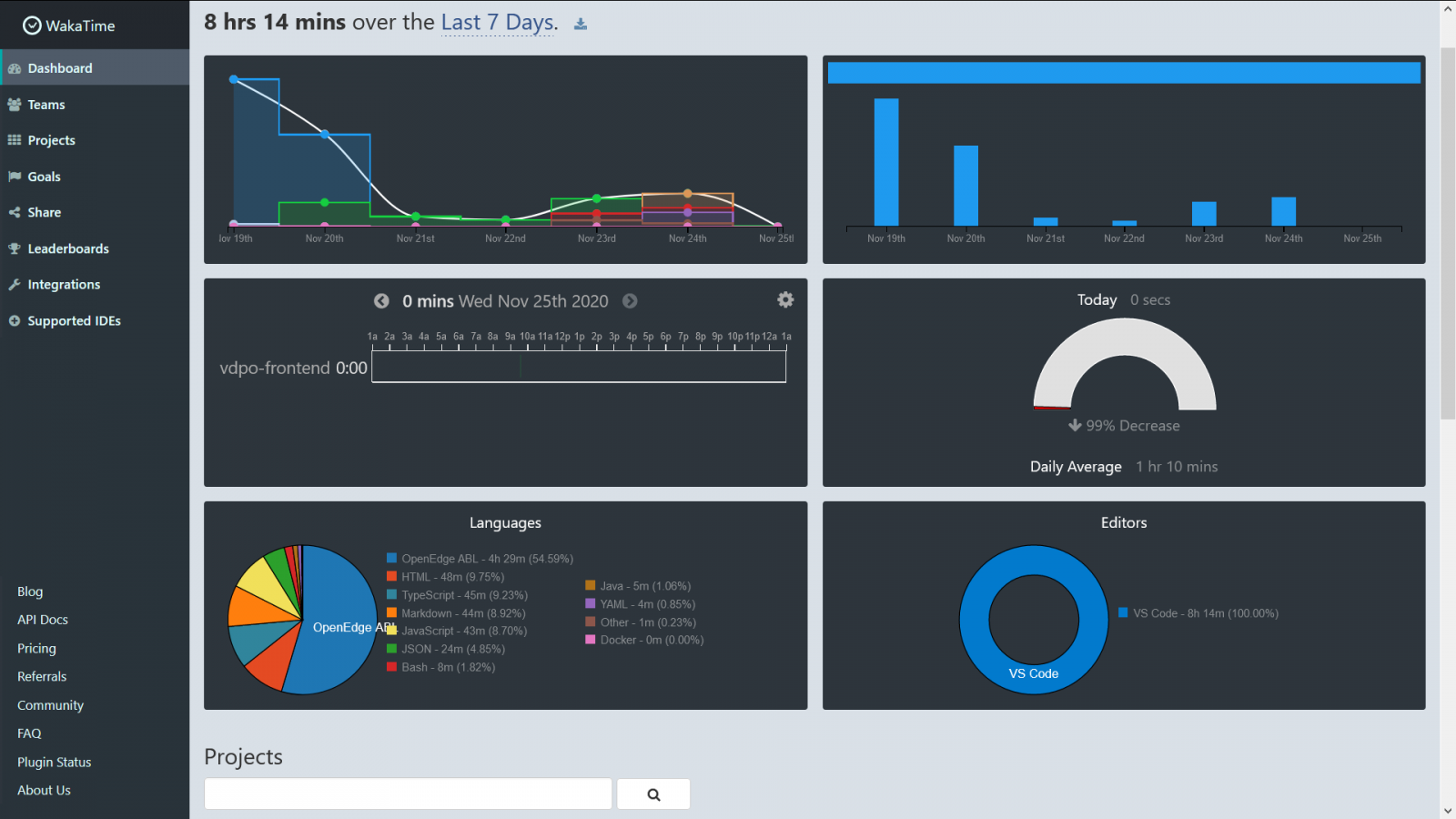
I use an excellent service to collect time programming. Is the WakaTime: https://wakatime.com/.

This service integrate with main IDE tools, including VSCode and collect time spent by project, language, IDE and code stats at general. See my last 7 days:

These information help me to organize and balance my targets by project.

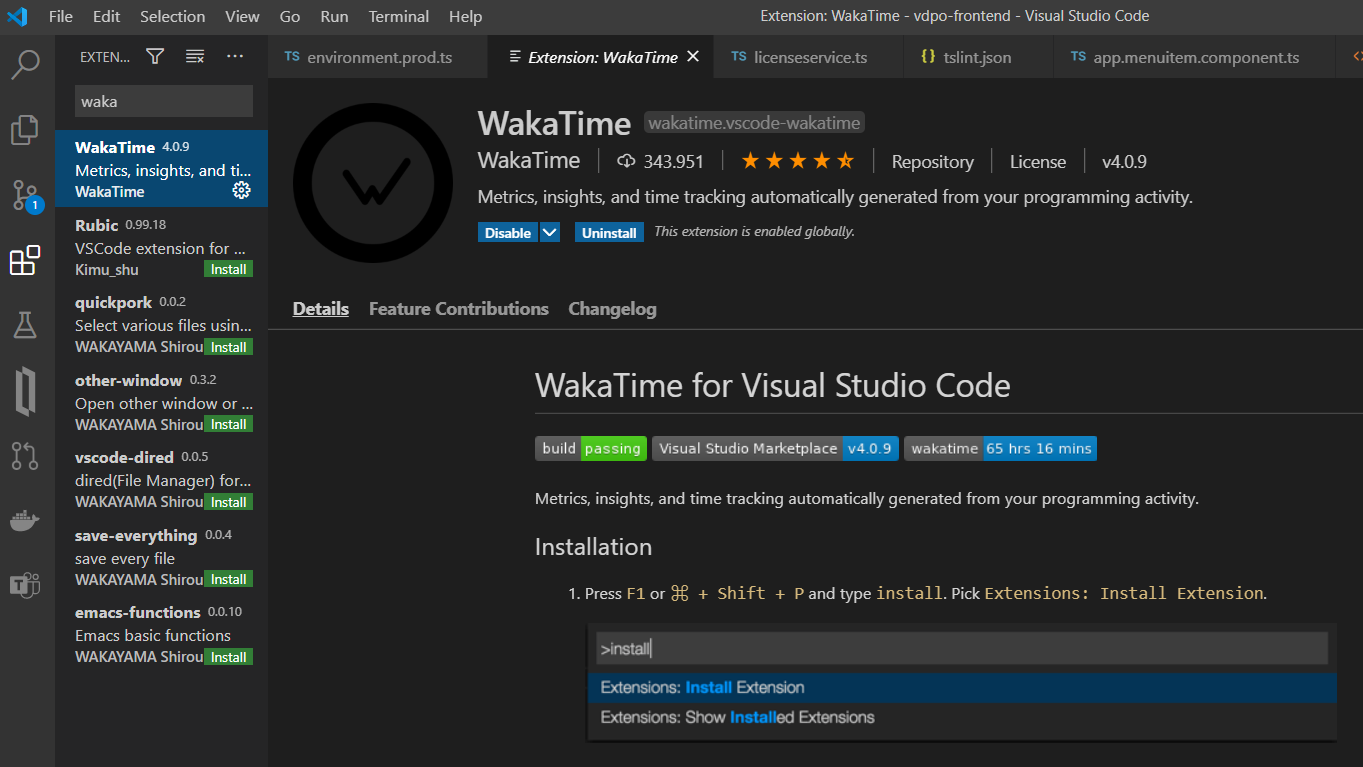
To use Waka signup the service: https://wakatime.com/signup and into your VSCode, into extensions search waka, see:

Restart your VSCode and now input your api key, you can get your api key into https://wakatime.com/settings/account.

3
2 473
Article Tani Frankel · Apr 7, 2021 1m read

In Studio you could open a class directly via it's name, without having to traverse the package tree with multiple clicks until arriving at the desired class.

You would Ctrl + O or (File -> Open) and be able to simply type in the class name, for example:

You press Enter, and viola - the class is opened.

How do you achieve this in VSCode?

1
0 819
Announcement Nikolay Solovyev · Apr 2, 2021

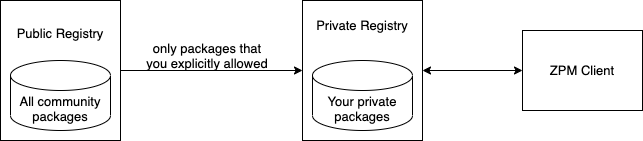
ZPM-Registry – is the package registry for the ZPM package manager.

As you probably know, the ZPM package manager is configured by default to work with the public community registry https://pm.community.intersystems.com/, which currently has more than 150 packages published.
You can install and configure your own registry for use in your organization.

Starting from version 1.1.2, zpm-registry includes the Proxy feature.
Now you can link your own registry to another (for example, the public registry of the community).


2
1 498
Article Evgeny Shvarov · Feb 24, 2020 9m read

Hi Developers!

Many of you publish your InterSystems ObjectScript libraries on Open Exchange and Github.

But what do you do to ease the usage and collaboration to your project for developers?

In this article, I want to introduce the way how to introduce an easy way to launch and contribute to any ObjectScript project just by copying a standard set of files to your repository.

Let's go!

21
6 2499
Article Yuri Marx · Jan 29, 2021 1m read

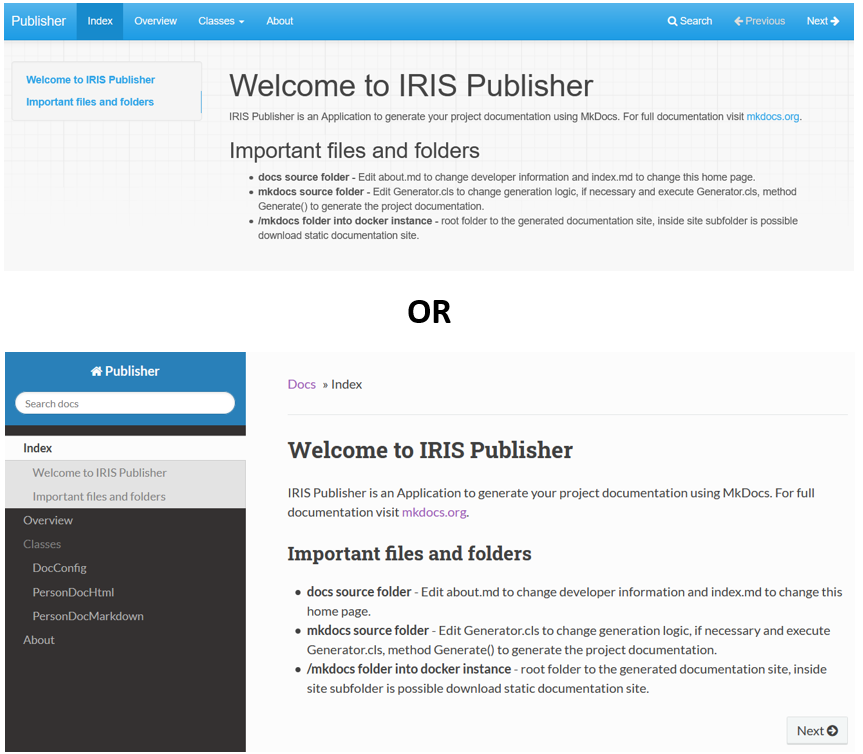
With https://openexchange.intersystems.com/package/IRIS-Publisher, you can document your IRIS Application and gererate the Application Documentation Web Portal (responsive). See the results:

Main Page:

Classes Menu and Class Page: The class page with class documentation, the list of methods and properties.

Navigation and Search bar: 

Search dialog:

About page: your contacts

Change the theme:


1
1 334
Article Yuri Marx · Jan 25, 2021 2m read

Hi Community,

In the past, technical documentation of the source code and software products was generated in chm, pdf files and documentation generators of the programming languages themselves. This old approach had the following limitations:
1. Outdated documentation;
2. Non-interactive and difficult to consult documentation;
3. Layout unresponsive, unfriendly and not adherent to HTML;
4. Inability to customize the layout of the documentation;
5. Inability to have HTML 5 documentation online and offline.
6. Lack of Markdown support.

5
0 714
Article Yuri Marx · Jan 25, 2021 3m read

The ObjectScript language of InterSystems IRIS has a very powerful metadata engine called XData. This feature allows the creation of metadata definitions for your classes, to be used by the compiler or by programs that will extend the standard features of the language, based on the XData definitions of its scope.

An example is IRIS Publisher, an Open Source application from the community capable of collecting all XData definitions in HTML and / or Markdown format and generating a Web Portal with all the application documentation assembled from these XData elements.

See the whole process here:

0
0 483
Question Werner Noske · Dec 25, 2020

Hi,

I'm moving my development to a new PC based on UBUNTU Linux now to be compatible with IRIS.

I found out, that the Atelier plugin for Eclipse is not available anymore on Eclipse Marketplace and https://atelier/jfrog.com/atelier/updates/stable/1.3.

And I was was wondering, that noone has commented this here until now and Intersystems is still mentioning the old sources in the document https://download.intersystems.com/download/atelier.csp

3
0 527
Article Tomohiro Iwamoto · Dec 24, 2020 6m read

About this article:

In InterSystems IRIS, the default form of access to the management portal is HTTP, which means that if the client is in the office and the server is in the cloud, many clients probably desire to encrypt their traffic in some way.

Thus, we would like to show you some ways to encrypt your traffic to and from the IRIS management portal (or various REST services) running on AWS.

0
2 882
Announcement Evgeny Shvarov · Nov 18, 2020

Hooray! 

I'm pleased to announce that 100 ZPM modules are available in the public InterSystems IRIS zpm-repository! Now!

Thank you, developers! This is great that you adopt ZPM Package manager that fast and share your open source add-on libraries for InterSystems IRIS in a form of ZPM packages which means that each of them could be installed as:

USER>zpm "install module-name"

Wish to see the next milestone of 1,000 modules soon in 2021!

Thank you!

4
1 292
Article John Murray · Oct 27, 2020 2m read

Now that 1.0 has shipped and is featuring in various sessions at Virtual Summit 2020 it seems like a good time to offer some guidance on how to report problems.

InterSystems ObjectScript for VS Code consists of three collaborating VS Code extensions. For ease of installation and management there's a fourth entity, the InterSystems ObjectScript Extension Pack. It's a great way to get started with minimum clicks, and handy to have even if you have already installed the other extensions.

0
0 709
InterSystems Official Raj Singh · Oct 20, 2020

Hello Developer Community!

Once again I'm here to talk about the ObjectScript extension for Visual Studio Code, and this time we are excited to announce the release of version 1.0!

The community has come together in an unprecedented way to deliver this product with InterSystems, and its only fitting that a tool so critical to  developer productivity would be built with community testing, feedback and source code from the very beginning.

What's New

Most of the features in this release have been present since 0.9 and were announced earlier in this post. They have all been enhanced and polished.

0
0 1148
Question Sergey Mikhailenko · Sep 25, 2020

Hello developers!

Share the best practices: 1) saving frequently used code sections, 2) quickly finding it, and 3) quickly including it into the current program? There was a thought for 1,2 to use DC(this resource), but the search is not always convenient not only for me

The idea on the surface is to use the git repos wiki. Are there any other best practices?

There is a project github awesome. Maybe we should include the awesome-objectscript sections in it? And in the future for vscode to develop a plugin for awesome-objectscript ?

12
0 290