As applications grow, every database eventually hits scaling limits. Whether it's storage capacity, concurrent users, query throughput, or I/O bandwidth, single-server architectures have inherent constraints. This guide explains fundamental approaches to database scalability and shows how InterSystems IRIS implements these patterns to support enterprise-scale workloads.
We'll explore two complementary scaling strategies: horizontal scaling for user volume (distributing computational load) and sharding for data volume (partitioning datasets). Understanding the general principles behind these approaches will help you make informed decisions about when and how to scale your IRIS applications.
The examples in this guide use InterSystems IRIS in Docker containers.
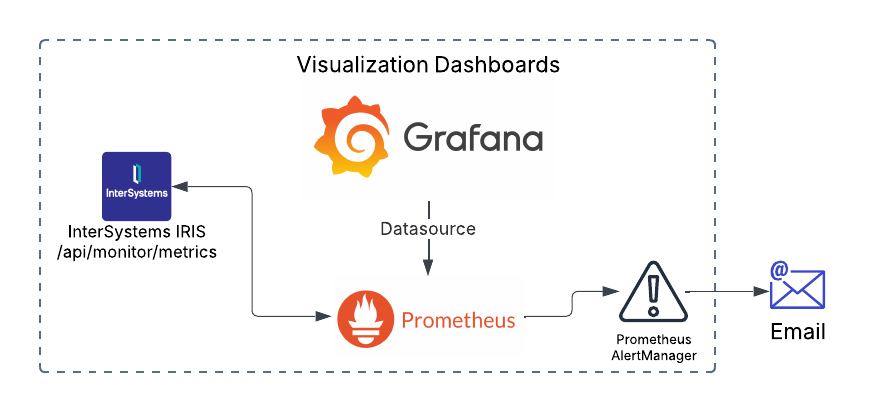
Monitoring your IRIS deployment is crucial. With the deprecation of System Alert and Monitoring (SAM), a modern, scalable solution is necessary for real-time insights, early issue detection, and operational efficiency. This guide covers setting up Prometheus and Grafana in Kubernetes to monitor InterSystems IRIS effectively.
This guide assumes you already have an IRIS cluster deployed using the InterSystems Kubernetes Operator (IKO), which simplifies deployment, integration and mangement.
InterSystems IRIS provides extensive configurable security options, yet many developers primarily use roles and resources to secure entire tables or routines. Today, we will delve deeper. We can also secure individual columns and rows separately, but these two mechanisms operate very differently. Let's begin with the columns.
Column Security
For testing and demonstration, we will keep our table structure concise and straightforward. We have a table called "Person" in the USER namespace that contains an ID column, a date of birth column (DOB), first name, and last name.
Security is fundamental to enterprise application development. InterSystems IRIS provides a comprehensive security framework that protects data, controls access, and ensures compliance. This guide introduces essential security features for developers new to IRIS, covering authentication, authorization, encryption, and practical implementation strategies.
I am working on building out a Workflow task that captures errors in mapping to specific tables. Within the Workflow task, I would like to give the owner of the task the ability to resubmit message once the mapping has been corrected. Is there a way to do it in a similar fashion to pulling up the Trace ie...
gj :: configExplorer is a new VS Code extension integrating with Server Manager and leveraging Structurizr to produce configuration diagrams of your servers.
Here's a short introductory video.
https://www.youtube.com/embed/WHkoZsg6P-A [This is an embedded link, but you cannot view embedded content directly on the site because you have declined the cookies necessary to access it. To view embedded content, you would need to accept all cookies in your Cookies Settings]
You may have noticed that to configure a mirror for InterSystems IRIS for Health™ and HealthShare® Health Connect there is a special requirement. I wanted to go through it step by step in this article.
Can someone give me an explanation of how Local.PD.Linkage.Definition.Individual works? This was setup by another company as part of our implementation.
Below is my configuration..
We are getting a lot of matches on Given Name, but then the Family Name does not match at all, so I am wondering if these need to be adjusted. I just don't understand if they need to be positive or negative.
So, you checked your server and saw that IRISTEMP is growing too much. There's no need to panic. Let’s investigate the issue before your storage runs out.
Step 1: Confirm the IRISTEMP Growth Issue
Before assuming IRISTEMP is the problem, let’s check its actual size.
I was facing the same issue as Jerry faced when connecting IRIS to SQL server. My ODBC connection is configured to authenticate via windows authentication.
Deploying new IRIS instances can be a time-consuming task, especially when setting up multiple environments with mirrored configurations.
I’ve encountered this issue many times and want to share my experience and recommendations for using Ansible to streamline the IRIS installation process. My approach also includes handling additional tasks typically performed before and after installing IRIS.
It's about an example for the External Languages Contest 2025
You get almost any information about your databases in IRIS using the System Management Portal. After passing several levels, you often get a wide list of items, but the interesting ones are hard to find.
UPDATE: since version 0.0.4 of the extension was published on 2025-11-23 it is now possible to use gj :: configExplorer directly in VS Code on Windows.
At the moment, we have 10 HealthShare instance servers (5 x mirrored pairs), where we implement an External Backup approach, using the freeze/thaw commands against whichever server of the pair is the backup mirror member, to complete a VM level backup. These backups are stored to a disk within our control, to purge as required. This approach allows us to deliver a zero downtime backup approach.
Finishing my previous example for multiple IRIS instances, I tried to compose a local single instance version. The step from the external Python app to a version using embedded Python seemed to be obvious. This was a wrong assumption, as some Python libraries just refused installation into my local Windows-based environment.
Securing IRIS Integrations with Mutual TLS (mTLS): A Practical Guide
In today’s enterprise environments, secure communication between systems is not optional—it’s essential. Whether you're integrating InterSystems IRIS with cloud APIs, internal microservices, or third-party platforms, Mutual TLS (mTLS) offers a powerful way to ensure both ends of the connection are authenticated and encrypted.
This post walks through how to configure IRIS for mTLS and how to validate your certificates to avoid common pitfalls.
I’m working with an existing InterSystems IRIS server that hosts several web applications and namespace-specific code and data. I’d like to reverse-engineer the current environment into a %Installer.Manifest file so I can store it in Git and manage its changes.
We have messages that are in a queued state for various reasons and when we do a manual shutdown of the instance, they are moved to a Suspended state. I thought I saw in the documentation somewhere a setting to make sure these messages stay in a queued state and not suspend them. Can someone confirm and point me in the correct location for that documentation, as I am trying to ensure that if we do have to manually shutdown a instance, someone doesn't have to remember to go back in and check for suspended messages and resubmit them?
Is it possible to audit code changes in a namespace?
Ideally what we'd like to be able to do is check which classes were compiled (or deleted) in a time period, eg in last 3 months, and which user made those changes. Even better would be an audit of what those changes were, but that's less important (for us, as we can probably find that information in other ways).
I have created a New Database/Namespace within our TEST environment on both the Primary and Backup of the mirror. When I go to create the database/namespace on the DR node I am getting "Cannot open file '/ensemble/TEST/iris.cpf_...." while the cpf file that it references does not exist. Anyone have any clue to why this might be happening?
I have a Task that I am trying to write the output to a file. How do I check for if the Output File has been included in the Task Schedule, so I can direct my output of my class to that output file?