#VSCode

14 Followers · 440 Posts

VSCode is a short name form for a popular cross-platform editor VisualStudio Code from Microsoft.

Learn more.

InterSystems staff + admins Hide everywhere
Hidden post for admin
Announcement John Murray · Feb 10, 2023

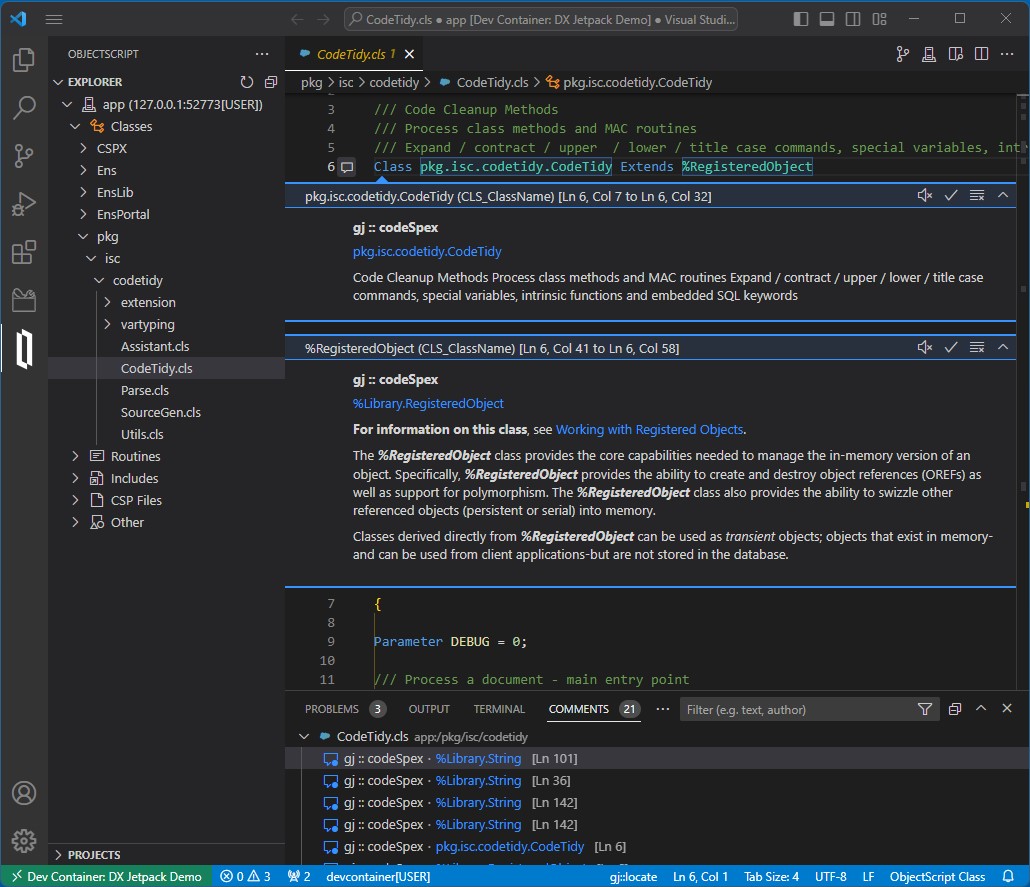
I just released an update of the gj :: codeSpex extension containing a new feature - Exclusions.

There's now a short video demonstrating how exclusions can help you focus on the packages you're less familiar with. The video also illustrates how with the ObjectScript Class View extension you can easily explore the inheritance of your classes.

Both extensions are members of the DX Jetpack, my entry in the 2023 Developer Tools contest. Voting closes very soon, so if you like what I've created please encourage me to do more by VOTING FOR ME here.

0
0 205
Announcement Laurel James (GJS) · Feb 10, 2023

If you haven’t already please give @John Murray your vote in the Developer Tool contest >> http://bit.ly/3XcxyeS


🚀 DX Jetpack boosts your developer experience when using VS Code with InterSystems platforms. 🚀


This extension pack includes: 

gj :: codeSpex - showing help using VS code's commenting feature.


ObjectScript class view - View and navigate all class members plus where they are inherited from.


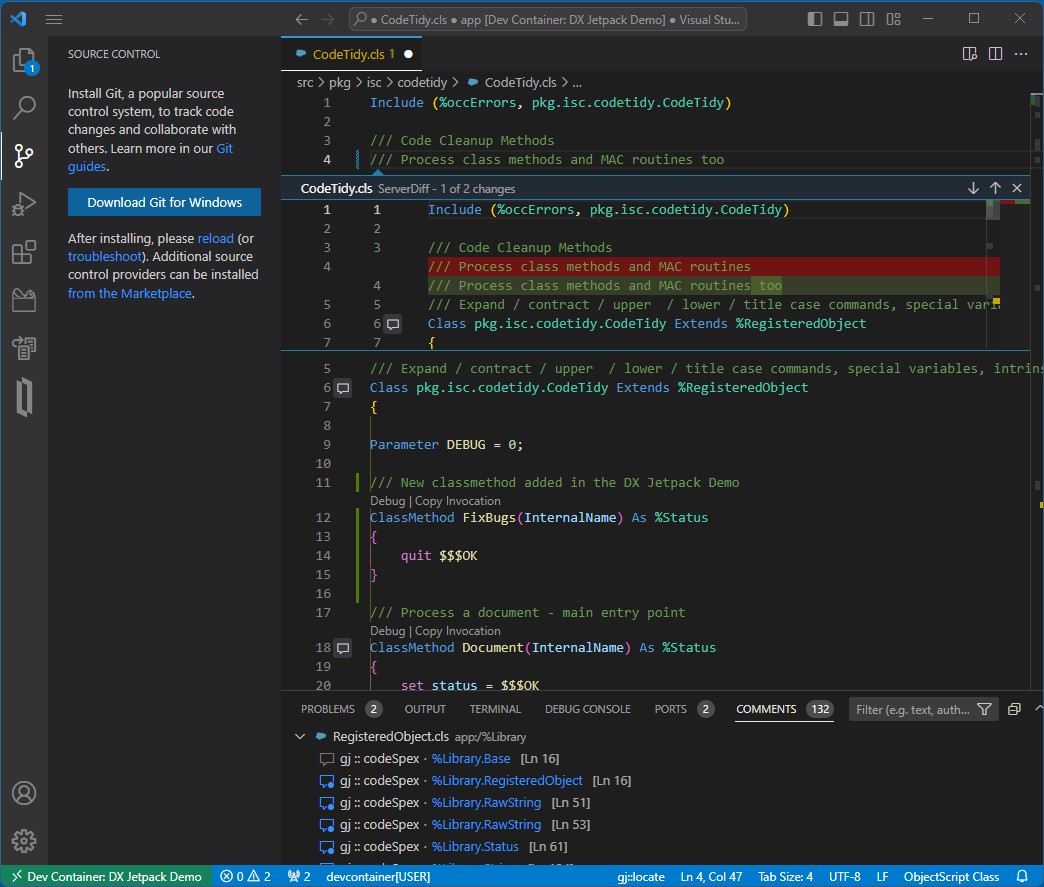
ServerDiff - See the difference between the code you are editing in VS Code and the server copy.


You can vote here >> http://bit.ly/3XcxyeS

1
0 235
Article Evgeny Shvarov · Jun 24, 2020 3m read

Hi Developers!

Suppose you have a persistent class with data and you want to have a simple Angular UI for it to view the data and make CRUD operations.

Recently @Alberto Fuentes described how to build Angular UI for your InterSystems IRIS application using RESTForms2. 

In this article, I want to tell you how you can get a simple Angular UI to CRUD and view your InterSystems IRIS class data automatically in less than 5 minutes.

Let's go!

3
4 1368
Question Stefan Cronje · Feb 7, 2023

Hi all,

In the days when I was still using studio, the indentation character of choice was tab, due to misalignment of code when using non-monospaced fonts.

In VSCode when I create new class files, this defaults to 4 spaces. Where and how do I set the default indentation for ObjectScript class files?

Also, with python it should be spaces. So what is recommended when doing python script inside objectscript classes?

Thank you.

2
0 1631
Announcement Derek Robinson · Jan 30, 2023

In our latest episode of Data Points, I had a conversation with George James, CEO of George James Software, about the importance of source control and developer tools, George James Software's own solutions, and their partnership with InterSystems. Take a listen, and visit https://georgejames.com to learn more about George James Software!

0
1 240
Article Evgeny Shvarov · Jan 25, 2020 4m read

Hi Developers!

"objectscript.conn" :{
      "ns": "IRISAPP",
      "active": true,
      "docker-compose": {
        "service": "iris",
        "internalPort": 52773
      }

I want to share with you a nice new feature I came across in a new 0.8 release of VSCode ObjectScript plugin by @Dmitry Maslennikov and CaretDev.

The release comes with a new configuration setting "docker-compose" which solves the issue with ports you need to set up to make your VSCode Editor connect to IRIS. It was not very convenient if you had more than one docker container with IRIS running on the same machine. Now, this is solved!

Read below how it works now.

8
3 919
Question Jordan Everett · Dec 30, 2022

I am currently trying to better my development process by using Visual Studio Code because I'm more familiar and comfortable with it than Studio.

I've followed the guide here, but I'm still having issues. I initially didn't have the Web Socket protocol allowed on my Web Gateway server, but I enabled that and restarted the server with no luck.

Am I just on too old of a version? Is there any way I'd be able to use Visual Studio Code and be able to debug with what I currently have? I wish I could upgrade to IRIS, but that doesn't seem to be an option.

15
1 901
Article Dmitry Maslennikov · Aug 20, 2021 6m read

Some time ago GitHub, has announced the new feature, GitHub Codespaces. It gives an ability to run VSCode in the browser, with almost the same power as it would run locally on your machine, but also with a power of clouds, so, you are able to choose the machine type with up to 32 CPU cores and 64 GB of RAM.

Looks impressive, is not it? But how it could help us, to work with projects driven by InterSystems IRIS? Let's have a look, how to configure it for us.

3
7 1184
Question Jeffrey Drumm · Jun 7, 2022

I'm attempting to configure VS Code's InterSystems Server Manager to establish a connection to an IRIS for Health server. It has a standalone CSP gateway running on an Apache server with TLS enabled. The port for all IRIS api and browser traffic is 443.

I've configured the webServer section's host, port, and variations on pathPrefix (including no pathPrefix entry), and have the correct user ID set. The password is stored in the server keychain.

The connection simply fails with "Server could not be reached." Nothing in the Output or Problems tabs.

5
1 2126
Article Lucas Enard · Nov 29, 2022 5m read

Hello everyone, this is with great pleasure that I announce the V2 of my application 'Contest-FHIR'.

In this new version, I used new tools and techniques I discovered at the EUROPEAN HEALTHCARE HACKATHON in which I was invited by InterSystems as a guest and as a mentor to display the multiple projects I did in my intership back in April 2022.

Today I present to you the V2 of my application, it can now transform CSV to FHIR to SQL to JUPYTER notebook.

This is for me a really huge step in InterSystems technologies and I think this tool will be used for many other purpuse and cases.

0
0 598
Article Lucas Enard · Nov 27, 2022 9m read

Hello everyone, I’m a French student in academical exchange for my fifth year of engineering school and here is my participation in the FHIR for Women's Health contest.

This project is supposed to be seen as the backend of a bigger application. It can be plugged into a Front End app and help you gather information from your patients. It will read your data in local and use a Data Transformation to make it into a FHIR object before sending it to the included local FHIR server.

1
1 1155
Article 王喆 👀 · Oct 18, 2022 4m read

preface

Since the contact with IRIS, it has been used most in hospitals as an ESB integration engine, as a link in the hospital's integration platform+data center. However, you can also develop some restful pis to be used as the backend of front end and back end separation projects

List of articles

Introduction

List of articles

I. Development of technologies and tools

II. Development Path and Relevant Codes

1. database

2. Preparatory work

3. Steps associated with developing an interface

4. Presentation of achievements

Summary

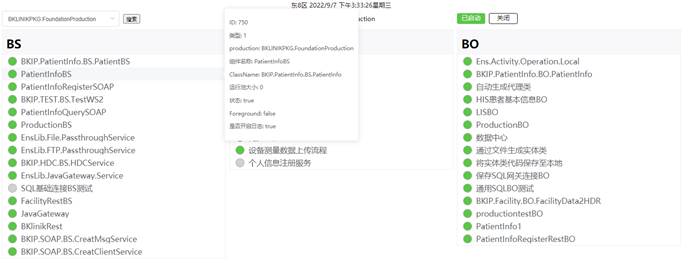
This article will show the CRUD operations related to IRIS in a simple page:

4
0 585
Question Victor Gordillo · Nov 11, 2022

Hi guys,

Open question for all of you...

We are getting some warnings in our code of a class definition when switching namespaces in the code, because the classes we use in different namespace wouldn't exist in each other's... an example:

ClassMethod DoSomething() {
     set oldNS=$zutil(5)
     znspace "SECONDNS"
     set ok=##class(MyPackage.MyClass).MyMethod()
     znspace oldNS
}

In that example, the vscode "Intersystems Language Server" extension would tag "MyPackage.MyClass" as a problem because that class only exists in the second namespace.

7
0 847
Discussion Jose-Tomas Salvador · Oct 21, 2022

Good morning, evening, night,... wink

A small reflection/question for today... it's true that new IRIS for Health (I4H) releases are more and more powerful each time regarding FHIR capabilities. Nowadays it allows us to consume FHIR resources with extrem easiness, we can connect with end-points in external FHIR servers very easily and make I4H act as passthrough or consume their resources... or, even more, we can define, configure and run a FHIR repository in, literally, less than 5 minutes.

3
0 425
Article Nicholai Mitchko · Apr 15, 2022 3m read

Adding VSCode into your IRIS container

One of the easiest ways to setup repeatable development environments is to spin up containers for them. I find that when iterating quickly, it was very convenient to host a vscode instance within my development container. Thus, I have created a quick container script to add a browser-based vscode into an IRIS container. This should work for most 2021.1+ containers. My code repository can be found here

InterSystems IRIS container with vscode and pre-connected

CredValue
User_SYSTEM
PasswordSYS

Overview

5
0 1056
Announcement Olga Zavrazhnova · Sep 20, 2022

Hi Community, 
Let's meet virtually at our first Community Roundtable! This will be a 45-min friendly discussion on a given topic: VSCode vs Studio. 
Imagine that we just gathered together to share our thoughts, experiences, tips, and tricks. If you want to discuss specific questions within a given topic - please share them in the comments.
Watch recording:

10
0 850
Article Raj Singh · Oct 11, 2022 2m read

As you have probably noticed, online product documentation has advanced tremendously in the last few years. Among numerous improvements under the hood, documentation has become easier to read and navigate. And we now have a powerful search engine that gets you to what you need more accurately than we could ever do with the old system of shipping documentation in the product. While most of you have probably had nothing but positive impacts on your workflows, it has come to my attention that some of you may be having a slight problem accessing custom class documentation.

3
3 473
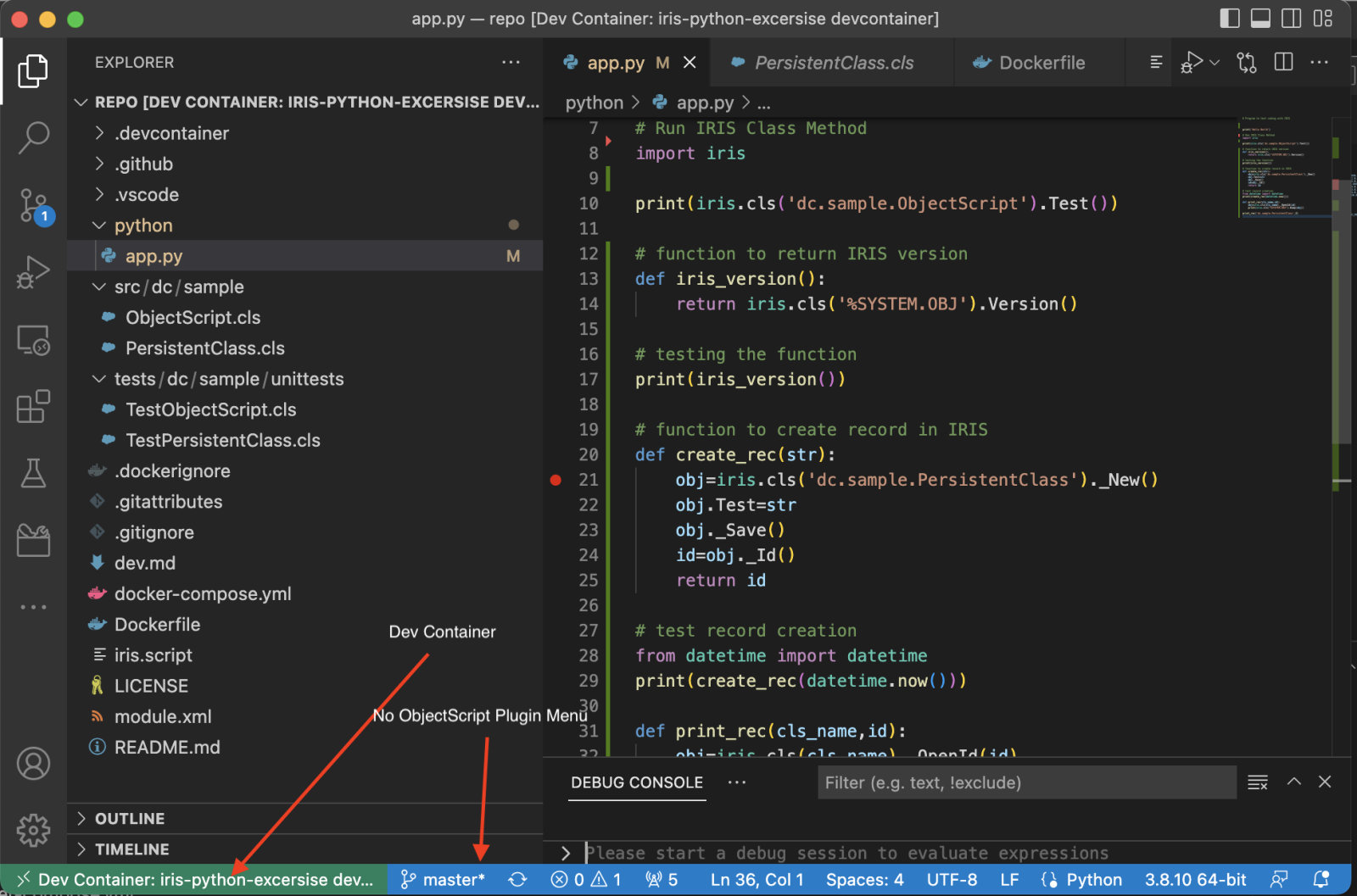
Question Evgeny Shvarov · Oct 21, 2022

Hi developers!

Those who code IRIS solutions in VSCode using Docker often use the convenient ObjectScript menu, which contains links to Management Portal, Class Reference, Unittest portal, Productions, etc.

While drilling down to a Dev Container to code Embedded Python there is no such option, at least within my settings:

So I don't know how to connect to it. 

Thoughts?

6
0 425
Article Evgeny Shvarov · Oct 24, 2022 4m read

Hi developers!

Let me share with you a minimal embedded python template, that I can recommend as a starting point for any general project with InterSystems IRIS that will use embedded python.

Features:

  • Embedded Python ready;
  • Examples of 3 ways of Embedded python development;
  • VSCode development ready;
  • Docker enabled;
  • Online demo enabled;
  • ZPM First development ready.

Let's discuss the features below!

0
0 1153
Question Evgeny Shvarov · Oct 20, 2022

Hi folks!

I'm playing with Embedded python with IRIS trying to do some 'hello-world' exercises.

I'm running IRIS in container and have the following python code:

# Program to test coding with IRIS

print('Hello World')

# Run IRIS Class Method import iris
print(iris.cls('dc.sample.ObjectScript')).Test()

So, when I execute it, I get the following:

5
0 677
Question Colin Brough · Oct 18, 2022

Context: Ensemble development with ObjectScript in a healthcare context - lots of HL7, and some web service stuff. We've used Studio up till now, alongside a lot of leaning on an external developer, but are expanding our team and doing more in-house. We are wondering about Visual Studio Code - not least because it looks easier to hook up to source management solutions. And we've noticed that the test environments that you get connected to when doing many of the online training courses on learning.intersystems.com give you a Visual Studio Code environment. At some point we are likely to shift

3
1 353
Question Evgeny Shvarov · Oct 8, 2022

Folks!

Could you please share any best practices on how to debug Embedded Python code?

Given I have the following class method:

ClassMethod HideShip() As %Status [ Language = python ]
{
    import iris
    shipsgl=iris.gref(iris.cls(__name__)._GetParameter("BoardStorage"))
    shipsgl.kill()
    from random import Random
    board=iris.cls(__name__)._GetParameter("BoardRange")
    x=random.randint(0,board+1)
    y=random.randint(0,board+1)
    shipsgl.set([x,y],1)
}

And when I run it shows the following error:

5
0 997
Announcement Laurel James (GJS) · Sep 20, 2021

Hi developers, 

We're excited to let you know about the latest release of Serenji, your on-the-spot debugger from George James Software. Version 3.2.0 focuses on the debug experience and introduces zero configuration for users. No matter where you are or what you're doing, Serenji is always ready to go in just one click, so you won't lose focus by spending time setting up a launch configuration. 

This enhanced debugger also takes advantage of the latest features of VS Code itself. With this powerful combination you'll be able to smoothly identify and quickly fix errors in your code, contributing to the production of quality, maintainable code... and isn't that what everyone wants?! 


In this latest release you will experience: 

  • Debugging in just one click with zero configuration. 
  • Navigation directly to the source of an error using our gj :: locate technology.
  • Intuitive prompting for entrypoint and arguments.
  • Configurable break on error.
  • Program output in debug console. 
  • Run and Debug CodeLenses.
  • Run multiple concurrent debug sessions and consoles. 
  • Shaded background for read-only documents. 

If you're a new user, it's now easier for you to get started. The introduction of a welcome page Walkthrough and guidance on the Explorer and Run and Debug views means you can effortlessly create your initial workspace and start debugging. 

Download Serenji directly from the VS Code marketplace and take a look at our release notes to find out more about these new features and how to use them. 

We offer a free 30 day trial so if you're not yet a user of Serenji but you're interested in how it can help you, drop me a message through the Developer Community or email us at info@georgejames.com.

Happy debugging! 

1
4 408
Announcement Raj Singh · Oct 7, 2022

Hurray for security!

If you're connecting to a local server and doing isolated development with a throwaway account, just store your password in plain text in the settings.json configuration file. But if you're working with a shared server using a "real" user account, it's a good idea to protect that information.

0
1 335