New
Hi, Community!
Have you tried the InterSystems AI Hub, available through the Early Access Program?
A programming tool or software development tool is a computer program that software developers use to create, debug, maintain, or otherwise support other programs and applications.
Hi, Community!
Have you tried the InterSystems AI Hub, available through the Early Access Program?
Epidemiological surveillance is one of the foundational pillars of public health. Régis Júnior et al. (2026) define it as a continuous system of data collection, analysis, interpretation and dissemination of health events — a function whose effectiveness depends critically on the quality of information systems, data analysis capacity, and coordination between different levels of care.
Common Table Expressions (CTEs) provide a structured framework for defining reusable intermediate result sets within SQL statements. InterSystems IRIS implements CTEs via the WITH clause, enabling clearer query composition and modular analytical processing while remaining fully integrated with the IRIS cost-based optimizer.
This article explores the semantics of CTEs in InterSystems IRIS, explains their interaction with query optimization, discusses appropriate deployment scenarios, and presents executable examples illustrating practical patterns for production environments.
Welcome to the monthly recap of updates and releases to VS Code and InterSystems-related extensions relevant to IRIS developers.
Don’t forget, if you’re migrating from InterSystems Studio to VS Code, or want to deepen your knowledge, check out the VS Code training courses from George James Software: georgejames.com/vscode-training.
This recap covers the four VS Code releases in May: v1.119, v1.120, v1.121, and v1.122.
Editor and navigation
What tools or techniques do you use to debug a Production during development? I know the Management Portal shows the message queue and event log, but I'm wondering if there are better ways to trace a message through the full BS > BP > BO flow without relying only on logs.
Hi everyone! 👋
I’m excited to share the project I’ve submitted to the current InterSystems .Net, Java, Python, and JavaScript Contest — it’s called IRIStool and Data Manager, and you can find it on the InterSystems Open Exchange and on my GitHub page.
I’m excited to share the project I’ve submitted to the current InterSystems .Net, Java, Python, and JavaScript Contest — it’s called FHIR Data Explorer with Hybrid Search and AI Summaries, and you can find it on the InterSystems Open Exchange and on my GitHub page.
Today, coding assistants like Claude, GitHub Copilot and Cursor have transformed the way developers write code. However, these tools are limited by being isolated from the systems and data sources that developers work with daily. This limitation can be overcome through the Model Context Protocol (MCP), an open standard designed to connect AI assistants to external data sources and tools in a secure and standardized way.
In this review article, we'll explore the current state-of-the-art regarding the MCP within the InterSystems ecosystem.
If you ever wondered how to debug some requests that are being made to or from IRIS, well here is a little tutorial on how to do that.
During a complex project, usually you get the specifications and implement the communication between IRIS and other things based on that. But from the paper to the real world there's usually a huge gap and you need to know why you are receiving an error on a parameter, on a header, you are not receiving the data and so on.
Data privacy regulations such as GDPR, LGPD, and HIPAA demand that organizations know exactly where Personally Identifiable Information (PII) lives inside their databases. Yet in practice, most teams rely on manual inventories, tribal knowledge, or external scanning tools that require data to leave the database engine — a process that itself creates privacy and security risks.
This article presents an MVP that takes a different approach: it runs PII detection inside InterSystems IRIS using Embedded Python, analyzing data where it lives and never exporting it to an external process.
Since our previous announcement, we have introduced several incremental improvements to the client‑side editing experience in VS Code. These updates focus on preserving developer‑authored formatting when synchronizing with the server.
Client‑side *.cls files previously lost certain formatting details during compilation, including keyword casing (e.g., classmethod → ClassMethod), normalization of blank lines between class members, and removal of line breaks within parameter lists.
The George James Software team is looking forward to going to National Harbor for READY 2026!
As part of the conference, we'll be hosting our Deltanji Source Control User Group:
Date: Wednesday, April 29th
Time: 8 - 9am (breakfast will be provided)
Location: Azalea 1
RSVP by emailing laurelj@georgejames.com.
We'll be showing what will be included in the next release of Deltanji, version 8.2, as well as providing an opportunity for questions and discussion. We welcome both current and prospective users to join us.
Customer support questions span structured data (orders, products 🗃️), unstructured knowledge (docs/FAQs 📚), and live systems (shipping updates 🚚). In this post we’ll ship a compact AI agent that handles all three—using:
Before finding the best solution for Supply Chain, we need to understand what Supply Chain is. Well, regardless of the language used, the term is known by the name already mentioned. For your information, the translation in Brazilian Portuguese is "Cadeia de Suprimentos" (Supply Chain), sometimes also called "Cadeia Logística" (Logistics Chain), but we will not dwell on the nomenclature, but rather on the meaning.
Recently, I replaced my old laptop with a new one and had to migrate all my data. I was looking for a guide but couldn’t find anything that explained in detail how to migrate server connections from InterSystems Studio and Visual Studio Code from one PC to another. Simply reinstalling the tools is not enough, and migrating all the connections manually seemed like a waste of time. In the end, I managed to solve the problem, and this article explains how.
Migrating Studio connections was the most challenging part.
Working with files often starts off simple. open the file, read, and process. That approach works perfectly well, until the file happens to be an Excel file.
A Common Assumption
At first, an Excel file (.xlsx) looks like just another data file, rows, columns and values. nothing unusual. So it's natural to assume it can be read the same way as a .txt ot .csv file. But that's where things start to break.
Why Excel files behave differently
The key difference is how the data is stored:
-> .txt / .csv - plain text, line-by-line.
-> .
Hello InterSystems Community,
I hope you're all doing well. I'm reaching out to ask if there's any way to enable a dark theme or dark mode for the HealthShare Management Portal.
I have a visual impairment (amblyopia/lazy eye) which means I'm nearly blind in one eye. Like many people with visual difficulties, I find that bright white backgrounds and interfaces cause significant eye strain and fatigue. This makes it challenging to work with the Management Portal for extended periods.
Hello everyone,
I am André from MedVertical. We are exploring InterSystems-native ways to operationalize continuous FHIR conformance: repeatable regression runs, baseline/delta comparisons, and evidence-style reporting to detect drift after releases and IG changes.
In many FHIR implementations, validation is done “point-in-time” in pre-prod, but conformance degrades in production due to IG/profile updates, terminology changes, mapping evolution, upstream releases, and configuration drift.
Welcome to the monthly recap of updates and releases to VS Code and InterSystems-related extensions relevant to IRIS developers.
If you're migrating from InterSystems Studio to VS Code, or want to deepen your knowledge check out the VS Code training courses from George James Software: georgejames.com/vscode-training.
VS Code version 1.110
Kitty graphics protocol in the Terminal - The integrated terminal now supports the Kitty graphics protocol, allowing for high-fidelity image rendering directly in the terminal pane.
This is more for my memory that anything else but I thought I'd share it because it often comes up in comments, but is not in the InterSystems documentation.
There is a wonderful utility called ^REDEBUG that increases the level of logging going into mgr\cconsole.log.
You activate it by
a) start terminal/login
b) zn "%SYS"
c) do ^REDEBUG
d) change logging level to FFFFFFFF
if you are on you production system (with lots of traffic) I suggest you quickly reproduce the error, rename the cconsole.log file, and repeat the steps above to set the logging level to FF.
InterSystems continues to push AI capabilities forward natively in IRIS — vector search, MCP support, and Agentic AI capabilities. That roadmap is important, and there is no intention of stepping back from it.
But the AI landscape is also evolving in a way that makes ecosystem integration increasingly essential. Tools like Dify — an open-source, production-grade LLM orchestration platform — have become a serious part of enterprise AI stacks.
Configuration differences between environments are not always mistakes, but they should always be intentional and governed.
We're excited to announce that version 3.6 of JediSoft IRISsync® is now available, bringing enhancements designed to give teams more control and visibility when managing configuration settings across multiple IRIS instances.
What's new in IRISsync 3.6:

You’ve seen how tools like Lovable are shaking up web development. People are spinning up entire apps just by talking to an AI, almost like pair‑programming on steroids.
Now imagine bringing that same “vibe coding” experience into healthcare. know, it sounds crazy. Healthcare is complex, full of regulations, and usually gives us a headache just thinking about the interoperability rules.
That’s exactly the space where withLove lives: an AI‑Native, Low‑Code platform built entirely on InterSystems IRIS for Health.
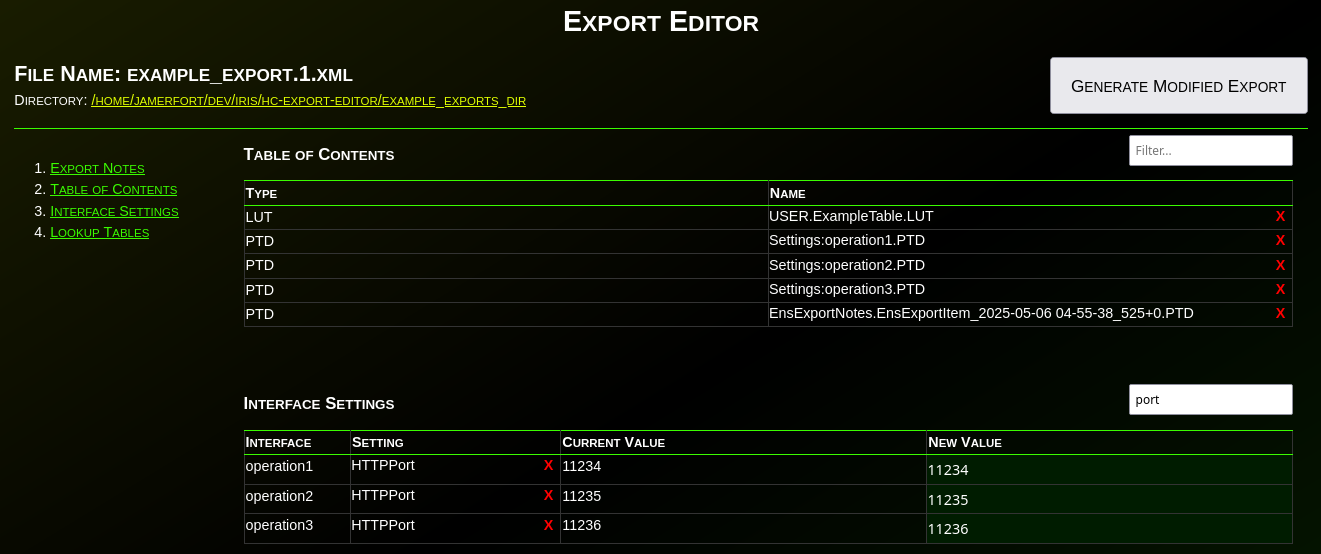
Have you ever needed to change an IP or port before deploying an interface to production? Needed to remove items from an export? What about modifying the value(s) in a lookup table before deploying? Have you wanted to disable an interface before deploying? What about adding a comment, category, or alert setting to an interface before deploying to production?
If you’ve ever needed to make any changes to an interface or lookup table before deploying to production, then Export Editor is for you!
Welcome to the monthly recap of updates and releases to VS Code and InterSystems-related extensions relevant to IRIS developers. We'll break down the updates that are relevant to InterSystems developers with tips on how they can be applied to your day-to-day projects.
Don’t forget, if you’re migrating from InterSystems Studio to VS Code, or want to deepen your knowledge, check out the VS Code training courses from George James Software: georgejames.com/vscode-training.
VS Code version 1.
Hi everyone,
Does anyone know how to export projects via VSC?
I opened the project through the "InterSystems Tools" plugin (command is "Edit Code in Project") and I can correctly work on it.
However, when I try using the "ObjectScript" plugin to export the project (right click on the project -> "Export Project Contents")
.png)
This message appears and it is not possible to export the project:
I've tried also to open a new window, then a folder and finally the project, but nothing changes.
This is an example of my workspace:
Anyone knows how to do it?
Thank you!

Some concepts make perfect sense on paper, whereas others require you to get your hands dirty. Take driving, for example. You can memorize every component of the engine mechanics, but that does not mean you can actually drive.
You cannot truly grasp it until you are in the driver's seat, physically feeling the friction point of the clutch and the vibration of the road beneath. While some computing concepts are intuitive, Intelligent Agents are different. To understand them, you have to get in the driver's seat.
When working with InterSystems Interoperability (Iris / Health Connect / Ensemble), configuration data is often spread across many production items: services, processes, operations, adapters, and their settings.
A common operational or security need is to answer questions like:
The ObjectScript utility below solves exactly that problem by exporting selected configuration settings into a CSV file.
Up until early this year, I haven't been not doing much coding at all -- I had gotten sick of it.
After many years as a hands-on software engineer and data scientist, I got burned out around 2015. I switched to business development roles focused on "external innovation," then joined InterSystems in 2019 as a product manager. I missed the creative aspects of coding, but not the tedium. The endless cycle of boilerplate, debugging, and context-switching had left me creatively depleted.
Developing and testing REST APIs in InterSystems IRIS often requires a significant amount of boilerplate code. While ObjectScript provides powerful tools for building APIs, writing consistent and repeatable tests can be time‑consuming. This is where IrisOASTestGen comes in.
IrisOASTestGen is a utility designed to generate the structure of test classes and the supporting utility code directly from an OpenAPI 2.0 specification