Hi Community,
The InterSystems Learning Website has many important iterative courses.
Pieces of experience in InterSystems Technology which solve some particular problem in elegant or unusual way.
Hi Community,
The InterSystems Learning Website has many important iterative courses.
Hi, every one. Again, it's me!!😀😀
Recently I was trying to organize some learning materials for InterSystems IRIS😆, and realized that the resources are actually quite scattered.🤐
So I put together a list here—grouped by categories—for anyone who:
Also adding some of my own experience on what worked (and what didn’t, may be only not work for me🤫🤐).
If you don’t know where to begin, start here:
InterSystems FAQ rubric
There is data, such as execution log data, that you do not want to return to its previous state even if a rollback occurs during a transaction. The above requirement can be met by placing that data in the IRISTEMP database, which will not be rolled back.
Temporary Globals and the IRISTEMP Database
By mapping the table entities you do not want to roll back to this database, you can retain the information after the rollback.
Updated 14/04/26
Before you can start building with InterSystems IRIS, you need a working local or server installation. This guide walks through downloading the distribution and installing IRIS on Windows in a straightforward way, focusing on the steps and decisions that matter in a development setup.
I’ll cover where to get the appropriate version, what prerequisites to check before installing, and how to run through the installer on your platform. The goal is to get you to a clean, usable environment with minimal friction, so you can move on to writing code, exploring the data platform, and integrating with your existing tools.
To download a Community version, please read this article: How to get InterSystems IRIS Community Edition. It explains the different ways to obtain InterSystems IRIS Community Edition, highlighting options for local, containerized, and cloud-based setups. It shows how to use Docker to quickly pull and run a ready-to-use IRIS instance. You can also learn how to deploy IRIS in the cloud via marketplaces like AWS to avoid local installation. What's important here, this guide walks through downloading an install kit from the InterSystems Evaluation Service and selecting the right version and platform.
Dynamic Entities (objects and arrays) in IRIS are incredibly useful in situations where you are having to transform JSON data into an Object Model for storage to the database, such as in REST API endpoints hosted within IRIS. This is because these dynamic objects and arrays can easily serve as a point of conversion from one data structure to the other.
The official InterSystems VS Code extensions are packed with features that make developing with InterSystems products a breeze. Today I'd like to highlight some small but useful features that you may have missed.
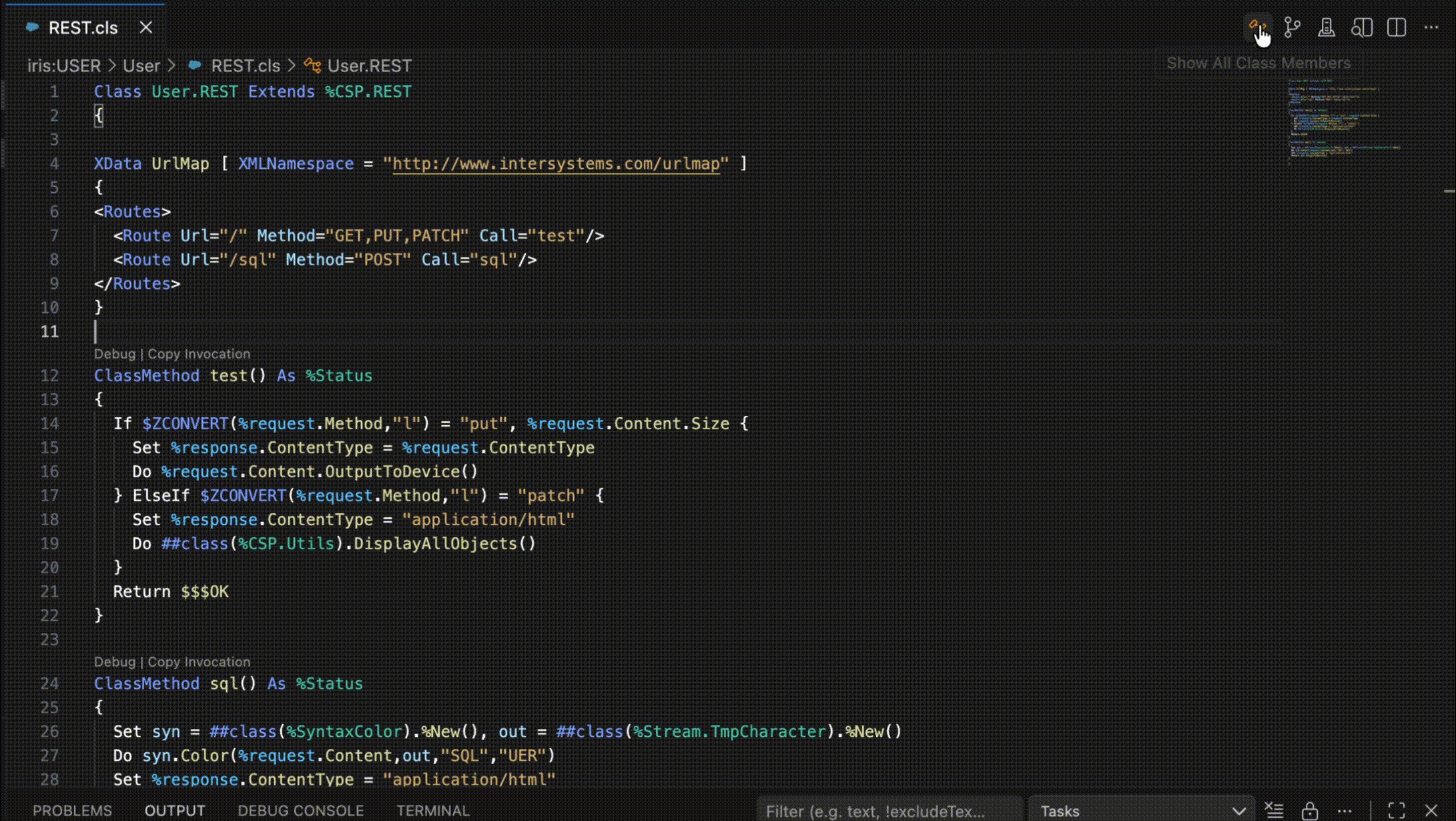
You can view all members of the current class, including inherited members, with the click of a button. Just click on the class icon in the top-right corner of the editor window and a filterable list of all members will appear. Clicking on one will reveal it in an editor tab.

Hello to all the esteemed members of the InterSystems developer community in Spanish!
Although I often consult the developer community and have occasionally left a question here, this will be my first article, and what better occasion to do so than by participating in the 3rd technical article contest.
The topic I will cover in this article is the different tools that InterSystems IRIS provides us to optimize both the databases and the queries we run, as well as the new types of storage and data.
When connecting to the database using a client-server architecture, for example using language binding, the machine name of the client can be obtained using the following code:
set client=##CLASS(%SYS.ProcessQuery).Open("P"_$j).ClientNodeNameOne objective of vectorization is to render unstructured text more machine-usable. Vector embeddings accomplish this by encoding the semantics of text as high-dimensional numeric vectors, which can be employed by advanced search algorithms (normally an approximate nearest neighbor algorithm like Hierarchical Navigable Small World). This not only improves our ability to interact with unstructured text programmatically but makes it searchable by context and by meaning beyond what is captured literally by keyword.
In this article I will walk through a simple vector search implementation that Kwabena Ayim-Aboagye and I fleshed out using embedded python in InterSystems IRIS for Health. I'll also dive a bit into how to use embedded python and dynamic SQL generally, and how to take advantage of vector search features offered natively through IRIS.
In the previous article, we examined how we can use the %CSP.Request and %CSP.Response classes to test a REST API without having the API fully set up and accessible across a network with an authentication mechanism. In this article, we will build on that foundation to perform some simple unit testing of one of our REST API methods.
The unit testing framework requires a couple of setup steps before we can use it. First, we have to ensure that the unit testing portion of the management portal is enabled so we can review the results of our tests.
Hi, Community!
Building integrations with InterSystems products? Find out about the latest UX enhancements available in version 2025.3!
Building Integrations: A New User Experience Version 2025.3
In this video, @Aya Heshmat, Product Manager for HealthShare® Health Connect, walks through:
💡You can opt into these enhancements for an improved experience with navigation and monitoring, as well as streamlined DTL creation and testing!
Hi Community,
We're pleased to invite you to the upcoming webinar in Hebrew:
👉 Debugging InterSystems IRIS & Health Connect: From VS Code Breakpoints to Interoperability Traces 👈
📅 Date & time: Feb 18th, 3:00 PM IDT
When production issues arise, speed and precision matter. This webinar is a practical, tool-driven walkthrough of debugging in InterSystems IRIS (including IRIS for Health) and Health Connect - starting with code-level debugging in VS Code and extending into platform and interoperability diagnostics. We will cover core logging as well as tracing techniques.
Here at InterSystems, we often deal with massive datasets of structured data. It’s not uncommon to see customers with tables spanning >100 fields and >1 billion rows, each table totaling hundred of GB of data. Now imagine joining two or three of these tables together, with a schema that wasn’t optimized for this specific use case. Just for fun, let’s say you have 10 years worth of EMR data from 20 different hospitals across your state, and you’ve been tasked with finding….
There are numerous excellent tools available for testing your REST APIs, especially when they are live. Postman, various web browser extensions, and even custom ObjectScript written with %Net.HttpRequest objects can get the job done. However, it is often difficult to test just the REST API without inadvertently involving the authentication scheme, the web application configuration, or even network connectivity. Those are a lot of hoops to jump through just to test the code within your dispatch class. The good news is that if we take our time to understand the inner workings of the %CSP.REST class, we will find an alternative option suited for testing only the contents of the dispatch class. We can set up the request and response objects to invoke the methods directly.
You send an HTTP request and get back an HTTP error but with an HTML error page which you didn't expect... what's happening?... 🤔
Specifically for example, perhaps you tried to READ a FHIR Resource (e.g. /Patient/123) and you get back a 404 error page, even though with other Patient IDs, you get back the Resource payload, so "the page" definitely does exist... why should you be getting a 404 error page? 🙄
Looking at my database I see I have a very big ^rINDEXSQL global? Why is that? 😬
In the Management Portal SQL page, under "SQL Statements" I see a 'Clean stale' button - what does this do? 🤔
In the list of Statements some have a 'Location' value and some don't? How is that? 🤨
InterSystems FAQ rubric
If you try to kill a global that is mapped at the subscript level from the top node, you will get a <SLMSPAN> error and it will not be deleted. This is because the kill command for subscript-level mapped globals cannot be used across mappings.
// Suppose subscript-mapped globals exist in different databases, as shown below:
^TEST(A*~K*) -> database A
^TEST(L*~Z*) -> database B

// Trying to kill from the top level will result in a <SLMSPAN> error.
NAMESPACE>Kill ^TEST
<SLMSPAN> <- This error is output.Hi everyone.
I'm going to give you a quick tip on how to implement an AI agent to search the Intersystems documentation integrated into Teams.
Yes, I know the documentation page has its own AI search engine and it's quite effective, but this way we'd have faster access, especially if Teams is your company's corporate tool.
You can also create another AI agent to search articles published in the developer community (which also has its own integrated AI search engine).
Too run SQL in Terminal use $system.SQL.Shell().
Please refer to the sample below.
SAMPLES>do $System.SQL.Shell()
SQL Command Line Shell
---------------------------------------------------- The command prefix is currently set to: <>.
Enter q to quit, ? for help.
SAMPLES>>select * from Sample.Vendor
1. select * from Sample.Inevitably, you will eventually need to move your code up from one version of IRIS or Cache to a more recent version of IRIS. There are a few good steps you can take to set yourself up for success in that process.
Read Documentation Carefully
Before you move anything you should check out the IRIS documentation page for many useful resources on changes made to various versions of IRIS. If you are upgrading through multiple versions, you will want to check on the documentation for all of them, not just the version to which you will upgrade.
When I started my journey with InterSystems IRIS, especially in Interoperability, one of the initial and common questions I had was: how can I run something on an interval or schedule? In this topic, I want to share two simple classes that address this issue. I'm surprised that some similar classes are not located somewhere in EnsLib. Or maybe I didn't search well? Anyway, this topic is not meant to be complex work, just a couple of snippets for beginners.
When exporting using the Export() method of the %Library.Global class, if the export format (fourth argument: OutputFormat) is set to 7, "Block format/Caché block format (%GOF)," mapped globals cannot be exported (only globals in the default global database of the namespace are exported). To export mapped globals in "Block format/Caché block format (%GOF)," specify the database directory to which you want to map them in the first parameter of %Library.Global.Export().
An example of execution is shown below.
Have you ever tried to do a search in Message Viewer on a busy interface and had the query time out? This can become quite a problem as the amount of data increases. For context, the instance of Health Connect I am working with does roughly 155 million Message Headers per day with 21 day message retention. To try and help with search performance, we extended the built-in SearchTable with commonly used fields in hopes that indexing these fields would result in faster query times. Despite this, we still couldn't get some of these queries to finish at all.
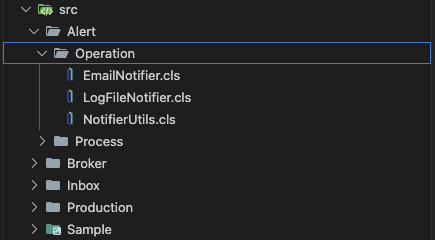
Over time, while I was working with Interoperability on the IRIS Data Platform, I developed rules for organizing a project code into packages and classes. That is what is called a Naming Convention, usually. In this topic, I want to organize and share these rules. I hope it can be helpful for somebody.
Disclaimer: This guide is a good fit for Interoperability projects. When you have integrations, data flows, when you use IRIS for ETL processes, etc. Overall, when your code is combined with Productions.
I was facing the same issue as Jerry faced when connecting IRIS to SQL server. My ODBC connection is configured to authenticate via windows authentication.
Configure IRIS ODBC connection with Windows authentication using a
How I fixed it for myself?
<ORGNAME>\<ASSETID>$Folks!
Recently I found several one-line long ObjectScript commands on DC and think that it'd be great not to lose it and to collect more!
So I decided to gather a few first cases, put in one OEX project, and share them with you!

And here is how you can use them.
1. Create client SSL configuration.
set $namespace="%SYS", name="DefaultSSL" do:'##class(Security.SSLConfigs).Exists(name) ##class(Security.SSLConfigs).Create(name)Useful if you need to read content from an URL.
Don't forget to return to a previous namespace. Or add
n $namespacebefore the call.
Hi all,
This is a quick tip about how to use case insensitive URL in REST API.
If you have a class that extends from %CSP.REST and Ens.BusinessService, to create a REST API service, and you have defined your WebApplication in lowercase
.png)
XData UrlMap [ XMLNamespace = "http://www.intersystems.com/urlmap" ]
{
<Routes>
    <Route Url="/user" Method="POST" Call="User"/>
    <Route Url="/login" Method="POST" Call="Login"/>
</Routes>
}
Only accepts the url in lowercase, i.e. http://myserver/myproduction/user
If you have any uppercase character, the url doesn't work.
Since InterSystems has recently announced the discontinuation of support for InterSystems Studio starting from version 2023.2 in favor of exclusive development of extensions for the Visual Studio Code (VSC) IDE, believing that the latter offers a superior experience compared to Studio, many of us developers have switched or are beginning to use VSC. Many may have wondered how to open the Terminal to perform operations, as VSC does not have an Output panel like Studio did, nor an integrated feature to open the IRIS terminal, except by downloading the plugins developed by InterSystems.
This one's for those of you who feel that InterSystems tech makes your life easier... whether you’re working on integration projects, building innovative solutions, or evolving existing ones.
InterSystems FAQ rubric
The ^%GCMP utility can be used to compare the contents of two globals.
For example, to compare ^test and ^test in the USER and SAMPLES namespaces, it would look like this:
*In the example below, 700 identical globals are created in the two namespaces, and the contents of one of them is changed to make it the detection target.