Question:
My journal files are growing rapidly - what could be the cause? How can I minimize the phenomena?
InterSystems IRIS is a Complete Data Platform
InterSystems IRIS gives you everything you need to capture, share, understand, and act upon your organization’s most valuable asset – your data.
As a complete platform, InterSystems IRIS eliminates the need to integrate multiple development technologies. Applications require less code, fewer system resources, and less maintenance.
Question:
My journal files are growing rapidly - what could be the cause? How can I minimize the phenomena?
This time I want to talk about something not specific to InterSystems IRIS, but that I think is important if you want to work with Docker and your server at work is a PC or laptop with Windows 10 Pro or Enterprise.
As you likely know, containers technology comes basically from Linux world and, nowadays, is on Linux hosts were it shows maximum potential. Those who use Windows on a normal basis see that both, Microsoft and Docker, have done important efforts during these last years that allow us to run containers based on Linux images on our Windows system in a really easy way... but it's something not supported for production systems and, this is the big problem, is not reliable if we want to keep persistent data outside of containers, in the host system,... mostly due to the big differences between Windows and Linux file systems. In the end, Docker for Windows itself uses a small linux virtual machine (MobiLinux) to run the containers... it does it transparently for the windows user... and it works perfectly well if, as I said, you don't require that your databases survive longer than the container...
Well,...let's get to the point,... the point is that many times, to avoid issues and simplify, we need a full Linux system and, if our server is based on Windows, the only way of having it is through a virtual machine. At least till WSL2 in Windows is released, but that will be another story and sure it'll take a bit of time to become robust enough.
In this article, I'll tell you, step by step, how to install an environment where you'll be able to work, if you need it, with Docker containers on an Ubuntu system in your Windows server. Let's go...
Hi Community!
As you know we launched the InterSystems Open Exchange — the marketplace for solutions and tools on InterSystems Data Platforms!

But how to publish your application on OE?
Before we start, let me answer the few basic questions.
I joined InterSystems less than a year ago. Diving into ObjectScript and IRIS was exciting, but also full of small surprises that tripped me up at the beginning. In this article I collect the most common mistakes I, and many new colleagues, make, explain why they happen, and show concrete examples and practical fixes. My goal is to help other new developers save time and avoid the same bumps in the road.
The issue: ObjectScript/IRIS ships with many system classes and packages (%Library, %SYS, %Persistent, %SQL, etc.).
This series of articles would cover Python Gateway for InterSystems Data Platforms. Leverage modern AI/ML tools and execute Python code and more from InterSystems IRIS. This project brings you the power of Python right into your InterSystems IRIS environment:
The plan for the series so far (subject to change).
Last week, we announced the InterSystems IRIS Data Platform, our new and comprehensive platform for all your data endeavours, whether transactional, analytics or both. We've included many of the features our customers know and loved from Caché and Ensemble, but in this article we'll shed a little more light on one of the new capabilities of the platform: SQL Sharding, a powerful new feature in our scalability story.
InterSystems IRIS 2019.1 has been out for a while and I would like to cover some enhancements for handling JSON which might have gone unnoticed. Dealing with JSON as a serialization format is an important part of building modern applications, especially when you interact with REST endpoints.
I have been using embedded python for more than 2 years now on a daily basis. May be it's time to share some feedback about this journey.
Why write this feedback? Because, I guess, I'm like most of the people here, an ObjectScript developer, and I think that the community would benefit from this feedback and could better understand the pros & cons of chosing embedded python for developing stuff in IRIS. And also avoid some pitfalls.

The following steps show you how to display a sample list of metrics available from the /api/monitor service.
In the last post, I gave an overview of the service that exposes IRIS metrics in Prometheus format. The post shows how to set up and run IRIS preview release 2019.4 in a container and then list the metrics.
This post assumes you have Docker installed. If not, go and do that now for your platform :)
Follow the download instructions at Preview Distributions to download the Preview Licence Key and an IRIS Docker image.
In the business world, every second counts, and having high-performing applications is essential for streamlining our business processes. We understand the significance of crafting efficient algorithms, measurable through the big O notation.
Nevertheless, there are numerous strategies to boost the performance of systems built on the IRIS Data Platform. These strategies are equally crucial for optimizing overall efficiency.
Let's join the journey for a sneak peek into the tips for making IRIS Data Platform work better, where every little trick will help your applications shine.
1.
This article, and following two articles of the series, is intended as a user guide for developers or system administrators, who need to work with OAuth 2.0 framework (further referred to as OAUTH for simplicity) in their InterSystems product based applications.
Hello everyone!
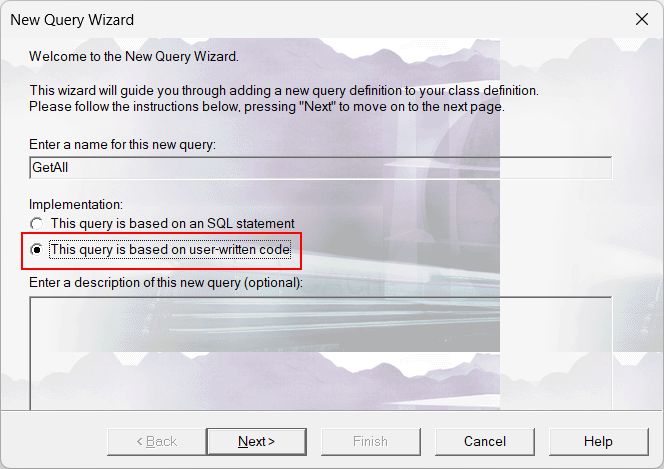
In this tutorial, I’d like to talk about Class Queries. To be more precise, about the Queries based on user-written code:

A lot of people disregard this type of query just because they aren’t very comfortable with writing lots of ObjectScript code for the methods or they don’t see how they can use it in their relational apps. But to be honest, for me – it’s one of the coolest inventions for the relational model in IRIS! It lets you expose whatever information you want (not limited to tables of your database) as a relational resultset for a client.
Imagine the scene. You are working happily at Widgets Direct, the internet's premier retailer of Widgets and Widget Accessories. Your boss has some devastating news, some customers might not be fully happy with their widgets, and we need a helpdesk application to track these complaints. To makes things interesting, he wants this with a very small code footprint and challenges you to deliver an application in less than 150 lines of code using InterSystems IRIS. Is this even possible?
ZPM is designed to work with applications and modules for InterSystems IRIS Data Platform. It consists of two components, the ZPN Client which is a CLI to manage modules, and The Registry which is a database of modules and meta-information. We can use ZPM to search, install, upgrade, remove and publish modules. With ZPM you can install ObjectScript classes, Frontend applications, Interoperability productions, IRIS BI solutions, IRIS Datasets or any files such as Embedded Python wheels.
In the last post we scheduled 24-hour collections of performance metrics using pButtons. In this post we are going to be looking at a few of the key metrics that are being collected and how they relate to the underlying system hardware. We will also start to explore the relationship between Caché (or any of the InterSystems Data Platforms) metrics and system metrics. And how you can use these metrics to understand the daily beat rate of your systems and diagnose performance problems.
Hi Developers
As you know it's very easy to publish a package to the Developers Community registry.
But how to test it before publishing? How to be sure that everything you introduced into module.xml is installed properly?
See the step-by-step instruction below!
This is the third post of a series explaining how to create an end-to-end Machine Learning system.
When you work with machine learning is common to hear this work: training. Do you what training mean in a ML Pipeline? Training could mean all the development process of a machine learning model OR the specific point in all development process that uses training data and results in a machine learning model.
In the very last point it looks like a normal application.

Easily transform a CSV file into a personalized preview of DeepSee - InterSystems BI
AnalyzeThis can be found on InterSystems Open Exchange. Use the Download link to navigate to GitHub and begin installing the project. Follow the “Installation” section of the GitHub README.
This week I am going to look at CPU, one of the primary hardware food groups :) A customer asked me to advise on the following scenario; Their production servers are approaching end of life and its time for a hardware refresh. They are also thinking of consolidating servers by virtualising and want to right-size capacity either bare-metal or virtualized. Today we will look at CPU, in later posts I will explain the approach for right-sizing other key food groups - memory and IO.
When connecting to the database using a client-server architecture, for example using language binding, the machine name of the client can be obtained using the following code:
set client=##CLASS(%SYS.ProcessQuery).Open("P"_$j).ClientNodeName.png)
As AI-driven automation becomes an essential part of modern information systems, integrating AI capabilities into existing platforms should be seamless and efficient. The IRIS Agent project showcases how generative AI can work effortlessly with InterSystems IRIS, leveraging its powerful interoperability framework—without the need to learn Python or build separate AI workflows from scratch.
This project explores how ChatGPT and Anthropic Claude, two of the most advanced AI models, can interact with IRIS using Custom GPTs and the Model Context Protocol (MCP).
Globals, these magic swords for storing data, have been around for a while, but not many people can use them efficiently or know about this super-weapon altogether.
If you use globals for tasks where they truly shine, the results may be amazing, either in terms of increased performance or dramatic simplification of the overall solution (1, 2).
Globals offer a special way of storing and processing data, which is completely different from SQL tables. They were first introduced in 1966 in the M(UMPS) programming language, which was initially used in medical databases. It is still used in the same way, but has also been adopted by some other industries where reliability and high performance are top priorities: finance, trading, etc.
Later M(UMPS) evolved into Caché ObjectScript (COS). COS was developed by InterSystems as a superset of M. The original language is still accepted by developers' community and alive in a few implementations. There are several signs of activity around the web: MUMPS Google group, Mumps User's group), effective ISO Standard, etc.
Modern global based DBMS supports transactions, journaling, replication, partitioning. It means that they can be used for building modern, reliable and fast distributed systems.
Globals do not restrict you to the boundaries of the relational model. They give you the freedom of creating data structures optimized for particular tasks. For many applications reasonable use of globals can be a real silver bullet offering speeds that developers of conventional relational applications can only dream of.
Globals as a method of storing data can be used in many modern programming languages, both high- and low-level. Therefore, this article will focus specifically on globals and not the language they once came from.
IRIS and Ensemble are designed to act as an ESB/EAI. This mean they are build to process lots of small messages.
But some times, in real life we have to use them as ETL. The down side is not that they can't do so, but it can take a long time to process millions of row at once.
To improve performance, I have created a new SQLOutboundAdaptor who only works with JDBC.
Extend EnsLib.SQL.OutboundAdapter to add batch batch and fetch support on JDBC connection.
Benchmarks released on Postgres 11.2 with 1 000 000 rows fetched and 100 000 rows inserted on 2 columns.

Since InterSystems has recently announced the discontinuation of support for InterSystems Studio starting from version 2023.2 in favor of exclusive development of extensions for the Visual Studio Code (VSC) IDE, believing that the latter offers a superior experience compared to Studio, many of us developers have switched or are beginning to use VSC. Many may have wondered how to open the Terminal to perform operations, as VSC does not have an Output panel like Studio did, nor an integrated feature to open the IRIS terminal, except by downloading the plugins developed by InterSystems.
I wanted to provide a heads up of an improvement in how we generate and call method code in IRIS 2023.1.
A class in IRIS is composed of two main runtime components:
The typeorm-iris project provides experimental support for integrating TypeORM with InterSystems IRIS, enabling developers to interact with IRIS using TypeORM’s well-known decorators and repository abstractions. This allows a more familiar development experience for JavaScript and TypeScript developers building Node.js applications with IRIS as the backend database.

While the project implements key integration points with TypeORM and supports basic entity operations, it’s not yet battle-tested or suitable for production environments.
| “At the request of the survivors, the names have been changed. Out of respect for the dead, the REST has been told exactly as it occurred.” |
If you want to start IRIS as a service on CentOS7 you can use systemd.
Login as root and create a new file iris.service in /etc/systemd/system.
# vi /etc/systemd/system/iris.service
[Unit] Description=Intersystem IRIS Service After=network.target [Service] Type=forking WorkingDirectory=<iris-install-dir> User=root ExecStart=<iris-inst-dir>/bin/iris start "<instance>" ExecStop=<iris-inst-dir>/bin/iris stop "<instance>" quietly Restart=on-abort [Install] WantedBy=default.target
<iris-install-dir> = Directory where you installed IRIS on Centos7 i.e.
Hi Community!
I think everyone keeps the source code of the project in the repository nowadays: Github, GitLab, bitbucket, etc. Same for InterSystems IRIS projects check any on Open Exchange.
What do we do every time when start or continue working with a certain repository with InterSystems Data Platform?
We need a local InterSystems IRIS machine, have the environment for the project set up and the source code imported.
So every developer performs the following:
If you dockerize your repository this steps line could be shortened to this 3 steps:
Profit - no any hands-on for 3-4-5 steps which could take minutes and bring head ache sometime.
You can dockerize (almost) any your InterSystems repo with a few following steps. Let’s go!