#Development Environment

5 Followers · 381 Posts

An integrated development environment (IDE) is a software application that provides comprehensive facilities to computer programmers for software development.

The official IDE for InterSystems Data Platform products is Atelier.

Question Scott Morrison · Mar 26, 2018

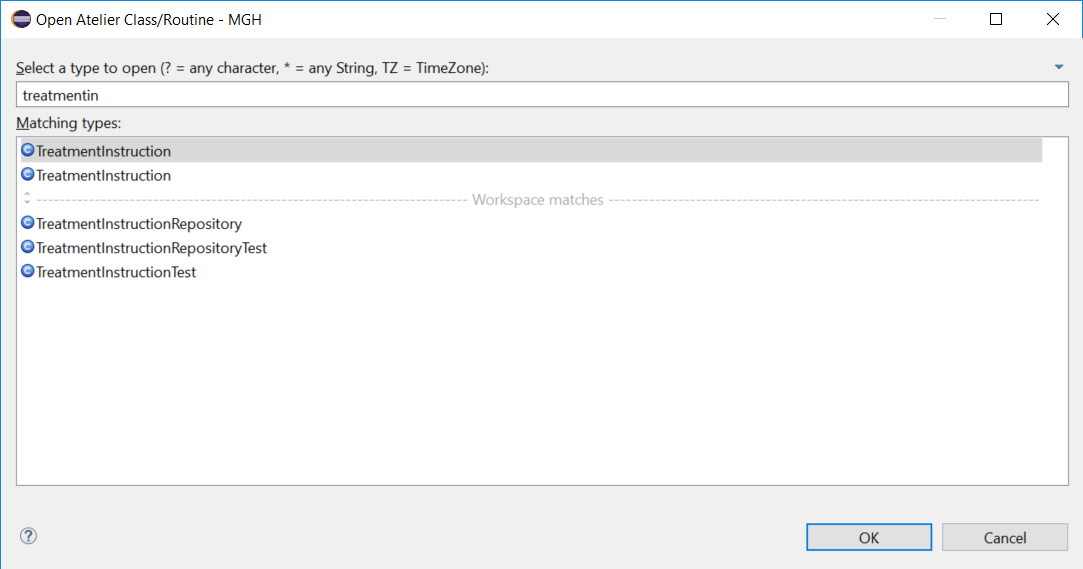
Is is possible to install multiple copies of Eclipse/Atelier, and have each instance maintain it's own distinct list of server connections? I thought I had figured it out, uninstalled everything, and reinstalled without using bundle pools.  I think this keeps projects separate, along with allowing different Eclipse settings and plug-ins. After installing the second instance, no server connections from the first were showing in the second. I added connections to the second instance, and after closing Eclipse and opening the first instance, that instance was showing the second instances

8
0 806
Announcement Michelle Spisak · Jan 23, 2018

Have you heard interesting things about Atelier, the InterSystems Eclipse plugin, and want to learn more?

Join @Michelle Stolwyk, a software developer at InterSystems, for Enter a New Era with Atelier, a webinar in which she shows how Atelier can simplify your development workflow. She also discusses the feature priorities InterSystems has for Atelier and even explains how your feedback can affect these priorities!

Do you have questions for Michelle following the webinar? Feel free to post them below!

3
0 559
Question David Foard · Feb 22, 2018

Just starting to use Atelier and having problems with making server connections. I have tried both the super server port and the web server port and both fail with either Unexpected end of file from server (Secure connection disabled) or PKIX path building failed (Secure connection enabled). On a different server I get Connection refused: check the web server configuration.

Anyone run into this before?

2
0 572
Question Trevor Strong · Sep 20, 2017

To be able to replace current Cache Studio user functionality in our source control system, I need to access the current project name that the atelier file belongs to when being checked out and in within the UserAction method of the source control class.
In addition to this, there also appears to be a problem in that when UserAction code is executed by the Atelier callbacks, the process is running as UnKnownUser instead of utilising the authentication values assigned in the Connection settings for the server.

Does anyone know if these properties are currently exposed?

5
0 422
Question Michael Hampton · Feb 7, 2018

When using Atelier on COS ctrl-left and ctrl-right considers a word to start on each capital letter in variable names. So if you are on the word:

UpdateServerName

The cursor will stop on the capital U, S, and N. Same thing in javascript files, but NOT in css files. In Studio it didn't use to stop on capital letters in variable names etc. Personally I consider this very annoying and requires a lot more key presses to jump across code to the right spot.

Is this behavior changeable to NOT stop on capital letters?

2
0 348
Announcement Mike Kadow · Feb 4, 2018

A new book on Caché Objects and Atelier                     $25 at Amazon.com                                                                                               

TinyUrlhttps://tinyurl.com/y74jw49c

Coming on Kindle

There are many good MUMPS developers who want to learn Caché Objects but do not know how to start.

At the same time, InterSystems is pushing the envelope of technology with a new development platform

such as Atelier along with Eclipse.

It is my aim in this book to help those developers bridge the gap into Caché Objects at the same time learn

Atelier as well.

5
0 1367
Question Michael Hampton · Jan 30, 2018

Well my last post got cut off for some reason. I am trying the new beta and wondering about the following functionality from Studio that I don't find in Atelier:

F12 = Open the routine and jump to the tag of the current call the cursor is on in a routine

F2 / <Ctrl> F2 = jumping to a bookmark / toggling a bookmark

<Ctrl> G = Jump to a tag in the code

When might these things be in Atelier? I use them a lot in Studio and the absence of these really slows me down.

8
0 540
Article Nicole Aaron · Jan 12, 2018 1m read

Where did the RemoteSystemsTempFiles project come from?

If you're using Atelier, you may have noticed a project called "RemoteSystemsTempFiles" in the Atelier Explorer and Project Explorer views. This project is automatically created by the Eclipse Remote Systems Explorer (RSE) on start-up. The RSE allows you to connect to and work with a variety of remote systems.

You can either hide this project within your views, or remove it completely by following the steps below.

Removing the RemoteSystemsTempFiles project from Eclipse

0
0 4462
Question Kurro Lopez · Jan 10, 2018

Hi all,

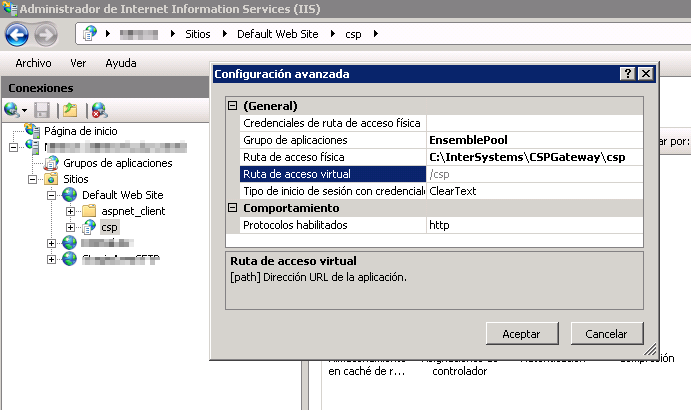
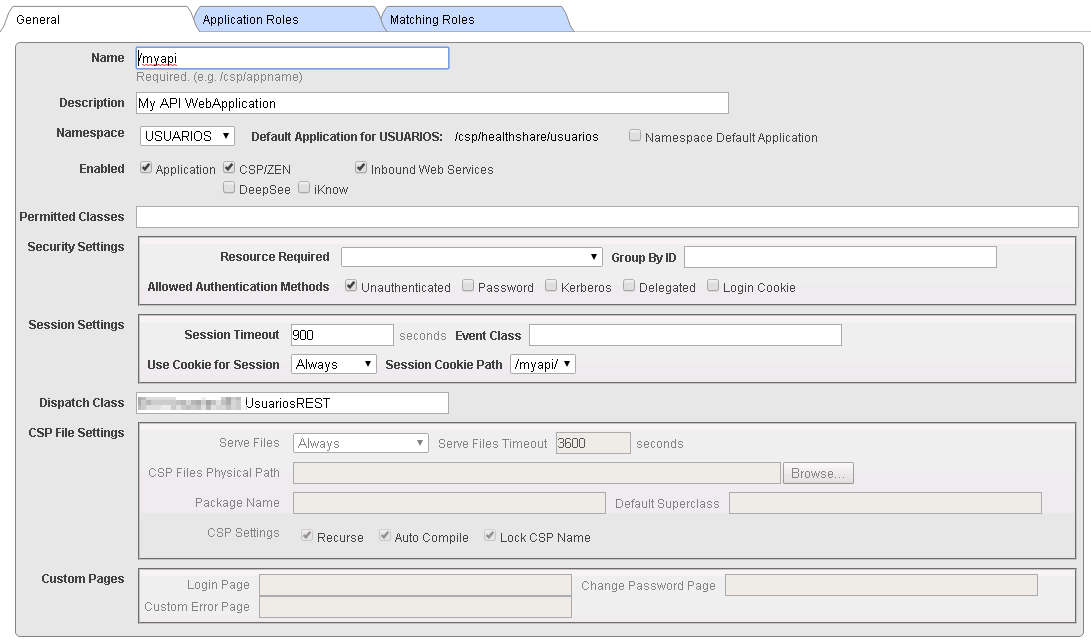
I've configured my Ensemble instance to use IIS 7, according to the instructions CSP Gateway configuration Guide and I've configure the CSP Virtual application.

All the process about Native modules is done.

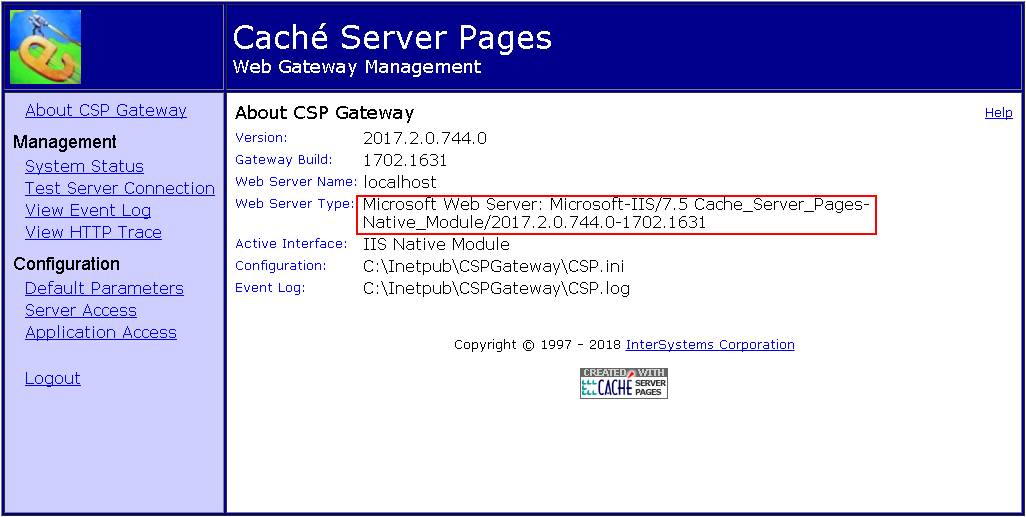
If I open http://localhost/csp/bin/Systems/Module.cxw I see that it is using the IIS as I expected.

I've created a WebApi and I've deployed in my server

If I call the check method it works 

however, if I call it directly (localhost/myapi/check) it doesn't work.

Error HTTP 404.0 - Not Found

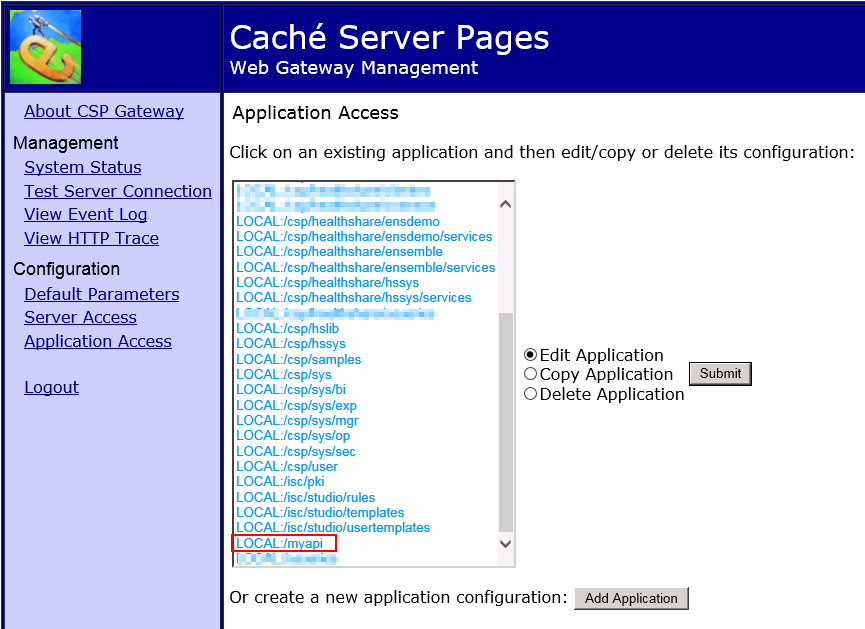
If I check the list of application access in the CSP Web Gateway management, it is in the list.

7
0 1544
Announcement Michelle Stolwyk · Dec 28, 2017

InterSystems is ready for 2018 since Atelier 1.1 is now available as a stable release! Bring on the new year!

To subscribe to the NEW Atelier release channel, please follow the instructions on the Atelier Download page.

Stick with the beta update channel if you want to be an Atelier insider and get the latest new features and enhancements before anyone else. #VIP

With this release, you can:

0
0 544
Announcement Michelle Stolwyk · Dec 26, 2017

[Update] The problem has been fixed.

The update sites listed on the Atelier download page will be temporarily down for some time. We will notify the community here once the servers are brought back up.

As a result, you will not be able to install Atelier 1.1.391 from the beta update site until this work is completed.

Thank you for your patience and we apologize for any inconvenience.

2
0 254
Question David Crawford · Dec 20, 2017

Hello everyone, I work for a company that currently uses Studio on version 2016.1.2, and will be looking at options to upgrade to 2016.2 and beyond. This would also include the potential to switch from Studio to Atelier, however there are a lot of workflow changes and new features to test.

Does Atelier have a simple way to evaluate what it has to offer without needing to setup an entire separate environment? How did your organization demo its features before committing?

Thank you! yes

2
0 455
Question Sébastien Demoustiez · Nov 21, 2017

Hello Community,

I recently encountered a issue with Caché and I can't figure out where the problem is coming from.

I noticed that the license limit (200)  was reached whenever I was opening my Studio (so it seems). When this occurs, I restart Caché (with the Cube in the Taskbar), and the number of license used is back to 1%, but grows back after.  The time taken before the number of license  grows back again looks pretty random.

Here is a couple of screenshots :

Does anybody know where the problem might come from ?
7
0 1994
Question Георгий Самаров · Dec 12, 2017

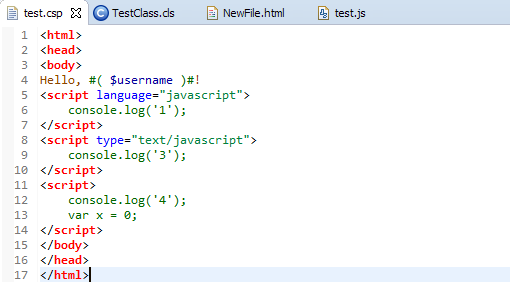
Hello everyone. So as title says, I used to install Eclipse with Atelier plugin recently to work in instead of Cache Studio and spotted that all my JS-code on CSP page is colored green as you can see here:


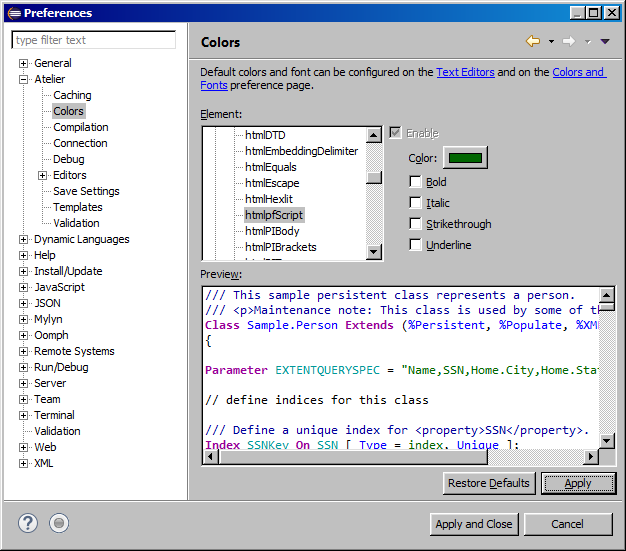
I couldn't find how to make code-detection on CSP files like JS files. All I found is this element which controls code inside HTML tag <script></script>

..which can't help me to color for example var to be pink color and etc. Any solutions?

6
0 971
Question Mike Kadow · Dec 2, 2017

I started with the Atelier Stand Alone.

Now I have moved on to Atelier as a plug-in to Eclipse.

With the Stand Alone I had access to two help topics, the Workbench and the InterSystems Atelier.

Now, as a plug-in I have access to a number of other help topics.

When I do a Help Contents, how do I eliminate those help topics I have no interest in?

Or only do a Help Contents on the topics that apply to me as a Atelier user?

I apologize if you have already covered this, but there is so much to read on Atelier already.

2
0 316
Announcement Joyce Zhang · Nov 6, 2017

To simplify the upgrade processes and to keep up with industry standards, we decided to make Atelier only available as an Eclipse plugin. Those of you who are currently using a standalone Atelier client will not be able to upgrade to a later version.

Please go to the Atelier Download page or see the sections below for the detailed instructions about installing Eclipse and the Atelier plugin. Feel free to reach out to support or leave a comment down below if you have any questions.

Edit: Related article - How to convert from your standalone Atelier?

Installation Instructions

System requirements

9
0 1772
Article Joyce Zhang · Jul 12, 2017 2m read

The Atelier beta update channel:

https://atelier.artifactoryonline.com/atelier/updates/beta/1.1

offers the latest features and bug fixes. It now updates your installation of Atelier to build 1.1.310 for Mac, Windows, Red Hat, SUSE and Ubuntu. Here’s an account of what’s recently been improved:

New Features:

  • The SQL parser has been significantly enhanced including performance improvements
  • The JavaScript parser has been simplified for performance improvements. The class shown in the example below invokes the JavaScript parser. The "File is too large to parse properly" issue has been fixed.
6
0 851
Question Thomas Kotze · Nov 2, 2017

Hello,

Just today updated Atelier to the latest Beta release.Getting the following error in Eclipse:
Plug-in com.intersys.eclipse.legacy.extension was unable to load class com.intersys.eclipse.legacy.extension.Startup.

Unable to open Atelier perspective.

Does anybody else get this issue, how to go back to previous version?

Regards

Thomas

6
0 408
Article Joyce Zhang · May 2, 2017 1m read

Greetings fellow Atelier users! To help new users get started, we are planning to make a list of video tutorials (e.g., how to create an Atelier project). The first one is "Introduction to Atelier", which is a brief tour of the Atelier user interface. We'd appreciate it if you could watch this video and let us know your comments. We'll be relying on your feedback to create more video tutorials to make it easier for new users to learn Atelier.

Please feel free to post your comments below. We look forward to hearing from you!

1
0 851
Question Mike Kadow · Oct 23, 2017

I am trying to create a routine in Atelier.

I go through and enter the necessary information but before I can save, it says I have an invalid project location.

I am not sure what this is referring to, a directory? a namespace? a website? something else? "Location" does not describe what is necessary here.

I had a screen shot but cannot seem to post it here.

2
0 386
Article Joyce Zhang · Jun 6, 2017 2m read

It's been 6 months since InterSystems released Atelier 1.0 and we continue to roll out enhancements and new features through the beta channel (please see the Atelier Download page for details). In the meantime, we have received a lot of messages from the Developer Community with ideas for further improvements. Based on your feedback, we created a roadmap for Atelier 1.1 so you can conveniently track when specific features are going to be integrated.

Below is a list of the major improvements planned for 1.1, which we are expecting to demo at the Global Summit.

15
0 1572