5 Followers · 227 Posts

A programming tool or software development tool is a computer program that software developers use to create, debug, maintain, or otherwise support other programs and applications.

Article Victoria Castillo · Mar 19, 2024 5m read

I have been walking through this with a few team members and as such I thought there might be others out there who could use it, especially if you work with HL7 & Ensemble/HealthConnect/HealthShare and never venture out past the Interoperability section. 

First, I would like to establish that this is an extension of the already established documentation on importing and exporting SQL data found here: https://docs.intersystems.com/iris20241/csp/docbook/DocBook.UI.Page.cls?

2
1 748
Article Robert Barbiaux · Sep 1, 2025 9m read

InterSystems IRIS interoperability production development involves using or writing various types of components. They include services (which handle incoming data), processes (which deal with the data flow and logic), and operations (which manage outgoing data or requests). Messages flowing through those components constantly require being adapted to consuming applications. Therefore,Data transformations are by far the most common component in interoperability productions.

In the early stages of data transformation development, thetest tool from the Management Portal becomes quite handy.

0
0 142
Article Alberto Fuentes · Sep 1, 2025 7m read

Customer support questions span structured data (orders, products 🗃️), unstructured knowledge (docs/FAQs 📚), and live systems (shipping updates 🚚). In this post we’ll ship a compact AI agent that handles all three—using:

  • 🧠 Python + smolagents to orchestrate the agent’s “brain”
  • 🧰 InterSystems IRIS for SQL, Vector Search (RAG), and Interoperability (a mock shipping status API)
0
2 211
Announcement David McCaldon · Aug 18, 2025

I’m pleased to announce the release of tree-sitter-objectscript, a new open-source tree-sitter grammar that brings first-class ObjectScript support to modern editors. If you caught the preview at READY ’25, you’ll be glad to know it’s now up on Github:

https://github.com/intersystems/tree-sitter-objectscript

What Does It Provide?

  • Fast & Precise Parsing: A powerful grammar for ObjectScript, enabling real-time syntax parsing, smart highlighting, and structural editing in modern code editors.
  • Polyglot-Awareness: ObjectScript .
12
4 432
Article Pietro Di Leo · Aug 21, 2025 3m read

Recently, I replaced my old laptop with a new one and had to migrate all my data. I was looking for a guide but couldn’t find anything that explained in detail how to migrate server connections from InterSystems Studio and Visual Studio Code from one PC to another. Simply reinstalling the tools is not enough, and migrating all the connections manually seemed like a waste of time. In the end, I managed to solve the problem, and this article explains how.

InterSystems Studio

Exporting Server Connections

Migrating Studio connections was the most challenging part.

0
2 155
Question Andre Ribera · Mar 25, 2025

Been testing out the Production Validator toolkit, just to see what we can/not do with it. Seems really interesting and there seem to be some use cases for it that can really streamline some upgrades (or at least parts of upgrades) but I was running into so many hurdles with the documentation. I am curious if anyone else has used it.
Did you experience any issues getting it working? Any clarification that you would have liked in the documentation? any use cases that you worked through that made it particularly valuable? etc?

6
0 210
Article Yuri Marx · Jul 26, 2025 8m read

Word documents are widely used in the market. Users frequently create contracts, memos, resumes, reports, analyses, and other documents that may require data from or captured by InterSystems IRIS. However, IRIS does not have an API, SDK, library, or adapter for this. This limitation no longer exists. 

The new Open Exchange library iris4word (https://openexchange.intersystems.com/package/iris4word) delivers an ObjectScript SDK where the developer passes any %DynamicObject as a parameter, a Word file template and then receives a ready document, with the structure and formatting defined in its template.


2
3 124
Announcement Evgeny Shvarov · Jul 14, 2025

Here are the technology bonuses for the InterSystems Developer Tools Contest 2025 that will give you extra points in the voting:

  • IRIS Vector Search usage -3
  • Embedded Python usage -3
  • InterSystems Interoperability - 3
  • InterSystems IRIS BI - 3
  • VSCode Plugin - 3
  • FHIR Tools - 3
  • Docker container usage -2 
  • ZPM Package Deployment - 2
  • Implement InterSystems Community Idea - 4
  • Find a bug in Embedded Python - 2
  • Article on Developer Community - 2
  • The second article on Developer Community - 1
  • Video on YouTube - 3
  • First Time Contribution - 3

See the details below.<--break->

3
0 179
Announcement John Murray · Jul 23, 2025

Users of the %UnitTest framework can now get test coverage information inside VS Code by combining the latest release (v2.0.0) of the InterSystems Testing Manager extension with @Timothy Leavitt's impressive Test Coverage Tool.

Above you can see the Test Coverage pane, which I have moved to the secondary sidebar on the right so it can more easily be explored in conjunction with the Test Explorer on the left.

Notice how the most recent test run (of all Test Coverage Tool's own unit tests) covered the BitValue method of TestCoverage.Procedures but not the BitCount method (nor 6 other methods).

0
0 130
Article Sylvain Guilbaud · Jul 18, 2025 8m read

🛠️ Managing InterSystems InterSystems API Manager (IAM = Kong Gateway) configurations in CI/CD

🔍 Context: InterSystems IAM configurations 

As part of integrating InterSystems IRIS into a secure and controlled environment, InterSystems IAM relies on Kong Gateway to manage exposed APIs.
Kong acts as a modern API Gateway, capable of handling authentication, security, traffic management, plugins, and more.

However, maintaining consistent Kong configurations (routes, services, plugins, etc.) across different environments (development, testing, production) is a major challenge.

0
1 172
Article Henry Pereira · Jun 11, 2025 15m read

Learn how to design scalable, autonomous AI agents that combine reasoning, vector search, and tool integration using LangGraph.

cover

Too Long; Didn't Read

  • AI Agents are proactive systems that combine memory, context, and initiative to automate tasks beyond simple chatbots.
  • LangGraph is a framework that enables us to build complex AI workflows, utilizing nodes (tasks) and edges (connections) with built-in state management.
4
4 693
Discussion Harshitha · May 30, 2025

Hey everyone,

I'm diving deeper into Caché ObjectScript and would love to open a discussion around the most useful tips, tricks, and best practices you’ve learned or discovered while working with it.

Whether you're an experienced developer or just getting started, ObjectScript has its own set of quirks and powerful features—some well-documented, others hidden gems. I’m looking to compile a helpful set of ideas from the community.

3
4 220
Question Eric Tulowetzke · May 23, 2025

Hi all,

My team is exploring options for handling timezone offsets in DTL and we’re wondering if there are any built-in methods available — ideally low-code or no-code solutions. Specifically, we're looking for a way to adjust timestamps based on the date and whether Daylight Saving Time (DST) is in effect.

For example, if an HL7 message has an MSH-7 value of 20250518144529, it should be converted to 20250518144529-0500 (Central Daylight Time), but if the timestamp were 20250218144529, it should be 20250218144529-0600 (Central Standard Time).

6
1 197
Article sween · Mar 4, 2024 8m read

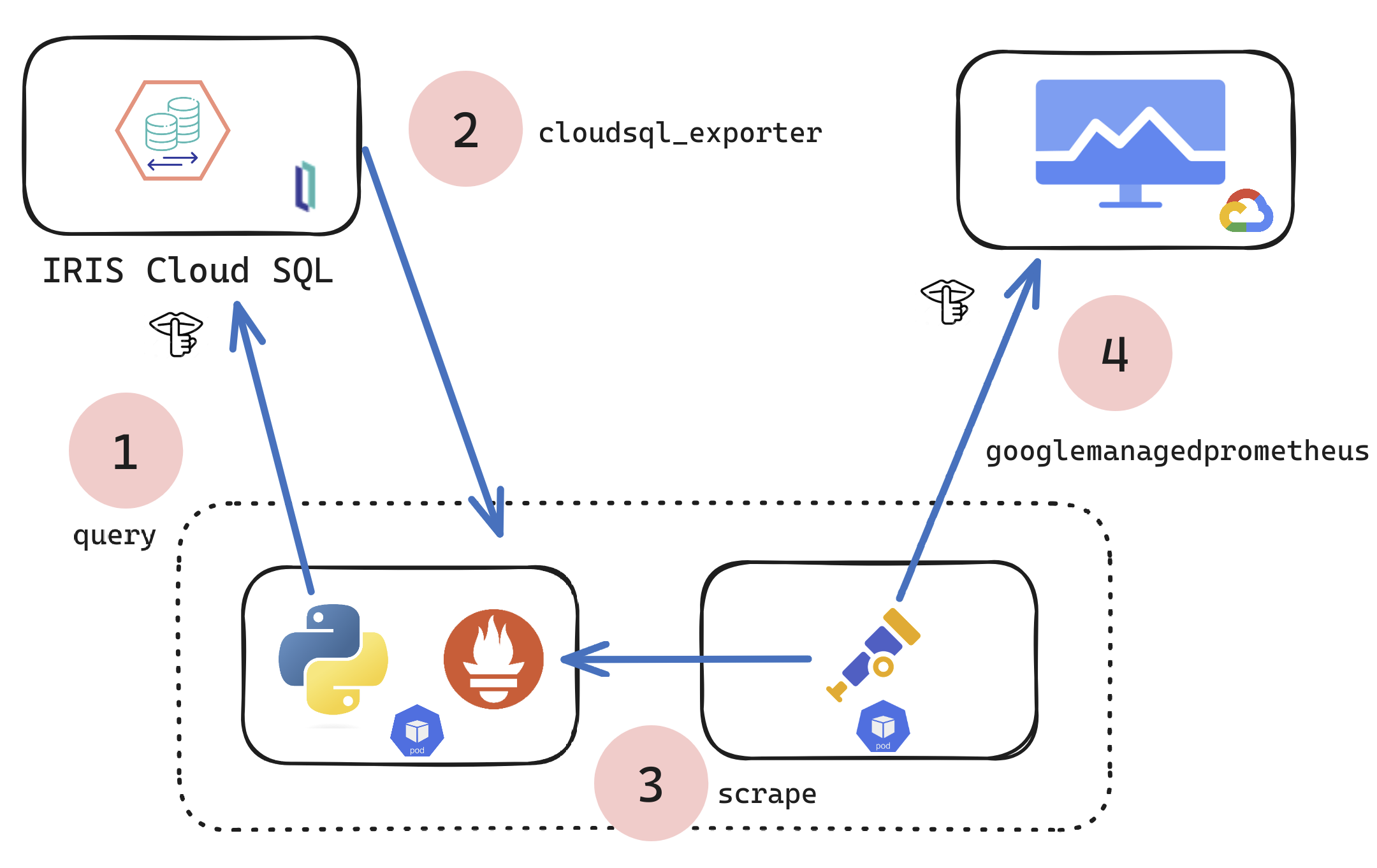
If you are a customer of the new InterSystems IRIS® Cloud SQL and InterSystems IRIS® Cloud IntegratedML® cloud offerings and want access to the metrics of your deployments and send them to your own Observability platform, here is a quick and dirty way to get it done by sending the metrics to Google Cloud Platform Monitoring (formerly StackDriver).

1
2 385
Article Muhammad Waseem · Apr 1, 2025 7m read

Hi Community,
In this article, I will introduce my application iris-AgenticAI .

The rise of agentic AI marks a transformative leap in how artificial intelligence interacts with the world—moving beyond static responses to dynamic, goal-driven problem-solving. Powered by OpenAI’s Agentic SDK , The OpenAI Agents SDK enables you to build agentic AI apps in a lightweight, easy-to-use package with very few abstractions. It's a production-ready upgrade of our previous experimentation for agents, Swarm.
This application showcases the next generation of autonomous AI systems capable of reasoning, collaborating, and executing complex tasks with human-like adaptability.

Application Features

  • Agent Loop 🔄 A built-in loop that autonomously manages tool execution, sends results back to the LLM, and iterates until task completion.
  • Python-First 🐍 Leverage native Python syntax (decorators, generators, etc.) to orchestrate and chain agents without external DSLs.
  • Handoffs 🤝 Seamlessly coordinate multi-agent workflows by delegating tasks between specialized agents.
  • Function Tools ⚒️ Decorate any Python function with @tool to instantly integrate it into the agent’s toolkit.
  • Vector Search (RAG) 🧠 Native integration of vector store (IRIS) for RAG retrieval.
  • Tracing 🔍 Built-in tracing to visualize, debug, and monitor agent workflows in real time (think LangSmith alternatives).
  • MCP Servers 🌐 Support for Model Context Protocol (MCP) via stdio and HTTP, enabling cross-process agent communication.
  • Chainlit UI 🖥️ Integrated Chainlit framework for building interactive chat interfaces with minimal code.
  • Stateful Memory 🧠 Preserve chat history, context, and agent state across sessions for continuity and long-running tasks.
0
0 365
Announcement Brett Saviano · Aug 7, 2024

The VS Code extension development team is looking for beta testers to provide feedback on a proposed overhaul of the client-side editing workflow. The full list of changes can be found in the GitHub pull request description. Here are the highlights:

  • Support the use of client-side editing in any non-isfs workspace folder, not just folders in your local file system. For example, with VS Code Remote Development.
  • Create an index of all Classes, MAC and INT routines, and Include files inside non-isfs workspace folders.
35
2 862
Article Nikita Savchenko · Apr 1, 2016 6m read


Hello!

This article is a small overview of a tool that helps to understand classes and their structure inside the InterSystems products: from IRIS to Caché, Ensemble, HealthShare.

In short, it visualizes a class or an entire package, shows the relations between classes and provides all the possible information to developers and team leads without making them go to Studio and examine the code there.

If you are learning InterSystems products, reviewing projects a lot or just interested in something new in InterSystems Technology solutions — you are more than welcome to read the overview of ObjectScript Class Explorer!

38
4 6255
Article Theo Stolker · Jun 4, 2024 2m read

When developing a new Interoperability Production, it is quite natural that settings are initially added in the Production.

However, as soon as you want to move the Production from development to a test or staging environment, it becomes clear that some settings like HTTP Servers, IP addresses and/or ports need to be changed. In order to avoid these settings being overwritten during a redeployment later on, it is essential that you move these settings from the Production to the System Default settings.

2
8 502
Announcement John Murray · Dec 16, 2024

The InterSystems platforms have always offered dynamic documentation of the packages and classes in a namespace, a feature known informally as Documatic. But what if you need to publish this class reference information on a website without requiring the site to be connected to an IRIS server containing the actual classes?

For my entry to the December 2024 Developer Community “Bringing Ideas to Reality” contest I decided to implement the idea of a generator that produces a static set of class reference pages .

1
2 227
Article sara aplin · Dec 20, 2024 2m read

Monitor incremental changes in the database through scheduled tasks, display change trends through charts, set alarm thresholds, and write information to messages.log

How to use it

You can install it through Docker or ZPM

Deploying with Docker Prerequisites

Make sure you have git and Docker desktop installed.

Installation

1.Clone/git pull the repo into any local directory

git clone https://github.com/Sara771dev/Database-Size-Monitoring.
0
1 284
Article Lorenzo Scalese · Nov 15, 2020 8m read

Hi Community,   OpenAPI-Client Gen has just released, this is an application to create an IRIS Interoperability Production client from Swagger 2.0 specification.   Instead of the existing tool ^%REST that creates a server-side REST application, OpenAPI-Client Gen creates a complete REST Interoperability Production client template.

Install by ZPM:

zpm "install openapi-client-gen"

  How to generate production from Swagger document?   It's very simple.

Open a terminal and execute:

Set sc = ##class(dc.openapi.client.Spec).generateApp(<applicationName>, <Your Swagger 2.
12
0 1343
Article Chi Nguyen-Rettig · Sep 21, 2024 3m read

There are many applications for working with HL7 V2 messages, but the tools for working with XML in IRIS Management Portal and Cache Studio are limited. While plenty of external utilities and IDEs work with XML messages and even C-CDA documents, there is a compelling case for being able to test directly against the IRIS C-CDA framework. 

Testing within the IRIS environment provides the necessary context: 

  • XML parser configuration
  • XML namespace context
  • Facility and OID setup
  • IHE header handling
  • The HS.IHE.Util, HS.Util.XSLTTransformer, and %XML.XSLT.
7
4 450
Announcement John Murray · Sep 25, 2024

Please allow me to introduce you to a new way of interacting with IPM (InterSystems Package Manager), also known as ZPM,directly from inside Visual Studio Code.

First, install into VS Code the free InterSystems Package Manager extension, published to Marketplace by George James Software. A quick way is to use the search field in VS Code's Extensions view and look for 'ipm zpm' (without the quotes). Alternatively browse to https://marketplace.visualstudio.com/items?itemName=georgejames.iris-pa…

Here's a short video showing the extension in action.

7
1 250