#Terminal

5 Followers · 220 Posts

Posts that relate to discussions on utilizing the Terminal tool.

Article Brendan Batchelder · Dec 9, 2016 3m read

When testing a new routing rule, one frequently encountered problem is that messages that seem like they should be getting routed to a target component are not getting routed.  This article aims to describe how to determine why the message didn't get routed.

1. Check the Event Log for the router to make sure there wasn't an error evaluating the rule or running any transformations referenced by the rule.  If there was, debug that error first.

2
1 1227
Question Thomas Chericka · Dec 8, 2016

Hi,

Thanks for your time.

Plain $ZF(-1) and $ZF(-2) calls from Cache Studio or Terminal have stopped launching the OS shell from Win10.

cmd (Windows Command Prompt) should be launched.

Configuration:

Windows 10 Anniversary Update, Ensemble 2016.2.0.585.0 Developer Edition x64

Is this common? I have enabled both %Developer role and a Cache CallOut privilege for all users that operate in this scenario.

In Terminal, W $ZF(-1) prints -1, W $ZF(-2) prints -1

In Studio, W $ZF(-1) hangs the IDE, W $ZF(-2) prints 0

In all four cases, cmd (Windows Command Prompt) is not launched!

Any ideas, anybody?

2
0 1409
Question William Proctor · Nov 23, 2016

Good Morning,   All replies are appreciated.

We have a development instance of cache that was installed and the person that installed and set it up is no longer here.  We have no id's that we have the passwords for.  I have brought the database up in emergency mode and I can get access thru the terminal using my emergency id but I do not know how to add  a user/password thru the terminal.  Can someone enlighten me or point me to documentation that I haven't found yet.

2
0 718
Article Gevorg Arutiunian · Nov 21, 2016 4m read

Caché Localization Manager

CLM  is a tool for localization/internationalization/adding multi-language support to a project based on InterSystems Caché.

Imagine that you have a ready project where all the content is in Russian, and you need to add an English localization to it. You wrap all your strings into resources, translate them into English and call the necessary resource for Russian or English when necessary. Nothing tricky, if you think about it. But what if there are lots of strings and there are mistakes in Russian (or English)? What if you need to localize in more than one language – say, ten? This is exactly the kind of project where you should use CLM. It will help you localize the entire content of your project into the necessary language and retain the possibility to correct entries.

4
0 1054
Article Alessandro Marin · Nov 14, 2016 5m read

The DeepSee TroubleShooting Guide helps you track down and fix problems occurring in your DeepSee project. A common problem is finding less records than expected in a DeepSee Cube or a related Subject Area. The DeepSee TroubleShooting Guide suggests starting your investigation by checking the following:

Check cube for build restrictions

Check if maxFacts is used

Check if Build Errors are occurring

0
0 489
Question Ryan Miller · Nov 7, 2016

I tried using the DeepSee Troubleshooting guide but the suggestions weren't working.  Let's say that the source data we are using to build the cube on has a value out of range. This would cause the cube build/update to fail. How do I see the error log that explains which field has the value out of range? Please be detailed on exactly what command I should enter and where I should enter it in.

5
0 785
Article Mario Sanchez Macias · Nov 10, 2016 1m read

I tried to make atelier look more like XCODE with this simple trick or tip: change the default font to SF Mono and size 14.

To do it I did:

1) Install SF Mono font in the system which is the default font for XCODE and needs to be installed in order to use it.

You can find it in: /Applications/Utilities/Terminal.app/Contents/Resources/Fonts

Double Click SFMono-Regular.otf file and install it. You will get a warning of "serious problems" but it will work all right.

0
0 529
Article Cindy Olsen · Nov 8, 2016 7m read

In this post I would like to talk about the syslog table.  I will cover what it is, how you look at it, what the entries really are, and why it may be important to you.  The syslog table can contain important diagnostic information.  If your system is having any problems, it is important to understand how to look at this table and what information is contained there.

1
2 2905
Question Nikita Savchenko · Nov 2, 2016

Hello community!

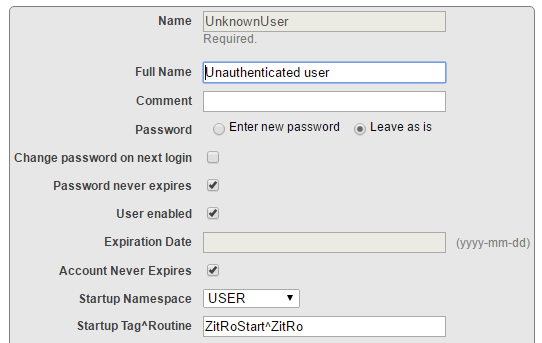
I am trying to set up Startup Tag^Routine field for the UnknownUser as follows:

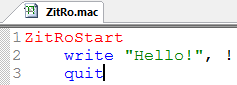
And my simple routine is the next:

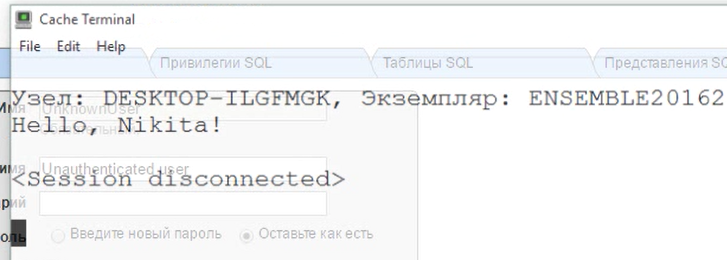
Calling do ZitRoStart^ZitRo in the terminal prints "Hello", but when opening Caché Terminal it results with the next:

And the terminal closes.

// Cache for Windows (x86-64) 2016.2 (Build 636U) Wed Apr 13 2016 20:58:35 EDT

What am I doing wrong in setup?

Thank you very much!

6
0 856
Article Benjamin De Boe · Nov 3, 2016 16m read

This article contains the tutorial document for a Global Summit academy session on Text Categorization and provides a helpful starting point to learn about Text Categorization and how iKnow can help you to implement Text Categorization models. This document was originally prepared by Kerry Kirkham and Max Vershinin and should work based on the sample data provided in the SAMPLES namespace.

0
1 792
Article Stephen Walasavage · Nov 1, 2016 2m read

This post is meant to provide a quick possible explanation for a very perplexing problem.

Scenario:  You’ve just created your own administrative user in your 2014.1 (or later) instance of Caché.  You gave it every possible security role (including %All), so it should in theory be able to do anything within the instance.

You’ve written a very advanced routine with a break command in it for debugging:

MyTestRoutine
            set ^MyInitGlobal = 1
            write "Hello, my name is..."
            break
            write "Steve"
            quit

1
0 575
Article Sylvain Guilbaud · Oct 4, 2016 6m read

This sample class will add parameter DSINTERVAL to each class containing the parameter DSTIME

To execute it from a Terminal :


SAMPLES>d ##class(adm.param).add(,,1)
[SAMPLES] parameter DSINTERVAL=5 added to class DeepSee.Study.CityRainfall (via adm.param)
[SAMPLES] parameter DSINTERVAL=5 added to class HoleFoods.Transaction (via adm.param)
[SAMPLES] parameter DSINTERVAL=5 added to class News.DeepSee.NewsArticle (via adm.param)
DSINTERVAL parameter was added to 3 classes
6
1 1138
Article Sean McKenna · Aug 5, 2016 8m read

Creating and working with the new SDA extensions for storage of custom data elements

In HSCore 15.01, there is a new way to store custom data elements.  HealthShare now had the ability to use custom extensions on many SDA elements.

This article will:

  1. Show how to set up your system to use SDA extensions
  2. Create a new SDA extension property
  3. Use the new SDA extension property in HL7 transactions
  4. Interact with the new data
  5. Show new SDA extension used in a customization of Patient Summary Report
 
   
2
1 2964
Article Leo Makowski · Jul 15, 2016 5m read

              While Studio and Atelier are useful development interfaces, there are occasionally situations where a quick edit needs to be made to code and only terminal access is available.  A useful set of tools to do this are the zload, zprint, zinsert, zremove, and zsave commands.  These are abbreviated to zl, zp, zi, zr, and zs respectively.  While each of these commands has its own page in documentation, this article will synthesize that information with examples to provide instruction for their combined use.

2
1 833
Article Mike Kadow · May 17, 2016 3m read

NewBie's Corner Session 3 More Read and Write commands & Multiple commands

Welcome to NewBie's Corner, a weekly or biweekly post covering basic Caché Material.

Click on the Caché Cube in your system tray and select Terminal to try out the commands.

Write command with carriage return and line feed

When the exclamation point "!" is inserted after a Write command, a carriage return and line feed combination is produced. Note in this example, that a comma separates the exclamation point from the variable "X".

Set X=12
Write !,X
1
0 613
Article Mike Kadow · Jul 10, 2016 4m read

NewBie's Corner Session 12 Do and Goto

Welcome to NewBie's Corner, a weekly or biweekly post covering basic Caché Material.

InterSystems Caché provides a GUI (Graphical User Interface) based Integrated Development Environment (IDE) called Caché Studio. Developers can use Studio to create and maintain applications.

Controlling Process Flow

Controlling Process Flow means controlling the execution path of code. The execution of code flows from the top to the bottom in a routine, except for the following:

•             Do and Quit commands

•             Goto command

0
0 337
Article Mike Kadow · Jun 20, 2016 4m read

NewBie's Corner Session 8 Not

Welcome to NewBie's Corner, a weekly or biweekly post covering basic Caché Material.

Click on the Caché Cube in your system tray and select Terminal to try out these commands.

NOT operator ('), single quote or apostrophe 

The "NOT" operator reverses the truth-value and is intended for numeric operands, however it can be used on alphanumeric operands.

Set X=1
Write  'X
0
 
Set X=1
If X Write "True"                               ; 1 is always true and 0 is always false
True
 
Set X=0
Write 'X                                                ; X is 0, so "Not X" is 1 or true
1
9
0 555
Question Mike Kadow · May 1, 2016

I am hoping some of you network guys have ideas. InterSystems seems to be at a standstill. When I startup Studio and try to start Terminal I get License Limit Exceeded. Starting with Terminal and going to Studio, same thing. It started when I put down a 2016 version of Cache on top of a 2015. InterSystems told me to uninstall everything and start fresh. I did that but have the same problems. What can I look at? How do I start to debug this? Although I am the only one on my PC it is really impacting my performance.

-thank you

5
0 1303
Article Mike Kadow · Jun 11, 2016 2m read
NewBie's Corner Session 7 True and FalseWelcome to NewBie's Corner, a weekly or biweekly post covering basic Caché Material.Click on the Caché Cube in your system tray and select Terminal to try out these commands.In COS, a 0 is false and any other number (positive or negative) is true.Set X=1If X Write "True"          ;  1 is true and 0 is falseTrue Set X=0If X Write "True"          ;  0 is false<>  Set X=10If X Write "True"          ; Any number other than 0 is trueTrue Set X=-10If X Write "True"          ; Any number other than 0 is true, even negative onesTrue Set X="1"If X Write "True"
0
0 407
Article Mike Kadow · Jun 2, 2016 3m read

NewBie's Corner Session 6 If and Kill commands

Welcome to NewBie's Corner, a weekly or biweekly post covering basic Caché Material.

Click on the Caché Cube in your system tray and select Terminal to try out the commands.

As in other computer programming languages, the If command is the primary decision makes.

If command with numeric operands

Set X=12
If X=12 Set X=13
Write X
13

If command with alphanumeric operands

Set X="ABC"
If X="ABC" Set X="XYZ"
Write X
XYZ

Whenever alphanumeric data is being referenced, quotation marks are required.

Kill command

0
0 505
Article Mike Kadow · May 24, 2016 2m read

NewBie's Corner Session 4 The Plus Sign and Concatenation Operators

Welcome to NewBie's Corner, a weekly or biweekly post covering basic Caché Material.

Click on the Caché Cube in your system tray and select Terminal to try out the commands.

Plus Sign (+) operator

Typically, the Plus sign (+) adds two numbers together. This is true in COS (Caché ObjectScript), but COS uses it in other ways as well.

Set the variable X to a value of +12

Set X=+12
Write X
12

Set the variable X to the value of +"ABC"

Set X=+"ABC"
Write X
0
0
0 490