Hi, folks!
Do you know the option/mode when I can feed multiline code into a terminal?
E.g.
for i=1:1:100 {

/// do one line

///do something else}Posts that relate to discussions on utilizing the Terminal tool.
Hi, folks!
Do you know the option/mode when I can feed multiline code into a terminal?
E.g.
for i=1:1:100 {
/// do one line
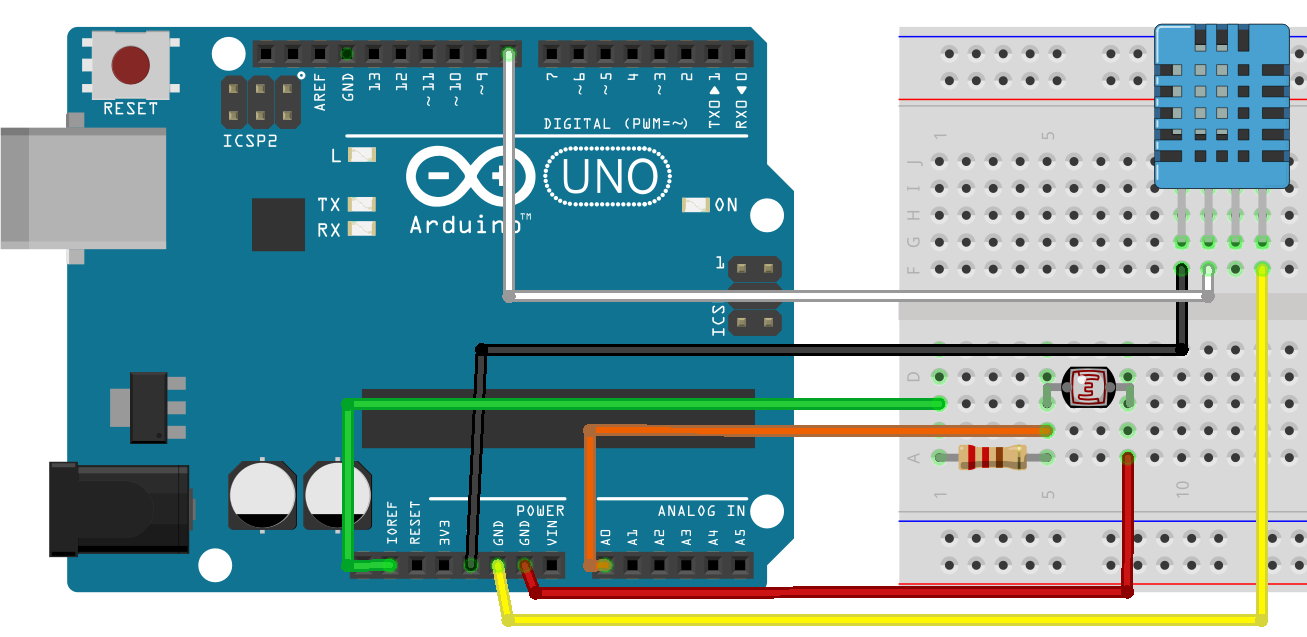
///do something else}It was InterSystems hackathon time and our team, consisting of Artem Viznyuk and me had Arduino board (one) and various parts of it (in overabundance). And so like that our course of action was set - like all other Arduino beginners, we decided to build a weather station. But with data persistent storage in Caché and visualization in DeepSee!
Hi folks!
When I start IRIS in docker every time I do the following:
$ docker-compose up -d --build

$ docker-compose exec iris iris session iris

USER>zn "NAMESPACEINEED"
Is it possible to have an open terminal command connect to a particular namespace?
Simple problem:
Is there any way to force terminal to the foreground after current command ends?
This is Windows with cterm/iristerm although Putty/Kitty solution would also be nice.
Some weeks ago, I was reading a book by Stephen Hawking and Leonard Mlodinow, The Grand Design. At a certain point, trying to define why do we exist? , why do we use the models we use in physics?, ...those kind of things you know... they pointed at the Game of Life example invented by the mathematician John Coward in 1970... Basically he wanted to show that a system with really basic fundamental laws (Physics) could evolve and "live" to become a more complex system (Chemistry) in which "something" (humans) could work out its own model and complex rules to explain its reality… the rules for this deterministic model that he exposed were so basic that I thought it could be funny to implement them in ObjectScript when I had some spare time... there are others implementations in JavaScript and other languages... but not in ObjectScript... and that had to be corrected!!… so here you are!
Hi Developers!
Create Database, Namespace, REST Applications using Portal Management is an easy task. You just need a few clicks or maybe more clicks than you expect.
But, what if you traded all those clicks for a simple command-line ?!
IRISAPP>do ##class(diashenrique.Utils.GenerateDB).CreateNewYou just need to answer a few questions:
Do you want to create a new Database/Namespace? (Y/N) :

Choose your Namespace name :
Choose the Dataset location <Path Default is mgr directory> :
Make this an Interoperability namespace?I just tried to log into our QA server and connect to Terminal (v 2013.1).
I can type in my username but when I attempt to type my password, no characters are typed. When I press ENTER the password is invalid.
I can connect to the management portal and the studio development environment without any problems. Also, I do not have this problem when connecting to the terminal in our production environment (2010).
Does anyone know what can cause this type of problem?
Thanks.
Good Day;
looking at disabling Telnet - on Windows - Cache 2012,2017. The security scans don't need it on network.
But still leave users able to use `Terminal - direct - on the box should be fine.
am posting here for quick refs (as this is a common security vulnerability out there).
Regards;
Anzelem.
First,
Forgive me if this is a rather low-level question - I am a physician informaticist who is learning cache/mumps for the first time. I am sure this probably relates to some setting but I can't find a similar issue anywhere.
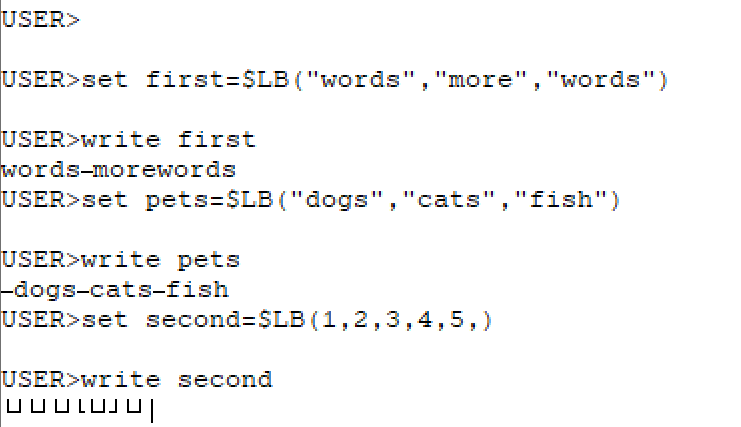
When I create a list, and then try and return that list - I get a bunch of symbols back along with my results, or sometimes I just get symbols.
I pasted a screenshot below. Thank is advance for the help!
Anthony
I was searching for the most simple way to connect from visual studio code to my local instance via terminal without having to change any window.
I know this can also be achieved via telnet but seems a bit overhead if you're in your local machine.
For me the simplest sollution is to open a terminal window in VS Code, navigate to the /bin folder of your instance installation and run .\csession.
Hello,
I am wondering the best way to disable a user account using this class in Cache (Security.Users).
https://cedocs.intersystems.com/latest/csp/documatic/%25CSP.Documatic.c…
Example User Account = jhipp
Currently is Enabled
I know that we can use the auto-generated EnabledGetStored method, for example:
%SYS> w ##class(Security.Users).EnabledGetStored("jhipp")
1
There is not an auto-generated method to set this property, right?
I can modify this property with the Modify function, but I have to build a temp array with one value etc.
How do you cancel a query that is executing in the Management Portal > System > SQL?
Does closing the browser cancel the query or does it continue to run in the background?
Is there any added benefit to using the Shell over the Portal? Perhaps there is a way to cancel/stop a query here?
$SYSTEM.SQL.Shell()
Thanks
Hello!
I am taking the 'Creating an InterSystems Class Definition' course, and the Exercices asks to open a Terminal from the Management Portal to create and interact with a new object. I didn't found how to acces tot the Terminal from the Management Portal, and the documentation I have seen doesn't help me... 
In some moment I saw a video wich explains how to acces to the terminal, but I can't find it. ¿Can someone explains me how to find the Terminal acces?
Thank you!
I've been having a blast with the Advent of Code puzzles this year - though I'll be heading into a busy span of time with family soon and will probably drop off toward the end. (At least, that's what always seems to happen - it's a good thing, though!)
I had a whole plane ride to play around with Day 13 and wanted to share some fun terminal tricks.
Hi all...
I am testing this project:
https://intersystems-community.github.io/webterminal/
Is there any way to be able to record a log of what is done on this terminal?
Does anyone use this in production?
When deploying IRIS in a container, what are recommendations for permitting users terminal access? There is docker exec -it, but that does not work from a user's workstation where - in the old deployment model - they would connect to the server over ssh using Putty and open a terminal session from there.
HI,
I am a newbie so excuse my basic questions.
I have installed Caché on Mac Os High Sierra 10.13.6 and have started the ObjectScript tutorial but I cannot open Terminal in Caché.
The instructions provided on the tutorial don't appear to be for Mac OS as there is no cube icon:
n order to begin practicing using ObjectScript, you need to start the Terminal. Click the Caché cube icon in the task bar and select Terminal from the menu. This brings up the terminal window, and you can see from the prompt that we are in the USER namespace.
Session : Working with the FHIR Resource Repository
We tried below steps to create and load sample data from Synthea (FHIR data).
Guys, I made an application, how can I run the methods in the terminal?
thanks.
Hi Developers!
InterSystems Package Manager (ZPM) is a great thing, but it is even better if you don't need to install it but can use immediately.
There are several ways how to do this and here is one approach of having IRIS container with ZPM built with dockerfile.
I've prepared a repository which has a few lines in dockerfile which perform the download and install the latest version of ZPM.
Add these lines to your standard dockerfile for IRIS community edition and you will have ZPM installed and ready to use.
To download the latest ZPM client:
HI,
I have been using evaluation version of Cache 2017.2, it was working fine and I was using Cache studio, SMP & Cache Terminal/console till yesterday.
Today, cache was in shutdown status, then I restarted. But, Cache terminal is not working and showing as Access Denied while otherthings like studio and SMP is working as expected. I checked all security level services on SMP, all are fine and enabled.
Can anyone help me to diagnose the problem and make it working.
Thanks.
Hi
Is there any way to control what control sequence is sent to a device when a "write #" is executed?
I have an application that establishes a banner at the top of the terminal window and when we do a "write #" the banner disappears. I need to be able to recreate the banner line as part of the screen clear.
Thanks
Jenna
Hello,
I am struggling to print out the actual property values of the Security.System class.
https://cedocs.intersystems.com/latest/csp/documatic/%25CSP.Documatic.c…
I was hoping to be able to print the Authentication Enabled properties of a system from the command line using the Get or GetProperties class method. Currently, however, I am only able to get a return 1 or Invalid Oref error.
I would expect one of these to work, but I think I am missing something. Any tips?
%SYS>w ##class(Security.System).Get("
1
%SYS>w ##class(Security.System).
0 {?
Hi developers!
Every day coding with IRIS and docker I call the following 3 commands in VSCode terminal. Always the same for any projects:
docker-compose build   ; to build the container

docker-compose up -d   ; to run the IRIS in container

docker-compose exec iris iris session iris ; to open the IRIS terminal
Is there any way to map the key sequence which will type me the rest?
e.g.
irisb for docker-compose build,

irisup for docker-compose up -d,

irist for docker-compose exec iris iris session iris
I know and use keyboard sequences for mac, but it doesn't work in VSCode terminal :/
Hi Community!
How can I know the port of management portal e.g. from terminal?
The one which looks like
localhost:port/csp/sys/exp/%25CSP.Portal.Home.zen
in browser?
Have enabled LDAP for our numerous , Ensemble, IRIS and cache instances with many namespaces. All is working fine and the ldap logins work.
But have noticed that the first instance that the user logs into the namespace is assigned to that user, but when that user than logs into another instance the default namespace from the first login is still there and doesn't update to the new namespace.
So this doesn't effect the ldap login but is now effecting the terminal logins where the user is now getting access denied.
Not sure why the first namespace is not being replaced by the current namespace.
is there a way to send commands to the CMD in windows form COS I would like to run an application within COS by sending a command to the CMD
I used Cache 2016.
I used the following statement to sort after paging, but suggested an error:
SELECT *
FROM
  (SELECT sslog.userRowid,
          sslog.CreateDate,
          sslog.CreateTime,
          Sslog.SSUSR,
          sslog.Terminal,
          ssuser.Initials,
          ssuser.USName
   FROM SUser_Log sslog
   LEFT JOIN DHC_SSuser ssuser ON (Sslog.SSUSR = ssuser.userRowid
                                   OR sslog.ssusr = ssuser.Initials
                                   OR sslog.ssusr = ssuser.USName)
   WHERE ssuser.USName ['admin'
ORDER BY sslog.Hello gentlemen,
I have to create a objectscript program that will simulate a mainframe (because it's going to be removed). For my program, I receive data from another program that is written in Delphy by TCP on a preset socket. Here is my problem, how can I handle this?
Which class shoud my program extend?
Which Adapter should I use?
My program must be able to read what the delphy one is sending and i don't really know what structure it is in what it is in. So is there a class that can allow me to read it? Thanks for your future anwers.
Here is a sample of what I have thought but doesn't work.
Hi Community!
When you run IRIS container out-of-the-box and connect to it via terminal e.g. with:
docker-compose exec iris bashYou see something like:
root@7b19f545187b:/opt/app# irissession IRIS

Node: 7b19f545187b, Instance: IRIS

Username: ***

Password: ***

USER>
And you enter login and password every time.
How to programmatically setup docker-compose file to have IRIS container with OS authentication enabled? And have the following while entering the terminal:
root@7b19f545187b:/opt/app# irissession IRIS

Node: 7b19f545187b, Instance: IRIS

USER>