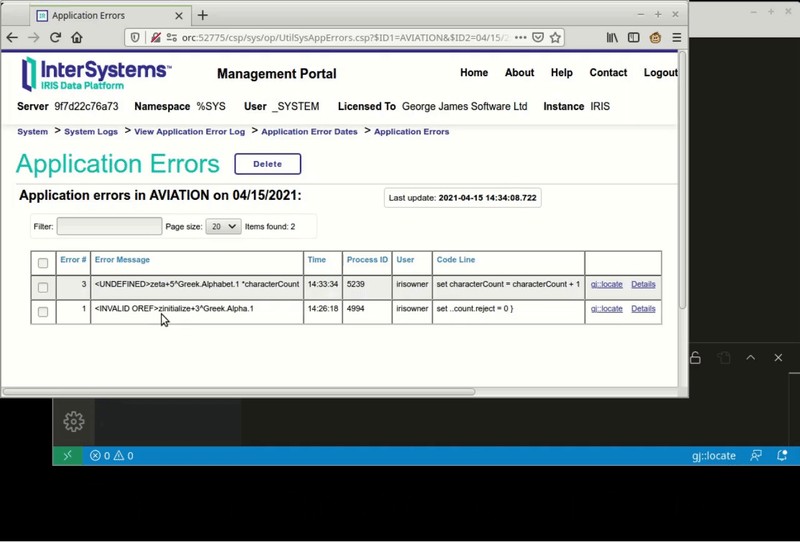
Announcing gj :: locate. A simple extension for VS Code that will help you get to the source of your errors.

In VS Code, using either the Serenji extension or the basic InterSystems objectscript extension, this small add-on will open the appropriate class or routine and position you at the exact line where an error occurred.

No more tedious counting of lines to find <UNDEFINED>zCredit+206^Ledger.Invoice.1. Instead, with gj :: locate you can get there with just a couple of clicks.

This 20 second video tells it all:

2 2
2 341
Article
· Apr 20, 2021 3m read
Why gj :: locate?

You may think it isn’t too difficult to get from label+offset^routine to the actual source line responsible for the error. For an expert it isn't that hard... most of the time. But there are enough oddities and special rules that even an expert can get it wrong, whilst spending a lot of time trying to get there.

gj :: locate is the latest tool from George James Software – it debugs any error, class or routine by converting the location of an error in compiled .int code to the corresponding location in your source, and then taking you right there.

Image this scenario…

4 0
1 362

I checked out a Git-Branch and want to Import all Objectscript-Objects to my localhost.

While using Import without Compilation I receive a lot of errors.

request to http://127.0.0.1:57772/api/atelier/v3/TSTCBW/doc/MusLT01LCOD.int?ignoreC... failed, reason: connect ECONNREFUSED 127.0.0.1:57772

While using Import and Compile I receive much more of this errors.

Is there a setting, that I have to key in?

0 5
0 481

In Studio you could open a class directly via it's name, without having to traverse the package tree with multiple clicks until arriving at the desired class.

You would Ctrl + O or (File -> Open) and be able to simply type in the class name, for example:

You press Enter, and viola - the class is opened.

How do you achieve this in VSCode?

5 1
0 818
Question
· Mar 30, 2021
IRIS and VsCode Questions

Hi Community,

I'm developing an IRIS environment for a project and I would like to take some questions to pass on to the developers that I haven't found yet here in the community:

1. Is it possible to debug the process in VSCode in real time?

2. How can we use the terminal in VsCode for some configuration or just import applications (Example: Web Terminal)?

0 12
1 902

Moving over from Studio To VSCode like many other will do now the ObjectScript plugin reached version 1.0, I noticed I was missing some items in the objectscript explorer. For example when creating a Rest API using the spec first approach, 3 classes are generated, an application.impl, application.disp and application.spec class, but the disp class was missing in the Object Explorer.

As the application.disp is a generated class, for showing these classes you need to turn this on by hitting the switch on the object explorer:

8 1
1 550
Article
· Mar 3, 2021 4m read
Access to IRIS from Rust

What do you think If I will say you, that very soon you will be able to connect to IRIS from the application written in Rust.

What is Rust

Rust is a multi-paradigm programming language designed for performance and safety, especially safe concurrency. Rust is syntactically similar to C++, but can guarantee memory safety by using a borrow checker to validate references. Rust achieves memory safety without garbage collection, and reference counting is optional. (c) Wikipedia

6 5
2 769
Question
· Feb 19, 2021
VS Code export MAC files

Currently in Visual Studio Code when we connect to a Cache server and export the CLS and MAC files, they get placed in the following:

\Comp;anyName\src\Packages

Where the Packages folder corresponds to the different class packages we have. The MAC files are placed in the src folder and not contained in it's own folder.

Is there a way to configure the export for the MAC files so that it's contained in it's own folder like this:

\CompanyName\src\mac

Thanks in advance for your help.

-Roberto

0 2
0 402

Hi Developers,

Please welcome the new video on InterSystems Developers YouTube:

Building REST API with InterSystems IRIS Docker Container in 5 Minutes

https://www.youtube.com/embed/VVpIE1jfi1M
[This is an embedded link, but you cannot view embedded content directly on the site because you have declined the cookies necessary to access it. To view embedded content, you would need to accept all cookies in your Cookies Settings]

5 0
0 385

Hi -

I know this is very "newby" of me, but here goes..

I have moved some classes onto my server, but these have never been in VSCode as edited files, and I'm just not finding the magic command or button or drop-down that says "pull this file from the server and make me a local copy to edit. I can see the class files on the server using the ObjectScript plugin - but I just can't find out where to make a local copy for editing

Thanks

0 2
0 302

Hi,

When wanting to use VS-Code for server-side editing.. - In VS-code I can right click on a server item (eg a class) to see a set of menu options including 'Server Source Control... ' and 'Server Command Menu...' at the bottom.

I noticed that these options are somewhat connected to my server-side source control hooks class that inherits from %Studio.SourceControl.Base, however, I am seeing different behavior between my custom subclass of this, and, the provided %Atelier.SourceControl subclass.

1 1
0 622

On a default VS Code installation, when you create a new file its language mode is 'Plain Text'

You have to click there to set another mode.

Luckily, there's a setting you can tweak to change this. It is called files.defaultLanguage

Set it to the ID of the language you want. Those IDs display in parentheses after each entry on the language mode selector.

3 1
1 2.7K

Coming up this Wednesday (27th January 2021), two and a half hours of online sessions by members of the product team at Microsoft.

Join the Visual Studio Code team and community at a live event just for VS Code users. Get a glimpse of things to come and meet the team who works on VS Code every day.

It's free, starts at 8am PST, and sessions will be available for replay after the event.

https://code.visualstudio.com/vscode-day

3 0
0 291

Hi all,
By using VS code, I want to copy multiple files to local directory, then sync them to server, but I can't find where local directory is stored?
In Atelier IDE, I could open a view of server and can copy the code to the project, then code is saved in the local directory. When I copy multiple files to the local directory -> choose sync in Atelier -> the code will be synchronized to the server
How to do this from VS Code?
Thanks!

0 14
0 974

I am currently evaluating Source Control systems that we can use for both MS SQL, MS Visual Studio, and InterSystems IRIS. For both MS SQL and MS Visual Studio we do have the option of either Azure or GitHub. I understand when we upgrade to IRIS 2019.1 we have options for Source Control, and in previous Global Summit's I have heard GitHub discussed. So why can't I user GitHub for both MS SQL/MS Visual Studio and IRIS?

A couple of questions come to mind starting to think about Source Control

0 7
1 1.8K
Question
· Dec 9, 2020
Code migration using VSCode

I am fairly new to using VSCode. I have used VSCode to create some files on our Test Server, now I need to move them to Production.

Looking through the VSCode extension documentation, maybe I missed it but how to I migrate code from one workspace to another. In Studio I was use to exporting the code into an XML and just being able to import it on the Production server version of Studio.

Thanks

Scott

0 9
0 966

Hi Developers,

Watch the new video on InterSystems Developers YouTube to learn how to develop with InterSystems ObjectScript using the Visual Studio Code plug-in.

Using Visual Studio Code and ObjectScript

https://www.youtube.com/embed/swmkF0EIcS8
[This is an embedded link, but you cannot view embedded content directly on the site because you have declined the cookies necessary to access it. To view embedded content, you would need to accept all cookies in your Cookies Settings]

5 0
0 988

Hey Developers,

Please welcome the first session from InterSystems Virtual Summit 2020:

Creating InterSystems IRIS Analytics Solutions Using Docker & VSCode

https://www.youtube.com/embed/SgEEayfME9U
[This is an embedded link, but you cannot view embedded content directly on the site because you have declined the cookies necessary to access it. To view embedded content, you would need to accept all cookies in your Cookies Settings]

4 1
1 247

I've just installed Visual Studio Code, installed the InterSystems ObjectScript Extension Pack as documented here, connected it to a local InterSystems IRIS instance, and created a workspace associated with one of that instance's namespaces. However, after doing this, I don't see the ObjectScript button on the left toolbar when opening the workspace.

0 5
0 590

Hi Community,

Please welcome the new video recorded by @Evgeny Shvarov on InterSystems Developers YouTube:

Developing InterSystems IRIS solution using GitHub Codespaces

https://www.youtube.com/embed/Kklh_ht2aJg
[This is an embedded link, but you cannot view embedded content directly on the site because you have declined the cookies necessary to access it. To view embedded content, you would need to accept all cookies in your Cookies Settings]

4 2
0 363

This may not be the right place to ask, but I am having some issues with the VSCode setup. I have installed the InterSystems Extensions but I am not seeing the InterSystems icon on the Action Bar long the left side of the screen.

Can someone point me in the correct direction of what I need to do to fix this issue?

Thanks

Scott

0 1
0 1.6K