Introduction

As AI-driven automation becomes an essential part of modern information systems, integrating AI capabilities into existing platforms should be seamless and efficient. The IRIS Agent project showcases how generative AI can work effortlessly with InterSystems IRIS, leveraging its powerful interoperability framework—without the need to learn Python or build separate AI workflows from scratch.

16 10
3 544

I’m pleased to announce the release of tree-sitter-objectscript, a new open-source tree-sitter grammar that brings first-class ObjectScript support to modern editors. If you caught the preview at READY ’25, you’ll be glad to know it’s now up on Github:

https://github.com/intersystems/tree-sitter-objectscript

14 12
4 384

Hi Community,

In this article, I will introduce my application iris-AgenticAI .

The rise of agentic AI marks a transformative leap in how artificial intelligence interacts with the world—moving beyond static responses to dynamic, goal-driven problem-solving. Powered by OpenAI’s Agentic SDK , The OpenAI Agents SDK enables you to build agentic AI apps in a lightweight, easy-to-use package with very few abstractions. It's a production-ready upgrade of our previous experimentation for agents, Swarm.
This application showcases the next generation of autonomous AI systems capable of reasoning, collaborating, and executing complex tasks with human-like adaptability.

Application Features

  • Agent Loop 🔄 A built-in loop that autonomously manages tool execution, sends results back to the LLM, and iterates until task completion.
  • Python-First 🐍 Leverage native Python syntax (decorators, generators, etc.) to orchestrate and chain agents without external DSLs.
  • Handoffs 🤝 Seamlessly coordinate multi-agent workflows by delegating tasks between specialized agents.
  • Function Tools ⚒️ Decorate any Python function with @tool to instantly integrate it into the agent’s toolkit.
  • Vector Search (RAG) 🧠 Native integration of vector store (IRIS) for RAG retrieval.
  • Tracing 🔍 Built-in tracing to visualize, debug, and monitor agent workflows in real time (think LangSmith alternatives).
  • MCP Servers 🌐 Support for Model Context Protocol (MCP) via stdio and HTTP, enabling cross-process agent communication.
  • Chainlit UI 🖥️ Integrated Chainlit framework for building interactive chat interfaces with minimal code.
  • Stateful Memory 🧠 Preserve chat history, context, and agent state across sessions for continuity and long-running tasks.

6 0
0 324

In this article, we will discuss all the debugging tools included in the Microsoft Visual Studio Code IDE.

What will be covered:

  • Breakpoints
  • Watch window
  • Call Stack

Let's start by learning about debugging requirements!

Prerequisites

There are two plugins (extensions) for debugging ObjectScript:

The first is part of the InterSystems ObjectScript Extension Pack. The second is Serenji, a standalone plugin that provides an editor, file manager, and debugging functionality. Both plugins can be installed from the plugin store. To activate key functionality, Serenji requires a license. For this article, we'll use the InterSystems ObjectScript Extension Pack to reduce the learning curve. After you've mastered the basics, you can consider purchasing a paid license for Serenji.

9 2
5 246

Here are the technology bonuses for the InterSystems Developer Tools Contest 2025 that will give you extra points in the voting:

  • IRIS Vector Search usage -3
  • Embedded Python usage -3
  • InterSystems Interoperability - 3
  • InterSystems IRIS BI - 3
  • VSCode Plugin - 3
  • FHIR Tools - 3
  • Docker container usage -2
  • ZPM Package Deployment - 2
  • Implement InterSystems Community Idea - 4
  • Find a bug in Embedded Python - 2
  • Article on Developer Community - 2
  • The second article on Developer Community - 1
  • Video on YouTube - 3
  • First Time Contribution - 3

See the details below.<--break->

0 3
0 168

Hey everyone,

I'm diving deeper into Caché ObjectScript and would love to open a discussion around the most useful tips, tricks, and best practices you’ve learned or discovered while working with it.

Whether you're an experienced developer or just getting started, ObjectScript has its own set of quirks and powerful features—some well-documented, others hidden gems. I’m looking to compile a helpful set of ideas from the community.

Some areas I’m especially interested in:

6 3
4 206

Been testing out the Production Validator toolkit, just to see what we can/not do with it. Seems really interesting and there seem to be some use cases for it that can really streamline some upgrades (or at least parts of upgrades) but I was running into so many hurdles with the documentation. I am curious if anyone else has used it.

2 6
0 200

Table of Contents

  1. Introduction
  2. Version Control
  3. Exporting Classes
  4. Exporting BI Analytics classes
  5. Exporting globals

Introduction.

In this article, we'll cover a quick start to Git development with the InterSystems Developer Community and version control practices when working with IRIS InterSystems. We'll cover scenarios where we need to export Interoperability classes, globals, and analytics elements such as cubes and dashboards. These scenarios encompass key version control practices with IRIS.

To get started, you'll need:

  1. Register and log in to GitHub
  2. Be a member of the intersystems-community organization on Git

Getting started with IRIS InterSystems is very simple!

6 0
6 191

Customer support questions span structured data (orders, products 🗃️), unstructured knowledge (docs/FAQs 📚), and live systems (shipping updates 🚚). In this post we’ll ship a compact AI agent that handles all three—using:

  • 🧠 Python + smolagents to orchestrate the agent’s “brain”
  • 🧰 InterSystems IRIS for SQL, Vector Search (RAG), and Interoperability (a mock shipping status API)

5 0
2 172
3 2
0 126
Article
· Jul 26, 2025 8m read
Creating advanced Word documents with IRIS

Word documents are widely used in the market. Users frequently create contracts, memos, resumes, reports, analyses, and other documents that may require data from or captured by InterSystems IRIS. However, IRIS does not have an API, SDK, library, or adapter for this. This limitation no longer exists.

The new Open Exchange library iris4word (https://openexchange.intersystems.com/package/iris4word) delivers an ObjectScript SDK where the developer passes any %DynamicObject as a parameter, a Word file template and then receives a ready document, with the structure and formatting defined in its template.

7 2
3 117

Hi everyone! 👋
I’m excited to share the project I’ve submitted to the current InterSystems .Net, Java, Python, and JavaScript Contest — it’s called IRIStool and Data Manager, and you can find it on the InterSystems Open Exchange and on my GitHub page.

7 1
2 121

Recently, I replaced my old laptop with a new one and had to migrate all my data. I was looking for a guide but couldn’t find anything that explained in detail how to migrate server connections from InterSystems Studio and Visual Studio Code from one PC to another. Simply reinstalling the tools is not enough, and migrating all the connections manually seemed like a waste of time. In the end, I managed to solve the problem, and this article explains how.

4 0
2 141

Project Overview / Introduction

Developing and testing REST APIs in InterSystems IRIS often requires a significant amount of boilerplate code. While ObjectScript provides powerful tools for building APIs, writing consistent and repeatable tests can be time‑consuming. This is where IrisOASTestGen comes in.

4 2
0 94

Overview

This web interface is designed to facilitate the management of Data Lookup Tables via a user-friendly web page. It is particularly useful when your lookup table values are large, dynamic, and frequently changing. By granting end-users controlled access to this web interface (read, write, and delete permissions limited to this page), they can efficiently manage lookup table data according to their needs.

The data managed through this interface can be seamlessly utilized in HealthConnect rules or data transformations, eliminating the need for constant manual monitoring and management of the lookup tables and thereby saving significant time.

Note:
If the standard Data Lookup Table does not meet your mapping requirements, you can create a custom table and adapt this web interface along with its supporting class with minimal modifications. Sample class code is available upon request.

2 0
1 120

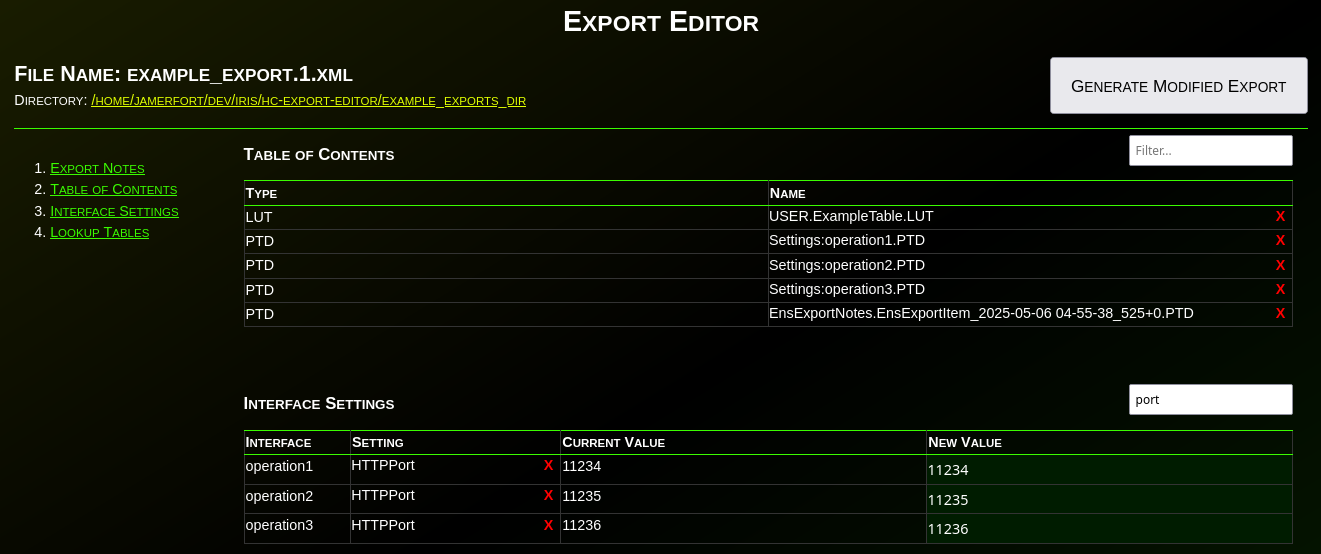
Have you ever needed to change an IP or port before deploying an interface to production? Needed to remove items from an export? What about modifying the value(s) in a lookup table before deploying? Have you wanted to disable an interface before deploying? What about adding a comment, category, or alert setting to an interface before deploying to production?

1 0
0 108

When working with InterSystems Interoperability (Iris / Health Connect / Ensemble), configuration data is often spread across many production items: services, processes, operations, adapters, and their settings.

A common operational or security need is to answer questions like:

9 0
2 81