#Best Practices

37 Followers · 307 Posts

Best Practices recommendations on how to develop, test, deploy and manage solutions on InterSystems Data Platforms better. 

InterSystems staff + admins Hide everywhere
Hidden post for admin
Article Nicholai Mitchko · Oct 27, 2022 2m read
   _________ ___ ____  
  |__  /  _ \_ _|  _ \ 
    / /| |_) | || |_) |
   / /_|  __/| ||  __/ 
  /____|_|  |___|_|    

Starting in version 2021.1, InterSystems IRIS began shipping with a python runtime in the engine's kernel. However, there was no way to install packages from within the instance. The main draw of python is its enormous package ecosystem. With that in mind, I introduce my side project zpip, a pip wrapper that is callable from the iris terminal.

What is zpip?

6
1 878
Article Oliver Wilms · Mar 19, 2023 5m read

csp-log-tutorial

Prerequisites

Make sure you have git installed.

I created a git folder inside the IRIS mgr directory. I right clicked the git folder and chose Git Bash Here from the context menu.

git clone https://github.com/oliverwilms/csp-log-tutorial.git

Clone my csp-log-tutorial GitHub repo if you like to try it out for yourself.

I will describe in this tutorial how I try to use access.log and CSP.log files in webgateway pods to track requests and responses.

1
0 411
Article Jimmy Xu · Oct 11, 2022 2m read

ZPM is designed to work with applications and modules for InterSystems IRIS Data Platform. It consists of two components, the ZPN Client which is a CLI to manage modules, and The Registry which is a database of modules and meta-information. We can use ZPM to search, install, upgrade, remove and publish modules. With ZPM you can install ObjectScript classes, Frontend applications, Interoperability productions, IRIS BI solutions, IRIS Datasets or any files such as Embedded Python wheels. 

Today this cookbook will go through 3 sections:

10
11 1488
Article Lucas Enard · Aug 2, 2022 8m read

On this GitHub you can find all the information on how to use a HuggingFace machine learning / AI model on the IRIS Framework using python.

1. iris-huggingface

Usage of Machine Learning models in IRIS using Python; For text-to-text, text-to-image or image-to-image models.

Here, models as example :

5
1 894
Article Murray Oldfield · May 25, 2023 12m read

I am often asked to review customers' IRIS application performance data to understand if system resources are under or over-provisioned.

This recent example is interesting because it involves an application that has done a "lift and shift" migration of a large IRIS database application to the Cloud. AWS, in this case.

A key takeaway is that once you move to the Cloud, resources can be right-sized over time as needed. You do not have to buy and provision on-premises infrastructure for many years in the future that you expect to grow into.

Continuous monitoring is required. Your application transaction rate will change as your business changes, the application use or the application itself changes. This will change the system resource requirements. Planners should also consider seasonal peaks in activity. Of course, an advantage of the Cloud is resources can be scaled up or down as needed.

For more background information, there are several in-depth posts on AWS and IRIS in the community. A search for "AWS reference" is an excellent place to start. I have also added some helpful links at the end of this post.

AWS services are like Lego blocks, different sizes and shapes can be combined. I have ignored networking, security, and standing up a VPC for this post. I have focused on two of the Lego block components;

  • Compute requirements.
  • Storage requirements.
1
3 1223
Article Anton Umnikov · Jan 21, 2021 26m read

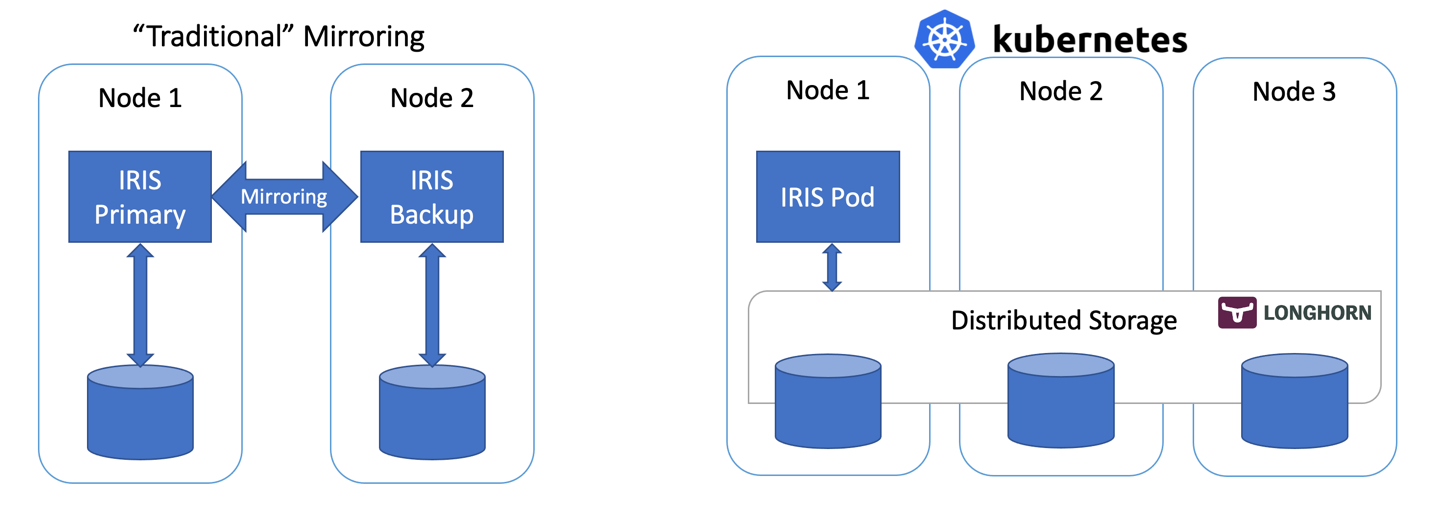
In this article, we’ll build a highly available IRIS configuration using Kubernetes Deployments with distributed persistent storage instead of the “traditional” IRIS mirror pair. This deployment would be able to tolerate infrastructure-related failures, such as node, storage and Availability Zone failures. The described approach greatly reduces the complexity of the deployment at the expense of slightly extended RTO.

16
8 3975
Article Dmitry Maslennikov · Feb 6, 2023 4m read

Let me introduce my new project, which is irissqlcli, REPL (Read-Eval-Print Loop)  for InterSystems IRIS SQL 

  • Syntax Highlighting
  • Suggestions (tables, functions)
  • 20+ output formats
  • stdin support
  • Output to files 

Install it with pip

pipinstallirissqlcli

Or run with docker

dockerrun-itcaretdev/irissqlcliirissqlcliiris://_SYSTEM:SYS@host.docker.internal:1972/USER

Connect to IRIS

$ irissqlcli iris://_SYSTEM@localhost:1972/USER -W
Password for _SYSTEM:
Server:  InterSystems IRIS Version 2022.3.0.606 xDBC Protocol Version 65
Version: 0.1.0
[SQL]_SYSTEM@localhost:USER> select $ZVERSION
+---------------------------------------------------------------------------------------------------------+
| Expression_1                                                                                            |
+---------------------------------------------------------------------------------------------------------+
| IRIS for UNIX (Ubuntu Server LTS for ARM64 Containers) 2022.3 (Build 606U) Mon Jan 30202309:05:12 EST |
+---------------------------------------------------------------------------------------------------------+
1 row in set
Time: 0.063s
[SQL]_SYSTEM@localhost:USER> help
+----------+-------------------+------------------------------------------------------------+
| Command  | Shortcut          | Description                                                |
+----------+-------------------+------------------------------------------------------------+
| .exit    | \q                | Exit.                                                      |
| .mode    | \T                | Change the table format used to output results.            |
| .once    | \o [-o] filename  | Append next result to an output file (overwrite using -o). |
| .schemas | \ds               | List schemas.                                              |
| .tables  | \dt [schema]      | List tables.                                               |
| \e       | \e                | Edit command with editor (uses $EDITOR).                   |
| help     | \?                | Show this help.                                            |
| nopager  | \n                | Disable pager, print to stdout.                            |
| notee    | notee             | Stop writing results to an output file.                    |
| pager    | \P [command]      | Set PAGER. Print the query results via PAGER.              |
| prompt   | \R                | Change prompt format.                                      |
| quit     | \q                | Quit.                                                      |
| tee      | tee [-o] filename | Append all results to an output file (overwrite using -o). |
+----------+-------------------+------------------------------------------------------------+
Time: 0.012s
[SQL]_SYSTEM@localhost:USER>
20
2 962
Article Eduard Lebedyuk · Apr 17, 2017 4m read

In this article I'll cover testing and debugging Caché web applications (mainly REST) with external tools. Second part covers Caché tools.

You wrote server-side code and want to test it from a client or already have a web application and it doesn't work. Here comes debugging. In this article I'll go from the easiest to use tools (browser) to the most comprehensive (packet analyzer), but first let's talk a little about most common errors and how they can be resolved.

2
5 3884
Article Mark Bolinsky · Feb 12, 2019 32m read

The Amazon Web Services (AWS) Cloud provides a broad set of infrastructure services, such as compute resources, storage options, and networking that are delivered as a utility: on-demand, available in seconds, with pay-as-you-go pricing. New services can be provisioned quickly, without upfront capital expense. This allows enterprises, start-ups, small and medium-sized businesses, and customers in the public sector to access the building blocks they need to respond quickly to changing business requirements.

Updated: 10-Jan, 2023 

3
12 7113
Article Evgeny Shvarov · Mar 14, 2019 5m read

Hi Community!

I think everyone keeps the source code of the project in the repository nowadays: Github, GitLab, bitbucket, etc. Same for InterSystems IRIS projects  check any on Open Exchange.

What do we do every time when start or continue working with a certain repository with InterSystems Data Platform?

We need a local InterSystems IRIS machine, have the environment for the project set up and the source code imported.

So every developer performs the following:

  1. Check out the code from repo
  2. Install/Run local IRIS installation
  3. Create a new namespace/database for a project
  4. Import the code into this new namespace
  5. Setup all the rest environment
  6. Start/continue coding the project 

If you dockerize your repository this steps line could be shortened to this 3 steps:

  1. Check out the code from repo
  2. Run docker-compose build 
  3. Start/continue coding the project 

Profit - no any hands-on for 3-4-5 steps which could take minutes and bring head ache sometime.

You can dockerize (almost) any your InterSystems repo with a few following steps. Let’s go!

10
9 1968
Article Benjamin De Boe · Sep 13, 2022 8m read

In the vast and varied SQL database market, InterSystems IRIS stands out as a platform that goes way beyond just SQL, offering a seamless multimodel experience and supporting a rich set of development paradigms. Especially the advanced Object-Relational engine has helped organizations use the best-fit development approach for each facet of their data-intensive workloads, for example ingesting data through Objects and simultaneously querying it through SQL. Persistent Classes correspond to SQL tables, their properties to table columns and business logic is easily accessed using User-Defined Functions or Stored Procedures. In this article, we'll zoom in on a little bit of the magic just below the surface, and discuss how it may affect your development and deployment practices. This is an area of the product where we have plans to evolve and improve, so please don't hesitate to share your views and experiences using the comments section below.

6
0 1208
Article Sean McKenna · Aug 26, 2016 8m read

Enterprise Monitor is a component of Ensemble and can help organizations monitor multiple productions running on different namespaces within the same instance or namespaces running on multiple instances.

Documentation can be found at:

http://docs.intersystems.com/ens20161/csp/docbook/DocBook.UI.Page.cls?KEY=EMONITOR_all#EMONITOR_enterprise

In Ensemble 2016.1 there were changes made to make this utility work with HealthShare environments.

This article will:

  • Show how to set up Enterprise Monitor for HealthShare sites
  • Show some features of Enterprise Monitor
  • Show some features of Enterprise Message Viewer

For this article, I used the following version of HealthShare:

Cache for Windows (x86-64) 2016.1 (Build 656U) Fri Mar 11 2016 17:42:42 EST [HealthShare Modules:Core:14.02.2415 + Linkage Engine:14.02.2415 + Patient Index:14.02.2415 + Clinical Viewer:14.02.2415 + Active Analytics:14.02.2415]

2
0 1587
Article Henry Pereira · Dec 1, 2021 5m read

freepik- freepik.com First of all, what is data anonymization?

According to Wikipedia:

Data anonymization is a type of information sanitization whose intent is privacy protection. It is the process of removing personally identifiable information from data sets, so that the people whom the data describe remain anonymous.

In other words, the data anonymization is a process that retains the data but keeps the source anonymous. Depending on the adopted anonymization technique the data is redacted, masked or substituted.

And that is the purpose of iris-Disguise, to provide a set of anonymization tools.

12
3 1567
Article Robert Cemper · May 22, 2022 1m read

I'm sure you have met this situation:

  • There is a bug in a System that you can't reproduce yourself locally
  • You need to run a few lines in the affected instance
  • You get full access to System Management Portal
  • But there is just  no terminal, nor console, nor access with Studio, Atelier or VSCode
  • How to run your few lines for testing ???
3
5 1113
Article Yuri Marx · Sep 26, 2022 9m read

Visual Studio Code (VSCode) is the most popular code editor on the market. It was created by Microsoft and distributed as a free IDE. VSCode supports dozens of programming languages, including ObjectScript, Until 2018, Atelier (based on Eclipse). It was considered as one of the main options to develop InterSystems products. However, in December 2018, when the InterSystems Developer Community launched support for VSCode, a relevant portion of InterSystems professionals started actually using this editor and have been doing it ever since, especially the developers working with new technologies

4
5 2390
Article Murray Oldfield · Nov 14, 2019 6m read

Released with no formal announcement in IRIS preview release 2019.4 is the /api/monitor service exposing IRIS metrics in Prometheus format. Big news for anyone wanting to use IRIS metrics as part of their monitoring and alerting solution. The API is a component of the new IRIS System Alerting and Monitoring (SAM) solution that will be released in an upcoming version of IRIS.

2
7 2239
Article Brendan Bannon · Aug 29, 2016 7m read

The Art of Mapping Globals to Classes 1 of 3

Looking to breathe new life into an old MUMPS application?  Follow these steps to map your existing globals to classes and expose all that beautiful data to Objects and SQL.

By following the simple steps in this article and the next two you will be able to map all but the craziest globals to Caché classes.  For the crazy ones I will put up a zip file of different mappings I have collected over the years.  This is NOT for new data; if you don’t already have existing global please just use the default storage.

26
13 6211
Article Julian Matthews · Jul 21, 2021 4m read

Over the years, I have found myself needing to create multiple HL7 messages based on a single inbound message. Usually these take the form of an order or result from a lab. Each time I have approached it, I have tried to start from scratch under the belief that the previous attempt could have been done better.

Recently, the need arose again and I was able to create a solution that I wasn't ashamed of. My main concern was that I would always either find myself getting buried in a BPL, or use ObjectScript and attempt to edit messages using the SetValueAt Method for the HL7 Message Class.

Problem

1
2 1463
Article Evgeny Shvarov · Jun 24, 2020 3m read

Hi Developers!

Suppose you have a persistent class with data and you want to have a simple Angular UI for it to view the data and make CRUD operations.

Recently @Alberto Fuentes described how to build Angular UI for your InterSystems IRIS application using RESTForms2. 

In this article, I want to tell you how you can get a simple Angular UI to CRUD and view your InterSystems IRIS class data automatically in less than 5 minutes.

Let's go!

3
4 1368
Article Bob Binstock · Sep 6, 2016 19m read
Mirroring 101Caché mirroring is a reliable, inexpensive, and easy to implement high availability and disaster recovery solution for Caché and Ensemble-based applications. Mirroring provides automatic failover under a broad range of planned and unplanned outage scenarios, with application recovery time typically limited to seconds. Logical data replication eliminates storage as a single point of failure and a source of data corruption. Upgrades can be executed with little or no downtime.Deploying a Caché mirror does, however, require significant planning, and involves a number of different
22
3 7864
Article Andreas Schneider · Jan 2, 2022 3m read

The last days I've work with the great new feature: LOAD DATA With this post I would like to share my first experiences with you. The following points do not contain any order or other evaluation. These are only things that I noticed when using the LOAD DATA command. It should also be noted that these points are based on the IRIS Version 2021.2.0.617 which is a preview release. So it may be that my observations do not apply to newer IRIS versions. But maybe they are helpful for others.

1) The file path is on server side

5
2 1252
Article Yuri Marx · Jul 20, 2022 6m read

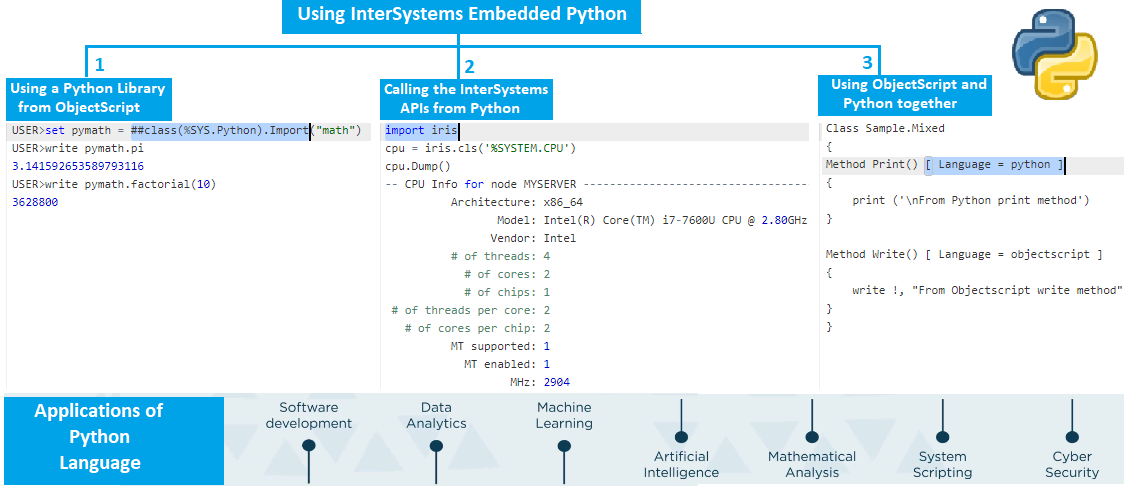
Python has become the most used programming language in the world (source: https://www.tiobe.com/tiobe-index/) and SQL continues to lead the way as a database language. Wouldn't it be great for Python and SQL to work together to deliver new functionality that SQL alone cannot? After all, Python has more than 380,000 published libraries (source: https://pypi.org/) with very interesting capabilities to extend your SQL queries within Python. This article details how to create new SQL Stored Procedures in InterSystems IRIS Database using Embedded Python.

Python libraries used as samples

3
0 1348
Article Jeff Morgan · Oct 21, 2016 3m read

This article will describe and include an example of how to embed an external PDF file into an HL7 segment, specifically ADT_A01:2.3.1 OBX().  This can be useful when attempting to insert pictures or other external data into an HL7 message.  In this example, the name of the PDF file to be embedded is provided in the incoming HL7 message in OBX(1):ObservationValue field.

The basic stipulations for this example are as follows:

  1. Accept a PDF file
  2. Accept an HL7 message
  3. Using the name of the PDF file, embed the PDF data into the HL7 message
  4. Output the message to file


4
6 15851
Article Evgeny Shvarov · Jan 25, 2020 4m read

Hi Developers!

"objectscript.conn" :{
      "ns": "IRISAPP",
      "active": true,
      "docker-compose": {
        "service": "iris",
        "internalPort": 52773
      }

I want to share with you a nice new feature I came across in a new 0.8 release of VSCode ObjectScript plugin by @Dmitry Maslennikov and CaretDev.

The release comes with a new configuration setting "docker-compose" which solves the issue with ports you need to set up to make your VSCode Editor connect to IRIS. It was not very convenient if you had more than one docker container with IRIS running on the same machine. Now, this is solved!

Read below how it works now.

8
3 919
Article Kyle Baxter · Jul 19, 2016 2m read

Date range queries going too slow for you?  SQL Performance got you down?  I have one weird trick that might just help you out! (SQL Developers hate this!)*

If you have a class that records timestamps when the data is added, then that data will be in sequence with your IDKEY values - that is, TimeStamp< TimeStampif and only if ID1 < IDfor all IDs and TimeStamp values in table - then you can use this knowledge to increase performance for queries against TimeStamp ranges.  Consider the following table:

9
1 30715
Article Rizmaan Marikar · Jul 27, 2022 6m read

What is Web Scraping:

In simple terms, Web scrapingweb harvesting, or web data extraction is an automated process of collecting large data(unstructured) from websites. The user can extract all the data on particular sites or the specific data as per the requirement. The data collected can be stored in a structured format for further analysis.

What is Web Scraping? — James Le
Steps involved in web scraping:

  1. Find the URL of the webpage that you want to scrape
  2. Select the particular elements by inspecting
  3. Write the code to get the content of the selected elements
  4. Store the data in the required format

It’s that simple !!

12
9 1870
Article Dmitry Maslennikov · Aug 20, 2021 6m read

Some time ago GitHub, has announced the new feature, GitHub Codespaces. It gives an ability to run VSCode in the browser, with almost the same power as it would run locally on your machine, but also with a power of clouds, so, you are able to choose the machine type with up to 32 CPU cores and 64 GB of RAM.

Looks impressive, is not it? But how it could help us, to work with projects driven by InterSystems IRIS? Let's have a look, how to configure it for us.

3
7 1184