5 Followers · 224 Posts

A programming tool or software development tool is a computer program that software developers use to create, debug, maintain, or otherwise support other programs and applications.

New
Article Henry Pereira · Feb 14 3m read

cover

You’ve seen how tools like Lovable are shaking up web development. People are spinning up entire apps just by talking to an AI, almost like pair‑programming on steroids.

Now imagine bringing that same “vibe coding” experience into healthcare. know, it sounds crazy. Healthcare is complex, full of regulations, and usually gives us a headache just thinking about the interoperability rules.

That’s exactly the space where withLove lives: an AI‑Native, Low‑Code platform built entirely on InterSystems IRIS for Health.

And no, this is not “one more chatbot” that spits out half‑broken code for you to

1
0 28
Article Eric Fortenberry · May 30, 2025 3m read

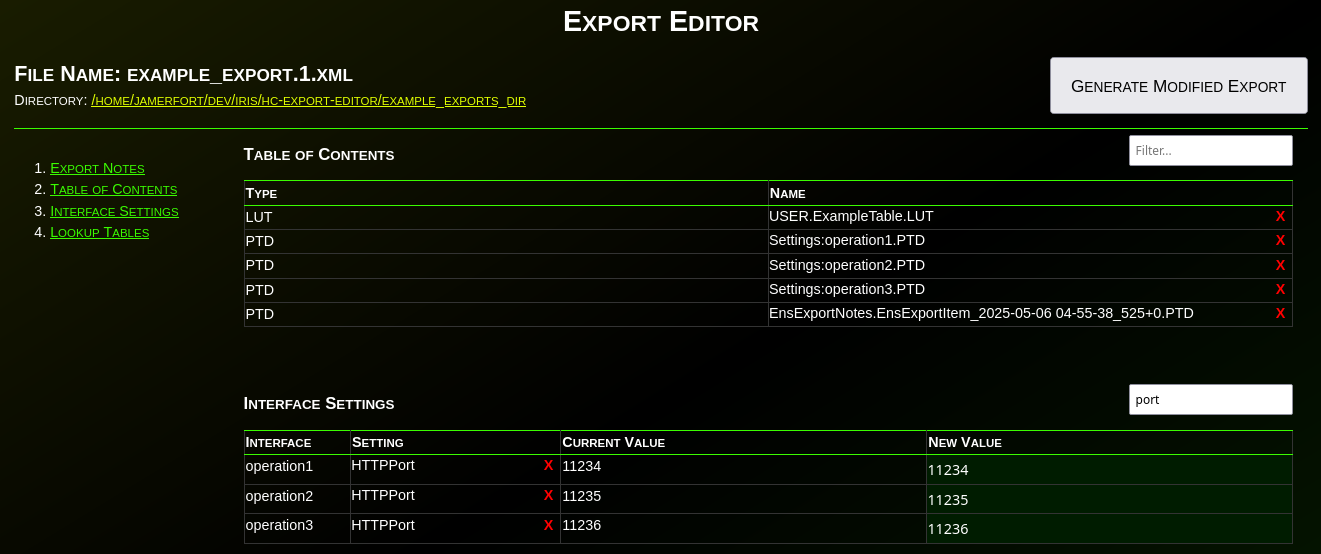
Have you ever needed to change an IP or port before deploying an interface to production? Needed to remove items from an export? What about modifying the value(s) in a lookup table before deploying? Have you wanted to disable an interface before deploying? What about adding a comment, category, or alert setting to an interface before deploying to production?

If you’ve ever needed to make any changes to an interface or lookup table before deploying to production, then Export Editor is for you!

Export Editoris a Python/WSGI web application that provides a method for editing exports before

1
0 192
Article Laurel James (GJS) · Feb 10 2m read

Welcome to the monthly recap of updates and releases to VS Code and InterSystems-related extensions relevant to IRIS developers. We'll break down the updates that are relevant to InterSystems developers with tips on how they can be applied to your day-to-day projects. 

Don’t forget, if you’re migrating from InterSystems Studio to VS Code, or want to deepen your knowledge, check out the VS Code training courses from George James Software: georgejames.com/vscode-training.
VS Code version 1.109

  • Editor stability and navigation improvements - folding, syntax highlighting and navigation are now more
0
0 43
Question Pietro Di Leo · Jan 17, 2024

Hi everyone, 

Does anyone know how to export projects via VSC? 

I opened the project through the "InterSystems Tools" plugin (command is "Edit Code in Project") and I can correctly work on it.

However, when I try using the "ObjectScript" plugin to export the project (right click on the project -> "Export Project Contents")

This message appears and it is not possible to export the project:

I've tried also to open a new window, then a folder and finally the project, but nothing changes. 

This is an example of my workspace: 


Anyone knows how to do it? 

Thank you! 

14
0 3320
Article Henry Pereira · Jan 26 6m read

image1

Some concepts make perfect sense on paper, whereas others require you to get your hands dirty. Take driving, for example. You can memorize every component of the engine mechanics, but that does not mean you can actually drive.

You cannot truly grasp it until you are in the driver's seat, physically feeling the friction point of the clutch and the vibration of the road beneath. While some computing concepts are intuitive, Intelligent Agents are different. To understand them, you have to get in the driver's seat.

In my previous articles regarding AI agents, we discussed such tools as CrewAI and La

0
2 207
Article Keren Skubach · Dec 29, 2025 2m read

When working with InterSystems Interoperability (Iris / Health Connect / Ensemble), configuration data is often spread across many production items: services, processes, operations, adapters, and their settings.

A common operational or security need is to answer questions like:

  • Which interfaces reference file system paths?
  • Where are directories, network shares, or absolute paths configured?
  • Can I quickly audit or document this information across all my productions?

The ObjectScript utility below solves exactly that problem by exporting selected configuration settings into a CSV file.

This

0
2 102
Article Thomas Dyar · Dec 27, 2025 10m read

The Rut

Up until early this year, I haven't been not doing much coding at all -- I had gotten sick of it.

After many years as a hands-on software engineer and data scientist, I got burned out around 2015. I switched to business development roles focused on "external innovation," then joined InterSystems in 2019 as a product manager. I missed the creative aspects of coding, but not the tedium. The endless cycle of boilerplate, debugging, and context-switching had left me creatively depleted. Like Jim Carrey's character in Yes Man, I found myself saying "no" to new projects -- so much so that I

0
1 81
Article José Pereira · Dec 7, 2025 16m read

Project Overview / Introduction

Developing and testing REST APIs in InterSystems IRIS often requires a significant amount of boilerplate code. While ObjectScript provides powerful tools for building APIs, writing consistent and repeatable tests can be time‑consuming. This is where IrisOASTestGen comes in.

IrisOASTestGen is a utility designed to generate the structure of test classes and the supporting utility code directly from an OpenAPI 2.0 specification. It leverages the OpenAPITools openapi‑generator under the hood to scaffold test stubs and helper methods that make it easier to interact

2
0 112
Article Dmitrij Vladimirov · Dec 1, 2025 5m read

In this article, we will discuss all the debugging tools included in the Microsoft Visual Studio Code IDE.

What will be covered:

  • Breakpoints
  • Watch window
  • Call Stack

Let's start by learning about debugging requirements!

Prerequisites

There are two plugins (extensions) for debugging ObjectScript:

The first is part of the InterSystems ObjectScript Extension Pack. The second is Serenji, a standalone plugin that provides an editor, file manager, and debugging functionality. Both plugins can be installed from the plugin store. To activate key functionality, Serenji requires a license. For this article, we'll use the InterSystems ObjectScript Extension Pack to reduce the learning curve. After you've mastered the basics, you can consider purchasing a paid license for Serenji.

2
5 272
Article Dmitrij Vladimirov · Dec 16, 2025 6m read

Table of Contents

  1. Introduction
  2. Version Control
  3. Exporting Classes
  4. Exporting BI Analytics classes
  5. Exporting globals

Introduction.

In this article, we'll cover a quick start to Git development with the InterSystems Developer Community and version control practices when working with IRIS InterSystems. We'll cover scenarios where we need to export Interoperability classes, globals, and analytics elements such as cubes and dashboards. These scenarios encompass key version control practices with IRIS.

To get started, you'll need:

  1. Register and log in to GitHub
  2. Be a member of the intersystems-community organization on Git

Getting started with IRIS InterSystems is very simple!

0
6 236
Article John Murray · Dec 15, 2025 1m read

It was encouraging to see more people building VS Code extensions for the recent contest. However I noticed that of of the three extensions requiring credentials with which to make their connections only mine, gj :: dataLoader, leverages the long-established and officially-supported InterSystems Server Manager extension to obtain the connection definitions and to handle credentials securely.

0
1 80
Article Georgii Tatevosian · Mar 30, 2025 5m read

Introduction

As AI-driven automation becomes an essential part of modern information systems, integrating AI capabilities into existing platforms should be seamless and efficient. The IRIS Agent project showcases how generative AI can work effortlessly with InterSystems IRIS, leveraging its powerful interoperability framework—without the need to learn Python or build separate AI workflows from scratch.
This project explores how ChatGPT and Anthropic Claude, two of the most advanced AI models, can interact with IRIS using Custom GPTs and the Model Context Protocol (MCP).

10
3 610
Article Laurel James (GJS) · Dec 4, 2025 3m read

Welcome to the monthly recap of updates and releases to VS Code and InterSystems-related extensions that are relevant to IRIS developers. 

We'll break down the updates that are relevant to InterSystems developers with tips on how they can be applied to your day-to-day projects. 

Don't forget, if you're migrating from InterSystems Studio to VS Code, or want to deepen your knowledge, check out the VS Code training courses from George James Software: georgejames.com/vscode-training

VS Code version 1.106

Unified AI-agent dashboard - 1.106 introduces an Agent Sessions view that consolidates all

0
0 87
Article José Pereira · Nov 26, 2025 11m read

In Part 1, we explored how window functions operate. We learned the logic behind PARTITION BY, ORDER BY, and such functions as ROW_NUMBER() and RANK(). Now, in Part 2, let's delve into more window functions with practical examples.


1. Aggregate-over-Window Functions

Overview

These functions compute an aggregate (e.g., sum, average, min, max, count, etc.) over the defined window frame but don’t collapse rows.
Each row remains visible, augmented with aggregated values for its partition.

Supported functions include the following:

  • AVG() — average of values in the window frame.
  • SUM() — total of values
0
1 261
Discussion Gabriel Ing · Nov 17, 2025

Hi Everyone, 

As I'm sure most of you will be aware, we have an excellent resource available to developers in the Open Exchange, which is a place for Community Members to share open source resources, templates, tools and demos built with or for InterSystems technologies. This has been a massive success, with >1100 projects shared!

However, the growing size of the Open Exchange inevitably leads to some excellent resources being buried and lost in the sea of resources.

0
1 100
Article Ashok Kumar T · Nov 4, 2025 3m read

Introducing IRIS DocDB Explorer: A Sleek UI for Managing JSON Documents in InterSystems IRIS

IRIS offers a dedicated feature for storing and retrieving JSON documents using DocDB, without requiring a predefined schema.

Developers often need a quick and intuitive way  to browse, create, and edit documents without switching between multiple tools or writing repetitive code. To solve this, I creatediris-docdb-ui — a CSP-based open-source application that provides a clean, responsive interface for interacting with DocDB effortlessly.

0
0 95
Discussion Yone Moreno Jiménez · Aug 1, 2025

Hello InterSystems Community,

I hope you're all doing well. I'm reaching out to ask if there's any way to enable a dark theme or dark mode for the HealthShare Management Portal.

Background

I have a visual impairment (amblyopia/lazy eye) which means I'm nearly blind in one eye. Like many people with visual difficulties, I find that bright white backgrounds and interfaces cause significant eye strain and fatigue. This makes it challenging to work with the Management Portal for extended periods.

What I've Found So Far

I've searched through the community forums and documentation, but I've only found

8
0 250
Article Sanjib Pandey · Oct 17, 2025 13m read

Overview

This web interface is designed to facilitate the management of Data Lookup Tables via a user-friendly web page. It is particularly useful when your lookup table values are large, dynamic, and frequently changing. By granting end-users controlled access to this web interface (read, write, and delete permissions limited to this page), they can efficiently manage lookup table data according to their needs.

The data managed through this interface can be seamlessly utilized in HealthConnect rules or data transformations, eliminating the need for constant manual monitoring and management of the lookup tables and thereby saving significant time.

Note:
If the standard Data Lookup Table does not meet your mapping requirements, you can create a custom table and adapt this web interface along with its supporting class with minimal modifications. Sample class code is available upon request.

0
1 137
Announcement John Murray · May 22, 2023

If you have already built unit tests using the %UnitTest framework, or are thinking about doing so, please take a look at InterSystems Testing Manager.

Without leaving VS Code you can now browse your unit tests, run or debug them, and view previous run results.

InterSystems Testing Manager works with both of the source code location paradigms supported by the ObjectScript extension.Your unit test classes can either be mastered in VS Code's local filesystem (the 'client-side editing' paradigm) or in a server namespace ('server-side editing').

26
1 1105
Article Pietro Di Leo · Nov 16, 2023 5m read

Introduction

Since InterSystems has recently announced the discontinuation of support for InterSystems Studio starting from version 2023.2 in favor of exclusive development of extensions for the Visual Studio Code (VSC) IDE, believing that the latter offers a superior experience compared to Studio, many of us developers have switched or are beginning to use VSC. Many may have wondered how to open the Terminal to perform operations, as VSC does not have an Output panel like Studio did, nor an integrated feature to open the IRIS terminal, except by downloading the plugins developed by InterSystems.

10
12 2372
Article Pietro Di Leo · Oct 6, 2025 4m read
2
0 148
Article Pietro Di Leo · Oct 6, 2025 5m read

Hi everyone! 👋
I’m excited to share the project I’ve submitted to the current InterSystems .Net, Java, Python, and JavaScript Contest — it’s called IRIStool and Data Manager, and you can find it on the InterSystems Open Exchange and on my GitHub page.

1
2 145
Announcement Kimi Niittyniemi · Sep 14, 2025

We are excited to announce the general availability of JediSoft IRISsync®, our new synchronization and comparison solution built on InterSystems IRIS technology.  IRISsync makes it easy to synchronize and compare IRIS instances.

IRISsync was voted runner-up in the "Most Likely to Use" category at InterSystems READY 2025 Demos and Drinks.

A huge thanks to everyone who supported us — we’re thrilled to see IRISsync resonating with the InterSystems user community!

IRISsync provides clear visibility into differences between environments.

0
0 136
Article John Murray · Dec 18, 2024 1m read

A benefit of using Doxygenerate is that Doxygen does more than just HTML output. Tweak the Doxyfile that tells Doxygen what to do and you can easily create a PDF. Our example MARINA application yielded a 524-page PDF. Here's what page 94 looks like:

You can browse the whole file here.

In the screenshot above, notice how we only get details of the superclass that is part of the app (AuditHistory). The primary superclass, %Library.SerialObject, is shown faded and with no details of what BankDetails inherits from it.

With another tweak to the Doxyfile we can show full inheritance detail in a 586-pag

1
1 330
Article Victoria Castillo · Mar 19, 2024 5m read

I have been walking through this with a few team members and as such I thought there might be others out there who could use it, especially if you work with HL7 & Ensemble/HealthConnect/HealthShare and never venture out past the Interoperability section. 

First, I would like to establish that this is an extension of the already established documentation on importing and exporting SQL data found here: https://docs.intersystems.com/iris20241/csp/docbook/DocBook.UI.Page.cls?KEY=GSQL_impexp#GSQL_impexp_import

This tutorial will explicitly detail how to create, populate or update a Data LookUp Table

2
1 743
Article Robert Barbiaux · Sep 1, 2025 9m read

InterSystems IRIS interoperability production development involves using or writing various types of components. They include services (which handle incoming data), processes (which deal with the data flow and logic), and operations (which manage outgoing data or requests). Messages flowing through those components constantly require being adapted to consuming applications. Therefore,Data transformations are by far the most common component in interoperability productions.

In the early stages of data transformation development, thetest tool from the Management Portal becomes quite handy.

0
0 140
Article Alberto Fuentes · Sep 1, 2025 7m read

Customer support questions span structured data (orders, products 🗃️), unstructured knowledge (docs/FAQs 📚), and live systems (shipping updates 🚚). In this post we’ll ship a compact AI agent that handles all three—using:

  • 🧠 Python + smolagents to orchestrate the agent’s “brain”
  • 🧰 InterSystems IRIS for SQL, Vector Search (RAG), and Interoperability (a mock shipping status API)
0
2 205