Forgive my lack of understanding, but I am working on a vendor created Cache database and the indexes specified in the classes for ODBC connections are not working. A few of them are created, but of the 50+ classes we have, only a handful of them are created when the class is compiled, yet no errors occur.
I have generated a class using the linked procedure wizard however I can't get it to work if the datatype of one of the parameters is VARCHAR(MAX). It works fine if I change it to say VARCHAR(500) and rerun the stored procedure wizard.
I get the following error returned.:
ErrorMsg: SQLState: (07002) NativeError: [0] Message: [Microsoft][ODBC SQL Server Driver]COUNT field incorrect or syntax error
I work as a contractor for the Department of Veterans Affairs. I want to read data from an Excel workbook. I searched posts here and saw Apache POI suggested. I believe Apache POI is not approved for use within VA. I also believe we should be able to run SQL query against Excel. Has anybody done such a thing or are there other ways to read data from Excel workbooks?
Im just wondering if there is any possibility to "Listen" to a cache DB? We have our cache DB somewhere else provided by a different company, we are provided the interface to connect to that cache DB so we can extract the cache DB every night.
Im just curious if theres a way to "listen" to the cache DB, so if theres any changes on the table in the cache DB, I could make a trigger to extract the table again.
I know i could just set my ETL every hour or so... but that would extract all the tables in cache DB.
Most of my classes are mapped from Globals. I want to access Cache classes from a BI software through ODBC connection.
'Last update' information does not exist in most of the classes. My question is whether there is a 'last update' timestamp that is automatically generated for each line in classes I can extract to external systems?
Hi, I am trying to execute a store procedure within an ensemble operation to connect to aMsSQL database and I am having problem to pass the input arguments... I have tried several things but only one seems to work and it is not the ideal solution.
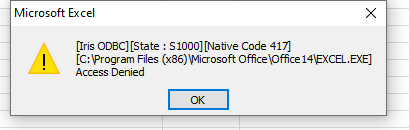
I'm working on integrating a Cache database into an existing .NET project of mine. I'm trying to execute certain queries utilizing the Cache ODBC driver. The first error I ran into was "[S1000] [Cache ODBC][State : S1000][Native Code 417] Access Denied". The part that's throwing me for a loop though is that the application ran ~200 successful queries before I started getting that. After some of those Access Denied errors, they turned into "[Cache ODBC][State : S1T00][Native Code 450] Request timed out due to user timeout". This was all with the regular (2.5?) driver.
I am tasked with using CACHE to insert data retrieved from a CACHE data base and insert it into an sql database. The columns in the sql table that I am trying to insert data into have names that contain underscores such as "ACCESSION_DATE" I found a utility in CACHE to connect to the sql data base and perform inserts. I have the data I need to insert. I need to pass the data into the sql utility referencing the column names.
I tried using indirection to set the data into underscored variables, but that isn't allowed in cache object script.
It would be convenient to be able to fetch the whole query result in one operation instead of looping through every row. A fetch_all() method or something similar would provide this functionality I guess. Is there a reason why this is not implemented?
I'm trying to authenticate a user(Health Share clinician) from a Java Application.
I 'm already connected to Caché and able to run SQL commands.
My question is: How can I authenticate a user using only SQL? In fact, what I want is verify if the users exists in the base and if the given password is the same used in Health Share.
There is a column 'password' in Security.users table but I'm not able to see its content, even so, I don't know which hash function to use to compare with.
I get this on some queries in some namespaces. For instance, this query:
SELECT TOP 10 SessionId, datediff(s,min(TimeCreated),max(TimeCreated)) as ResponseTime FROM ens.messageheader GROUP BY SessionId ORDER BY ResponseTime DESC
It works fine in HSBUS but in HSREG it throws the error.
Server closed communication device
Does anyone know what would cause this? Would it log something more useful somewhere?
While I can query the HL7 message class EnsLib.HL7.Message (EnsLib_HL7.Message for SQL) to my heart's content in the SQL Shell or the Management Portal's SQL page, I can't seem to SELECT anything other than ID/%Id from an ADO/ODBC client. Properties such as TimeCreated, Name, MessageTypeCategory, etc. all seem to prevent the query from ever completing EXCEPT when I provide the ID as part of the WHERE criteria.
This works fine in the Management Portal and Shell:
I have created a custom role in IRIS for users to provide limited view-only access for querying tables in the HSANALYTICS namespace. WinSQL has been installed on a Windows server (WinSQL Lite version 14.0.244.784) and an ODBC connection entry has been created in WinSQL for the users to log in and run SQL queries. The custom role provides the roles/resources included in the attached file. The WinSQL System DSN entry defined is:
Health Insight UAT HSANALYTICS 64-bit InterSystems ODBC35
I am trying to built a SSIS package thru BIDS Visual Studio 2013. My Datasource is a InterSystems Cache Database, I wanted to Import Tables records from the Datasource to MS SQL Server 2014.
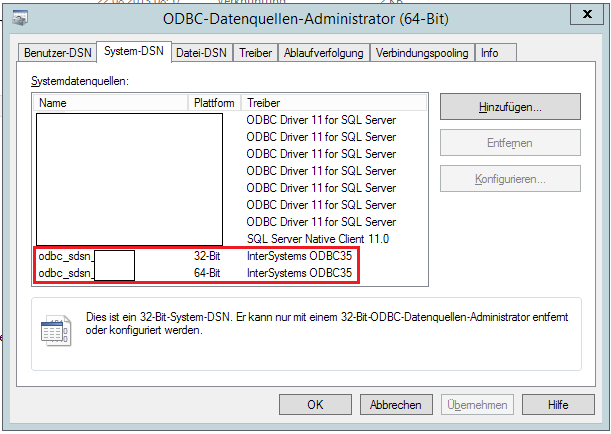
As a Sanity check. I only created one Package to import one Table to MSSQL Server to try out. The connection to the InterSystems Cache Database was successful. The DSN for the InterSystems Cache Database is created in the System for 32 and 64 Bit.
How strange this is to me. I'm querying a table against a numeric(15,2) column call max_client_resp_service. When I query max_client_resp_service > 0 or any number, I get results, but they are not always right, for example where max_client_resp_service > 5 returns values less than 5, e.g.
I use Microsoft Query via Excel to query an Intersystems database.
Since upgrading from CACHE to Intersystems, lots of reports fail to refresh twice - by which I mean I can open the report (which may have several separate queries) and query the database once, and then it will refuse to reconnect.
Is there a way for us to restrict user's ODBC permissions based on what program they're running on a client?
For example, we have some older Windows apps (.exe) that are a regular part of our software package which require the user to be able to select, insert, update, and delete. Some of our users are also using other third-party apps to connect (mostly reporting tools) but we only want them to be able to select unless we've approved the exe. Is there a way to do that?
These are not applications that were developed using CacheDirect.
I am new in Cache. I have to update a record with a long text field, for that, I am using ODBC but the issue is that it is returning an error when I execute the ODBC SQL statement because the field contains some commas, colon, double quotes, single quotes, and CR LF characters.
There is a way to escape this chars? I have seen I can save the field when I replace the single quotes with a double single quote (it's -> it''s) but I can not save the information when the field contains double quote chars. What about the other chars?
I have a rights problem when giving a user permission to perform some select queries on particular tables. So I have created a user with the following rights.
So this all works well. No problem so far. But the customer is using a program where you can easily build visually the query by selecting the table, choose the right colums etc. So the problem we have is when I give the user the Role %All the tables are shown.
A client recently upgraded from Cache2010 to Cache2017 and now reports that for certain tables, WinSQL does not show the indices which were previously visible in Cache2010. Has anyone heard of this type of behavior before? Is there a remedy or some change which needs to be made to the table definitions? Thanks.
I was trying to create a query that can be exposed as a stored procedure (function actually) that would return a resultset with a random number of columns.
Unfortunately, it seems that unless I specify the ROWSPEC annotation on the Query method, I won't get any columns exposed. I was hoping to implement QueryNameGetInfo method and specify the names and number of columns I would be returning dynamically. But it seems that GetInfo information is simply ignored.

 By replies
.png)
.png)