#InterSystems IRIS

19 Followers · 5.6K Posts

InterSystems IRIS is a Complete Data Platform
InterSystems IRIS gives you everything you need to capture, share, understand, and act upon your organization’s most valuable asset – your data.
As a complete platform, InterSystems IRIS eliminates the need to integrate multiple development technologies. Applications require less code, fewer system resources, and less maintenance.

Article Murray Oldfield · Nov 30, 2021 3m read

When looking at system performance and capacity planning I need to know what processors a server is running.

In ^SystemPerformance Linux systems report Intel processors explicitly, for example:

processor	: 0
vendor_id	: GenuineIntel
cpu family	: 6
model		: 79
model name	: Intel(R) Xeon(R) CPU E5-2673 v4 @ 2.30GHz
stepping	: 1
microcode	: 0xffffffff
cpu MHz	: 2294.
2
1 61505
Article Stuart Salzer · Nov 8, 2016 38m read

What is a core file? and When are they use­ful?

The in­for­ma­tion in this doc­u­ment is cur­rent as ver­sions of InterSystems prod­ucts re­leased through 2024-06-06. This up­date date cov­ers er­rors in that dis­covered up to 2024-08-12, but not changes present in new ver­sions of InterSystems prod­ucts.

Nevertheless, the de­tails for ex­ist­ing prod­ucts are not sub­ject to fre­quent change.

The WRC can supply you with a .PDF ver­sion of this article suitable for printing on either US 8½″ × 11″ or A4 210 mm × 297 mm paper.

1
2 34804
Article Kyle Baxter · Jul 19, 2016 2m read

Date range queries going too slow for you?  SQL Performance got you down?  I have one weird trick that might just help you out! (SQL Developers hate this!)*

If you have a class that records timestamps when the data is added, then that data will be in sequence with your IDKEY values - that is, TimeStamp< TimeStampif and only if ID1 < IDfor all IDs and TimeStamp values in table - then you can use this knowledge to increase performance for queries against TimeStamp ranges.  Consider the following table:

Class User.
9
1 30744
Article Jose-Tomas Salvador · Apr 8, 2020 6m read

This time I want to talk about something not specific to InterSystems IRIS, but that I think is important if you want to work with Docker and your server at work is a PC or laptop with Windows 10 Pro or Enterprise.

As you likely know, containers technology comes basically from Linux world and, nowadays, is on Linux hosts were it shows maximum potential. Those who use Windows on a normal basis see that both, Microsoft and Docker, have done important efforts during these last years that allow us to run containers based on Linux images on our Windows system in a really easy way... but it's something not supported for production systems and, this is the big problem, is not reliable if we want to keep persistent data outside of containers, in the host system,... mostly due to the big differences between Windows and Linux file systems. In the end, Docker for Windows itself uses a small linux virtual machine (MobiLinux) to run the containers... it does it transparently for the windows user... and it works perfectly well if, as I said, you don't require that your databases survive longer than the container...

Well,...let's get to the point,... the point is that many times, to avoid issues and simplify, we need a full Linux system and, if our server is based on Windows, the only way of having it is through a virtual machine. At least till WSL2 in Windows is released, but that will be another story and sure it'll take a bit of time to become robust enough.

In this article, I'll tell you, step by step, how to install an environment where you'll be able to work, if you need it, with Docker containers on an Ubuntu system in your Windows server. Let's go...


11
3 29888
Article Mark Bolinsky · Jul 1, 2016 17m read

++Update: August 2, 2018

This article provides a reference architecture as a sample for providing robust performing and highly available applications based on InterSystems Technologies that are applicable to Caché, Ensemble, HealthShare, TrakCare, and associated embedded technologies such as DeepSee, iKnow, Zen and Zen Mojo.

Azure has two different deployment models for creating and working with resources: Azure Classic and Azure Resource Manager. The information detailed in this article is based on the Azure Resource Manager model (ARM).

4
0 12654
Article Daniel Kutac · Feb 11, 2019 4m read

Hi guys,


Couple days ago, a customer approached me with the wish to enhance their existing legacy application, that uses SOAP (Web)Services so it shares the same authorization with their new application API based on REST. As their new application uses OAuth2, the challenge was clear; how to pass access token with SOAP request to the server.

After spending some time on Google, it turned out, that one of possible ways of doing so was adding an extra header element to the SOAP envelope and then making sure the WebService implementation does what is needed to validate the access token.

1
3 12169
Article Murray Oldfield · Jan 12, 2017 19m read

Hi, this post was initially written for Caché. In June 2023, I finally updated it for IRIS. If you are revisiting the post since then, the only real change is substituting Caché for IRIS! I also updated the links for IRIS documentation and fixed a few typos and grammatical errors. Enjoy :)


In this post, I show strategies for backing up InterSystems IRIS using External Backup with examples of integrating with snapshot-based solutions. Most solutions I see today are deployed on Linux on VMware, so a lot of the post shows how solutions integrate VMware snapshot technology as examples.

29
9 12105
Article Murray Oldfield · Apr 8, 2016 17m read

This post will guide you through the process of sizing shared memory requirements for database applications running on InterSystems data platforms. It will cover key aspects such as global and routine buffers, gmheap, and locksize, providing you with a comprehensive understanding. Additionally, it will offer performance tips for configuring servers and virtualizing IRIS applications. Please note that when I refer to IRIS, I include all the data platforms (Ensemble, HealthShare, iKnow, Caché, and IRIS).


[A list of other posts in this series is here](https://community.intersystems.

3
9 11250
Article Azezur Rahman · Oct 19, 2020 3m read

Updated guide 👇

>> How to get InterSystems IRIS Community Edition


IRIS Community Edition Installation Process.


Hello there developers,

As a new amateur to the Developer Community, I had a few hurdles that I had to cross in order to find a way and install the IRIS for Community Edition.

The Developer Community has been very helpful in guiding me thought this process, and which has made me write this post today. 

I believe that this will be helpful for any armature on the Developer Community trying to get hands on experience with IRIS.


Steps to be followed.

8
3 10241
Article Niyaz Khafizov · Jul 19, 2018 4m read

Hi all. Today we are going to use k-means algorithm on the Iris Dataset.

Note: I have done the following on Ubuntu 18.04, Apache Zeppelin 0.8.0, python 3.6.5.

Introduction

K-Means is one of the simplest unsupervised learning algorithms that solves the clustering problem. It groups all the objects in such a way that objects in the same group (group is a cluster) are more similar (in some sense) to each other than to those in other groups. For example, assume you have an image with a red ball on the green grass. K-Means will split all pixels into two clusters.

0
3 9821
Article Bob Binstock · Sep 6, 2016 19m read

Mirroring 101

Caché mirroring is a reliable, inexpensive, and easy to implement high availability and disaster recovery solution for Caché and Ensemble-based applications. Mirroring provides automatic failover under a broad range of planned and unplanned outage scenarios, with application recovery time typically limited to seconds. Logical data replication eliminates storage as a single point of failure and a source of data corruption. Upgrades can be executed with little or no downtime.

22
3 7882
Article Murray Oldfield · Nov 29, 2016 20m read

This post provides guidelines for configuration, system sizing and capacity planning when deploying IRIS and IRIS on a VMware ESXi. This post is based on and replaces the earlier IRIS-era guidance and reflects current VMware and InterSystems recommendations.

Last update Jan 2026. These guidelines are a best effort, remember requirements and capabilities of VMware and IRIS can change.

I jump right in with recommendations assuming you already have an understanding of VMware vSphere virtualization platform.

1
6 7382
Article Evgeny Shvarov · May 11, 2016 1m read

Hi!

I believe the simplest is (to work with csv delimited by ";"):


set file = ##class(%File).%New( "data.csv" )
    set sc = file.Open( "R" ) 
    if $$$ISERR(sc) quit    ; or do smth

    while 'file.AtEnd {
        set str=file.ReadLine() 
        for i=1:1:$length( str, ";" ) {
            set id=$piece( str, ";" ,i ) 
            write !, id  // or do smth
        }
    }
    do file.Close()

Possible options:

different variants of error handling with sc code.

Embrace while loop into try/catch block.

And what's yours?

16
0 7288
Article Dmitry Maslennikov · Jul 13, 2019 6m read

I wanted to write it as a comment to article of @Evgeny Shvarov . But it happens to be so long, so, decided to post it separately.

Image result for docker clean all images

I would like to add a bit of clarification about how docker uses disk space and how to clean it.  I use macOS, so, everything below, is mostly for macOS, but docker commands suit any platform.

6
3 7268
Article Mark Bolinsky · Feb 12, 2019 32m read

The Amazon Web Services (AWS) Cloud provides a broad set of infrastructure services, such as compute resources, storage options, and networking that are delivered as a utility: on-demand, available in seconds, with pay-as-you-go pricing. New services can be provisioned quickly, without upfront capital expense. This allows enterprises, start-ups, small and medium-sized businesses, and customers in the public sector to access the building blocks they need to respond quickly to changing business requirements.


Updated: 10-Jan, 2023 

3
12 7133
Article Katherine Reid · Apr 24, 2019 5m read

The %Net.SSH.Session class lets you connect to servers using SSH. It's most commonly used with SFTP, especially in the FTP inbound and outbound adaptors.

In this article, I'm going to give a quick example of how to connect to an SSH server using the class, describe your options for authenticating, and how to debug when things go wrong.

Here's an example of making the connection:

Set SSH = ##class(%Net.SSH.Session).%New()
Set return=SSH.Connect("ftp.intersystems.com")​

This creates a new connection, and then connects to the ftp.intersystems.com SFTP server on the default port.

4
2 6794
Article Murray Oldfield · Jun 6, 2017 20m read

I am often asked by customers, vendors or internal teams to explain CPU capacity planning for large production databases running on VMware vSphere.


This post was originally written in 2017, I am updating the post in February 2026. For context I have kept the original post, but highlighted changes. This post was originally written for ESXi 6.0. The core principles remain valid for vSphere 7.x and 8.x, though there have been improvements to vNUMA handling, CPU scheduling (particularly for AMD EPYC), and CPU Hot Add compatibility with vNUMA in vSphere 8.

7
0 6730
Article Murray Oldfield · Nov 12, 2016 6m read

Index

This is a list of all the posts in the Data Platforms’ capacity planning and performance series in order. Also a general list of my other posts. I will update as new posts in the series are added.


You will notice that I wrote some posts before IRIS was released and refer to Caché. I will revisit the posts over time, but in the meantime, Generally, the advice for configuration is the same for Caché and IRIS. Some command names may have changed; the most obvious example is that anywhere you see the ^pButtons command, you can replace it with ^SystemPerformance.


While some posts are updated to preserve links, others will be marked as strikethrough to indicate that the post is legacy. Generally, I will say, "See: some other post" if it is appropriate.


Capacity Planning and Performance Series

Generally, posts build on previous ones, but you can also just dive into subjects that look interesting.


0
7 6612
Article Nikita Savchenko · Apr 1, 2016 6m read


Hello!

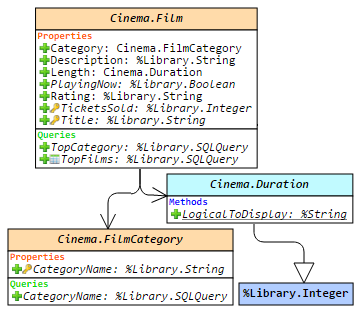
This article is a small overview of a tool that helps to understand classes and their structure inside the InterSystems products: from IRIS to Caché, Ensemble, HealthShare.

In short, it visualizes a class or an entire package, shows the relations between classes and provides all the possible information to developers and team leads without making them go to Studio and examine the code there.

If you are learning InterSystems products, reviewing projects a lot or just interested in something new in InterSystems Technology solutions — you are more than welcome to read the overview of ObjectScript Class Explorer!

38
4 6260
Article Lily Taub · Mar 19, 2019 9m read

Intro

Most server-client communication on the web is based on a request and response structure. The client sends a request to the server and the server responds to this request. The WebSocket protocol provides a two-way channel of communication between a server and client, allowing servers to send messages to clients without first receiving a request. For more information on the WebSocket protocol and its implementation in InterSystems IRIS, see the links below.

7
3 6173
Article Michael Broesdorf · Jul 22, 2016 16m read

1.About this article

Just like Caché pattern matching, Regular Expressions can be used in Caché to identify patterns in text data – only with a much higher expressive power. This article provides a brief introduction into Regular Expressions and what you can do with it in Caché. The information provided herein is based on various sources, most notably the book “Mastering Regular Expressions” by Jeffrey Friedl and of course the Caché online documentation. The article is not intended to discuss all the possibilities and details of regular expressions. Please refer to the information sources listed in chapter 5 if you would like to learn more. If you prefer to read off-line you can also download the PDF version of this article.

11
8 6129
Article Daniel Kutac · Aug 10, 2016 22m read

Created by Daniel Kutac, Sales Engineer, InterSystems

Warning: if you get confused by URLs used: the original series used screens from machine called dk-gs2016. The new screenshots are taken from a different machine. You can safely treat url WIN-U9J96QBJSAG as if it was dk-gs2016.

Part 2. Authorization server, OpenID Connect server

In the previous part of this short series, we have learned about simple use case – acting as an OAUTH[1] client. Now, it’s time to bring our experience to a whole new level.

12
4 5816
Article Mark Bolinsky · Jan 29, 2016 4m read

** Revised Feb-12, 2018

While this article is about InterSystems IRIS, it also applies to Caché, Ensemble, and HealthShare distributions.

Introduction

Memory is managed in pages.  The default page size is 4KB on Linux systems.  Red Hat Enterprise Linux 6, SUSE Linux Enterprise Server 11, and Oracle Linux 6 introduced a method to provide an increased page size in 2MB or 1GB sizes depending on system configuration know as HugePages.

At first HugePages required to be assigned at boot time, and if not managed or calculated appropriately could result in wasted resources.  As a result various Linux distributions introduced Transparent HugePages with the 2.6.38 kernel as enabled by default.  This was meant as a means to automate creating, managing, and using HugePages.  Prior kernel versions may have this feature as well however may not be marked as [always] and potentially set to [madvise].  

Transparent Huge Pages (THP) is a Linux memory management system that reduces the overhead of Translation Lookaside Buffer (TLB) lookups on machines with large amounts of memory by using larger memory pages.  However in current Linux releases THP can only map individual process heap and stack space.

9
5 5786
Article Murray Oldfield · Mar 25, 2016 14m read

This week I am going to look at CPU, one of the primary hardware food groups :) A customer asked me to advise on the following scenario; Their production servers are approaching end of life and its time for a hardware refresh. They are also thinking of consolidating servers by virtualising and want to right-size capacity either bare-metal or virtualized. Today we will look at CPU, in later posts I will explain the approach for right-sizing other key food groups - memory and IO.

10
2 5368
Article Yuri Marx · May 15, 2023 6m read

 These days the vast majority of applications are deployed on public cloud services. There are multiple advantages, including the reduction in human and material resources needed, the ability to grow quickly and cheaply, greater availability, reliability, elastic scalability, and options to improve the protection of digital assets. One of the most favored options is the Google Cloud. It lets us deploy our applications using virtual machines (Compute Engine), Docker containers (Cloud Run), or Kubernetes (Kubernetes Engine). The first one does not use Docker.

0
3 5196
Article Murray Oldfield · May 22, 2018 9m read

This post provides useful links and an overview of best practice configuration for low latency storage IO by creating LVM Physical Extent (PE) stripes for database disks on InterSystems Data Platforms; InterSystems IRIS, Caché, and Ensemble.

Consistent low latency storage is key to getting the best database application performance. For applications running on Linux, Logical Volume Manager (LVM) is often used for database disks, for example, because of the ability to grow volumes and filesystems or create snapshots for online backups.

4
1 4927