New
Hi, Community!
Need help setting up OAuth on the FHIR Server? We'll guide you through the workflow:
Beginner tag unites articles and questions for those who are getting started with InterSystems Data Platform
Hi, Community!
Need help setting up OAuth on the FHIR Server? We'll guide you through the workflow:
Despite the fact that LOCK (docs) is a foundational part of InterSystems IRIS, responsible for concurrency, there is not a lot of discussion on the Developer Community about it. Which is understandable, considering it's stable and fairly low-level command. In this article, I will show a simple example of how to use locks with interoperability.
Hi Communtiy,
I am a begineer who is working and trying to understand Intersystems. I am developing an Ensemble interface which receives a XML message and converts it into HL7 format without using enslib.HL7 classes.
Requirement
Are you familiar with SQL databases, but not familiar with IRIS? Then read on...
About a year ago I joined InterSystems, and that is how IRIS got on my radar. I've been using databases for over 40 years—much of that time for database vendors—and assumed IRIS would be largely the same as the other databases I knew.
Earlier this year, I set about creating kit to introduce young techy folk at a Health Tech hackathon to using InterSystems IRIS for health, particularly focusing on using FHIR and vector search.
I wanted to publish this to the developer community because the tutorials included in the kit make a great introduction to using FHIR and to building a basic RAG system in IRIS.
In this article I'll show you how to set up in your laptop, very quickly, a cluster of IRIS nodes in sharding. It's not the goal of this article neither to talk about sharding in detail nor define a deployment of a production ready architecture, but to show how to set up quickly, in your own machine, a cluster of IRIS instances configured as shard nodes, with which you'll able to play and test this functionality. If you're insterested in knowing more about sharding in IRIS, take a look at the documentation clicking here.
First and foremost, I want to remark that IRIS sharding will allow us 2 things:
So, as I said, we let for other article playing with shard or federated tables, and just focus now in the previous step, that is, setting up the cluster of shard nodes.
Hi, Community!
Want to try using Flask to expose InterSystems IRIS data over HTTP? This short video will get you started:
Building a REST API in Flask with InterSystems IRIS
👨💻Try it yourself in this hands-on exercise! (exercise, 30m).
Needs some help with FHIR return code 200 or 201 when processing HL7 messages in HealthConnect.
Issue:
1. If FHIR code is 200 or 201, HealthConnect keep processing HL7 messages
2. If FHIR code is NOT 200 or 201, HealthConnect keep suspend the HL7 messages in the messages queue, then keep processing NEXT subsequent HL7 messages in the TEXT file if the FHIR code is 200 or 201
3. I am also using following "Reply Code Actions" in Operation settings (:?R=S,:?E=S,:~=S,:?A=C,:*=S,:I?=W,:T?=C)
Please advice if I have a "if condition check" for FHIR codes 200 or 201, what "Reply Code Actions" I should use?
InterSystems IRIS is built on an architecture that separates the logical organization of data (namespaces) from its physical storage location (databases). Understanding this separation and the distinction between Namespaces and Databases is crucial for effective data management, security, and especially, high-performance data sharing.
In this article, I will discuss these foundational components and provide a practical guide on leveraging global mappings to share native data structures (globals) across different logical environments.
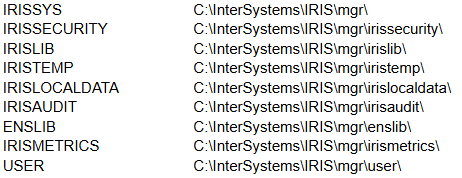
A database represents the physical reality of where the data is stored on the disk. First and foremost, it’s a file in a file system called IRIS.dat (e.g., <Install folder>\mgr\user\IRIS.DAT). The maximum size of this file is 32TB. It is the container for all the actual data and the code. Databases are managed by the IRIS kernel, which handles caching, journaling, and transaction logging at the physical file level.
When you install InterSystems IRIS DBMS, the following databases are installed automatically:
In this article, we will discuss all the debugging tools included in the Microsoft Visual Studio Code IDE.
What will be covered:
Let's start by learning about debugging requirements!
Prerequisites
There are two plugins (extensions) for debugging ObjectScript:
The first is part of the InterSystems ObjectScript Extension Pack. The second is Serenji, a standalone plugin that provides an editor, file manager, and debugging functionality. Both plugins can be installed from the plugin store. To activate key functionality, Serenji requires a license. For this article, we'll use the InterSystems ObjectScript Extension Pack to reduce the learning curve. After you've mastered the basics, you can consider purchasing a paid license for Serenji.
Table of Contents
Introduction.
In this article, we'll cover a quick start to Git development with the InterSystems Developer Community and version control practices when working with IRIS InterSystems. We'll cover scenarios where we need to export Interoperability classes, globals, and analytics elements such as cubes and dashboards. These scenarios encompass key version control practices with IRIS.
To get started, you'll need:
Getting started with IRIS InterSystems is very simple!
Working on interfaces, trying to add simple email alert (link below) under "Operations"
https://docs.intersystems.com/healthconnect20231/csp/docbook/DocBook.UI…
if the message is good, health connect processes ok.
if the message has an ERROR, it held up the message in Queue (keep retrying), then subsequent messages held up in the queue as well to be processed. Because of the message held up in Queue, Operation for TCP connection also turning blue.
Please advice.
Hi Community,
Are you looking for resources to help your team onboard? Use these guides to get started!
Updated 12/09/25
Hi Community,
You can unlock the full potential of InterSystems IRIS—and help your team onboard—with the full range of InterSystems learning resources offered online and in person, for every role in your organization. Developers, system administrators, data analysts, and integrators can quickly get up to speed.
Updated 12/09/25
Hi Community,
Need to find the most relevant onboarding for your HealthShare Unified Care Record® team? Maximize your team's knowledge and success by diving into this curated list of offerings from InterSystems Learning Services—which includes online and in-person training for a variety of roles in your organization.
Hi, Community!
Want to build smoother communication between payer systems and providers? See how the Prior Authorization Support (PAS) module of the InterSystems Payer Services ePrior Authorization solution can help:
Hello Community,
Great news for developers who have just started working with InterSystems IRIS! We have hands‑on interactive tutorials available via the Instruqt platform! These are perfect for getting up to speed quickly, playing in real environments, and building confidence with IRIS‑based development.
.png)
Terminal Commands for Production:
Do ##class(Ens.Director).StartProduction(“ProductionName”)
Do ##class(Ens.Director).StopProduction()
Do ##class(Ens.Director).UpdateProduction()
Do ##class(Ens.Director).RecoverProduction()
Do ##class(Ens.Director).CleanProduction()
Abort Messages in the queue:
d ##class(Ens.Queue).AbortQueue(“Component Name”)
Get InstanceName :
W !,##class(%SYS.System).GetUniqueInstanceName()
Get Node Name:
W !,##class(%SYS.System).GetNodeName()
Terminate JobId :
d $SYSTEM.
Hi, Community!
If you need to help providers meet a payer's documentation requirements, see how the Documentation Templates and Rules (DTR) module of the InterSystems Payer Services ePrior Authorization solution can help:
Hi, Community!
Looking for an efficient way to allow providers to see whether prior authorization is required? See how the Coverage Requirements Discovery (CRD) module of the InterSystems Payer Services ePrior Authorization solution can help:
If you start with InterSystems ObjectScript, you will meet the XECUTE command.
And beginners may ask: Where and Why may I need to use this ?
The official documentation has a rich collection of code snippets. No practical case.
Just recently, I met a use case that I'd like to share with you.
When you build an IRIS container with Docker, then, in most cases,
you run the initialization script
iris session iris < iris.script
This means you open a terminal session and feed your input line-by-line from the script.
And that's fine and easy if you call methods, or functions, or commands.
When we need to integrate Caché/IRIS with other relational databases, one common question arises: “How do I set up the JDBC connection?”.
The official documentation doesn’t always provide a straightforward step-by-step guide, which can be frustrating, especially for beginners.
In this article, I’ll walk you through the entire process of configuring a JDBC connection with MySQL, from downloading the connector to linking tables in Caché/IRIS.
Note: JDBC connections in Caché/IRIS have some limitations, especially regarding caching and the use of ResultSet
Hi, Community!
Need to install a HealthShare solution module? Follow this simple step-by-step process to get started!
Deploying HealthShare Solution Modules with InterSystems Package Manager
I joined InterSystems less than a year ago. Diving into ObjectScript and IRIS was exciting, but also full of small surprises that tripped me up at the beginning. In this article I collect the most common mistakes I, and many new colleagues, make, explain why they happen, and show concrete examples and practical fixes. My goal is to help other new developers save time and avoid the same bumps in the road.
The issue: ObjectScript/IRIS ships with many system classes and packages (%Library, %SYS, %Persistent, %SQL, etc.).
Hey folks! Having recently onboarded to InterSystems, I realized that despite having a totally free and awesome Community Edition, it's not super clear how to get it. I decided to write up a guide highlighting all the different ways you can access the Community Edition of InterSystems IRIS:
Working with a containerized instance of the Community Edition is the recommended approach for folks who are new to developing on InterSystems IRIS, and in my opinion it's the most straightforward. InterSystems IRIS Community Edition can be found on DockerHub; if you have an InterSystems SSO account, you can also find it in the InterSystems Container Registry.
In either case, you'll want to pull the image you want using the docker CLI:
docker pull intersystems/iris-community:latest-em
// or
docker pull containers.intersystems.com/intersystems/iris-community:latest-em
Next, you'll need to start the container: In order to interact with IRIS from outside the container (for example, to use the management portal) you'll need to publish some ports. The following command will run the IRIS Community Edition container with the superserver and web server ports published; note that you can't have anything else running that depends on ports 1972 or 52773!
docker run --name iris -d --publish 1972:1972 --publish 52773:52773 intersystems/iris-community:latest-emThe August Article Bounty on the Global Masters article caught my attention, and one of the proposed topics sounded quite interesting in regard to its future use in my teaching. So, here's what I'd like to tell my students about tables in IRIS and how they correlate with the object model.
First of all, InterSystems IRIS boasts a unified data model. This means that when you work with data, you are not locked into a single paradigm. The same data can be accessed and manipulated as a traditional SQL table, as a native object, or even as a multidimensional array (a global). It means that when you create an SQL table, IRIS automatically creates a corresponding object class. When you define an object class, IRIS automatically makes it available as an SQL table. The data itself is stored only once in IRIS's efficient multidimensional storage engine. The SQL engine and the object engine are simply different "lenses" to view and work with the same data.
First, let's look at the correlation between the relational model and the object model:
| Relational | Object |
| Table | Class |
| Column | Property |
| Row | Object |
| Primary key | Object Identifier |
It's not always a 1:1 correlation, as you may have several tables represent one class, for example. But it's a general rule of thumb.
Hi, Community!
Need a more efficient way to exchange health data? See how InterSystems Payer Services can help:
Automate Prior Authorization and Data Exchange with InterSystems Payer Services
By Patrick Jamieson, M.D., Product Technical Manager, InterSystems IRIS for Health
When working with InterSystems IRIS or IRIS for Health, an external web server like Apache2 or NGINX is essential for managing HTTP workloads, especially for FHIR servers Starting with version 2023.3, the private Apache server was removed from the installation kit (except for Community Editions and Health Connect).
Hi Community,
Looking for a more personal approach to learning InterSystems products?
Try one of our live classroom courses! In just a few days, our experienced instructors will help you get up to speed, no matter your role.