Namespaces and databases - basics of inner workings of InterSystems IRIS
InterSystems IRIS is built on an architecture that separates the logical organization of data (namespaces) from its physical storage location (databases). Understanding this separation and the distinction between Namespaces and Databases is crucial for effective data management, security, and especially, high-performance data sharing.
In this article, I will discuss these foundational components and provide a practical guide on leveraging global mappings to share native data structures (globals) across different logical environments.
Databases: Physical Reality
A database represents the physical reality of where the data is stored on the disk. First and foremost, it’s a file in a file system called IRIS.dat (e.g., <Install folder>\mgr\user\IRIS.DAT). The maximum size of this file is 32TB. It is the container for all the actual data and the code. Databases are managed by the IRIS kernel, which handles caching, journaling, and transaction logging at the physical file level.
When you install InterSystems IRIS DBMS, the following databases are installed automatically:
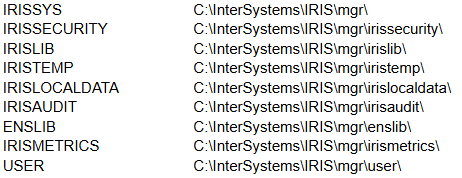
When you’re working in a production environment, it’s strongly recommended that you create a separate dedicated database or several to store your data and code.
To create a new database, go to System > Configuration > Local Databases > Create New Database and provide a name and a directory where it should be stored:
.png)
Namespaces: Logical Sandbox
A namespace in InterSystems IRIS represents a self-contained, logical work environment. It is analogous to a schema in a relational database or a project workspace. It defines the scope of all application elements: persistent classes (objects), routines (code), and most importantly, globals (native data structures). Moreover, applications running in one namespace are logically isolated from those in another. This prevents conflicts between different applications or development environments (e.g., Development, Staging, Production). From the developer's perspective, everything, data and code, resides within the confines of the namespace to which they are connected. Each IRIS application process runs in one namespace. If you want to access data/code in another namespace, you need to change it explicitly.
When you install InterSystems IRIS DBMS, the following namespaces are set up automatically:
- %SYS
- USER
Mapping Logic to Physics
The link between a Namespace and a Database is established through a Mapping. Every Namespace has a defined set of mappings that specify which physical database(s) should be used to store its elements.
For example, we have several databases:
- Clients – contains data about clients
- Finances – contains financial data that allows working with both clients and vendors
- Vendors – contains data about vendors
and two namespaces:
- Billing – has mapping to clients and some or all info from finances that allows the applications that work with this namespace to get all necessary info to deal with clients
- Purchasing – has mapping to vendors and some or all info from finances that allows the applications that work with this namespace to get all necessary info to deal with vendors
.png)
At the same time, each namespace has a default database for data and code.
In this example, it could be:
.png)
You set up which database should be the default for the namespace when you create a namespace (System > Configuration > Namespaces > New Namespace):

Database for temporary storage will be IRISTEMP by default.
The database for Globals stores data, while the database for Routines stores code and class descriptions.
If you wish to add more mappings to data to other databases, go to System > Configuration > Namespaces > (Choose the namespace) > Global Mappings > New and add a new mapping:
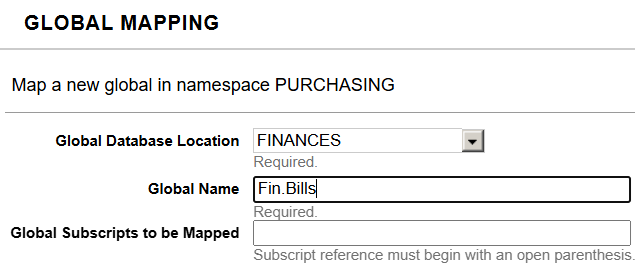
As you can see, you are able to set up access in minute detail – including the subscripts of particular globals.
The same can be done to Routine mappings.
Apart from user-defined mappings, there are also system mappings. System-level code and data (like system class definitions, routines, and system-specific globals starting with ^%) are mapped to system databases (e.g., IRISLIB, IRISSYS). This ensures that application data doesn't interfere with the core system components.
By separating the logical Namespace from the physical Database, and by using mappings, you can gain fine-grained control over data location, security, and performance.