Locks in InterSystems IRIS
Despite the fact that LOCK (docs) is a foundational part of InterSystems IRIS, responsible for concurrency, there is not a lot of discussion on the Developer Community about it. Which is understandable, considering it's stable and fairly low-level command. In this article, I will show a simple example of how to use locks with interoperability. In our example, we'll have a local table with reference data used by two distinct processes:
- A Utility Function that reads from the table (used by various DTL/Rules in Production)
- A dedicated Business Operation that updates the table
The problem here is that when Business Operation updates the table (in the worst case, doing a full rebuild), the custom function would be unable to get the data from the table, which would cause issues in DTL/Rule processing.
Locks would help us with that. Here's how:
- Utility function would take a shared lock before getting the data. Any number of processes can hold a shared lock, so there are no concurrency issues. Once the data is retrieved, we release the shared lock.
-
Updater Business Operation would take a shared lock first and then take out an exclusive lock. Once a process has an exclusive lock, IRIS guarantees that no other process can obtain a lock on the same resource. This way, the utility function won't be able to take a shared lock while an exclusive lock is held. Once our Business Operation finishes updating the table, it releases an exclusive lock, allowing utility functions to access the table.
Let's do it!
Local table
A bit simplistic (and would probably be better as a LUT in a real project), but our goal here is to show how locks work, rather than build a complicated table:
Class Lock.RefData Extends %Persistent
{
Property Value;
}
Note that the table itself is not modified in any way.
Utility function
Here's our utility function:
Class Lock.CF Extends Ens.Rule.FunctionSet
{

ClassMethod GetRefData() As %String
{

	$$$TRACE("Request Shared lock")
	LOCK +^Lock.RefData("ref")#"S"
	$$$TRACE("Gained Shared lock")
	Try {
		Set rs = ##class(%SQL.Statement).%ExecDirect(,"SELECT Value FROM Lock.RefData")
	} Catch ex {
		LOCK -^Lock.RefData("ref")#"S"
		Return "EX - NO DATA"
	}

	if 'rs.%Next()
	{
		$$$TRACE("NO DATA, Releasing lock")
		LOCK -^Lock.RefData("ref")#"S"
		Quit "SQL - NO DATA"
	}
	Set val = rs.Value
	$$$TRACE("Val: " _ val)
	$$$TRACE("Releasing lock")
	LOCK -^Lock.RefData("ref")#"S"
	Quit val
}

}
Note that we acquire a shared lock on ^Lock.RefData("ref") before running SQL and release the lock only after getting a value into a local variable.
Updater Operation
Next, let's implement the Business Operation. It can run on schedule or manually. In our case it will accept Ens.StringContainer with an integer specifying how many seconds to simulate work.
Class Lock.BO Extends Ens.BusinessOperation
{

Method OnMessage(pRequest As Ens.StringContainer, Output pResponse As Ens.Response) As %Status
{
    Set sc = $$$OK
	Try {
		$$$TRACE("Request Shared lock")
		LOCK +^Lock.RefData("ref")#"S"
		$$$TRACE("Gained Shared lock")
		Try {
			$$$TRACE("Request Exclusive lock")
			LOCK +^Lock.RefData("ref")
			$$$TRACE("Gained Exclusive lock.")
			Try {
				$$$TRACE("Simulate the purge work")
				&sql(DELETE FROM Lock.RefData)

                Hang +pRequest.StringValue

				Set obj = ##class(Lock.RefData).%New()
				Set obj.Value  = $zdt($h, 3, 1, 3)
				Do obj.%Save()

                $$$TRACE("Release exclusive lock on succesfull completion")
                LOCK -^Lock.RefData("ref")
			} Catch ex {
				$$$TRACE("Release exclusive lock on error")
                LOCK -^Lock.RefData("ref")
				THROW ex // re-throw the exception after releasing lock
            }
            $$$TRACE("Release shared lock on successfull completion")
            LOCK -^Lock.RefData("ref")#"S"
		} Catch ex {
			$$$TRACE("Release shared lock on error")
			LOCK -^Lock.RefData("ref")#"S"
			THROW ex // re-throw the exception after releasing lock
		}
	} Catch ex {
		Set sc = ex.AsStatus()
	}
	Set pResponse = ##class(Ens.Response).%New()
	$$$TRACE("Done.")
	Quit sc
}

}
Production
To show how it all works together, I also added a Router with a Business Rule which calls a custom function and a Business Service which calls the Router every second. Here's a sample of the Production Event Log:
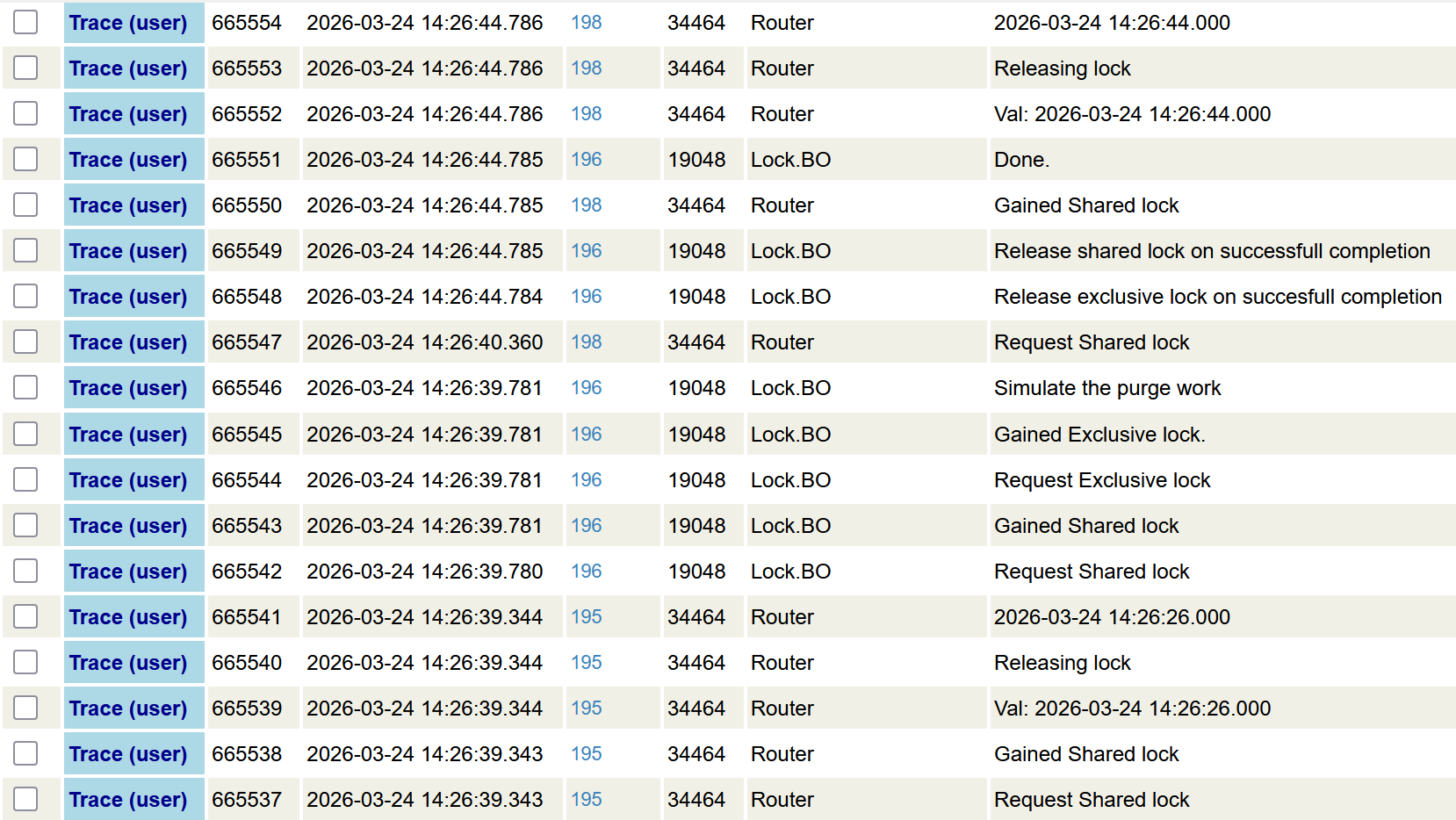
At 14:26:39.780 updater gets a shared lock and immediately upgrades it to an exclusive lock. At 14:26:40.360 a shared lock is requested by a custom function, however it's granted only 14:26:44.785, immediately after the exclusive lock is released by the updater Business Operation.
Conclusion
Locks provide a low-level tooling to manage concurrency in a multiprocess system.
Links
Comments
One aspect that I think is not always appreciated is how locking is happening automatically. For example,
- the %OpenId method when used in Objects has a second parameter that is not always utilized or thought about. The second parameter is the concurrency parameter. I think of applications as plenty of locations where reads are done and a single(small number of places) where %Save is done. With this in mind do you really need a lock of some kind in the place where reads are done. You may feel like they do need locks which is fine, just understand that calling %OpenId will use the default concurency option and this may acquire some form of a lock. Now the other aspect of this is %OpenId returns tSC by reference. How many people call %OpenId and never check the value of tSC. This could come back with an error %Status if for example you didnt specifiy the concurrency option and some other process had an Exclusive Lock on the record you are attempting to Open
- SQL statements like INSERT, UPDATE, DELETE will by default acquire locks on the rows that it is impacting. You can use the %NOLOCK keyword to tell the SQL engine to not lock but that is on you to add. If you have a single SQL statement like DELETE FROM Table1 WHERE NOT EXISTS (SELECT * FROM Table2) this statement is atomic, which means among other things
- all of the deletes on the rows are journalled
- all of the rows that are being deleted will be locked. At some point lock escalation will take place and the table will be locked.
TLDR .. know that locking is happening when using Objects and SQL and use accordingly.
Thank you, Stephen!
Hi Eduard,
Why does OnMessage() request a shared lock right before requesting an exclusive lock?
I thought it's safer but rereading the docs I don't see any difference.
I agree. I think you can remove that extra try/catch.