#Tips & Tricks

12 Followers · 335 Posts

Pieces of experience in InterSystems Technology which solve some particular problem in elegant or unusual way.

Article Hiroshi Sato · Feb 15, 2024 2m read

InterSystems FAQ rubric

The $ZF(-100) command is used in the following format.

$ZF100

The "/shell" flag is required when running OS commands.
For example, use mkdir like this:

 // mkdir C:\temp\newdir


If a command has multiple arguments, enclose them in double quotes and separate them with commas, as in the example below.

Also, use synchronous/asynchronous execution as follows.

Please see the document below for details.
How to use $ZF(-100) [IRIS]

How to use $ZF(-100)

0
3 419
Article Mihoko Iijima · Jan 25, 2024 4m read

InterSystems FAQ rubric

If the system does not stop for 24 hours, old journal files will be deleted at 0:30 according to the "Journal file deletion settings".

A possible cause of journal files remaining that are older than the "Journal file deletion settings" is that there are transactions that remain open.

In that case, you will be able to delete the journal file by searching for processes executing transactions and finalizing the transactions.

The sample below checks for the existence of open transactions, and if they exist, outputs the target file name and journal record information.

3
2 494
Article Hiroshi Sato · Jan 18, 2024 1m read

InterSystems FAQ rubric

If you need to migrate your server for some reason, you can reduce the setup work by copying configuration information from the pre-migration environment to the post-migration environment.

The following setting information can be migrated.

  • iris.cpf
  • SQL gateway settings
  • web gateway settings *Note 1
  • user-created routines etc. stored in the IRISSYS database *Note 2
  • security settings
  • task settings

Note 1: If a password has been set, only the password needs to be reset manually.
Note 2: Preferred connection server settings such as ^%ZSTART, ^ZMIRROR routines, etc.

1
2 327
Article Anssi Kauppi · Jun 30, 2020 3m read
Many organisations implement centralised log management systems to separate and centralise the log data in order to e.g. automate threat detection (and response) and to comply with regulatory requirements. The primary systems of interest are the various user facing applications, but increasingly also other kinds of systems including integration platforms.

What comes to the data platform (not the user facing application) most of the the events of interest/required are available as predefined system audit events in audit log - out of the box. They just need to be enabled.

2
2 578
Article Megumi Kakechi · Jan 11, 2024 2m read

InterSystems FAQ rubric

This error occurs when an instance of the class is already open at compile time.

There are two ways to deal with this issue:

  1. Terminate the process or application that has the instance open
  2. Compile options in the studio build menu: Check the compile flag “Compile classes in use” and compile.  

If you want to determine which process is using the class, try the sample routine below.

/// Test.mac
1
0 248
Article Evgeny Shvarov · Apr 4, 2023 2m read

Hi developers!

As you know InterSystems IRIS besides globals, object, document and XML data-models also support relational where SQL is expected as a language to deal with the data.

And as in other relational DBMS InterSystems IRIS has its own dialect.

I start this post to support an SQL cheatsheet and invite you to share your favorites - I'll update the content upon incoming comments.

Here we go!

26
7 1832
Article Megumi Kakechi · Jan 4, 2024 1m read

InterSystems FAQ rubric

If a relationship is set and there is a large number of n in a 1:n ratio, a large amount of memory may be consumed due to sequential processing of the relationship.

After referencing a many-sided object in a program and internally swizzling it, simply releasing the variable containing the OREF (deleting it, setting another value, etc.) will not free the many-sided object and the relationship object. This is the cause.

0
0 392
Article Jose Ruperez · Oct 11, 2016 4m read

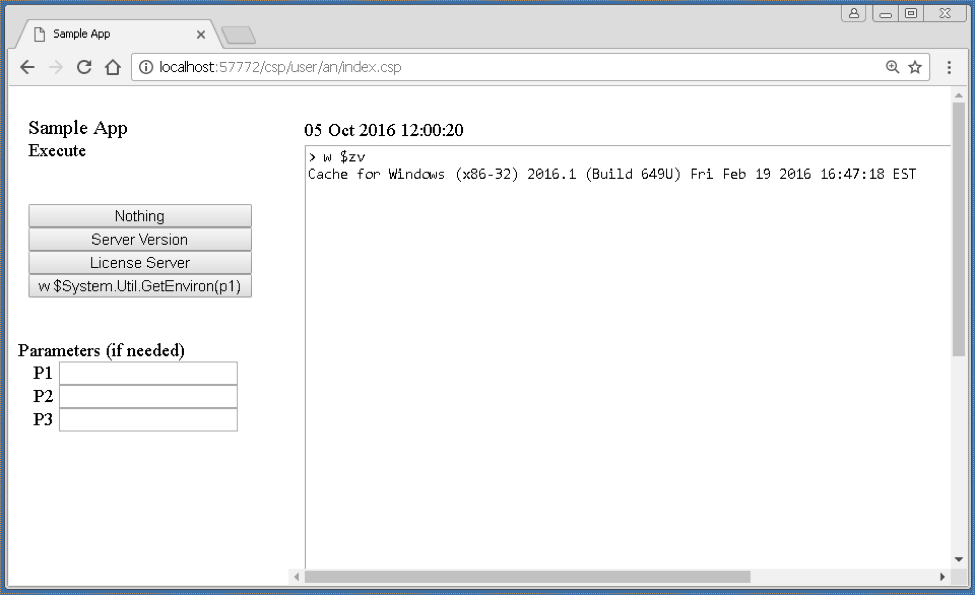
Now, let’s say you can’t access the terminal or simply you just rather execute it from a web interface. In this article, I will show you how to execute terminal commands from a simple web page.

For example, in the image below you see how we execute $zv on a webpage:

This is mostly possible due to the XECUTE command in Caché ObjectSCript. This command takes a string as a parameter and tries to execute it. This is the command used from the webpage, to execute what is being passed from the left navigation menu.

This article contains three snippets of code.

7
0 32924
Article Mihoko Iijima · Dec 28, 2023 1m read

InterSystems FAQ rubric

There is no need to recompile the routines after the version upgrade, but since the version update overwrites %SYS, user-created INT and OBJ format routines (*.INT,*.OBJ) in %SYS will be deleted. Therefore, you need to be careful. 

MAC, INT and OBJ routines with the following names are not deleted.

%Z*.INT, %z*.INT, Z*.INT,z*.INT
%Z*.OBJ, %z*.OBJ, Z*.OBJ,z*.OBJ

Please note that classes/CSPs need to be compiled after upgrading.

However, if you are upgrading to a maintenance release, no compilation is required. For details, please refer to the document below.

0
1 291
Article Mihoko Iijima · Dec 21, 2023 1m read

InterSystems FAQ rubric

If multiple InterSystems products are installed on the same system, the latest version of the InterSystems ODBC driver among the installed products will remain registered in the driver manager.

You can change to any driver by changing the registry entry below.

 Please note that running RegFiles.bat does not change the ODBC driver.

The registry entry is as follows.

HKEY_LOCAL_MACHINE\SOFTWARE\ODBC\ODBCINST.INI\InterSystems ODBC35 key Driver
HKEY_LOCAL_MACHINE\SOFTWARE\ODBC\ODBCINST.INI\InterSystems ODBC35 key Setup
0
0 464
Article Megumi Kakechi · Dec 7, 2023 2m read

InterSystems FAQ rubric

To resolve the error <PROTECT>, remove the read-only attribute of the system-wide library database (IRISLIB for InterSystems IRIS, CACHELIB for Caché/Ensemble/HealthShare (Caché-based))

Once you have finished importing the routine, remember to change it back to read-only.
 

[Version 2013.1 and above]
[Management Portal] > [System Administration] > [Configuration] > [System Configuration] > [Local Database] Uncheck "Mount read-only" from the database name link.

[Version 2011.1 - Version 2012.

3
0 662
Article Mihoko Iijima · Nov 30, 2023 3m read

InterSystems FAQ rubric

Class definitions created by users are stored in class definition classes. They can be used to obtain a list of class definitions from a program.

Note: Class definition classes refer to all classes contained in the %Dictionary package.

In the sample code below, a list of class definitions is obtained using the query Summary of the class %Dictionary.ClassDefinitionQuery.

ClassClassMethod#dim

An example of execution is as follows.

2
0 668
Article Robert Cemper · Nov 19, 2023 2m read

There are situations when your only access to a server is using a web browser,
and there is just no chance of a Terminal or Console access.
The Online Demo Server is such a case.

So you have WebTerminal. That's fine for ObjectScript and Embedded Python.

But my demo is straight Java. And is interactive.
$ZF(-100...) is some aproach. But it's rater batch-oriented and not interactive.
@Enrico Parisi  presented a nice extension to WebTerminal recently.
It's close to my own packageWebCommand that I presented a year ago.

0
0 263
Article Megumi Kakechi · Oct 19, 2023 2m read

InterSystems FAQ rubric

A tool (^GLOBUFF utility) is available to check the database cache usage for each global variable.

You can run the utility directly or programmatically in the %SYS namespace.

Here's how to run the utility directly:

USER>zn "%SYS"
 
%SYS>do ^GLOBUFF
 
Find which globals are using the most buffers.
 
Display the top <25>:     → Press Enter  // Default is to display top 25 globals
 
Total buffers: 102400     Buffers in use: 6926     PPG buffers: 77 (1.
5
1 994
Article Tomoko Furuzono · Jun 1, 2023 1m read

InterSystems FAQ rubric

You can set the maximum size of the IRISTemp database at IRIS startup by setting a configuration parameter called MaxIRISTempSizeAtStart.

After setting, the system will truncate IRISTemp to the set value (MB) at the next IRIS startup. If the current size is less than the specified MaxIRISTempSizeAtStart, no truncation will occur. Also, if 0 is specified, truncation will not be performed, so the size will start without changing. (Default) Settings are made from the menu below.

1
0 822
Article Tomoko Furuzono · Nov 16, 2023 2m read

InterSystems FAQ rubric

To run an online backup from a command you can use the API BACKUP^DBACK routine.
An example of performing a full backup is as follows.

set^DBACK""

The return value is 1 if the backup is successful, and 0 if the backup is unsuccessful. Please refer to the log file for details on failure.

Additionally, you can specify C for the second argument TYPE to specify a cumulative backup, and specify I to specify a differential backup.

An example routine is below.

FULL ()  public  {
    
0
0 400
Article Mihoko Iijima · Nov 9, 2023 1m read

InterSystems FAQ rubric

To create a user-defined error you need to prepare the XML that describes the error code and corresponding message that you want to use as a user-defined error.

Please set the error code as a negative integer.

<?"1.0""UTF-8" 
<<

Once the XML file is created, load it into the namespace you want to use.

##class

Once loaded, you can retrieve and display user-defined errors with a command like the following:

USER>
2
2 762
Question Colin Brough · Nov 13, 2023

We are successfully using System Default Settings to manage differences in settings across environments where the production and underlying code are otherwise identical. However, the TestingEnabled and LogGeneralTraceEvents settings don't appear to be settable via this mechanism. While we appear to be able to set them on the SDS page, they do not show up as selectable when resetting the settings on the Production Settings tab in the management portal - see screenshots below.

3
0 401
Article Mihoko Iijima · Nov 2, 2023 3m read

InterSystems FAQ rubric

For routines (*.mac)

You can hide the source by exporting/importing only the *.obj that is generated after compiling the source program.

The command execution example specifies EX1Sample.obj and EX2Sample.obj, which are generated by compiling EX1Sample.mac and EX2Sample.mac, as export targets and exports them to the second argument file.

After moving to another namespace, I am using the exported XML file to perform the import.

USER>do$system

For classes (*.cls)

1
0 716
Article Mihoko Iijima · Oct 26, 2023 2m read

InterSystems FAQ rubric

Information on properties defined in a class can be obtained using the following system classes:

%Dictionary.ClassDefinetion

%Dictionary.PropertyDefinition

The code description example is as follows.

ClassClassMethodAs

An example of execution is as follows.

USER>

Related article: How to get all fields of a specified table with SQL

0
2 700
Article David Hockenbroch · Oct 4, 2023 8m read

We are back to %SYS once again! Since we covered managing users and resources in the last two articles, we can finally move on to roles. As you may have guessed, there are a lot of methods of managing them that you have already seen in our previous writings. However, we can still encounter key differences in this particular class.

Before we begin, bear in mind that this is another class that should not be manipulated through direct SQL access. In newer versions of IRIS, you will find a NoSQL trigger that will prevent you from doing that anyway.

3
5 811
Article Mihoko Iijima · Oct 12, 2023 1m read

InterSystems FAQ rubric

ObjectScript allows you to pass any number of arguments using arrays. Do it by adding ... after the argument name.

An example is as follows. In the example statement, the argument information is set in a global variable (a variable stored in the database) so that it can be easily checked after the method is executed.

ClassExtends%RegisteredObject

The result of running it in the terminal is as follows.

USER>
1
0 581
Article Megumi Kakechi · Sep 28, 2023 2m read

InterSystems FAQ rubric

In the sample below, an image file is encoded into a Base64 string in a class property, saved, decoded again with Base64, and restored to another file.

【Usage class】

Class User.test Extends %Persistent
{
Property pics As %GlobalBinaryStream;
}


【When importing】

  set x=##class(User.test).%New() // create a new object

  // prepare an image
  set file=##class(%File).%New("c:\temp\Mii.png")
  do file.Open("RUK\BIN\")
  for {
       if file.AtEnd=1 quit
       // Convert image to Base64 format in chunks of 1024 bytes
       set cnt=file.Read(1024)
       set b64=$system.Encryption.Base64Encode(cnt) // b64: 1402byte
       do x.pics.Write(b64)
  }
  do x.%Save()
  do file.Close()
2
2 797
Article Mihoko Iijima · Oct 5, 2023 1m read

InterSystems FAQ rubric

On Linux, use the iris command to execute a routine or method from a shell and get the return value.

For more information,  please refer to the document "About Instance Connections".

An example of a command is as follows.

iris terminal instname [arguments]

The return value of a shell script can be specified using a special variable using the Terminate() method of the %SYSTEM.Process class when the process ends, rather than by specifying an argument in the QUIT or RETURN command that is specified when a routine or method ends. Use the method of returning a value to $?

2
1 612
Article Mihoko Iijima · Sep 21, 2023 1m read

InterSystems FAQ rubric

The meaning of each timeout value is as follows.

1. [Server response timeout]

If IRIS/Caché processing (routine or query execution) does not finish within this set time, the browser will return an error.

For example, if this value is 60 seconds and it takes 90 seconds to execute a routine/method/query, an error will occur.

2. [Queued request timeout]

For each IRIS/Caché server configured in CSP/REST, you can limit the number of processes that can run CSP/REST concurrently.

2
0 714
Article Mihoko Iijima · Sep 14, 2023 1m read

InterSystems FAQ rubric

It can be retrieved using the schema INFORMATION_SCHEMA.

INFORMATION_SCHEMA is a system schema and is not displayed by default in the SQL menu of the Management Portal.

The method to display it is as follows.

  1. Open Management Portal → System Explorer → SQL menu.
  2. Check "System" on the left of the schema drop-down.
  3. Select INFORMATION_SCHEMA from the schema dropdown.

The SQL to get the ID, field name (COLUMN_NAME), data type (DATA_TYPE), description (DESCRIPTION) for the specified table (Sample.Human) is as follows.

0
1 784