1. set tSC=...
    do $SYSTEM.Status.DisplayError(tSC)

2. set tSC=...
   zwrite tSC

3. An alternative?
Is there a meaningful difference between the two? Should one be used over the other for any reason? Should something else be used?
Posts that relate to discussions on utilizing the Terminal tool.
Hi,
I have an odd problem that occurs when I'm trying to import lookup tables in the XML format into Studio.
I store my files in in C:\CodeRepository.
I can manually import these lookup tables using "Import local..." option in the InterSystems Studio.
However, when I'm trying to import them using command in terminal: do $system.OBJ.LoadDir("C:\CodeRepository\","ck")
I'm getting the following error:
Loading file C:\CodeRepository\Title.lut.xml as xml
ERROR #5863: Another user has 'Title.LUT' open for editing.
I am trying to add Web Terminal as a feature for my team to use.
I installed webterminal via zpm "install webterminal" ran on %SYS on our Development box.
%SYS>zpm "install webterminal"
[%SYS|webterminal] Reload START (/ensemble/DEV/mgr/.modules/%SYS/webterminal/4.9.6/)
[%SYS|webterminal] Reload SUCCESS
[webterminal] Module object refreshed.
[%SYS|webterminal] Validate START
[%SYS|webterminal] Validate SUCCESS
[%SYS|webterminal] Compile START
Recompiling WebTerminal, skipping the deletion...
Installing WebTerminal application to %SYS
Interacting with Users in the Terminal: A Guide to Using %Library.Prompt in IRIS
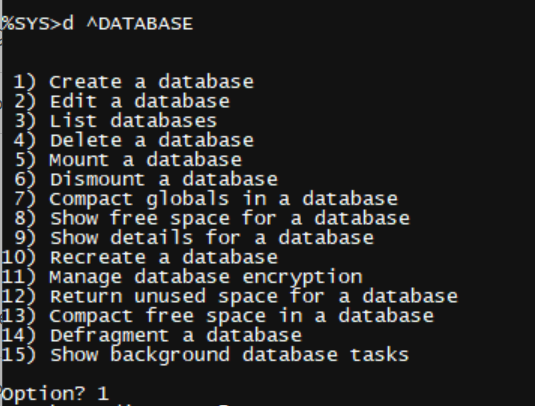
Have you ever wondered how commands like ^DATABASE engage users in the terminal? Or perhaps you're writing an automation routine and want ways to specify options directly from the terminal. Thankfully, the %Library.Prompt class in IRIS offers a straightforward way to do so!
For basic input, such as asking the user to provide a filepath or namespace, use the following code:
set status = ##class(%Library.Prompt).GetString("Input filepath:", .Hi Devs!
Recently I was impressed by @Dan Pasco's article where he shares also how he uses terminal aliases.
Terminal aliases is a very powerful tool for developers and sys admins if you often need to call some cumbersome terminal expressions and make it shorter and cleaner. Here is the documentation.
Yes!
But what about Docker environments? What if you are fan of Docker dev environments but also want to keep using your favorite aliases with Docker as well?
Turned out it is very possible.
Hey Community,
Watch this video to learn how to use terminal aliases for InterSystems IRIS and also how to set it up with your Docker Developer Environment:
⏯ InterSystems Terminal Aliases and How To Have It In Docker Environment
Hi all,
When is a Developer Community post not a Developer Community post? When it's just a few sentences wrapped around a link to InterSystems documentation! And what better way to finish up 2021 than by telling you about something cool that's been available since v2020.3? As the ball drops in Times Square, curl up with this:
I think it will bring you joy! Post your favorite aliases below. Happy New Year!
1. set tSC=...
do $SYSTEM.Status.DisplayError(tSC)
2. set tSC=...
zwrite tSC
3. An alternative?
Is there a meaningful difference between the two? Should one be used over the other for any reason? Should something else be used?
How can I check the currently installed version number of an ISCAgent running as the Arbiter in a Red Hat instance?
I can check the properties on a Windows system. I doesn't seem to respond to a --version argument in terminal.
Now, let’s say you can’t access the terminal or simply you just rather execute it from a web interface. In this article, I will show you how to execute terminal commands from a simple web page.
For example, in the image below you see how we execute $zv on a webpage:
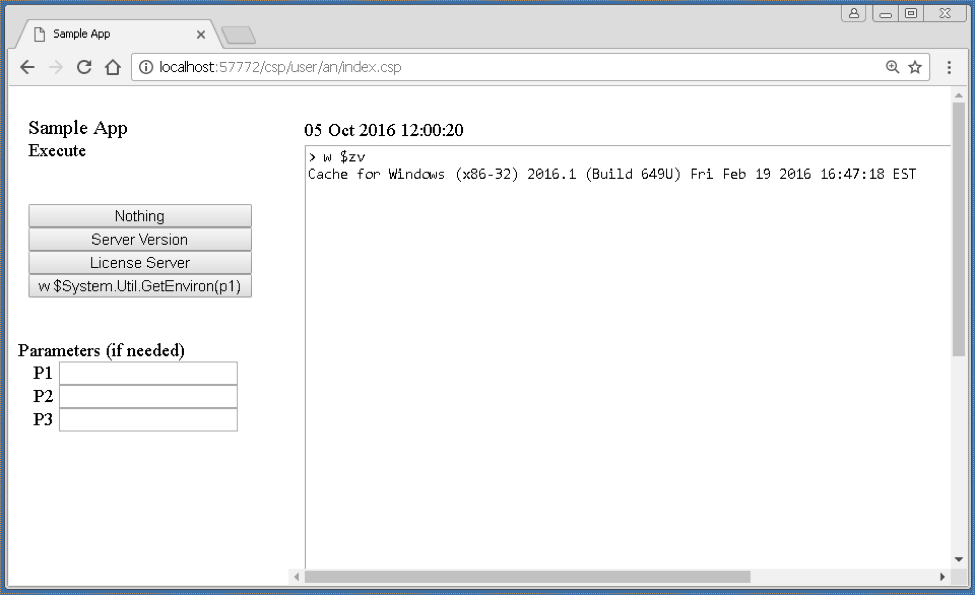
This is mostly possible due to the XECUTE command in Caché ObjectSCript. This command takes a string as a parameter and tries to execute it. This is the command used from the webpage, to execute what is being passed from the left navigation menu.
This article contains three snippets of code.
I just realized that operating system command execution does not work on Windows console if the IRIS service is started using a different user than Local System account (the default).
I always change the user configured in the IRIS service and I believe this is a standard good practice, particularly in "real" environments (be it production, stage, test or development) that are part of Windows Active Directory Domain.
When IRIS service starts using any user, including Administrators members, using "!" or "$" from the terminal prompt to run a OS command fail, nothing happen.
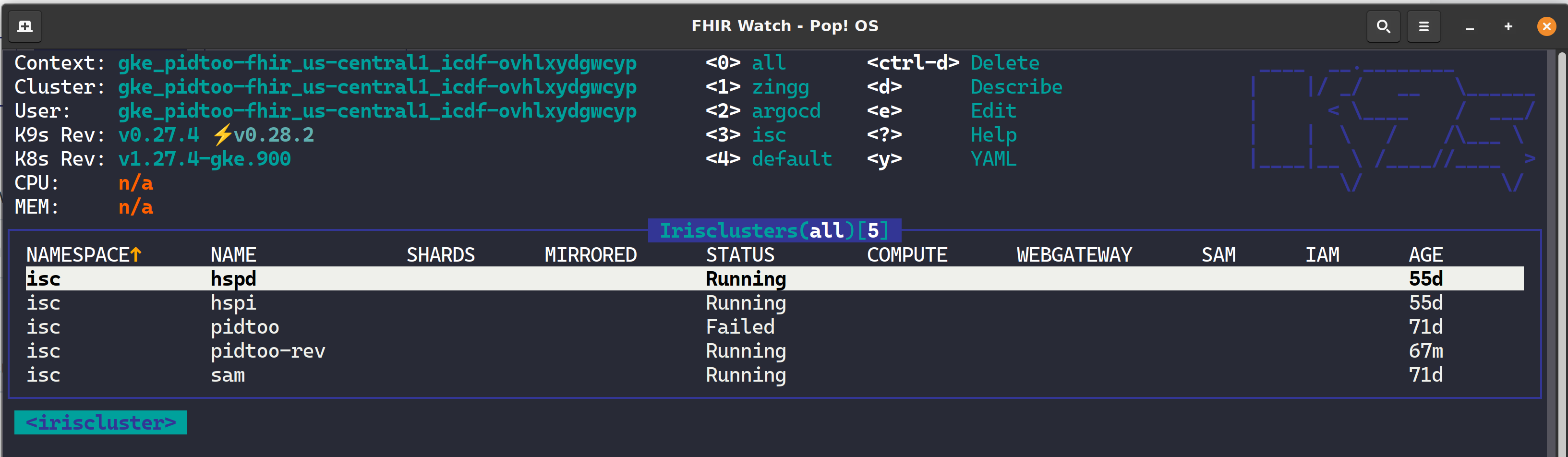
K9s is a terminal-based UI (aka kubectl clown suit), to manage Kubernetes clusters that drastically simplifies navigating, observing, and managing your applications in K8s, including Custom Resources like the InterSystems Kubernetes Operator (IKO) and ArgoCD Applications. If you are about to take your CKD, CKA, or CKS, leave k9s well enough alone for awhile as the abstraction to kubectl will become the standard for navigating the cluster and you will undoubtedly become estranged to the extended flags of kubectl and bomb the exam.
I think WebTerminal is an outstanding project, kudos to @Nikita Savchenko
One useful functionality is missing, the the ability to run Operating System (Linux or Windows) commands.
In many cases WebTerminal is used when access to the OS is difficult, so having the ability do run simple OS commands from WebTerminal would be a big advantage.
Using "normal" terminal, be it Windows IRIS console, Windows Telnet or within "iris session" in linux is simple, from the IRIS terminal prompt just precede the OS command with "$" or "!".
See the article "Terminal tip: Running OS-level commands" from @John.
Hello Everyone,
We currently have CSP application that runs under 2 servers(usually primary), and every month the server reboots for patching SERVER1(primary) in the morning and SERVER2(backup) at night.
Whenever the SERVER1 reboots SERVER2 behaves as primary and when SERVER1 comes back up it will act as backup server.
First Patching:
So, when SERVER1 is down, I need to start httpd service for SERVER2 and stop httpd service for SERVER1 (which is now backup server).
I tried using the code below in terminal to start httpd service for SERVER2 with no success.
For my Embedded Python ONLY demo package I need some user input.
Similar to ObjectScript
read "say somthing",reply
I use the Python equivalent
reply = input("say something")And this works excellent without problems from Terminal or Doker console
BAD SURPRISE:
withWebTermnial ObjectSscript works fine, but embedded Python fails badly.
.png)
I do not care about line terminators without <CR>
but it is just impossible to receive any input.
This is no improvement. The content is missing !!!!
.png)
QUESTION to the experts.
Hello,
I have set up a Docker image with IrisHealth Community Edition and created a backup of all databases with the Management Portal. Obviously, the restore requires a different way, i.e. a terminal or session needs to be started to use a "Do ^DBREST".
Due to the manual first a session (which is probably same as iristerm terminal) needs to be started:
docker exec -it iris iris session iris
If I enter "DO ^DBREST", I get the answer:
<NOROUTINE> *DBREST.
I assume that when I start the session that way I get logged in as "USER", at least the prompt "USER>" indicates this.
Hey ISC Community!
For a small automation feature I would like to login to the IRIS shell non-interactively, skipping the whole username and password prompts, providing the credentials through other means. Something in the fashion of "iris session <instance-name> --user myuser --pass mypass" would be great, but the session tool itself doesn't seem to be capable of doing this.
Does anyone know a way to accomplish this? It need not be through "iris session", any way that can be automated would be fine. Disabling authentication for the terminal is not an option, though.
Visual Studio Code, like Atelier, connects to IRIS through the Web Server and a web service, unlike Studio that connect to the SuperServer port.
What about the VS Code terminal? Does that open a shell with SSH or does it also use a web service?
In other words, does an IRIS developer using VS Code need direct access to the IRIS instance with SSH or the SuperServer port, in addition to the external or private web server to execute terminal commands?
Is that different with linux vs. Windows?
Hi Community,
Watch this video to learn the basics of how to use the InterSystems® command line interface to execute commands, including starting the Terminal, executing methods and routines, and exiting the Terminal.
Are you all ready for something you wish you knew ages ago (or, in my case, a DECADE ago)? Open up a portal in your favorite instance and go to:
System Administration->Configuration->Additional Settings->Startup
Scroll down to "Terminal Prompt" and click 'Edit'. This allows you to edit what you see on your terminal prompt. You can change that to my current setting: 8,3,2
What does this do? It adds your instance name for your prompt.
Hi Developers!
There is a recent update came for developer community images of InterSystems IRIS and IRIS For Health.
This release comes with Environment variables support.
Currently 3 variables are supported:
Here is what you can do - see below.
Start iris with your username and password created:
docker run --rm --name iris-sql -d -p 9091:1972 -p 9092:52773 -e IRIS_PASSWORD=demo -e IRIS_USERNAME=demo intersystemsdc/iris-communityHi Devs!
For me, one of the most painful things about ObjectScript is ##class(Class).Method() typing to call a class method in code or in a terminal. I even submitted an idea to simplify it in ObjectScript.
But! There is a new feature in VSCode ObjectScript that was just introduced to the plugin - Copy Invocation!
Just hover Copy Invocation linkabove every classmethod in a code, click on it and the invocation is copied to the buffer:
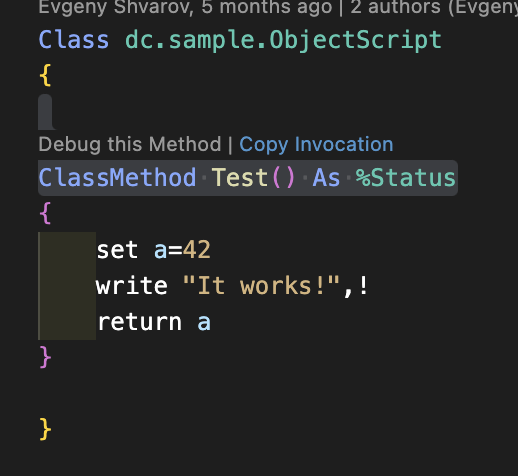
Paste it anywhere you want it to execute!
USER>w ##class(dc.sample.ObjectScript).Test()Bazinga!
Here is the video that shows how it works.
Hi folks!
When I launch IRIS as a docker container instance, e.g. like this one:
docker run --name iris-sql -d --publish 9091:1972 --publish 9092:52773 intersystemsdc/iris-community
And then try to connect to it e.g. via irissqlcli it says I need to change the password:
irissqlcli iris://_SYSTEM:SYS@localhost:9091/USER

Password change required
I know that I can open Management portal http://localhost:9092/csp/sys/UtilHome.csp and change password manually, but is there a programmatic way?
Say if I have a password in a file and I can just provide it to docker instance for the change?
Hey all!
I was wondering if anyone had any input on how to troubleshoot classes in a terminal session? I'm currently writing an "adapter" so that way we can encrypt and decrypt files through GNUPG (PGP keys).
I currently have a %RegisteredObject class for this and am running into the excruciating pain of testing this. Every time I make a change on the RegisteredObject I have to renew the class and all of its properties in order to test the newly compiled code that I have written. I know that this doesn't seem like too much of a hassle, but after doing it multiple times it becomes tiring.
I've been trying for a while now to get OS authentication working on IRIS running on Ubuntu 20.04 and subsequently 22.04. I have the following authentication methods enabled for %Service_Terminal:
And i have these options selected in Authentication/Web Session Options:
.png)
But when logging in via iris session <instancename> I am always prompted for a username and password. I am logged into the operating system with a username that matches my IRIS username, and the same configuration and login method works fine on Red Hat 8.5.
Suppose you have developed your own app with InterSystems technologies stack and now want to perform multiple deployments on the customers' side. During the development process you've composed a detailed installation guide for your application, because you need to not only import classes, but also fine-tune the environment according to your needs.
To address this specific task, InterSystems has created a special tool called %Installer. Read on to find out how to use it.
I was able to run the Cache terminal from the command prompt with the following command, in the namespace that I provided in the brackets:
cterm /console=cn_ap:ENSEMBLE[TEST_1]
But the command suddenly stopped opening the terminal in the correct namespace. It just opens it in the default namespace. I tried it with different namespaces or invalid namespaces, it always opens the terminal in the default namespace now.
I cannot figure out what is causing this behaviour.
As we all know, Caché is a great database that accomplishes lots of tasks within itself. However, what do you do when you need to access an external database? One way is to use the Caché SQL Gateway via JDBC. In this article, my goal is to answer the following questions to help you familiarize yourself with the technology and debug some common problems.
I am new to using containers. I am working on trying to specify some of the SAM settings and wondered how to access the terminal while IRIS is running in a Container. Can someone help me out?
Hello,
I need to run some clean up routine in the background so loss of my terminal session won't stop the process.
I found the JOB command in the documentation.
JOB | ObjectScript Reference | InterSystems IRIS Data Platform 2022.1
When I try it, it doesn't seem to be doing much. I also expected this to become visible in the Background Tasks but that doesn't happen either.
Probably I am missing something.
This is the command I am running:
JOB ##class(HIHLib.Support.GetHL7MessageStat).ISBListingQuery("2017-01-01","2017-02-01",0,"WAHISCL",-1,0)::10
The same command without the ::10 has the same effect.
Hi,
I have a problem with the recent update 4.9.4 of the WebTerminal.
This message appeared after the loading of the page :
New update is available. Click here to install it now. Changelist:
4.9.4: No longer require /terminal to be at the root of the URL
So I installed the new version. Unfortunatly, after refreshing the page, I have this message again and again :
WebTerminal lost connection with server (code 1006).
Attempting to restore session in 10 seconds...
Please, refresh the web page to start a new session.

WebTerminal lost connection with server (code 1006