#DevOps

7 Followers · 96 Posts

Software engineering practice that aims at unifying software development (Dev) and software operation (Ops).

Article Robert Cemper · Oct 9, 2018 3m read

The question has come up several times and I saw mixed answers and no quick example

My personal preference is using CPIPE device as you get back exactly the output you will get at the command line interface of your OS .
The tricky thing is to stop reading in time.
The example just displays what you normally see in your console.
it becomes useful if you look for things that you can't get from any $system.whatever()

e.g.
- your servers IP address or addresses depending on your configuration.

5
4 2633
Article Luca Ravazzolo · Feb 2, 2018 4m read

Container Images

In this second post on containers fundamentals, we take a look at what container images are.

What is a container image?

A container image is merely a binary representation of a container.

A running container or simply a container is the runtime state of the related container image.

Please see the first post that explains what a container is.

Container images consist of a basic OS substratum and all the software we need to run our service. I use the term service for a given "container solution" as a generic description of a software solution wrapped in a container.

1
0 2511
Article Murray Oldfield · Nov 14, 2019 6m read

Released with no formal announcement in IRIS preview release 2019.4 is the /api/monitor service exposing IRIS metrics in Prometheus format. Big news for anyone wanting to use IRIS metrics as part of their monitoring and alerting solution. The API is a component of the new IRIS System Alerting and Monitoring (SAM) solution that will be released in an upcoming version of IRIS.

However, you do not have to wait for SAM to start planning and trialling this API to monitor your IRIS instances.

2
7 2252
Article Lorenzo Scalese · Apr 22, 2022 8m read

Apache Web Gateway with Docker

Hi, community.

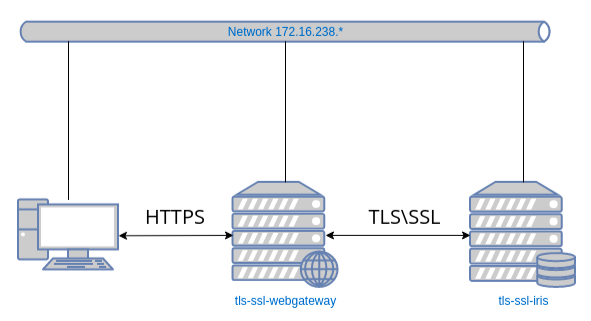
In this article, we will programmatically configure an Apache Web Gateway with Docker using:

  • HTTPS protocol.
  • TLS\SSL to secure the communication between the Web Gateway and the IRIS instance.

image

We will use two images: one for the Web Gateway and the second one for the IRIS instance.

All necessary files are available in this GitHub repository.

Let’s start with a git clone:

git clone https://github.com/lscalese/docker-webgateway-sample.
15
8 2183
Article Murray Oldfield · Sep 7, 2023 8m read

Most transactional applications have a 70:30 RW profile. However, some special cases have extremely high write IO profiles.

I ran storage IO tests in the ap-southeast-2 (Sydney) AWS region to simulate IRIS database IO patterns and throughput similar to a very high write rate application.

The test aimed to determine whether the EC2 instance types and EBS volume types available in the AWS Australian regions will support the high IO rates and throughput required.

Minimal tuning was done in the operating system or IRIS (see Operating System and IRIS configuration below).

0
0 1694
Article Murray Oldfield · Jun 5, 2019 2m read

If a picture is worth a thousand words, what's a video worth? Certainly more than typing a post.

Please check out my "Coding talks" on InterSystems Developers YouTube:

1. Analysing InterSystems IRIS System Performance with Yape. Part 1: Installing Yape


Running Yape in a container.

2. Yape Container SQLite iostat InterSystems

Extracting and plotting pButtons data including timeframes and iostat.

3
2 1693
Article Mikhail Khomenko · Dec 23, 2019 12m read

Last time we deployed a simple IRIS application to the Google Cloud. Now we’re going to deploy the same project to Amazon Web Services using its Elastic Kubernetes Service (EKS).

We assume you’ve already forked the IRIS project to your own private repository. It’s called <username>/my-objectscript-rest-docker-template in this article. <root_repo_dir> is its root directory.

Before getting started, install the AWS command-line interface and, for Kubernetes cluster creation, eksctl, a simple CLI utility. For AWS you can try to use aws2, but you’ll need to set aws2 usage in kube config file as described here.

1
3 1672
Article Anton Umnikov · May 31, 2021 6m read

All source code to the article is available at: https://github.com/antonum/ha-iris-k8s&nbsp;

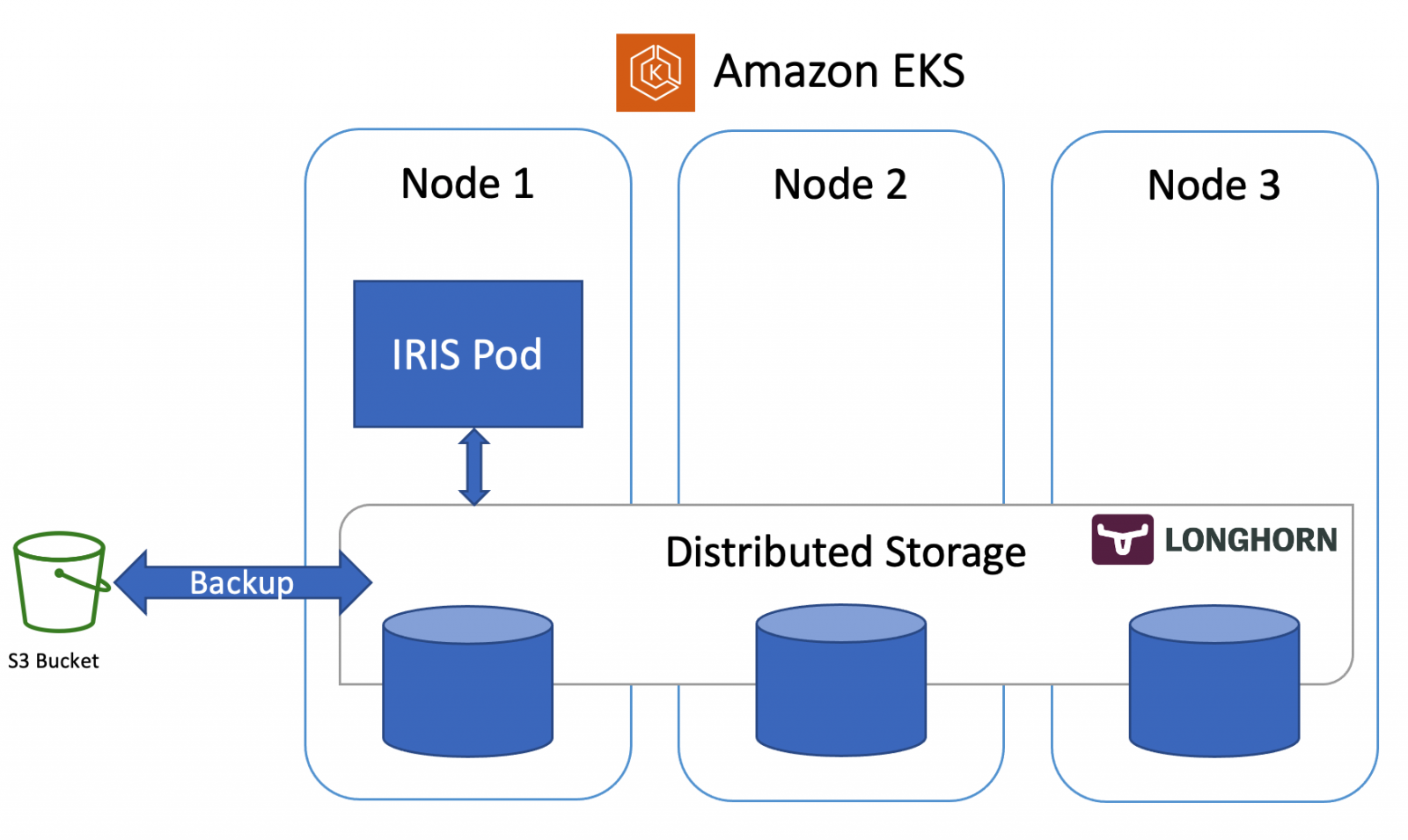
In the previous article, we discussed how to set up IRIS on k8s cluster with high availability, based on the distributed storage, instead of traditional mirroring. As an example, that article used the Azure AKS cluster. In this one, we'll continue to explore highly available configurations on k8s. This time, based on Amazon EKS (AWS managed Kubernetes service) and would include an option for doing database backup and restore, based on Kubernetes Snapshot.

Installation

Let's get right to business.

2
0 1581
Article Mikhail Khomenko · Jan 13, 2020 16m read

Last time we launched an IRIS application in the Google Cloud using its GKE service.

And, although creating a cluster manually (or through gcloud) is easy, the modern Infrastructure-as-Code (IaC) approach advises that the description of the Kubernetes cluster should be stored in the repository as code as well. How to write this code is determined by the tool that’s used for IaC.

In the case of Google Cloud, there are several options, among them Deployment Manager and Terraform. Opinions are divided as to which is better: if you want to learn more, read this Reddit thread Opinions on Terraform vs. Deployment Manager? and the Medium article Comparing GCP Deployment Manager and Terraform

1
2 1569
Article Lorenzo Scalese · Feb 8, 2022 11m read

History

Version Date Changes
V1 2022-02-08 Initial release
V1.1 2022-04-06 Certificates generation with sh file instead of pki-script
Using environment variables in configuration files

Hi Community,

Have you already set up a mirrored environment? Does it have a private network, virtual IP address, and SSL configuration? After doing this a couple of times, I realized that it is long, and there are a lot of manual actions required to generate certificates and configure each IRIS instance. It is a pain in the neck for people who often have to do this.

2
1 1307
Article Mikhail Khomenko · Mar 12, 2020 23m read

Imagine you want to see what InterSystems can give you in terms of data analytics. You studied the theory and now you want some practice. Fortunately, InterSystems provides a project that contains some good examples: Samples BI. Start with the README file, skipping anything associated with Docker, and go straight to the step-by-step installation. Launch a virtual instance, install IRIS there, follow the instructions for installing Samples BI, and then impress the boss with beautiful charts and tables. So far so good. 

Inevitably, though, you’ll need to make changes.

1
1 1299
Article Robert Cemper · Apr 16, 2021 1m read

Some changes in IRIS configuration require a restart of IRIS.
This is no big issue as long as I have access to the server command line with sufficient privileges.
In a container, this is not always given.
Stopping IRIS from the terminal/session prompt is no problem.
But the restart after is.  

Note1: container start-stop is no option as it might be removed by option --rm in docker run
Note2: the target is linux (manly in docker).  Windows is excluded

GitHub

4
0 1151
Article Mikhail Khomenko · Nov 25, 2020 18m read

Introduction
Several resources tell us how to run IRIS in a Kubernetes cluster, such as Deploying an InterSystems IRIS Solution on EKS using GitHub Actions and Deploying InterSystems IRIS solution on GKE Using GitHub Actions. These methods work but they require that you create Kubernetes manifests and Helm charts, which might be rather time-consuming.
To simplify IRIS deployment, InterSystems developed an amazing tool called InterSystems Kubernetes Operator (IKO). A number of official resources explain IKO usage in details, such as  New Video: Intersystems IRIS Kubernetes Operator and InterSystems Kubernetes Operator.

2
2 1120
Article Mikhail Khomenko · Feb 11, 2020 17m read

In an earlier article (hope, you’ve read it), we took a look at the CircleCI deployment system, which integrates perfectly with GitHub. Why then would we want to look any further? Well, GitHub has its own CI/CD platform called GitHub Actions, which is worth exploring. With GitHub Actions, you don’t need to rely on some external, albeit cool, service.

In this article we’re going to try using GitHub Actions to deploy the server part of  InterSystems Package Manager, ZPM-registry, on Google Kubernetes Engine (GKE).

1
1 1096
Article Janne Korhonen · Jun 4, 2020 5m read

A lot of developers like to work with Studio and have been looking into source code version control such as GIT or into enabling modern development workflows like CICD or DevOps processes.

This article describe an elementary solution to get you started in CICD and DevOps, even if you are not yet ready to move to Atelier or forth coming VS Code approach which enable client side source code version control.

0
0 1085
Article Nicholai Mitchko · Apr 15, 2022 3m read

Adding VSCode into your IRIS container

One of the easiest ways to setup repeatable development environments is to spin up containers for them. I find that when iterating quickly, it was very convenient to host a vscode instance within my development container. Thus, I have created a quick container script to add a browser-based vscode into an IRIS container. This should work for most 2021.1+ containers.

5
0 1071
Article Mikhail Khomenko · Nov 18, 2019 9m read

Most of us are more or less familiar with Docker. Those who use it like it for the way it lets us easily deploy almost any application, play with it, break something and then restore the application with a simple restart of the Docker container.
InterSystems also likes Docker. The InterSystems OpenExchange project contains a number of examples that run InterSystems IRIS images in Docker containers that are easy to download and run. You’ll also find other useful components, such as the Visual Studio IRIS plugin.

1
4 1048
Article Lorenzo Scalese · Jul 21, 2022 11m read

Hi community,

This is the third article in the series about initializing IRIS instances with Docker. This time, we will focus on Enterprise Cache Protocol (ECP).

In a very simplified way, ECP allows configuring some IRIS instances as application servers and others as data servers. Detailed technical information can be found in the official documentation.

This article aims to describe:

  • How to script the initialization of a data server, and how to script the initialization of one or more application servers.
  • How to establish an encrypted connection between these nodes with Docker.
0
2 1046
Article Lorenzo Scalese · Apr 15, 2021 6m read

Hi Developers,

Writing a script for the application deployment can be very interesting to ensure rapid deployment without forgetting anything. config-api is a library to help developers to write configuration scripts based on a JSON document.

Implemented features :

  • Set system settings.
  • Set security settings.
  • Enable services.
  • Configure namespaces, databases, mapping.
  • Export existing configuration.
  • All features are exposed with a RESTful API.

This library is focused on IRIS configuration to help applications deployment.

19
0 1033
Article Alexey Maslov · Oct 20, 2020 11m read

As we all well know, InterSystems IRIS has an extensive range of tools for improving the scalability of application systems. In particular, much has been done to facilitate the parallel processing of data, including the use of parallelism in SQL query processing and the most attention-grabbing feature of IRIS: sharding. However, many mature developments that started back in Caché and have been carried over into IRIS actively use the multi-model features of this DBMS, which are understood as allowing the coexistence of different data models within a single database. For example, the HIS qMS database contains both semantic relational (electronic medical records) as well as traditional relational (interaction with PACS) and hierarchical data models (laboratory data and integration with other systems). Most of the listed models are implemented using SP.ARM's qWORD tool (a mini-DBMS that is based on direct access to globals). Therefore, unfortunately, it is not possible to use the new capabilities of parallel query processing for scaling, since these queries do not use IRIS SQL access.

Meanwhile, as the size of the database grows, most of the problems inherent to large relational databases become right for non-relational ones. So, this is a major reason why we are interested in parallel data processing as one of the tools that can be used for scaling.

In this article, I would like to discuss those aspects of parallel data processing that I have been dealing with over the years when solving tasks that are rarely mentioned in discussions of Big Data. I am going to be focusing on the technological transformation of databases, or, rather, technologies for transforming databases.

4
3 981
Article Lorenzo Scalese · Nov 10, 2022 8m read

REST API for Security Package

Hi community,

In this article, we will learn how to set up a REST API for the IRIS Security Package. We will be able to create users, roles, add applications, etc... by simple HTTP requests as well as generate a client application in ObjectScript.

Requirements

We need :

  1. An IRIS instance (installation kit or docker).
  2. ObjectScript package manager (ZPM).
  3. (Optional) A second IRIS instance to generate an ObjectScript client.

We will use a set of existing applications and libraries on OpenExchange.

1
0 821
Article Dmitry Maslennikov · Mar 20, 2019 3m read

This is a continuation of my story about the development of my project isc-tar started in the first part.

Just having tests is not enough, it does not mean that you will run tests after all changes. Running tests should be automated, and when you cover all your functionality with tests, everything should work well after any change in any place.  And Continuous Integration (CI) helps to keep the code and deployment procedure with as fewer bugs as possible and automates the routine procedures, like publishing releases.

I use GitHub to store the source code. And some time ago GitHub started to work on its own CI/CD platform and named it GitHub Actions. It is not widely available, yet. You have to be signed as a beta tester for this feature, as I did. GitHub Actions uses quite a different way how to deal with a build workflow. What is important that Github Actions allows to use Docker, and it’s quite easy to customize available actions. And interesting that GitHub Actions is really much bigger than any classic CI like we have in Travis, Circle or Gitlab CI and so on. You can find more in the official documentation.

0
1 805
Article Luca Ravazzolo · Jul 14, 2020 3m read

Hi All,

With this article, I would like to show you how easily and dynamically System Alerting and Monitoring (or SAM for short) can be configured. The use case could be that of a fast and agile CI/CD provisioning pipeline where you want to run your unit-tests but also stress-tests and you would want to quickly be able to see if those tests are successful or how they are stressing the systems and your application (the InterSystems IRIS backend SAM API is extendable for your APM implementation). 

0
1 800
Article Mikhail Khomenko · Apr 20, 2020 14m read

This article is a continuation of Deploying InterSystems IRIS solution on GKE Using GitHub Actions, in which, with the help of GitHub Actions pipeline, our zpm-registry was deployed in a Google Kubernetes cluster created by Terraform. In order not to repeat, we’ll take as a starting point that:

1
1 761
Article Mikhail Khomenko · Jan 5, 2022 8m read

We’ve already considered how to run an IRIS-based application in GCP Kubernetes in Deploying InterSystems IRIS Solution into GCP Kubernetes Cluster GKE Using CircleCI. Additionally, we’ve seen how to run an IRIS-based application in AWS Kubernetes in Deploying a Simple IRIS-Based Web Application Using Amazon EKS. Now, let’s look at how to deploy an application to the Azure Kubernetes Service (AKS).

0
0 761
Article Dmitry Maslennikov · Mar 18, 2019 4m read

I am just recently announced my project isc-tar. But sometimes it is not less interesting what’s behind the scene: how it was built, how it works and what happens around the project. Here is the story:

  • How to develop this project
  • How to test it
  • How to release new versions for publishing
  • And finally how to automate all above
  • Continuous integration

So, I would like to tell all about it.

0
2 674
Article Philipp Bonin · Jun 19, 2023 3m read

OwnObjectScriptExtension

ObjectScript is a powerful language used in InterSystems products like InterSystems IRIS, enabling developers to build robust applications. To enhance the ObjectScript development experience, the OwnObjectScriptExtension is a Visual Studio Code extension that provides a range of tools and features. In this article, we will explore how the OwnObjectScriptExtension can improve your ObjectScript development workflow.


7
2 657
Article Evgeny Shvarov · May 28, 2022 3m read

Hi Developers!

This is yet another short post that is intended to simplify developers' life. Now we'll talk about how to make GitHub run unit tests with every push to the repository by adding just one file to the repo. For free.  On Github Cloud. Sounds great, isn't it?

It is possible and very easy to do. Credit goes to @Dmitry Maslennikov (and his repo), ZPM Package Manager, and GitHub Actions.  Let's see how this all works!

Something for Nothing by Robert Sheckley - YouTube

0
0 576