This tag relates to the discussions on the development of analytics and business intelligence solutions, visualization, KPI and other business metrics management.
New to using Analytics and using Dashboards. We have this Report, SQL Query that lists out the Activity per Data Source in Health Share Provider Directory. Instead of running it as a report, because it takes a while to run, was wondering if there is a way to do this as a Dashboard instead.
How can I take the SQL from this report and create a Dashboard instead?
Hi everyone, on HealthShare Unified Care Record 2024.1.0 Build, we're using the Analytics section to create a dashboard containing a time chart showing a cumulative curve of the number of documents indexed in the registry for each documentSource of each repository. We tried the following steps: we created a cube whose dimensions are the CreationDate, SourceValue, and repositoryUniqueID of the HS_Registry.Document table; in the Analytics section, we created a pivot table that lists the document creation date on each row, along with as many columns as each repository's documentSources.
Can someone give me an explanation of how Local.PD.Linkage.Definition.Individual works? This was setup by another company as part of our implementation.
Below is my configuration..
We are getting a lot of matches on Given Name, but then the Family Name does not match at all, so I am wondering if these need to be adjusted. I just don't understand if they need to be positive or negative.
To give you some context: I have a user who has been assigned only the role %HS_UsageDashboard_Access.This allows them to access the dashboards correctly (by giving the direct URL). Then, if I try to access the Management Portal with this same user, I can log in with no access to any resources within it (as expected).
I work a lot with IRIS BI, but some features are still a mystery to me. There is a great feature here that allows you to create expressions in Architect.
I'm already very familiar with it, but I still don't quite understand what environment it uses.
I am trying to create a treeMapChart in IRIS BI that will then be displayed on my DeepSeeWeb dashboard. In the IRIS BI User Portal, this is an example of what my treeMapChart looks like:
I know there is a huge amount of rectangles in this graphic - I care most about the common components (the largest boxes) but I still want all of the boxes to show. However, it projects to my DeepSeeWeb dashboard as the following:
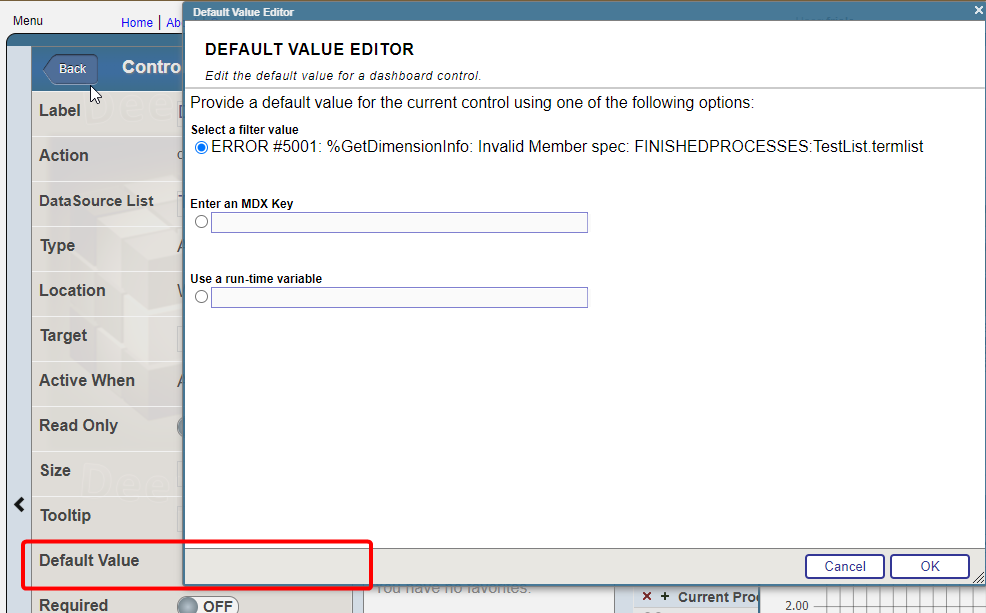
I have a widget that uses "choose Data source" control option. Termlist for the control consist of the two data sources and i want to set one of them by default. For example: I have two data sources, one is grouped by month, the other by year. I need to set the one that is grouped by year by default
The goal is to get data (from half a thousand to 3-4 thousands lines) from DB, calculate standart deviation then use it as logical condition in analyzer.
For example IF std > custom_value = show_the_result ELSE null
There is a STDDEV(MDX) method used in Analyzer but it is a measure and it can not be used as logical condition (correct me if i am wrong)
Hi, I'm new to the Analytics world in Intersystems and was attempting to print and/or export selected rows from a detail listing in a pivot on a dashboard. I am able to print and/or export all the rows; but if I select a specific set of rows, it prints out the entire detail listing; not the selected rows. Please advise on the best approach to accomplish this task. Thanks.
I am working with InterSystems IRIS and seeking guidance on how to perform specific tasks related to the FHIR SQL Builder using commands or code, rather than the graphical user interface (GUI). The specific tasks I am trying to accomplish are:
I hope this message finds you well. I am reaching out because I have encountered an issue with a new dimension I created, named "Region," and I could use your assistance in resolving it.
The problem is that when I open the cube analyzer, the "Region" dimension does not populate data as expected. Instead, it merely displays the text "sourceRegion," which I specified as an expression in the architect.
I'm trying to build a cube based on a linked table but seems that IRIS is not able to do it :O
Long story short, I have a linked table in IRIS that sources a Microsoft SQL table (using standard linked feature from the portal). It works fine, I can access it using SQL as many other times. On top of that, I've created in DeepSee (ok, Analytics) a cube that uses this class as source. It compiles correctly, no errors given. When I build it with 100 records, all goes well and using Analyzer I can see results.
Hello community, I need to solve a complex but trivial issue.
Given:
Two tables "Comment" and "Post". Each one contains an "Author" field, which is essentially a user ID. In these tables, each user ID represents an author. The goal is to count all participants together and then group them by month, language, and other metrics.
The question is how to do this within the IRIS ecosystem. Is it even possible to take two tables, get distinct data from them and then combine into one cube?
Our team has had success creating and publishing Power BI reports using an ODBC connection to an IRIS database, but there have been concerns about the responsiveness of these reports.
As an attempt to improve responsiveness, I'm trying out the "DirectQuery" connection using the InterSystems IRIS connector available in our version of Power BI Desktop (September 2021).
The version of IRIS I'm connecting with is "IRIS for Windows (x86-64) 2022.2"
I built a dashboard to show hourly instrument capacities based on a term list. The term list consists of the TestInstrumentID and the number of tests that instrument can perform in 1 hour. The calculation works correctly and the data is accurate but periodically if you go to check the dashboard the percentages all get changed to 100% across every hour. If you check it later or add an additional site to the filter then the percentages correct themselves. I don't know what's causing this or how to troubleshoot it because it does calculate correctly but is not consistent.
I have a pvot table defined. that generates a set of data. I want. to. execute the pivot table programatically which I believe involves using %DeepSee.ResultSet. Does someone have an example showing how to apply filters to the results?
For. example
[DateTime of Filing].[Date].[Date Filed Year] = &[2023]
I would like to define an advanced filter within my pivot table that allows me to look at diagnosis codes, or at procedure codes - but I do not want to hard code values within the pivot table definition (get the %OR defined).
I would like to be able to allow my dashboard user to chose what specific diagnosis codes or procedure codes they are interested in. So for example one user may want to look for # of patients with cancer dx or patients who have had a radiation procedure.
How can I accomplish this OR feature using dashboard filters?
I have a method like this and I want to be able to see the results on the terminal, how do I run this method on a terminal to display the results of this SQL query?