#VSCode

14 Followers · 441 Posts

VSCode is a short name form for a popular cross-platform editor VisualStudio Code from Microsoft.

Learn more.

InterSystems staff + admins Hide everywhere
Hidden post for admin
Question Chip Gore · Sep 22, 2020

Hi -

I'm trying to get my VS Code instance that is connected to an AWS IRIS instance to edit/save/compile .csp files, but it's failing to work and I'm not sure why. The ".csp" is associated with the objectscript-csp code, and the server is connected, but things just don't act like they are enabled.

Should this work? and if so, what might I have missed in configuring things?

5
0 1038
Question Nigel Salm · Oct 4, 2020

Hi

How do I run a CSP page from within VS Code.

Secondly I have installed an extension called "Live Server" which will run .html pages within VS Code. Have any of you made use of this extension and if so can you specify that .csp pages are html pages?

If I press F5 in VS Code (just as you would in Cache Studio) in order to view a csp page when I press F5 in vs code it tries to open

http://localhost:57772/csp/bootstrap/

without the csp page name

If I add the csp page name in the url it works. The question is how do I link the csp page to the url passed to the browser

Nigel

6
2 1367
Article Muhammad Waseem · Apr 5, 2022 7m read

image

Hi Community,

This post is a introduction of my openexchange iris-globals-graphDB application.
In this article I will demonstrate how to save and retrieve Graph Data into InterSystems Globals with the help of Python Flask Web Framework and PYVIS Interactive network visualizations Library

Recommendation

Step1 : Establish Connection with IRIS Globals by using python native SDK

 #create and establish connection
  if not self.iris_connection:
         self.iris_connection
2
1 898
Question Rajasekaran Dhandapani · Apr 9, 2022

I am new to Intersystems, in our project we are directly connecting to the server (environment) using  Intersystems VSCode extensions and publishing our changes from local machine. This is not the way we usually do as development process.

Is it possible to implement continuous integration ? So that developers can check-in their code in GIT Hub and can integrate Jenkins and automate the deployment?

Could you please help me on this ?

3
0 439
Announcement Raj Singh · Mar 30, 2022

 InterSystems is pleased to announce version 2.0.0 of the Language Server for VS Code. The Language Server augments the VS Code ObjectScript extension to provide better syntax coloring, embedded documentation, code completion and more. Detailed information is available in the GitHub repo's README. Version 2.0.0 adds support for a number of new platform architectures including M1 Macs! It also reduces package size, improves SQL coloring, and fixes a number of other issues detailed in the CHANGELOG. 

As always, if you already have the extension installed, VS Code should automatically update your

0
0 499
Announcement Raj Singh · Mar 21, 2022

I'm pleased to announce the release of version 1.4.4 of the VS Code extension, which contains the following enhancements and bug fixes. Links will take you to the GitHub issue being addressed. As always, if you already have the extension installed, VS Code should automatically update your extension. If you're a new user, use these instructions to get started. 

Change Log

  • Enhancements
    • Compile asynchronously to avoid timing out (#890)
    • Add objectscript.explorer.alwaysShowServerCopy setting to make ObjectScript Explorer always open server-side code, even when local copy exists (#494)
    • Move
0
0 342
Question Marlin Mixon · Mar 10, 2022

Please, I am having trouble connecting to one of several Health Share servers using ISC's Visual Studio Code add-on.

Installation seemed to go smoothly.  I have InterSystems's Studio and was able to automatically pull in my existing connections.  However when I try to make a connection it fails.  

Here is a configuration of one connection slightly edited for security:

        "xxxx-hsiecommon-base": {

            "description": "This has been created by the CCR system export.",

            "username": "therock",

            "webServer": {

                "host": "mongo.il.intersystems.com",

3
0 848
Question sween · Mar 9, 2022

We have an implementation with a bunch of users, and a bunch of namespaces, both of which are added and removed frequently, and the users have restrictive perms in the namespaces (lets just say, not %All)... and the users are utilizing the VSCODE extension for development.

Per the instructions and the user experience, we need to run:

GRANT EXECUTE ON %Library.RoutineMgr_StudioOpenDialog TO ${user}

For ... each Namespace, and additionally %SYS for Web Apps.

Is there a way to globally just make this happen "once" somewhere or is it absolutely necessary find a spot to invoke it?

We use delegated auth

4
0 446
Announcement John Murray · Feb 28, 2022

Coming up on Thursday March 3rd, VS Code Day 2022, the second official Visual Studio Code event from Microsoft.

Join the Visual Studio Code team and community at a live event just for VS Code users. Get a glimpse of things to come and meet the team who works on VS Code every day.

Starts 8am PST and runs for 90 minutes.

https://code.visualstudio.com/vscode-day/

0
0 451
Question Prachi Palaskar · Jul 15, 2021

Hi All,

We wanted to implement SSO(Single Sign On) flow from VSCode plugin to web application. In order to do this we need to launch new browser from VSCode (typescriptcode) and open application URL in this new browser. When trying to achieve this by using WebView  we are getting - X-frame-options issue and mentioning it is set as same origin. We have tried setting 'Content-Security-Policy' as well but not able to launch application in browser.

If anybody has worked on WebView to open another application URL in WebView or any other way where we can open application in browser from VSCode

1
0 336
Question Jeffrey Drumm · Feb 8, 2022

Is there a straightforward workflow in VS Code for moving a class from one namespace to another on the same server? With Caché/IRIS Studio, it was a (sort of) simple export/change namespace in file menu/import operation. But in VS Code it's not obvious (to me, at least). 

I can add multiple namespaces to a workspace, but when using isfs:// paths I see only a "Download" option and no "Upload" or "Import/Compile." When I'm navigating the local file tree, I see Import options, but no way to select the namespace into which I want to import.

I've worked around this by creating the package name on

8
0 1989
Question Stefan Cronje · Feb 1, 2022

Hi,

I am using VSCode together with IRIS 2021.1.
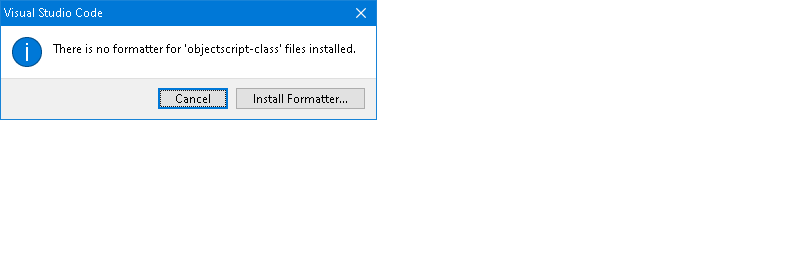
When using Shift+Alt+F to reformat a class file, it pops up with the below message. When I select install formatter, it routes me to the extensions page, where it shows the extensions as being installed. Any advice will be appreciated.


8
0 1617
Announcement John Murray · Dec 20, 2021

In my previous post I described how to install the pre-release of the Server Manager 3 extension and benefit from enhanced security for your stored credentials.

Now by upgrading to the latest release (1.2.7) of the InterSystems Language Server and opting in to the 1.3 pre-release of the ObjectScript extension you get the additional reassurance of being notified whenever either of those extensions try to access stored credentials for the first time.

0
0 282
Article John Murray · Dec 2, 2021 1m read

Server Manager 3.0 Preview, my entry for the InterSystems Security Contest, is now making use of a cool new feature of Visual Studio Code version 1.63 - support for pre-release extensions.

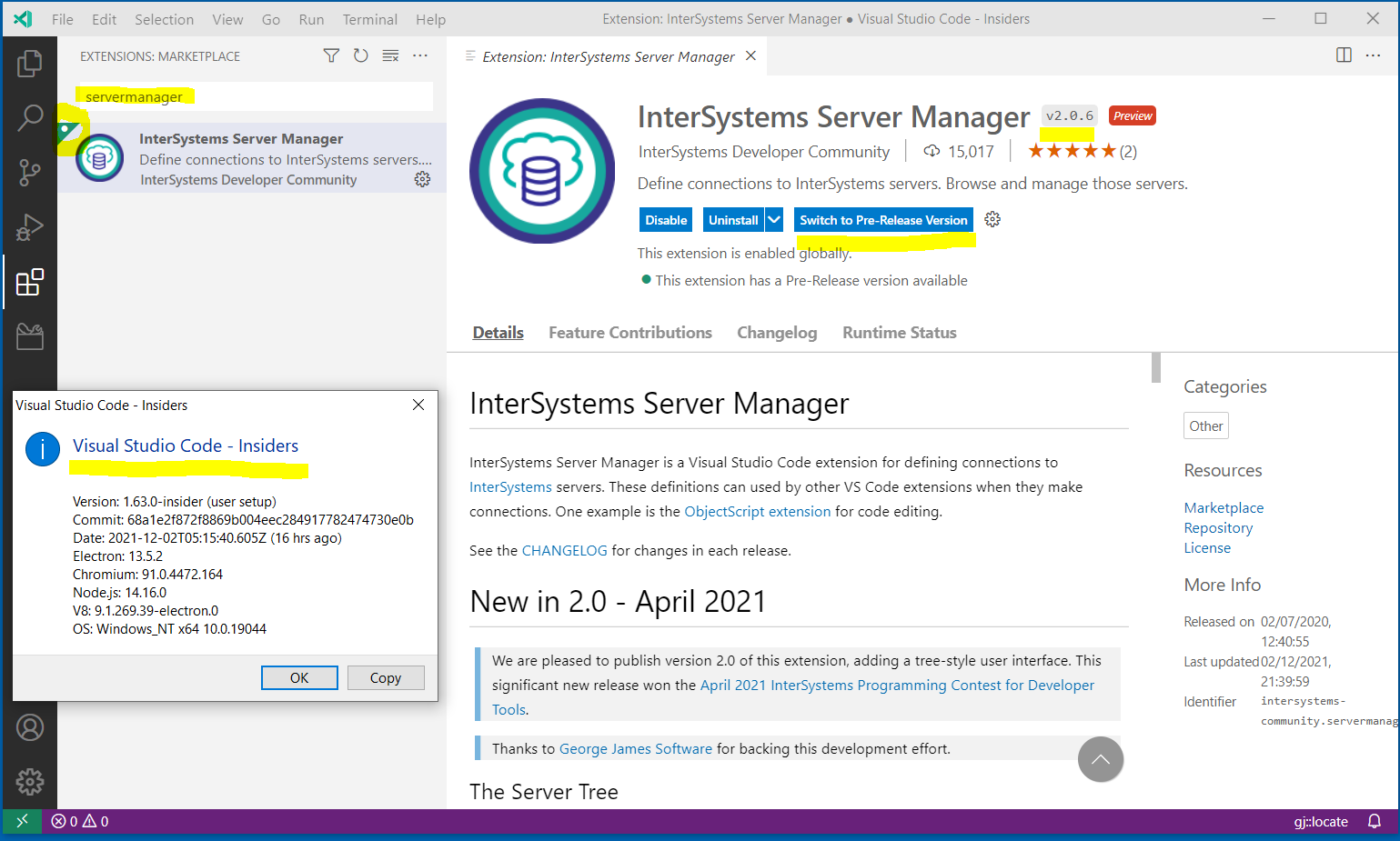
As I write this 1.63 hasn't yet shipped (it's expected out next Thursday), but you can already get your hands on it by installing the VS Code Insiders build. Once you've done that and launched it, use the Extension view to search for 'servermanager' and you'll see this:

In the screenshot above I was using a 1.63.0-insider build, but 1.63 has now shipped.

Note the triangular green bookmark on the extension's

1
0 515
Announcement Bob Kuszewski · Oct 28, 2021

Welcome to day 3 of Virtual Summit 2021!  We have incredible content available to you this year and I'd just like to bring your attention to the 4(!) sessions that we have on Embedded Python.

14
3 1039
Article John Murray · Nov 29, 2021 3m read

The InterSystems Server Manager extension for Visual Studio Code lets you define connections to your servers, list their namespaces and edit or view code there. You can also launch Portal for a server.

Server Manager 3.0 improves security by becoming a VS Code Authentication Provider. It is my entry for the November 2021 InterSystems Security Contest. Click here to visit the contest page where you may decide to vote for this entry. Please ignore the clickable "Contestant" label on this article header above, as it relates to a different contest for new DC articles. If you want to support me in that contest, simply "like" this post.

0
1 708
Question Martin Fukátko · Nov 27, 2021

Hi, I have VSCode on my Windows 10 notebook with intersystems-community.objectscript-pack installed. I'm successfully connected to remote IRIS (2021.1). I can export classes, change them, save and import back to IRIS. 

But every time VSCode starts, the message "Request initialize failed with message: Dynamic Linking Error: Win32 error 126" is displayed and InterSystems Language Server does not start.

Has anyone solved this problem yet?

5
0 810
Question Andrea Schecker-Krauss · Nov 23, 2021

I programmed some server command by my own. That server commands worked fine for a long time.

Suddonly I received 

Studio Action "Attempted Edit" not supported on 127.0.0.1:57772[CTAE01]

by using one of my server commands.

There is an explanation:

Error running command vscode-objectscript.serverCommands.contextOther: Running the contributed command: 'vscode-objectscript.serverCommands.contextOther' failed.. This is likely caused by the extension that contributes vscode-objectscript.serverCommands.contextOther.

Can you help me to solve that issue?

2
0 385
Discussion Carlos Sabel · Nov 19, 2021

Intersystems recently announced a partnership with unqork. I would like to know if someone already used this tool, or another tool, and how was the experience. Is there within the intersystems ecosystem (partners) any low-code tool that generates COS? Tks

1
0 460
Article Nigel Salm · Sep 16, 2021 3m read

I have just created a new Global Master Topic, "IRIS Cheatsheets".IRIS has introduced a lot of new functionality, especially in scripting languages, FHIR R4 support, enhanced Interoperability Tools, and IRIS Analytics.Having spent 35 years working on Windows-based PC's and Laptops, I have surprisingly little knowledge of Linux, Docker and Git.Furthermore, I have written almost every application and Interface in ObjectScript with splatterings of SQL, .Net, and Java Gateways and the most basic knowledge of WinSCP, Putty, SSH.All that changed when I received my first Raspberry Pi.

3
1 576
Article Laurel James (GJS) · Oct 25, 2021 2m read

InterSystems technologies are renowned for their high performing databases, which support the systems and operations of many organisations. However a key ingredient to this success is the quality and maintainability of their code. 

The quality of code can impact everything from speed and ease of fixing bugs and making enhancements, to the overall performance of your organization and your ability to get ahead in the marketplace. 

By ensuring your code is maintainable, you can reduce approximately 75% of the systems life cycle costs*. This is why, at George James Software, the solutions we build are always straightforward and written in high quality code - because we know that this solid foundation can positively impact the rest of your organization. 

With a maintainable system you're able to reduce your overall maintenance as any issues that occur are significantly faster to identify and fix. This means you're free to allocate that time and budget to enhancements, enabling you to get the most value out of your applications and ultimately better support your organization. 

Keep an eye out for our next few posts about what a maintainable system looks like and the tools that can help you keep your code maintainable, in order to help you to reduce those maintenance costs.  

1
1 483