I'm working on integrating a Cache database into an existing .NET project of mine. I'm trying to execute certain queries utilizing the Cache ODBC driver. The first error I ran into was "[S1000] [Cache ODBC][State : S1000][Native Code 417] Access Denied". The part that's throwing me for a loop though is that the application ran ~200 successful queries before I started getting that. After some of those Access Denied errors, they turned into "[Cache ODBC][State : S1T00][Native Code 450] Request timed out due to user timeout". This was all with the regular (2.5?) driver.
There is a problem connecting clients through ODBC.
"ERROR [08S01] [Cache ODBC][State : 08S01][Native Code 459] Connection via cconnect failed: TCP connect() failed - exception satisfied select(). Reason: (10061, 0x274d) No connection could be made because the target machine actively refused it."
Error sometimes occurs. In cconsole.log there are only messages about high CPU usage.
ODBC and Cache version Cache for Windows (x86-64) 2013.1.4 (Build 801).
I'm running Windows 10 x64 Pro 20H2 with Intersystems Cache ODBC driver v2018.01.00.184. I've setup a System DSN using the 64-bit of ODBC Administrator.
I've been getting inconsistent results using my regular application (Microsoft Power BI) which I use through ODBC to query my hosted TrakCare T2017 instance.
Using Microsoft ODBC Test Tool (part of MDAC 2.8 SDK) I can verify I get the same errors as in Power BI. They seem to be ODBC driver related but I can't pin it down.
I am trying to built a SSIS package thru BIDS Visual Studio 2013. My Datasource is a InterSystems Cache Database, I wanted to Import Tables records from the Datasource to MS SQL Server 2014.
As a Sanity check. I only created one Package to import one Table to MSSQL Server to try out. The connection to the InterSystems Cache Database was successful. The DSN for the InterSystems Cache Database is created in the System for 32 and 64 Bit.
I have a general query in regards to developers experience on extracting data from cache databases and the most efficient way to do so. I work with a number of clients who have applications with cache databases and require the data off the host system and onto data warehouse platforms for research and analysis. Often they require the data in source state which means the extracts are often simply a table scan of the entire database table without any aggregation or manipulation.
Where can i get the latest odbc providers from SQL Server 2012/2016?
I see some posts on line to an ftp site out there but I am unsuccessful at getting access to it. I have a version loaded on my server but get errors when querying cache'.
"[Cache ODBC][State : 22005][Native Code 22005]"
Any help would be appreciated.
the one we have might be version 2014.01.05851 64 bit (would that make sense?)
I'm trying to authenticate a user(Health Share clinician) from a Java Application.
I 'm already connected to Caché and able to run SQL commands.
My question is: How can I authenticate a user using only SQL? In fact, what I want is verify if the users exists in the base and if the given password is the same used in Health Share.
There is a column 'password' in Security.users table but I'm not able to see its content, even so, I don't know which hash function to use to compare with.
the ODBC driver is truncating the string to 50 characters.
If I run this same command with $system.SQL.Shell(), this doesn't occur. I did a test creating several parameters for COSClass_Methode, and they all have a 50 character limitation.
We are trying to make an ODBC connection via our intersystems ensemble (2016.2 running on ubuntu). However, when I am testing the connection I receive a pop-up that: "Http object response incomplete or invalid.0,#R". Note that the iodbctrace.log remains empty (and it is working because on the first try it registered a 459 error that I should activate kerberos, which I did). Any advise where I should look?
I have taken the following actions:
1. Expand the cacheodbc.ini in the mgr directory as follows:
I'm working on exporting data from an Intersystems Cache database through the Cache ODBC Driver. There is a particular table that is giving me an error message. The ODBC Driver crashes and reports an error from the Cache system. I think I was able to trace down where the error is coming from, but I do not know how to debug or fix the error.
The table I am trying to extract is called SEDMIHP.
I am tasked with using CACHE to insert data retrieved from a CACHE data base and insert it into an sql database. The columns in the sql table that I am trying to insert data into have names that contain underscores such as "ACCESSION_DATE" I found a utility in CACHE to connect to the sql data base and perform inserts. I have the data I need to insert. I need to pass the data into the sql utility referencing the column names.
I tried using indirection to set the data into underscored variables, but that isn't allowed in cache object script.
I work as a contractor for the Department of Veterans Affairs. I want to read data from an Excel workbook. I searched posts here and saw Apache POI suggested. I believe Apache POI is not approved for use within VA. I also believe we should be able to run SQL query against Excel. Has anybody done such a thing or are there other ways to read data from Excel workbooks?
Has anyone experienced an alert generated from a business operation (BO), which uses EnsLib.SQL.OutboundAdapter? That comes with an error message as below:
Hi, I am trying to execute a store procedure within an ensemble operation to connect to aMsSQL database and I am having problem to pass the input arguments... I have tried several things but only one seems to work and it is not the ideal solution.
Forgive my lack of understanding, but I am working on a vendor created Cache database and the indexes specified in the classes for ODBC connections are not working. A few of them are created, but of the 50+ classes we have, only a handful of them are created when the class is compiled, yet no errors occur.
I am trying to load all the data tables from one iris server to a client server but some of the tables data failing to load all the time. But I can load around 100 tables successfully but 8 to 10 tables are failing all the time. I made an IRIS odbc connection using odbc driver to load the data from tables.
Also I can see read server loop error message on the iris server side as the same time the table loading fails.
Please find the screen shot attached which shows the error on client server.
We are creating a package (written in Caché Object Script) that will provide access to an external DB (MySQL). Because applications that use our package will be run from machines with various, potentially unexpected, operating systems, we’d like to establish a connection to the external DB without using DSNs (we’ve heard that setting up DSNs on certain non-Windows machines can be cumbersome and problematic).
I got a quick answer from this forum yesterday so I'm going to try my luck again today! I've hit an error in another table when trying to extract through the Cache ODBC driver, but this one gives me less details and I'm struggling to pinpoint what might be causing the error.
The table I am trying to extract is called REF_TABLE_ONE.
I am new in Cache. I have to update a record with a long text field, for that, I am using ODBC but the issue is that it is returning an error when I execute the ODBC SQL statement because the field contains some commas, colon, double quotes, single quotes, and CR LF characters.
There is a way to escape this chars? I have seen I can save the field when I replace the single quotes with a double single quote (it's -> it''s) but I can not save the information when the field contains double quote chars. What about the other chars?
I'm trying to ultimately create a function that I can use with HL7 messages that calls a stored procedure held on a SQL Server.
Initially I tried extending the function class to use the sql inbound adapter and/or EnsLib.SQL.Common, but this wouldn't work from the class method for the function.

 All time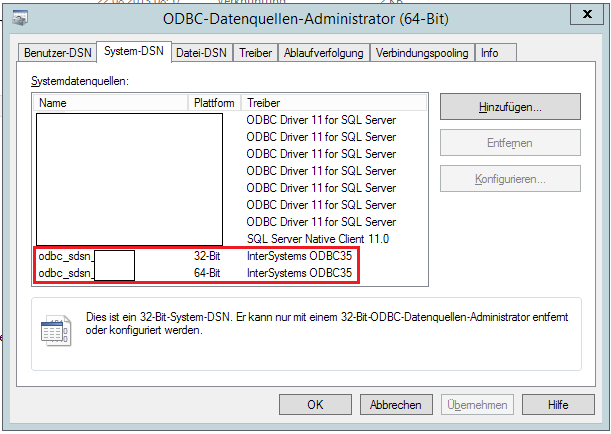
.png)