We recently changed the 'UserID" property in a "User" class from type of %String to be %Library.Username. This is for better consistency across our codebase regarding MAXLEN limit.
%Library.Username is a system wrapper datatype which extends %String and has a MAXLEN of 160. This change should have minimal/no impact on code behavior. However, we found that some SQL query cannot return expected rows after the change. Query will return empty values even if the entry is in the table.
You may have noticed that to configure a mirror for InterSystems IRIS for Health™ and HealthShare® Health Connect there is a special requirement. I wanted to go through it step by step in this article.
The Web Server Gateway Interface (WSGI) is a simple calling convention for web servers to forward requests to web applications or frameworks written in the Python programming language. WSGI is a Python standard described in detail in PEP 3333.
🤔 Ok, great definition and what the point with iris ?
There is a Link Procedure Wizard option within the Management Portal (System > SQL >Wizards > Link Procedure) which I had reliability issues with so I decided to use this solution instead.
Visual Studio Code (VS Code) is a free source code editor made by Microsoft for Windows, Linux, and macOS. It provides built-in support for JavaScript, TypeScript, and Node.js. You can add extensions to provide support for numerous other languages including ObjectScript.
The InterSystems extensions enable you to use VS Code to connect to an InterSystems IRIS server and develop code in ObjectScript. The Visual Studio Code Documentation is an excellent resource on VS Code, so it is a good idea to be familiar with it.
I have been struggling with a docker run command that kept crashing, the error message was too generic to point me to the right direction.
Since the container is shut down after the failure, I was unable to login to it in order to figure out the problem.
I had to run the container in a way that I'll be able to log into it before it crashed, so I found the adding -u false prevents the docker run command to run the iris session IRIS and the container stayed up and running. then I was able to log into it using:
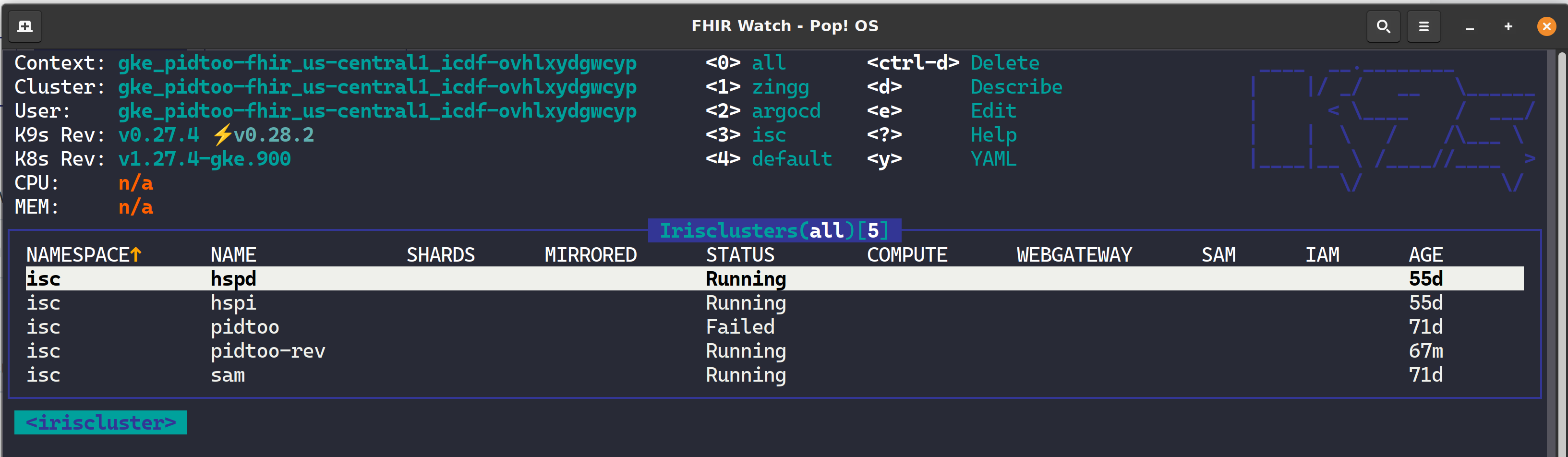
K9s is a terminal-based UI (aka kubectl clown suit), to manage Kubernetes clusters that drastically simplifies navigating, observing, and managing your applications in K8s, including Custom Resources like the InterSystems Kubernetes Operator (IKO) and ArgoCD Applications. If you are about to take your CKD, CKA, or CKS, leave k9s well enough alone for awhile as the abstraction to kubectl will become the standard for navigating the cluster and you will undoubtedly become estranged to the extended flags of kubectl and bomb the exam.
Here is an ObjectScript snippet which lets to create database, namespace and a web application for InterSystems IRIS:
    set currentNS = $namespace

    zn "%SYS"

    write "Create DB ...",!
    set dbName="testDB"
    set dbProperties("Directory") = "/InterSystems/IRIS/mgr/testDB"
    set status=##Class(Config.Databases).Create(dbName,.dbProperties)
    write:'status $system.Status.DisplayError(status)
    write "DB """_dbName_""" was created!",!!


    write "Create namespace ...",!
    set nsName="testNS"
    //DB for globals
    set nsProperties("Globals") = dbName
    //DB for routines
    set nsProperties("Routines") = dbName
    set status=##Class(Config.Namespaces).Create(nsName,.nsProperties)
    write:'status $system.Status.DisplayError(status)
    write "Namespace """_nsName_""" was created!",!!


    write "Create web application ...",!
    set webName = "/csp/testApplication"
    set webProperties("NameSpace") = nsName
    set webProperties("Enabled") = $$$YES
    set webProperties("IsNameSpaceDefault") = $$$YES
    set webProperties("CSPZENEnabled") = $$$YES
    set webProperties("DeepSeeEnabled") = $$$YES
    set webProperties("AutheEnabled") = $$$AutheCache
    set status = ##class(Security.Applications).Create(webName, .webProperties)
    write:'status $system.Status.DisplayError(status)
    write "Web application """webName""" was created!",!

    zn currentNS
This is the second part of my long post about package managers in operating systems and language distributions. Now, hopefully, we have managed to convince you that convenient package manager and rich 3rd party code repository is one key factor in establishing of a vibrant and fast growing ecosystem. (Another possible reason for ecosystem success is the consistent language design, but it will be topic for another day.)
 By date
 Open Exchange app

.png)
.png)