This topic unites posts which describe approaches, tools, and solutions to import and export data into InterSystems IRIS and other InterSystems Data platform products: CSV, JSON, SQL, flat files, binary files, globals, streams, etc.
Is it planned that LOAD DATA takes into account several DATE/DATETIME formats with, for example, a parameter indicating the format used in the source data?
example :
LOAD DATA .../...
USING
{
"from": {
"file": {
"dateformat": "DD/MM/YYYY"
}
}
}
I'm trying exported a project from version '2012.5' to '2018.1.4' but is returning ERROR #7602. Please, could you help me. How can I do it? Below is steps that I did:
We are retiring a hosted application for an electronic health care records (EHR) system which stored the data on Cache for UNIX (Red Hat Enterprise Linux for x86-64) 2017.2.2 (Build 867_4_20245) Thu Oct 8 2020 16:58:40 EDT. The hosting company is providing me with a single CBK file. I need to install a database system to restore the database and provide occasional SQL access for reports when necessary. I'll need to maintain access to the data for an approximately 10 year retention period. Not sure how to approach restoring this old of a database and eventually upgrading it to a newer re
We continue with the series of articles related to the QuinielaML application. In this article we are going to cover how to prepare the raw data that we have captured using the Embedded Python functionality.
I want to move a development IRIS for Health database to another server. I will do this manually for specific reasons. If I simply copy the /mgr folder along with all the files (.DAT, .GBK, etc.) and configure it in the new server, will it work?
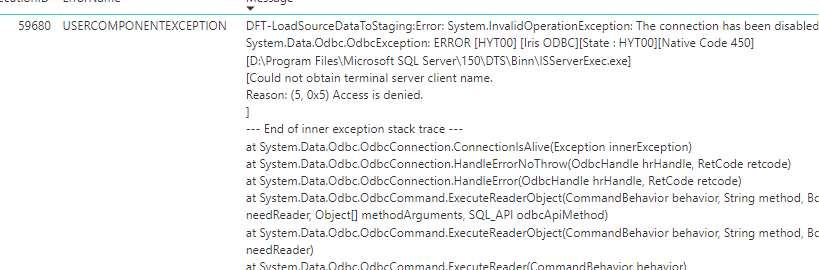
I am trying to load all the data tables from one iris server to a client server but some of the tables data failing to load all the time. But I can load around 100 tables successfully but 8 to 10 tables are failing all the time. I made an IRIS odbc connection using odbc driver to load the data from tables.
Also I can see read server loop error message on the iris server side as the same time the table loading fails.
Please find the screen shot attached which shows the error on client server.
It can sometimes be useful to list or export all of the subclasses that are derived, directly or indirectly, from a given class. In Studio, the Class -> Derived Classes menu option will show such a list, but I'm not aware of a built-in API for programmatically exporting their source code.
https://www.youtube.com/embed/FnSPT1U9u9A [This is an embedded link, but you cannot view embedded content directly on the site because you have declined the cookies necessary to access it. To view embedded content, you would need to accept all cookies in your Cookies Settings]
https://www.youtube.com/embed/aE743TEBgmw [This is an embedded link, but you cannot view embedded content directly on the site because you have declined the cookies necessary to access it. To view embedded content, you would need to accept all cookies in your Cookies Settings]
Exported contents of a namespace on one server (classes, include files and lookup tables). Importing that code into a newly created namespace on another server. Both servers Ensemble 2018.1, same build. Export was via InterSystems Studio. Export is around 18Mb in total (XML file sizes).
When importing and compiling on the new server, getting errors as below - with #6301: SAX XML Parser error prominent - on a number of the imported files, all containing data transformations or business processes.
WIN SQL is the normal editor used by most of the users .But we can't download large amount of data using winsql . So I have written a tutorial how to connect with a new Java based editor called Squirrel SQL which can easily download or export data in excel or any other formats. Also I included a Java JCBC connection program to connect with the IRIS database especially a mirroring/failover server.
Is there a command that will loop through the flat files of a given Linux/Unix folder? I can write the code to open and read each file. But the file names are unknown. I am looking for a way to access each file given a named Linux folder. The files have differing structures so a record map will not work.
Thank you for reading and thank you even more for answering!
In today's fast-paced and highly competitive manufacturing industry,
efficient machine communication and data exchange is essential to maximize
productivity and minimize downtime. That's where MTConnect comes in.
MTConnect is an open, royalty-free standard that provides a common language
for communication between machines, devices, and software applications in a
manufacturing environment.
Is there a way to read JSON and transform it (in DTL) by using a VDOC of this JSON (without transform it to internal message) like I can do with HL7 or XML?
If it possible, I guess that I should have a schema of the JSON so the second question is how to build a schema for JSON and load it to the IRIS?
The capacity of taking numerous records every second while also facilitating real-time queries simultaneously in real time is called Hybrid Transactional Analytical Processing (HTAP). It is also called Transactional analytics or Transanalytics or Translytics and is a very useful element in scenarios where there is constant flow of real time data coming from IIOT sensors or data on fluctuations in stock market, and supporting the need for querying these data sets in real-time or near real-time.
In terms of general through-put design and long term support, I'm considering what would be a "best approach" for needing to create multiple batch files in a few different layouts from the same data-sets.
In this GitHub we gather information from a csv, use a DataTransformation to make it into a FHIR object and then, save that information to a FHIR server all that using only Python.
The objective is to show how easy it is to manipulate data into the output we want, here a FHIR Bundle, in the IRIS full Python framework.
Has anyone had any success reading barcodes from PDFs or images in a Cache/IRIS application? I've been looking at some possible solutions for this, including the open source ZXing libraries. I know we have the ability to create them in Zen and Intersystems Reports, but as far as I know, there's nothing built in to actually read data from a barcode. If anyone has suggestions on how to go about this, I'd love to hear them.
Thanks to @Yuri Marx we have seen a very nice example for DB migration from Postgres to IRIS. My personal problem is the use of DBeaver as a migration tool. Especially as one of the strengths of IRIS ( and also Caché) before is the availability of the SQLgateways that allow access to any external Db as long as for them an access usinig JDBC or ODBC is available. So I extended the package to demonstrate this.
I'm writing an import Routine to read files into a global. The code is working fine except for the 'Delete' command. The files are being imported, copied but not deleted. Maybe someone has an Idea what ist happening.
I get the low level return value of -32 but i couldn't find anywhere to show me what that actually means. And my Caché version doesn't support the $ZU command.
Sometimes we need to import data into InterSystems IRIS from CSV. It can be done e.g. via csvgen tool that generates a class and imports all the data into it.
But what if you already have your own class and want to import data from CSV into your existing table?
There are numerous ways to do that but you can use csvgen (or csvgen-ui) again! I prepared and and example and happy to share. Here we go!