I built a dashboard to show hourly instrument capacities based on a term list. The term list consists of the TestInstrumentID and the number of tests that instrument can perform in 1 hour. The calculation works correctly and the data is accurate but periodically if you go to check the dashboard the percentages all get changed to 100% across every hour. If you check it later or add an additional site to the filter then the percentages correct themselves. I don't know what's causing this or how to troubleshoot it because it does calculate correctly but is not consistent.
Hello, I am writing some cache code that will pick up a PDF file, Base64 encode the contents and then send on to a third party system within a Long String (via their API). I have been testing this and discovered that the PDFs do not open within the supplier system (I get an error saying that it hasn't been decoded correctly). I wanted to prove that the issue does not lie with the way that I have Base64 encoded it within Ensemble, and therefore as a test wanted to Encode the PDF stream, then decode the stream and write out to a new file.
With InterSystems IRIS 2022.2, we introduced Columnar Storage as a new option for persisting your IRIS SQL tables that can boost your analytical queries by an order of magnitude. The capability is marked as experimental in 2022.2 and 2022.3, but will "graduate" to a fully supported production capability in the upcoming 2023.1 release.
The product documentation and this introductory video, already describe the differences between row storage, still the default on IRIS and used throughout our customer base, and columnar table storage and provide high-level guidance on choosing the appropriate storage layout for your use case. In this article, we'll elaborate on this subject and share some recommendations based on industry-practice modelling principles, internal testing, and feedback from Early Access Program participants.
It's time to announce the winners of the InterSystems Developer Tools Contest!
But first, we'd like to say Thank you to all our amazing participants who submitted 21 applications 🔥
We are thrilled to know that you think this subject is important! Now, without further ado, the winners are...
.jpg)
Can someone confirm that HealthShare Health Connect 2022.2 is the correct latest release that is available via the Online Distribution? I tried looking at the HealthShare Health Connect on WRC and now do not see a 2022.2 or 2022.3 version. Is this correct? So I shouldn't be running 2022.2? Did Health Connect get renamed? A couple of months ago I downloaded HealthConnect-2022.2.0.368.0-lnxrh8x64 but not seeing it now on the WRC site.
.png)
GREAT NEWS!!
Starting in April the InterSystems classroom course schedule will once again include public in-person classroom training in Cambridge.
InterSystems periodically updates our software release policies and practices to adjust to customer needs.
We're now changing our maintenance release cadence in order to be more predictable for customers and partners, and tweaking a few other areas.
This article summarizes the release cadence for our Data Platforms products and recent changes to it, and announces a few new updates.
Why change?
- Our customers are taking our new releases more quickly.
- Our customers are adopting new platforms versions (operating systems and orchestrators) more quickly.
In our latest episode of Data Points, @Brenna Quirk and I had a conversation with @Benjamin De Boe about the all-new columnar storage feature in InterSystems IRIS. Benjamin tells us a bit about what columnar storage is, why it's important for InterSystems IRIS users running analytical queries, and how you can learn more. Take a listen!
Does anyone have experience with installing the Arbiter Container using Podman instead of Docker in a Red Hat environment? I was able to pull down the docker image, but unsure what are the next steps as I am confused on how to start the container using Podman and ensure the parameters are set appropriately? Does anyone have the steps that I should take? Should I go through the WRC? Does the WRC have experience using Podman?
Or should I just install the ISC Agent instead of using the Container?
Please and thanks,
Scott Roth
Hi Community,
Just to make sure you're up-to-date with the latest happenings on Open Exchange as there have been some updates that you might have missed, but could be really helpful for you. Take a look and see if any of them can benefit you in your work!
.jpg)
On the ANALYTICS tab of your app, you can now find detailed statistics on the number of installs of your app through IPM (formerly ZPM)
ObjectScript quality test filter will let you find apps that have undergone testing by Community objectscriptQuality. Access the test report from the app page to gain insights into the app's performance.
Hello.
I'm trying to transfer two connectors from my test env to my production env ( both are IRIS 2021.1 )
So i have created an SSL configuration on both :
Test env :
.png)
Production env :
The connector work well on the test env. When i try the same code in my production env i got this error :
Erreur lors de la récupération du token : ERROR #6085: Unable to write to socket with SSL/TLS configuration 'XXXXX', error reported 'SSL/TLS error in SSL_connect(), SSL_ERROR_SYSCALL: I/O error (183)'
I tried to use the advanced debug like this post : https://community.intersystems.
Hello,
I read a great article by @Timothy Leavitt here, where he wrote about unit testing and test coverage with ZPM. I am facing a slight problem and was wondering if someone has some insight into the matter.
I am running my unit tests in the following way with ZPM, as instructed. They work well and test reports are generated correctly. Test coverage is also measured correctly according to the logs. However, even though I instructed ZPM to generate Cobertura-style coverage reports, it is not generating one. When I run the GenerateReport() method manually, the report is generated correctly.
InterSystems Supported Platforms Update Feb-2023
Welcome to the very first Supported Platforms Update! We often get questions about recent and upcoming changes to the list of platforms and frameworks that are supported by the InterSystems IRIS data platform. This update aims to share recent changes as well as our best current knowledge on upcoming changes, but predicting the future is tricky business and this shouldn’t be considered a committed roadmap.
We’re planning to publish this kind of update approximately every 3 months and then re-evaluate in a year. If you find this update useful, let us know! We’d also appreciate suggestions for how to make it better.
With that said, on to the update…
Hi folks!
Have a question for those who are masters of interoperability.
I have a basic task of having one CSV with some data. I need to transform one column in the initial dataset and get the new csv with the same form.
What's the best approach with Interoperability?
Should I user record mapper?
Should I use streams, objects?
What is the best practice?
How source control integrates with your system is imperative in ensuring it works seamlessly behind the scenes without interruption.
Deltanji source control understands the internal workings of InterSystems IRIS and provides a solution that can seamlessly handle its unique needs, with client integrations for VS Code, Studio, Management Portal, and Management Portal Productions.
You can find out more about the benefits of using a source control tailored for InterSystems IRIS at this webinar.
This demo will show how Deltanji goes beyond the traditional CI/CD pipeline, automating the project lifecycle from development through to deployment, making it the perfect source control companion for organizations with continually evolving systems.
🗓 Thursday, February 23rd
⏰ 4 pm GMT | 5 pm CET | 11 am ET
Sign up here > http://bit.ly/40JOaxo
Where are the SQL Show History entries for each user stored?
InterSystems has corrected an issue that can cause InterSystems IRIS® and Caché to not take advantage of large pages for shared memory on Windows, even though these products report that large pages are allocated. This can have detrimental effects on system performance.
The issue results from a change in Windows 10 that requires modification of InterSystems IRIS® and Caché. Note that this issue also affects all InterSystems products that are based on InterSystems IRIS® or Caché.
Hi Community,
Welcome to the second InterSystems Spanish technical article writing competition! Write an article in Spanish on any topic related to InterSystems technology:
🏆 2nd Spanish Téch Article Contest 🏆
Duration: February 6 - 28, 2023
Prizes for everyone: Everyone who publishes an article on Spanish Dev Community during this period will receive a special prize!
Several main prizes included!
➡️ Full details can be found in the original post.

Out of curiosity, I was looking in ^ROUTINE global to see how routines are stored internally.
I found out that lot of nodes are displaying "~pointer" as associated value (eg: instead of a string).
What are those pointers ? My guess is that it references some cache internal structure (eg: some nodes inside a B-Tree).
Is there a easily way to see what is behind ? Are pointers useful for user globals or is this something purely internal to Cache database ?
Hi Community,
A long time ago, I create a package for a String datatype that works with Regular Expression. It is quite a simple solution.
This can work well with packages like the OpenAPI-Suite, where you can then use the "Regular Expression String" as the type for properties of the validator objects where the Swagger contained a Regular Expression.
I am proposing we start a common package of datatypes for use. The package name to use can be provided by the admins.
The old package of mine can be removed, as it is also on a very old git profile on an email I no longer have.
Have a iris.dat file that was zipped in axis but , now I unzipped it and can see the file in my c drive but when I go to iris management console to perform a new db to pull in the current iris.dat file , in the wizard I do not see the iris.dat file listed.
Need some help with getting it restore the Cache backup in my iris community edition.
thank you,
This error I am getting when I am updating cache.dat file:
02/13/23-22:38:11:880 (3444) 3 Error: ERROR #5002: Cache error: <FUNCTION>LoadDLLs+27^STU - Shutting down the system.
This error I am getting whenever I am compiling any of my production or compiling Enslib.HL7.Adapter.TCPOutboundAdapter
#5002: Cache error: <SUBSCRIPT>ConstructCompileTree+72^%occInherit ^oddCOM("")
Can anyone help me with this ?
Hi Developers,
Enjoy watching the new video on InterSystems Developers YouTube:
⏯ InterSystems Startup Accelerator Pitching Sessions @ Global Summit 2022
XData blocks in Caché classes has a MimeType property, and dcoumentation says
MimeType — The MIME type (more formally, the internet media type) of the contents of the XData block. The default is text/xml
But unfortunately I can't set any other values, such as text/html or application/javascript, because XData still expect only XML.
So, question is, for what reasons this property was appeared?
It would be very usefull to set in this property anything other then text/xml, and Studio would highlighted it as developer expected.
Hi Community,
I would like to take advantage of our topic on capture for Health Data Warehouses (on DC-FR) to show you how to quickly create HTTP SOAP and REST clients. IRIS, as well as applications available on Open Exchange offers solutions to generate them from a WSDL or a swagger specification.
SOAP client
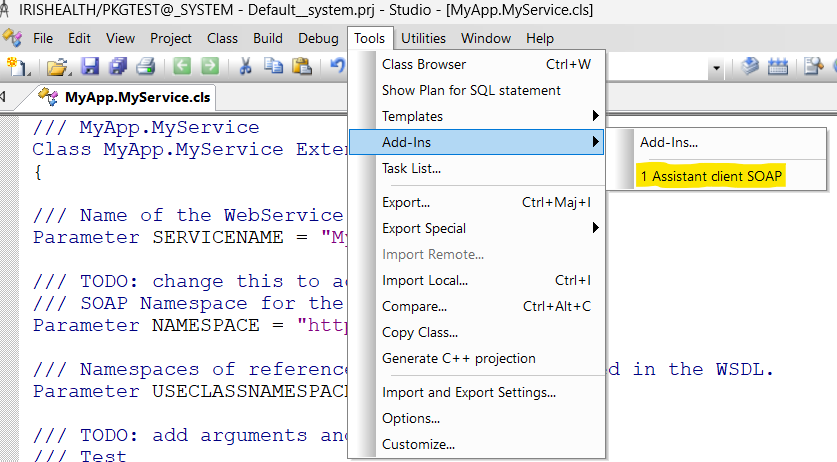
Nothing could be easier than creating a SOAP client. All you need is the WSDL.A wizard is available from the IRIS Studio. It allows you to generate not only your classes for a web service client but also the “Business Services” and “Business Operations” if you want to consume them with the interoperability framework.
If one of your packages on OEX receives a review you get notified by OEX only own YOUR package.
The rating reflects the experience of the reviewer with the status found at the time of review.
It is kind of a snapshot and might have changed meanwhile.
Reviews by other members of the community are marked by * in the last column.
I also placed a bunch of Pull Requests on Github when I found a problem I could fix.
Some were accepted and merged, and some were just ignored.
So if you did a major change and expect a changed review just let me know.
Hi Community,
Let's meet together at the online meetup with the winners of the InterSystems Developer Tools Contest – a great opportunity to have a discussion with the InterSystems Experts team as well as our contestants.
Winners' demo included!
Date & Time: Thursday, February 16, 5 PM GMT | 12 PM EST
Is it possible to retrieve the SQL-Executing process ID (PID) from a process spawned from a UNION %PARALLEL? I have a value set in the SQL-Executing process that I need to replicate in the UNION %PARALLEL spawned process(es). The SQL-Executing process writes the value to a global subscripted by its PID so determining the SQL-Executing PID from the spawned process is what I need. I expected $ZPARENT from the spawned process would hold the SQL-Executing PID but the PID returned is different.
With thanks,
Michael Hill
Hi guys,
I'm working on a project with my client.
They have a visit table which has about 7,000,000 records. The table is used in a random search page witch holds 20+ conditions to be combined.
The table is defined as below:
CREATETABLEVARCHARAll,
Trying to download IRIS from the left menu.
.png)
Have been getting this error:
I originally contacted support as noted in the alert on 12/20/22 and have yet to get a response.
Any idea of how I can get the software?
Thanks!
