InterSystems Official Daniel Palevski · Feb 3

The third developer previews of InterSystems IRIS® data platform, InterSystems IRIS® for Health, and HealthShare® Health Connect 2026.1 have been posted to the WRC developer preview site.  Containers can be found on our container registry and are tagged latest-preview.

These developer previews includes the dropping of Mac Intel support starting from 2026.1.0, and the adding back of Windows Server 2019 support to 2026.1.0.

Initial documentation can be found at these links below:

4
0 130
Article Gabriel Ing · Feb 6 8m read

TL;DR This article explains how to deploy InterSystems IRIS Community Edition on Azure using the Azure Marketplace and a Virtual Machine. It covers prerequisites, instance selection, authentication, SSH access, first verification steps, and how to delete resources to avoid charges. The deployment can typically be done using Azure free credits and is suitable for developers who want to quickly start working with IRIS in the cloud.

Who this guide is for. This guide is intended for developers, solution architects, and DevOps engineers who want to deploy InterSystems IRIS Community Edition on Microsoft Azure. No prior Azure automation experience is required, but basic familiarity with the Azure Portal and SSH is helpful.

After following this guide, you will be able to:

  • Launch InterSystems IRIS Community Edition from the Azure Marketplace
  • Configure a small, secure Azure VM
  • Connect to IRIS using SSH and the Management Portal
  • Reset the default IRIS password and verify that IRIS is running

Prerequisites

  • An active Azure subscription (new accounts may have free credits)
  • Permissions to create resource groups, VMs, and networking resources
  • An SSH client and a private key (.pem) you can store securely
  • Basic knowledge of Linux command line

Deployment overview

  • Open the IRIS Community Edition listing in Azure Marketplace and click Get it now
  • In Azure Portal, choose Start with a pre-set configuration (or Create)
  • Configure Basics: subscription, resource group, VM name, region, image, and size (a small VM is usually sufficient)
  • Choose SSH key authentication and generate/download the key if needed
  • Review + Create, accept terms, and deploy; then Go to resource → Connect → SSH
  • First SSH login: run iris password to change _SYSTEM/SYS; start a session with iris session iris
  • Management Portal: http://YOUR_VM_IP:52773/csp/sys/UtilHome.csp
0
0 48
Article Eduard Lebedyuk · Sep 27, 2023 2m read

If you work with Productions, highlighting connections between Business Hosts is a very convenient feature, allowing developers to get a visual representation of a data flow.

This feature works by default with all system Business Hosts. If a user writes their own Business Services, Processes, or Operations, they must implement the OnGetConnections method for this functionality to work with their custom Business Hosts (or use Ens.DataType.ConfigName properties for connections).
That said, the SMP shows only the first layer of connections of the selected Business Host. Sometimes, we need to get connections of connections recursively to build a complete data flow graph. Or we might need this connection information to check which downstream systems might be affected by a change upstream.

6
1 458
Discussion Olga Zavrazhnova · Jan 25

Hi Community! 👋

You’ve asked for easier ways to connect with other Global Masters and we heard you!
Random Coffee Chat is an easy way for Global Masters to connect and have an informal 1:1 conversation. ☕

🗓 When: January 26 – February 15

This thread is for participants based in North, Central, and South America who’d like to connect and schedule a short coffee chat directly with each other.
 
☕ How it works

  • Leave a comment in this thread to join
  • Reply to someone’s comment if you’d like to connect
  • Continue the conversation in Direct Messages and schedule a 30-minute quick call
6
0 123
Article sween · Feb 4 11m read

Enabling HSSYS Mirroring Out of the Gate with IKO

For those of us building InterSystems workloads on Kubernetes, we are definitely spoiled with the InterSystems Kubernetes Operator (IKO) doing the heavy lifting and mirroring on day one.  Where us spoiled brats jump up and down is when we try to add additional databases/namespaces when we provision from HealthConnect containers on day two, while others get to utilize HealthShare Mirroring for this task, the prerequisite of mirroring HSSYS out of the gate has been somewhat elusive.  Here is example on how you can this powerful feature up and running with the employment of IKO and IrisClusters.

1
0 41
Question Hour Abdellatif · Jan 26

Hello everyone,

My team lead mentioned that users can sometimes create globals directly without associating them with tables or classes. In this case, these globals would not be accessible via SQL.

Is this correct? Can a global exist independently in this way, and if so, is there a specific approach to access or manage them without SQL?

9
0 134
New
Article Alberto Fuentes · Feb 13 10m read

10:47 AM — Jose Garcia's creatinine test results arrive at the hospital FHIR server. 2.1 mg/dL — a 35% increase from last month.

What happens next?

  • Most systems: ❌ The result sits in a queue until a clinician reviews it manually — hours or days later.
  • This system: 👍 An AI agent evaluates the trend, consults clinical guidelines, and generates evidence-based recommendations — in seconds, automatically.

No chatbot. No manual prompts. No black-box reasoning.

This is event-driven clinical decision support with full explainability:

image

Triggered automatically by FHIR events ✅ Multi-agent reasoning (context, guidelines, recommendations) ✅ Complete audit trail in SQL (every decision, every evidence source) ✅ FHIR-native outputs (DiagnosticReport published to server)

Built with:

  • InterSystems IRIS for Health — Orchestration, FHIR, persistence, vector search
  • CrewAI — Multi-agent framework for structured reasoning

You'll learn: 🖋️ How to orchestrate agentic AI workflows within production-grade interoperability systems — and why explainability matters more than accuracy alone.

<iframe width="560" height="315" src="https://www.youtube.com/embed/43Vl7cU_uNY?si=o3NZ3AqPOdFkCn9w" title="YouTube video player" frameborder="0" allow="accelerometer; autoplay; clipboard-write; encrypted-media; gyroscope; picture-in-picture; web-share" referrerpolicy="strict-origin-when-cross-origin" allowfullscreen></iframe>
2
2 136
Article Luis Angel Pérez Ramos · Apr 18, 2025 3m read

Who hasn't been developing a beautiful example using a Docker IRIS image and had the image generation process fail in the Dockerfile because the license under which the image was created doesn't contain certain privileges?

In my case, what I was deploying in Docker is a small application that uses the Vector data type. With the Community version, this isn't a problem because it already includes Vector Search and vector storage. However, when I changed the IRIS image to a conventional IRIS (the latest-cd), I found that when I built the image, including the classes it had generated, it returned this error:

6
1 346
Article Henry Pereira · Feb 4 11m read

In Part 1, we laid the technical foundation of MAIS (Multi-Agent Interoperability Systems). We have successfully wired up the 'Brain', built a robust Adapter using LiteLLM, locked down our API keys with IRIS Credentials, and finally cracked the trick code on the Python interoperability puzzle.

However, right now our system is merely a raw pipe to an LLM. It processes text, but it lacks identity.

0
0 118
Article Iryna Mykhailova · Feb 4 2m read

France & Benelux READY 2026 has just come to an end, and once again, these two days demonstrated how dynamic, curious, and engaged the Developer Community truly is. Here is a look back in words and images at this great edition.

The event kicked off with welcome remarks from @Adeline Icard and @Geoffroy Vitoux, setting the tone for the days ahead: innovation, sharing, and collaboration.

0
0 42
Question Pietro Di Leo · Jan 17, 2024

Hi everyone, 

Does anyone know how to export projects via VSC? 

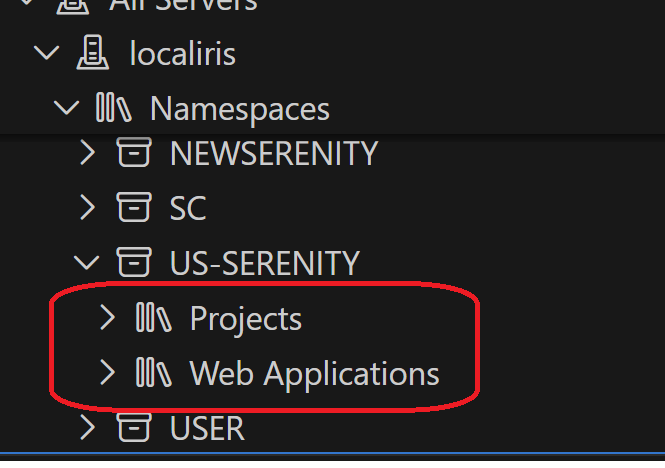
I opened the project through the "InterSystems Tools" plugin (command is "Edit Code in Project") and I can correctly work on it.

However, when I try using the "ObjectScript" plugin to export the project (right click on the project -> "Export Project Contents")

This message appears and it is not possible to export the project:

I've tried also to open a new window, then a folder and finally the project, but nothing changes. 

This is an example of my workspace: 


Anyone knows how to do it? 

Thank you! 

14
0 3289
Article Mikhail Khomenko · Jan 20 18m read

As applications grow, every database eventually hits scaling limits. Whether it's storage capacity, concurrent users, query throughput, or I/O bandwidth, single-server architectures have inherent constraints. This guide explains fundamental approaches to database scalability and shows how InterSystems IRIS implements these patterns to support enterprise-scale workloads.

We'll explore two complementary scaling strategies: horizontal scaling for user volume (distributing computational load) and sharding for data volume (partitioning datasets). Understanding the general principles behind these approaches will help you make informed decisions about when and how to scale your IRIS applications.

The examples in this guide use InterSystems IRIS in Docker containers.

4
5 222
New
Article Evgeny Shvarov · Feb 16 5m read

How I Vibecoded a Backend (and Frontend) on InterSystems IRIS

I wanted to try vibecoding a real backend + frontend setup on InterSystems IRIS, ideally using something realistic rather than a toy example. The goal was simple: take an existing, well-known persistent package in IRIS and quickly build a usable UI and API around it — letting AI handle as much of the boilerplate as possible. Here is the result of the experiments.

2
1 145
Announcement Evgeny Shvarov · Feb 2

Here are the technology bonuses for the InterSystems Full Stack Contest 2026, which will give you extra points in the voting:

  • IRIS Vector Search usage -3
  • InterSystems Native SDK for Python or Embedded Python usage -3
  • Developer Community Idea implemented - 2
  • Docker container usage -2 
  • IPM Package Deployment - 2
  • Online Demo -2 
  • Find and report a bug - 2
  • Article on Developer Community - 2
  • The second article on Developer Community - 1
  • Video on YouTube - 3
  • YouTube Short - 1
  • First Time Contribution - 3

See the details below.<--break->

0
0 74
Question Jainam Shah · Jan 25

I've modified the class file, but messages still arrive as a single line (e.g., "H|.../rQ|.../rL") instead of separate lines in the ASTM service. The <ENQ>..<EOT> header looks correct, logs show no errors, and the service receives messages fine. Is there an Ensemble 2018.1 engine setting (like line terminator handling or TCP framing) to fix the line splitting? ​

4
0 70
Article Ben Schlanger · Mar 15, 2024 4m read

When using InterSystems IRIS as an interoperability engine, we all know and love how easy it is to use the Message Viewer to review message traces and see exactly what's going on in your production. When a system is handling millions of messages per day, you may not know exactly where to begin your investigation though.

Over my years supporting IRIS productions, I often find myself investigating things like...

  • What sort of throughput does this workflow have?
  • Where is the bottleneck?
  • What are my most common errors?
4
6 504
Article Neil Shah · May 12, 2025 7m read

Introduction

Hello! In this article, I will be discussing database degrade, a type of data integrity issue one can face when using IRIS. First, I will be going over a review of the structure of IRIS databases. I'll then discuss how database degrade can manifest and common causes of degrade issues. I'll then conclude with general tips we give our customers about how to prevent or prepare for database degrade issues.

IRIS Database Structure

4
8 391
Question Pietro Di Leo · Jul 4, 2025

Hello everybody, 

I would like to export project contents using Visual Studio Code, as well as I do with InterSystems Studio.

However, while attempting the export through the InterSystems extension I get the following error:

- There are no folders in the current workspace that code can be exported to.

These are the step to reproduce my error:

  1. Create and save a new VSCode workspace
  2. Open a local directory 
  3. Go to the InterSystems extension
  4. Open "Projects" panel and right-click on the project you want to export
  5. Click on "Export Project Contents"

Anyone can help me solving this issue?

11
3 367