Article Murray Oldfield · Mar 13 4m read

Already included in SystemPerformance

There are nfs disk commands (including nfsiostat) included with SystemPerformance, but disabled by default. Enable them by running:

do Enablenfs^SystemPerformance()

Doing so will add the following nfs commands, for example, on Linux:

  1. /usr/sbin/nfsstat -cn
  2. /usr/sbin/nfsiostat [interval] [count]

Ensure the commands are installed and runnable from the OS :)

This can be subsequently disabled via do Disablenfs^SystemPerformance()


Adding a generic command to SystemPerformance

Adding an arbitrary OS tool creates a "user" command under ^IRIS.SystemPerformance("cmds","user")

2
2 140
Article Murray Oldfield · Aug 26, 2025 6m read

I am regularly contacted by customers about memory sizing when they get alerts that free memory is below a threshold, or they observe that free memory has dropped suddenly. Is there a problem? Will their application stop working because it has run out of memory for running system and application processes? Nearly always, the answer is no, there is nothing to worry about. But that simple answer is usually not enough. What's going on?

Consider the chart below. It is showing the output of the free metric in vmstat

3
12 535
Article Murray Oldfield · Sep 24, 2024 7m read

Problems with Strings

I am accessing IRIS databases with JDBC (or ODBC) using Python. I want to fetch the data into a pandas dataframe to manipulate the data and create charts from it. I ran into a problem with string handling while using JDBC. This post is to help if anyone else has the same issues. Or, if there is an easier way to solve this, let me know in the comments!

I am using OSX, so I am unsure how unique my problem is. I am using Jupyter Notebooks, although the code would generally be the same if you used any other Python program or framework.

0
0 653
Article Murray Oldfield · Jun 19, 2024 14m read

I have created some example Ansible modules that add functionality above and beyond simply using the Ansible builtin Command or Shell modules to manage IRIS. You can use these as an inspiration for creating your own modules. My hope is that this will be the start of creating an IRIS community Ansible collection.

1
3 784
Article Murray Oldfield · Sep 7, 2023 8m read

Most transactional applications have a 70:30 RW profile. However, some special cases have extremely high write IO profiles.

I ran storage IO tests in the ap-southeast-2 (Sydney) AWS region to simulate IRIS database IO patterns and throughput similar to a very high write rate application.

The test aimed to determine whether the EC2 instance types and EBS volume types available in the AWS Australian regions will support the high IO rates and throughput required.

Minimal tuning was done in the operating system or IRIS (see Operating System and IRIS configuration below).

0
0 1908
Article Murray Oldfield · May 25, 2023 12m read

I am often asked to review customers' IRIS application performance data to understand if system resources are under or over-provisioned.

This recent example is interesting because it involves an application that has done a "lift and shift" migration of a large IRIS database application to the Cloud. AWS, in this case.

A key takeaway is that once you move to the Cloud, resources can be right-sized over time as needed. You do not have to buy and provision on-premises infrastructure for many years in the future that you expect to grow into.

Continuous monitoring is required. Your application transaction rate will change as your business changes, the application use or the application itself changes. This will change the system resource requirements. Planners should also consider seasonal peaks in activity. Of course, an advantage of the Cloud is resources can be scaled up or down as needed.

For more background information, there are several in-depth posts on AWS and IRIS in the community. A search for "AWS reference" is an excellent place to start. I have also added some helpful links at the end of this post.

AWS services are like Lego blocks, different sizes and shapes can be combined. I have ignored networking, security, and standing up a VPC for this post. I have focused on two of the Lego block components;

  • Compute requirements.
  • Storage requirements.
1
3 1347
Article Murray Oldfield · Nov 10, 2022 7m read

Overview

Predictable storage IO performance with low latency is vital to provide scalability and reliability for your applications. This set of benchmarks is to inform users of IRIS considering deploying applications in AWS about EBS gp3 volume performance.

Summary

  • An LVM stripe can increase IOPS and throughput beyond single EBS volume performance limits.
  • An LVM stripe lowers read latency.
1
0 2825
Article Murray Oldfield · Oct 25, 2022 4m read

YASPE is the successor to YAPE (Yet Another pButtons Extractor). YASPE has been written from the ground up with many internal changes to allow easier maintenance and enhancements.

YASPE functions:

  • Parse and chart InterSystems Caché pButtons and InterSystems IRIS SystemPerformance files for quick performance analysis of Operating System and IRIS metrics.
  • Allow a deeper dive by creating ad-hoc charts and by creating charts combining the Operating System and IRIS metrics with the "Pretty Performance" option.
  • The "System Overview" option saves you from searching your SystemPerformance files for system details or common configuration options.

YASPE is written in Python and is available on GitHub as source code or for Docker containers at:


1
5 964
Article Murray Oldfield · Nov 30, 2021 3m read

When looking at system performance and capacity planning I need to know what processors a server is running.

In ^SystemPerformance Linux systems report Intel processors explicitly, for example:

processor	: 0
vendor_id	: GenuineIntel
cpu family	: 6
model		: 79
model name	: Intel(R) Xeon(R) CPU E5-2673 v4 @ 2.30GHz
stepping	: 1
microcode	: 0xffffffff
cpu MHz	: 2294.685
2
1 63006
Question Murray Oldfield · Mar 19, 2021

SAM - Hacks and Tips for set up and adding metrics from non-IRIS targets

SAM (System Altering and Monitoring) comes with as a 'batteries included' docker-compose container set that is ready to start monitoring IRIS instances with a default dashboard as soon as it starts up. The initial configuration is good to understand SAM functionality and start basic monitoring of your IRIS systems. However, out of the box, there are some setting s that you will need to change when you start to monitor many systems and collect a lot of metric data.

5
0 832
Article Murray Oldfield · Nov 18, 2019 8m read

The following steps show you how to display a sample list of metrics available from the /api/monitor service.

In the last post, I gave an overview of the service that exposes IRIS metrics in Prometheus format. The post shows how to set up and run IRIS preview release 2019.4 in a container and then list the metrics.


This post assumes you have Docker installed. If not, go and do that now for your platform :)


Step 1. Download and run the IRIS preview in docker

Follow the download instructions at Preview Distributions to download the Preview Licence Key and an IRIS Docker image

10
6 1714
Article Murray Oldfield · Nov 14, 2019 6m read

Released with no formal announcement in IRIS preview release 2019.4 is the /api/monitor service exposing IRIS metrics in Prometheus format. Big news for anyone wanting to use IRIS metrics as part of their monitoring and alerting solution. The API is a component of the new IRIS System Alerting and Monitoring (SAM) solution that will be released in an upcoming version of IRIS.

However, you do not have to wait for SAM to start planning and trialling this API to monitor your IRIS instances.

2
6 2299
Article Murray Oldfield · Jul 24, 2019 1m read

Available at:

https://hub.docker.com/r/yape/yape/

$ docker container run --rm -v "$(pwd)":/data yape/yape --version
yape 2.2.6

See the readme at:

https://github.com/murrayo/yape


Changes include:

  • Reinstate config file, make some more changes to smarter x and y axis.
  • Update line style choices in config file.
  • Solve for yyyy dates and yy dates or bail out. Make date string consistent for windows title (drop decimal places), add short day to title.
0
0 594
Article Murray Oldfield · Jun 5, 2019 2m read

If a picture is worth a thousand words, what's a video worth? Certainly more than typing a post.

Please check out my "Coding talks" on InterSystems Developers YouTube:

1. Analysing InterSystems IRIS System Performance with Yape. Part 1: Installing Yape


Running Yape in a container.

2. Yape Container SQLite iostat InterSystems

Extracting and plotting pButtons data including timeframes and iostat.

3
2 1724
Article Murray Oldfield · May 22, 2018 9m read

This post provides useful links and an overview of best practice configuration for low latency storage IO by creating LVM Physical Extent (PE) stripes for database disks on InterSystems Data Platforms; InterSystems IRIS, Caché, and Ensemble.

Consistent low latency storage is key to getting the best database application performance. For applications running on Linux, Logical Volume Manager (LVM) is often used for database disks, for example, because of the ability to grow volumes and filesystems or create snapshots for online backups.

4
1 4993
Article Murray Oldfield · Mar 15, 2018 14m read

InterSystems Data Platform includes utilities and tools for system monitoring and alerting, however System Administrators new to solutions built on the InterSystems Data Platform (a.k.a Caché) need to know where to start and what to configure.

This guide shows the path to a minimum monitoring and alerting solution using references from online documentation and developer community posts to show you how to enable and configure the following;

  1. Caché Monitor: Scans the console log and sends emails alerts.

  2. System Monitor: Monitors system status and resources, generating notifications (alerts and warnings) based on fixed parameters and also tracks overall system health.

  3. Health Monitor: Samples key system and user-defined metrics and compares them to user-configurable parameters and established normal values, generating notifications when samples exceed applicable or learned thresholds.

  4. History Monitor: Maintains a historical database of performance and system usage metrics.

  5. pButtons: Operating system and Caché metrics collection scheduled daily.

Remember this guide is a minimum configuration, the included tools are flexible and extensible so more functionality is available when needed. This guide skips through the documentation to get you up and going. You will need to dive deeper into the documentation to get the most out of the monitoring tools, in the meantime, think of this as a set of cheat sheets to get up and running.

1
9 2499
Article Murray Oldfield · Nov 9, 2017 3m read

A request came from a customer to estimate how long it would take to encrypt a database with cvencrypt utility.

This question is a little bit like how long is a piece of string — it depends. But its an interesting question. The answer primarily depends on the performance of CPU and storage on the target platform the customer is using, so the answer is more about coming up with a simple methodology that can be used to benchmark the CPU and storage while running cvencrypt.

Methodology

  1. Copy a large and representative CACHE.
0
2 1236
Article Murray Oldfield · Jun 6, 2017 20m read

I am often asked by customers, vendors or internal teams to explain CPU capacity planning for large production databases running on VMware vSphere.


This post was originally written in 2017, I am updating the post in February 2026. For context I have kept the original post, but highlighted changes. This post was originally written for ESXi 6.0. The core principles remain valid for vSphere 7.x and 8.x, though there have been improvements to vNUMA handling, CPU scheduling (particularly for AMD EPYC), and CPU Hot Add compatibility with vNUMA in vSphere 8.

7
0 6846
Question Murray Oldfield · Apr 21, 2017

I am looking for experience of people running Veeam with Caché databases. 

Tips/Tricks/General questions like; what Veeam features are you using, what your backup cycle looks like, where does your data end up, what recovery/integrity checks you do, what sort of compression/dedupe you get. 

Also what questions _you_ have and what problems you might be trying to solve.

9
0 2162
Article Murray Oldfield · Feb 20, 2017 3m read

Note (October 2022): yape has been deprecated and replaced by YASPE, there is no more development on yape.


Note (June 2019): A lot has changed, for the latest details go here

Note (Sept 2018): There have been big changes since this post first appeared, I suggest using the Docker Container version, the project and details for running as a container are still in the same place  published on GitHub so you can download, run - and modify if you need to.

5
2 2092
Article Murray Oldfield · Jan 12, 2017 19m read

Hi, this post was initially written for Caché. In June 2023, I finally updated it for IRIS. If you are revisiting the post since then, the only real change is substituting Caché for IRIS! I also updated the links for IRIS documentation and fixed a few typos and grammatical errors. Enjoy :)


In this post, I show strategies for backing up InterSystems IRIS using External Backup with examples of integrating with snapshot-based solutions. Most solutions I see today are deployed on Linux on VMware, so a lot of the post shows how solutions integrate VMware snapshot technology as examples.

29
10 12425
Article Murray Oldfield · Nov 29, 2016 20m read

This post provides guidelines for configuration, system sizing and capacity planning when deploying IRIS and IRIS on a VMware ESXi. This post is based on and replaces the earlier IRIS-era guidance and reflects current VMware and InterSystems recommendations.

Last update Jan 2026. These guidelines are a best effort, remember requirements and capabilities of VMware and IRIS can change.

I jump right in with recommendations assuming you already have an understanding of VMware vSphere virtualization platform.

1
6 7612
Article Murray Oldfield · Nov 25, 2016 23m read

Hyper-Converged Infrastructure (HCI) solutions have been gaining traction for the last few years with the number of deployments now increasing rapidly. IT decision makers are considering HCI when scoping new deployments or hardware refreshes especially for applications already virtualised on VMware. Reasons for choosing HCI include; dealing with a single vendor, validated interoperability between all hardware and software components, high performance especially IO, simple scalability by addition of hosts, simplified deployment and simplified management.

7
1 3905
Article Murray Oldfield · Nov 12, 2016 6m read

Index

This is a list of all the posts in the Data Platforms’ capacity planning and performance series in order. Also a general list of my other posts. I will update as new posts in the series are added.


You will notice that I wrote some posts before IRIS was released and refer to Caché. I will revisit the posts over time, but in the meantime, Generally, the advice for configuration is the same for Caché and IRIS. Some command names may have changed; the most obvious example is that anywhere you see the ^pButtons command, you can replace it with ^SystemPerformance.

0
7 6699
Article Murray Oldfield · Oct 3, 2016 4m read

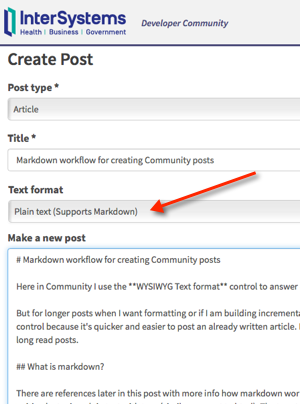
Here in Community I use the WYSIWYG Text format control to answer questions and other quick text entries.

But for longer posts when I want formatting or if I am building incrementally over several days I use the Plain text (supports markdown) control because it's quicker and easier to post an article I have written offline. In this post I share my workflow and a set of tools to publish long read posts.

What is markdown?

There are references later in this post with more info on how markdown works.

8
0 973
Article Murray Oldfield · Oct 1, 2016 10m read

One of the great availability and scaling features of Caché is Enterprise Cache Protocol (ECP). With consideration during application development distributed processing using ECP allows a scale out architecture for Caché applications. Application processing can scale to very high rates from a single application server to the processing power of up to 255 application servers with no application changes.

ECP was used widely for many years in TrakCare deployments I was involved in. A decade ago a 'big' x86 server from one of the major vendors might only have a total of eight cores.

6
3 3710
Article Murray Oldfield · Sep 30, 2016 1m read

I saw someone recently refer to ECP as magic. It certainly seems so, and there is a lot of very clever engineering to make it work. But the following sequence of diagrams is a simple view of how data is retrieved and used across a distributed architecture.

For more more on ECP including capacity planning follow this link: Data Platforms and Performance - Part 7 ECP for performance, scalability and availability

To start

  • There are three globals on disk ^A, ^B and ^C.
  • Global ^B equals "B"
  • There is one Data server and two or more Application servers.
0
0 1372
Article Murray Oldfield · Jun 17, 2016 2m read

Myself and the other Technology Architects often have to explain to customers and vendors Caché IO requirements and the way that Caché applications will use storage systems. The following tables are useful when explaining typical Caché IO profile and requirements for a transactional database application with customers and vendors.  The original tables were created by Mark Bolinsky.

In future posts I will be discussing more about storage IO so am also posting these tables now as a reference for those articles.

7
2 3223
Article Murray Oldfield · May 26, 2016 1m read

Post updated in August 2025 to include links to IRIS.

I have seen customer problems where the use of a virus scanner running over Caché or IRIS databases was causing intermittent application slowdowns and bad user response times.

This is a surprisingly common problem, so this short post is just a reminder to exclude key Caché and IRIS components from your virus scanning.

Generally, virus scanning must exclude the CACHE.DAT or IRIS.DAT database files and the InterSystems binaries. If an anti-virus is scanning *.DAT

2
1 1975