Hi,

I have an odd problem that occurs when I'm trying to import lookup tables in the XML format into Studio.

I store my files in in C:\CodeRepository.

I can manually import these lookup tables using "Import local..." option in the InterSystems Studio.

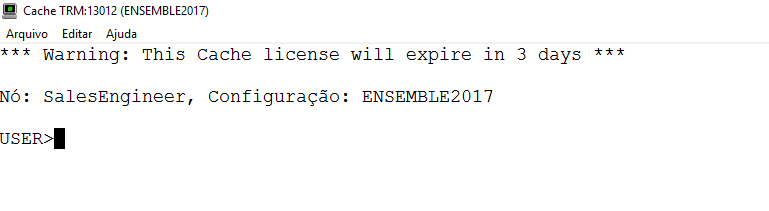
However, when I'm trying to import them using command in terminal: do $system.OBJ.LoadDir("C:\CodeRepository\","ck")

I'm getting the following error:

0 1
0 220

This post is meant to provide a quick possible explanation for a very perplexing problem.

Scenario: You’ve just created your own administrative user in your 2014.1 (or later) instance of Caché. You gave it every possible security role (including %All), so it should in theory be able to do anything within the instance.

You’ve written a very advanced routine with a break command in it for debugging:

7 1
0 547

Let's say I want to execute this cache script (saved as test.txt) from OS terminal:

zn "USER"
write 1
zn "%SYS"
write 2
halt

Executing the following command in a terminal:

csession cache < test.txt

Would yield this output:

$ csession cache < script.txt

Node: gitlab-test, Instance: CACHE

USER>

USER>
1
USER>

%SYS>
2
%SYS>
Job succeeded

Is there a better way to run these scripts?

Currently I have two problems:

1 1
0 1.1K

Visual Studio Code, like Atelier, connects to IRIS through the Web Server and a web service, unlike Studio that connect to the SuperServer port.

What about the VS Code terminal? Does that open a shell with SSH or does it also use a web service?

In other words, does an IRIS developer using VS Code need direct access to the IRIS instance with SSH or the SuperServer port, in addition to the external or private web server to execute terminal commands?

Is that different with linux vs. Windows?

0 1
0 419

Have enabled LDAP for our numerous , Ensemble, IRIS and cache instances with many namespaces. All is working fine and the ldap logins work.

But have noticed that the first instance that the user logs into the namespace is assigned to that user, but when that user than logs into another instance the default namespace from the first login is still there and doesn't update to the new namespace.

So this doesn't effect the ldap login but is now effecting the terminal logins where the user is now getting access denied.

0 1
0 342

I was searching for the most simple way to connect from visual studio code to my local instance via terminal without having to change any window.

I know this can also be achieved via telnet but seems a bit overhead if you're in your local machine.

For me the simplest sollution is to open a terminal window in VS Code, navigate to the /bin folder of your instance installation and run .\csession.exe INSTANCENAME

For simplicity you can just include your /bin folder in your path so you don't even need to navigate there

1 1
1 1.3K

In this post I would like to talk about the syslog table. I will cover what it is, how you look at it, what the entries really are, and why it may be important to you. The syslog table can contain important diagnostic information. If your system is having any problems, it is important to understand how to look at this table and what information is contained there.

16 1
2 2.8K
Article
· Nov 28, 2023 2m read
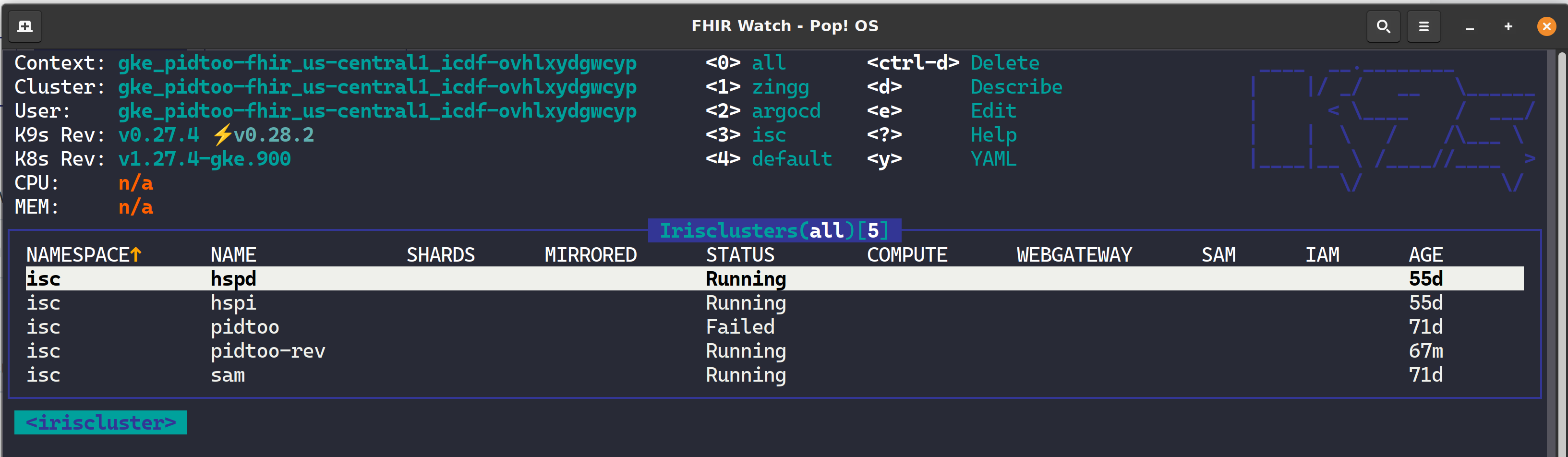
k9s - Manage Your IrisClusters In Style

K9s is a terminal-based UI (aka kubectl clown suit), to manage Kubernetes clusters that drastically simplifies navigating, observing, and managing your applications in K8s, including Custom Resources like the InterSystems Kubernetes Operator (IKO) and ArgoCD Applications. If you are about to take your CKD, CKA, or CKS, leave k9s well enough alone for awhile as the abstraction to kubectl will become the standard for navigating the cluster and you will undoubtedly become estranged to the extended flags of kubectl and bomb the exam.
3 1
0 560

Hi Developers!

InterSystems Package Manager (ZPM) is a great thing, but it is even better if you don't need to install it but can use immediately.

There are several ways how to do this and here is one approach of having IRIS container with ZPM built with dockerfile.

I've prepared a repository which has a few lines in dockerfile which perform the download and install the latest version of ZPM.

Add these lines to your standard dockerfile for IRIS community edition and you will have ZPM installed and ready to use.

To download the latest ZPM client:

2 1
1 1K

NewBie's Corner Session 4 The Plus Sign and Concatenation Operators

Welcome to NewBie's Corner, a weekly or biweekly post covering basic Caché Material.

Click on the Caché Cube in your system tray and select Terminal to try out the commands.

Plus Sign (+) operator

Typically, the Plus sign (+) adds two numbers together. This is true in COS (Caché ObjectScript), but COS uses it in other ways as well.

Set the variable X to a value of +12

0 0
0 473

NewBie's Corner Session 6 If and Kill commands

Welcome to NewBie's Corner, a weekly or biweekly post covering basic Caché Material.

Click on the Caché Cube in your system tray and select Terminal to try out the commands.

As in other computer programming languages, the If command is the primary decision makes.

If command with numeric operands

0 0
0 485

Hey Community,

Watch this video to learn how to use terminal aliases for InterSystems IRIS and also how to set it up with your Docker Developer Environment:

InterSystems Terminal Aliases and How To Have It In Docker Environment

https://www.youtube.com/embed/dnG6ErHZDXA
[This is an embedded link, but you cannot view embedded content directly on the site because you have declined the cookies necessary to access it. To view embedded content, you would need to accept all cookies in your Cookies Settings]

1 0
0 145
Article
· Jun 11, 2016 2m read
NewBie's Corner Session 7 True and False

NewBie's Corner Session 7 True and False

Welcome to NewBie's Corner, a weekly or biweekly post covering basic Caché Material.

Click on the Caché Cube in your system tray and select Terminal to try out these commands.

In COS, a 0 is false and any other number (positive or negative) is true.

0 0
0 390

Hi Community,

Watch this video to learn the basics of how to use the InterSystems® command line interface to execute commands, including starting the Terminal, executing methods and routines, and exiting the Terminal.

Using the InterSystems Terminal

https://www.youtube.com/embed/-vL31qoz91s
[This is an embedded link, but you cannot view embedded content directly on the site because you have declined the cookies necessary to access it. To view embedded content, you would need to accept all cookies in your Cookies Settings]

3 0
0 314
Article
· Jul 10, 2016 4m read
NewBie's Corner Session 12 Do and Goto

NewBie's Corner Session 12 Do and Goto

Welcome to NewBie's Corner, a weekly or biweekly post covering basic Caché Material.

InterSystems Caché provides a GUI (Graphical User Interface) based Integrated Development Environment (IDE) called Caché Studio. Developers can use Studio to create and maintain applications.

Controlling Process Flow

Controlling Process Flow means controlling the execution path of code. The execution of code flows from the top to the bottom in a routine, except for the following:

0 0
0 315

Hello everyone,

I have an issue related to Visual Studio Code and its InterSystems extension when exporting routines from the database to the file system.

The code entered via the terminal editor is encoded in DOS code page 437, but when I export it to my file system, even if I set the file opening to DOS CP 437, the accented characters which are two bytes long cause problems.

0 0
0 214

This article contains the tutorial document for a Global Summit academy session on Text Categorization and provides a helpful starting point to learn about Text Categorization and how iKnow can help you to implement Text Categorization models. This document was originally prepared by Kerry Kirkham and Max Vershinin and should work based on the sample data provided in the SAMPLES namespace.

5 0
1 760