New
Hi, Community!
Are you gathering data for clinical research? See how InterSystems OMOP can help streamline your data preparation:
In healthcare, interoperability is the ability of different information technology systems and software applications to communicate, exchange data, and use the information that has been exchanged.
Hi, Community!
Are you gathering data for clinical research? See how InterSystems OMOP can help streamline your data preparation:
The Interoperability user interface now includes modernized user experiences for the DTL Editor and Production Configuration applications that are available for opt-in in all interoperability products. You can switch between the modernized and standard views. All other Interoperability screens remain in the Standard user interface. Please note that changes are limited to these two applications and we identify below the functionality that is currently available.
To try out the new screens prior to upgrading, you can download the 2025.
The 2026.1 release of InterSystems IRIS® data platform, InterSystems IRIS® for Health, and InterSystems Health Connect™ is now Generally Available (GA). This is an Extended Maintenance (EM) release.
I need a %SYS.Python object that will be accessible from different processes. The goal is to avoid reinitializing the Python object whenever it is called. Ways that I checked and decided that it is NOT what I want:
Next, my ideas (none of them look like a silver bullet):
A microservice is an architectural style that structures an application as a collection of small, autonomous services. Each component is developed around a specific business capability, can be deployed independently, and is typically managed by a miniature, specialized, self-governing team. (Source: https://microservices.io/)

I'm a huge sci-fi fan, but while I'm fully onboard the Star Wars train (apologies to my fellow Trekkies!), but I've always appreciated the classic episodes of Star Trek from my childhood. The diverse crew of the USS Enterprise, each masterminding their unique roles, is a perfect metaphor for understanding AI agents and their power in projects like Facilis. So, let's embark on an intergalactic mission, leveraging AI as our ship's crew and boldly go where no man has gone before
Customer support questions span structured data (orders, products 🗃️), unstructured knowledge (docs/FAQs 📚), and live systems (shipping updates 🚚). In this post we’ll ship a compact AI agent that handles all three—using:
The 2025.1.4 and 2024.1.6 maintenance releases of InterSystems IRIS® data platform, InterSystems IRIS® for Health, and InterSystemsHealth Connect™ are now Generally Available (GA). These releases include the fixes for a number of recently issued alerts and advisories, including the following:
|
Alert ID |
Product & Versions Affected |
Risk Category & Score |
Explicit Requirements |
|
IF-9262 |
InterSystems IRIS® for Health InterSystems Health Connect™ versions |
System Stability Concern: 5 (High) |
FHIR and Health interoperability issues may cause upgrade failures and unexpected or adverse product behavior. |
FHIR (Fast Healthcare Interoperability Resources) is the modern standard for storing and exchanging clinical data. But once your data is in a FHIR server, how do you actually explore it? FHIR data is stored as JSON — powerful, but not practical to read directly. I wanted a tool where you could click on a patient, see their conditions, medications, lab results, and more — in a clean, readable format. So I built the FHIR Patient Viewer.
The app runs entirely in Docker and connects directly to an InterSystems IRIS for Health FHIR server.
Working with files often starts off simple. open the file, read, and process. That approach works perfectly well, until the file happens to be an Excel file.
A Common Assumption
At first, an Excel file (.xlsx) looks like just another data file, rows, columns and values. nothing unusual. So it's natural to assume it can be read the same way as a .txt ot .csv file. But that's where things start to break.
Why Excel files behave differently
The key difference is how the data is stored:
-> .txt / .csv - plain text, line-by-line.
-> .
If you have long-running messages here's a simple code to catch them. You can also use Queue Wait Alert to get the same results, although this code will catch even a single active message with an empty queue. It also scans all namespaces with no production modification, so it can be used for debugging.
Include Ensemble

Class User.LongMessagesTask Extends %SYS.Task.Definition
{

Parameter TaskName = "Long running messages";

Property LongRunningMessageThreshold As %Integer(MINVAL = 1) [ InitialExpression = 60 ];

Method OnTask() As %Status
{
	set ts = $zdatetime($NOW(0),3,1)
	set ns = ""
	while 1 {
		// Iterate namespaces
		set ns = $o($$$EnsJobMonitorRoot(ns))
		quit:ns=""

		set job =""
		while 1 {
			// Iterate jobs
			set job = $o($$$EnsJobMonitorRoot(ns, job))
			quit:job=""

			// Get business host name
			set bh = $o($$$EnsJobMonitorRoot(ns,job,""))

			// Get the time of the last state change
			set lastActivity = $$$EnsJobMonitorRoot(ns,job,bh,"%LastActivity")

			// Get active message, if any - bh can be just idling
			set active = $d(^[ns]Ens.ActiveMessage(job),messageid) // From $$$EnsActiveMessage
			if active {
				set time = $system.SQL.Functions.DATEDIFF("s", lastActivity,  ts)
				if time > ..LongRunningMessageThreshold {
					set text = $$$FormatText("Long running message %1, in ns: %2, BH: %3, processing since %4, for %5 seconds", messageid, ns, bh, lastActivity, time)
					// For debug
					// write text, !
					do ##class(%SYS.System).WriteToConsoleLog(text)
				}
			}
		}
	}
	quit $$$OK
}

}RabbitMQ is a message broker that allows producers (those who send a data message) and consumers (those who receive a data message) to establish asynchronous, real-time, and high-performance massive data flows. RabbitMQ supports AMQP (Advanced Message Queuing Protocol), an open standard application layer protocol.
The main reasons to employ RabbitMQ include the following:
v2026.1 was just released as GA, and one of the features I'm looking forward to using is the DTL Explainer feature.
This allows you to take a Data Transformation, and with a click of a button get a human-readable description of the transformation (which you can also use as the basis for the DTL Description).
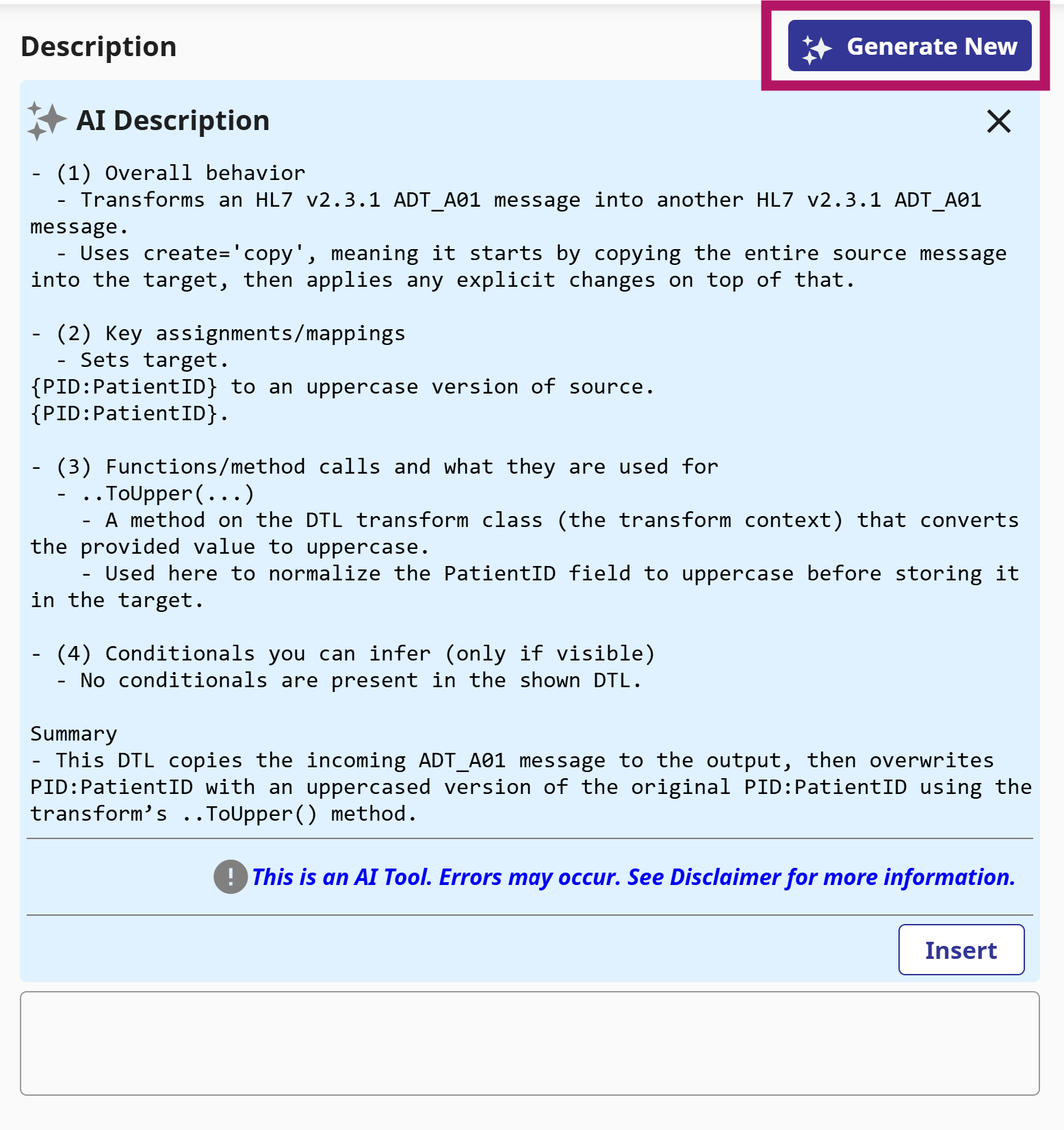
For complex DTLs, especially ones you didn't write yourself, or you did but a long time ago, this will allow you to get a clear quick understanding of what it's doing.
The Interoperability user interface project has continued from 2025.1 and has incorporated many of the items that you – our customers and partners – have suggested and observed. We are continuing to invest in feedback and updating this important user experience. In the latest release, 2026.1 for IRIS, IRIS for Health, Health Connect and Health Connect Cloud, the BPL Editor and Message Viewer/Visual Trace applications are now available for opt-in!
NOTE:
If you're building solutions on IRIS and want to use Git, that's great! Just use VSCode with a local git repo and push your changes out to the server - it's that easy.
But what if:
Introduction
The recent addition of FIFO groups allows First-In, First-Out (FIFO) message processing to be maintained in an interoperability production even when a Pool Size is greater than 1, enabling higher performance without sacrificing correctness. This feature first appears in InterSystems IRIS® data platform, InterSystems IRIS® for Health, and InterSystems Health Connect™ in version 2025.3.
First-In, First-Out message processing is critical in many integration scenarios, especially in healthcare. Traditionally, FIFO ordering is enforced by configuring each business host to process only one message at a time (Pool Size = 1). While effective, this approach can limit throughput and underutilize system resources. FIFO groups preserve FIFO ordering where needed without requiring a Pool Size of 1.
Hi Community,
Enjoy the new video on InterSystems Developers YouTube:
⏯ InterSystems Data Studio with Health Module - Unlocking Your Health Data's Potential @ Ready 2025
Hi Community,
In this article, I will introduce my application iris-HL7v2Gen .
IRIS-HL7v2Gen is a CSP application that facilitates the dynamic generation of HL7 test messages. This process is essential for testing, debugging, and integrating healthcare data systems. The application allows users to generate a wide variety of HL7 message types, validate their structure against HL7 specifications, explore the message hierarchy, and transmit messages over TCP/IP to production systems. These features are particularly useful in settings where compliance with HL7 standards is mandatory for interoperability between different healthcare organizations or systems.
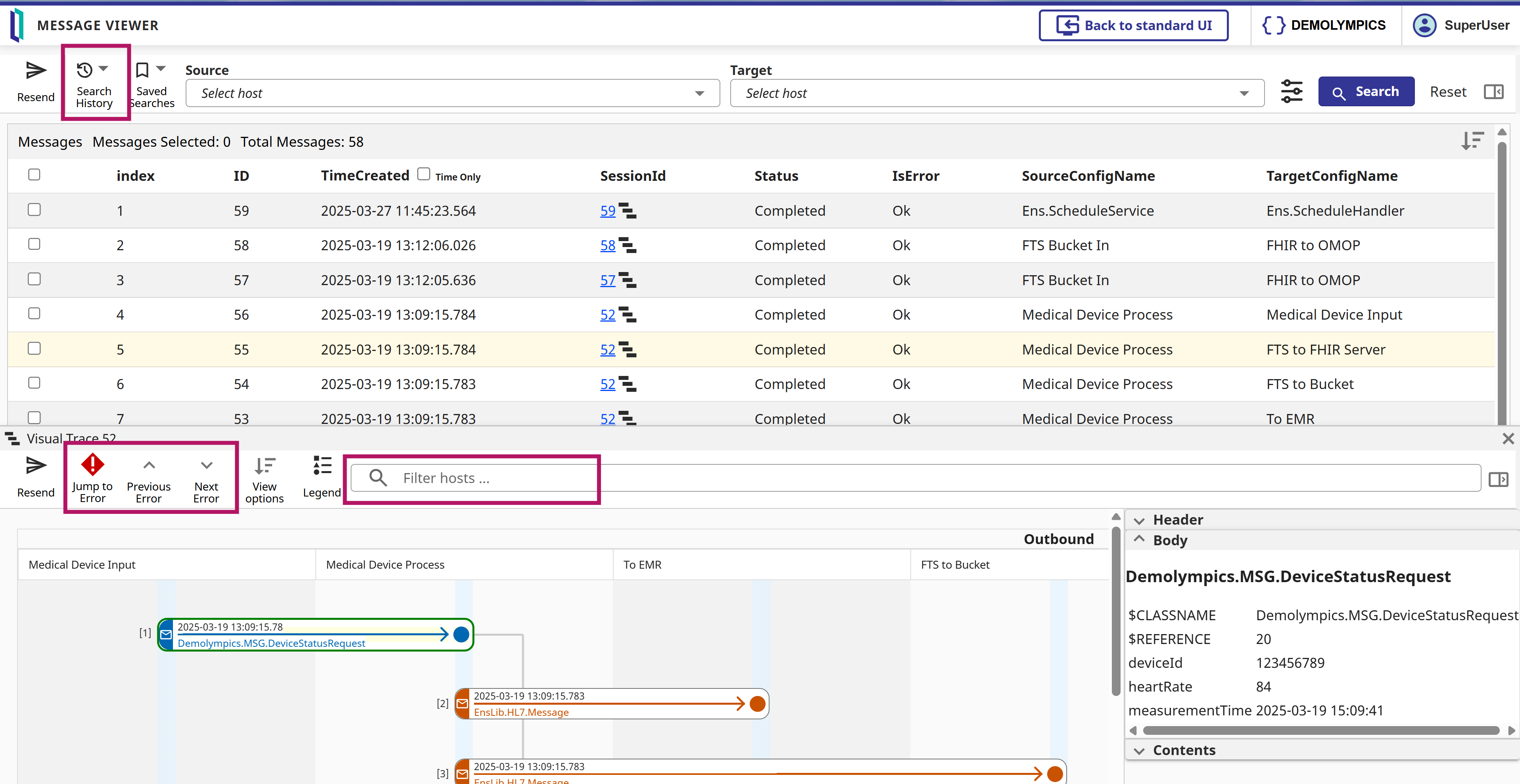
As part of the new Interoperability UI wave (see what was new in 2025.1, and 2025.3 by @Aya Heshmat), v2026.1 which is available already as a Developer Preview, and this could be a reason for you to give it a ride - will be shipping the new UI for the Message viewing and searching, including Visual Trace (and other UI goodies).
He's a quick teaser:
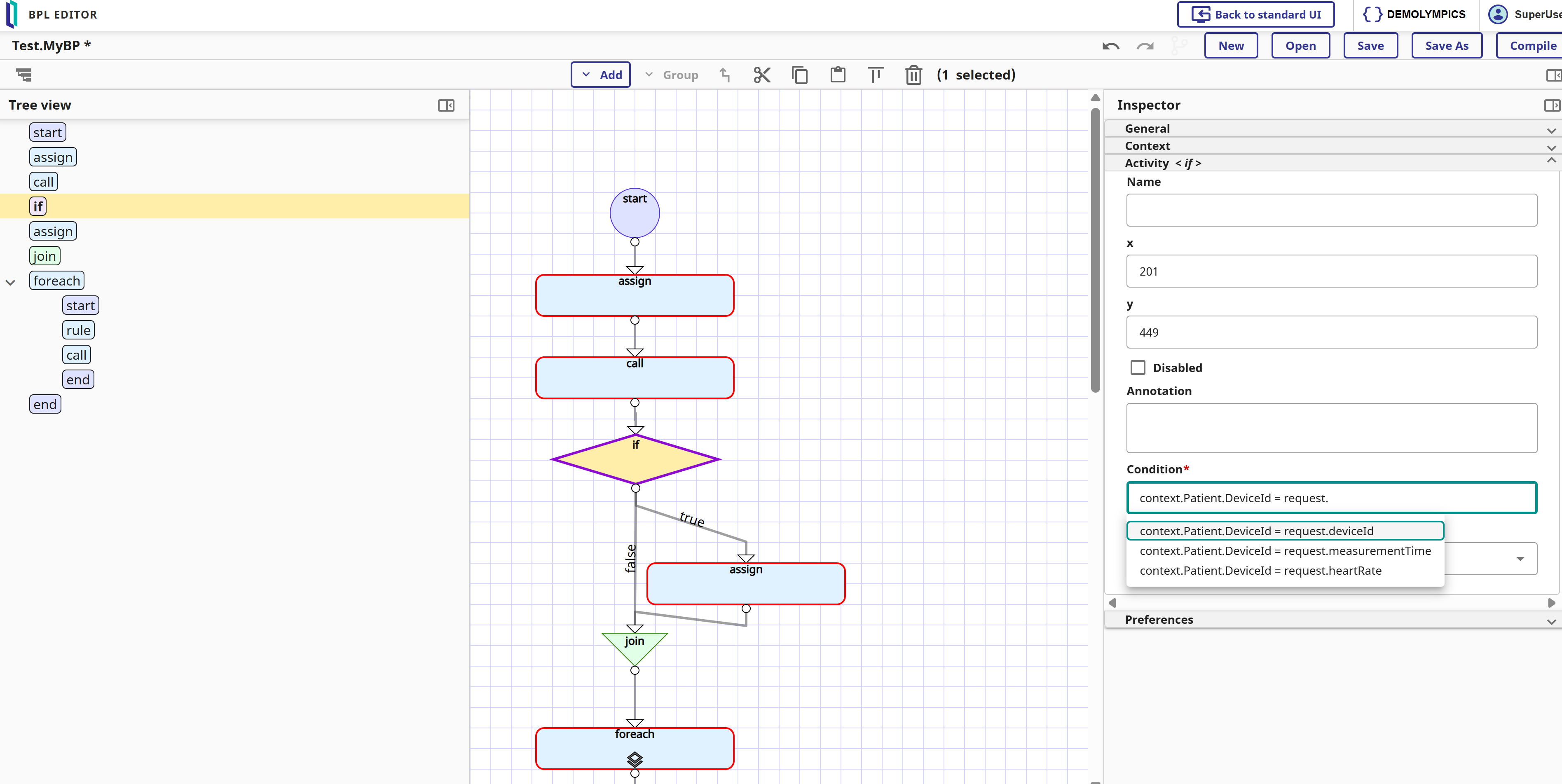
As part of the new Interoperability UI wave (see what was new in 2025.1, and 2025.3 by @Aya Heshmat), v2026.1 which is available already as a Developer Preview, and this could be a reason for you to give it a ride - will be shipping the new UI for the BPL editor (and other UI goodies).
He's a quick teaser:
I may have mentioned this before: I believe the Visual Traces, these sequence diagrams with full content of each step, are a fantastic feature of the IRIS Data platform! Detailed information about how the API works internally, as a visual trace, can be very useful for projects on the IRIS platform. Of course, this applies when we are not developing a high-load solution, in which case we simply don't have time for saving/reading messages. For all other cases, welcome to this tutorial!
Hey Community!
We're happy to share a new video from our InterSystems Developers YouTube:
Hello everyone, thanks for reading this question.
I am currently working with Ens.Alerting.ManagedAlert in an interoperability production and I am using the alert suppression mechanism to avoid generating duplicate alerts within a defined time window (for example, 30 minutes).
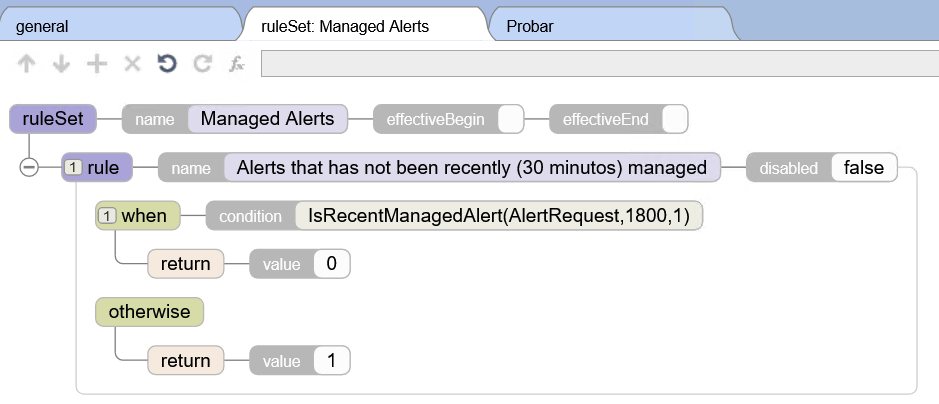
The configuration works correctly in terms of preventing duplicate alerts from being generated, but I have a question regarding observability.
When an alert is suppressed during the configured time window, I can see log messages such as:
"Managed alert not created for AlertRequest with ID 'XXXX' due to rule 'Rules.
Emergency Medical Services (EMS) teams often arrive at the emergency department with patients whose demographics are incomplete or unknown—no medical record number (MRN), no confirmed name, and sometimes no date of birth. Yet EMS transportation notes still need to land in the correct chart.
To support safe and reliable documentation, EMS agencies, third-party integration services, and hospital integration teams build secure interfaces that exchange identifiers and clinical messages.
Hello everyone,
I am André from MedVertical. We are exploring InterSystems-native ways to operationalize continuous FHIR conformance: repeatable regression runs, baseline/delta comparisons, and evidence-style reporting to detect drift after releases and IG changes.
In many FHIR implementations, validation is done “point-in-time” in pre-prod, but conformance degrades in production due to IG/profile updates, terminology changes, mapping evolution, upstream releases, and configuration drift.
How to execute a stored procedure in a remote DB2 database?
Hi Everyone,
I want to access a stored procedure in a remote DB2 database. The stored procedure in question is linked and receives a numeric value, returning a cursor with N number of rows. Sometimes the number of rows reaches hundreds of thousands, so I need to apply pagination.
I've been reading about the %ScrollableResultSet library, but it doesn't allow me to call a stored procedure.
Here's part of the code:
Set pValor=12345678
Set callSql="CALL Paquete.ClaseSpRemoto(?)"
Set rs=##class(%ScrollableResultSet).
JSON
JSON (JavaScript Object Notation) is a lightweight, text-based format designed for structured data interchange. It represents data objects consisting of key–value pairs and arrays, and it is entirely language-independent.
Hello, how are you?
Using Healthshare for Interoperability, we often see a wide variety of encoding issues. Some happen when transforming XML to HL7. Some happen the other ay around transforming HL7 to XML.
Is there a valid way to understand which encoding needs to be used?
I ask, because we use SOAP or REST or TCP HL7 services.
And we deliver messages with TCP HL7, SOAP, HTTP Operations.
And we often face this issue where special characters like ñ or á, are not encoded correctly.
Thanks for your replies.
Hey Community!
We're happy to share a new video from our InterSystems Developers YouTube:
⏯ Partnering For Success - Collaborative Innovations in Interoperability @ Ready 2025